bluewings
New member
Hello seven enthusiasts  ,
,
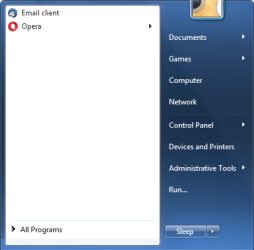
The only thing that annoys me for quite a time now, and I couldn't google it out is that my Win7 adds some extra empty space of about 1,5 lines above "All programs" under the recently used shortcut list, regardless of what I set at "Number of recent programs to display". Now it's 14 but 10-20 makes no change to the extra space, about 1,5 lines of empty space is added to the list regardless of the setting.
See the attached pic pls.
How can I get rid of that useless space ?
Thanks, Peter
,The only thing that annoys me for quite a time now, and I couldn't google it out is that my Win7 adds some extra empty space of about 1,5 lines above "All programs" under the recently used shortcut list, regardless of what I set at "Number of recent programs to display". Now it's 14 but 10-20 makes no change to the extra space, about 1,5 lines of empty space is added to the list regardless of the setting.
See the attached pic pls.
How can I get rid of that useless space ?
Thanks, Peter
Attachments

My Computer
- Computer type
- PC/Desktop
- Computer Manufacturer/Model Number
- Selfactory ;-))
- OS
- Windows 7 Ultimate x64
- CPU
- AMD A6-6400K APU
- Motherboard
- AsRock FM2A88X Extreme4+
- Memory
- 4x4 = 16 GB DDR3 1600
- Graphics Card(s)
- Built in APU
- Monitor(s) Displays
- Samsung SyncMaster 204B
- Screen Resolution
- 1600x1200
- Hard Drives
- OS - 60 GB Kingston SVP200 SSD SATA3
Data - Hitachi Ultrastar 7K3000 3TB 7200 RPM 64MB SATA3
- PSU
- Chieftech 500W
- Case
- Enermax Staray - 4 fans + PSU fan(s)
- Mouse
- A4Tech G9-500F
- Internet Speed
- 500/200
- Antivirus
- WhereToClick 98.765
- Browser
- Opera 42

 rb: properties > customize > use default settings