how to remove a malicious script

dendingo

New member
Member
Local time
4:54 AM
Messages
86
Location
Brisbane, Australia

My Computer

OS
windows 7 ultimate 64bit
CPU
intel 17
Motherboard
ASUS P6Delux
Memory
DDR3 6gb
Graphics Card(s)
Gigabyye
Monitor(s) Displays
LG Flatron 2486L
Hard Drives
Seagate
Hello there.

Run a Malware Scan with Malwarebytes' Anti-Malware.

Malwarebytes' Anti-Malware: Malwarebytes

Boot into safe mode with networking (F8 on BIOS before startup) and perform a full scan, after done, reboot and perform another scan to ensure that every single thread is now gone.

Post back with your results :geek:
 

My Computer

Computer type
PC/Desktop
OS
Windows
I'm a bit confused, how have you determined this is a malicious script? You say it is C:/Program Files (x86)/Mozilla Firefox/components/nsPlacesDBFlush.js:235

C:/Program Files (x86)/Mozilla Firefox/components/nsPlacesDBFlush.js is a legitimate name of a .js that FF installs to that location.

Navigate to that location and delete the script and replace it with this clean version.

View attachment nsPlacesDBFlush.zip

VT.jpg

I think we need more info about your problem, and how you determined you have an altered .js file. Replace it and do the MalwareBytes scan. A Guy
 

My Computer

Computer type
PC/Desktop
OS
Windows 10 Home x64
CPU
INTEL Core i5-750 Quad-Core 3.37GHz
Motherboard
ASUS P7P55D
Memory
HyperX Fury Black Series 8GB (2 x 4GB) 1866Mhz
Graphics Card(s)
EVGA GeForce GTX 750 Superclocked 1GB 128-Bit GDDR5
Monitor(s) Displays
LG 32MA68HY 32" IPS
Screen Resolution
1920 x 1080
Hard Drives
Samsung 840 Evo 120GB, SEAGATE 500GB Barracuda® 7200.12, SATA 3 Gb/s, 7200 RPM, 16MB cache
PSU
ANTEC TruePower New TP-550, 80 PLUS, 550W
Case
ANTEC Three Hundred Illusion
Cooling
COOLER MASTER Hyper 212 Plus, 4 x 120mm 1 x 140mm Noctua's
Internet Speed
85 + Mbps
Antivirus
Avast
Browser
Vivaldi
Oh, I made an error. I uninstalled IE8 and reinstalled IE8' Firefox and back to MS8, the problem with "not being able to used Flash programs. When i try to 'see" a Youtube clip or web site, it says install Adobe flash. I do and the problem is still there as per Youtube. I just mistakenly thought that the script file was the root cause of the problem. now i guess it is a virus of some sort aimed at adobe flash programs. Still MS security and malware, nortons, JV16 did not find anything. Thank you for your insight.
 

My Computer

OS
windows 7 ultimate 64bit
CPU
intel 17
Motherboard
ASUS P6Delux
Memory
DDR3 6gb
Graphics Card(s)
Gigabyye
Monitor(s) Displays
LG Flatron 2486L
Hard Drives
Seagate

My Computer

Computer type
PC/Desktop
OS
Windows 10 Home x64
CPU
INTEL Core i5-750 Quad-Core 3.37GHz
Motherboard
ASUS P7P55D
Memory
HyperX Fury Black Series 8GB (2 x 4GB) 1866Mhz
Graphics Card(s)
EVGA GeForce GTX 750 Superclocked 1GB 128-Bit GDDR5
Monitor(s) Displays
LG 32MA68HY 32" IPS
Screen Resolution
1920 x 1080
Hard Drives
Samsung 840 Evo 120GB, SEAGATE 500GB Barracuda® 7200.12, SATA 3 Gb/s, 7200 RPM, 16MB cache
PSU
ANTEC TruePower New TP-550, 80 PLUS, 550W
Case
ANTEC Three Hundred Illusion
Cooling
COOLER MASTER Hyper 212 Plus, 4 x 120mm 1 x 140mm Noctua's
Internet Speed
85 + Mbps
Antivirus
Avast
Browser
Vivaldi
yes, but to be sure I just installed it again, the same problem with yioutube, i need adobe flah.
 

My Computer

OS
windows 7 ultimate 64bit
CPU
intel 17
Motherboard
ASUS P6Delux
Memory
DDR3 6gb
Graphics Card(s)
Gigabyye
Monitor(s) Displays
LG Flatron 2486L
Hard Drives
Seagate
Sorry about the typos. I need to install adobe flash comes up. I will copy and paste it here if i can.
 

My Computer

OS
windows 7 ultimate 64bit
CPU
intel 17
Motherboard
ASUS P6Delux
Memory
DDR3 6gb
Graphics Card(s)
Gigabyye
Monitor(s) Displays
LG Flatron 2486L
Hard Drives
Seagate
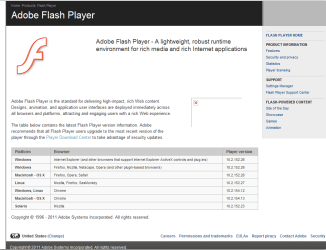
Here is a copy of what happens on a website:
 

Attachments

  • BCF.png
    BCF.png
    36.6 KB · Views: 22

My Computer

OS
windows 7 ultimate 64bit
CPU
intel 17
Motherboard
ASUS P6Delux
Memory
DDR3 6gb
Graphics Card(s)
Gigabyye
Monitor(s) Displays
LG Flatron 2486L
Hard Drives
Seagate

My Computer

Computer type
PC/Desktop
OS
Windows 10 Home x64
CPU
INTEL Core i5-750 Quad-Core 3.37GHz
Motherboard
ASUS P7P55D
Memory
HyperX Fury Black Series 8GB (2 x 4GB) 1866Mhz
Graphics Card(s)
EVGA GeForce GTX 750 Superclocked 1GB 128-Bit GDDR5
Monitor(s) Displays
LG 32MA68HY 32" IPS
Screen Resolution
1920 x 1080
Hard Drives
Samsung 840 Evo 120GB, SEAGATE 500GB Barracuda® 7200.12, SATA 3 Gb/s, 7200 RPM, 16MB cache
PSU
ANTEC TruePower New TP-550, 80 PLUS, 550W
Case
ANTEC Three Hundred Illusion
Cooling
COOLER MASTER Hyper 212 Plus, 4 x 120mm 1 x 140mm Noctua's
Internet Speed
85 + Mbps
Antivirus
Avast
Browser
Vivaldi
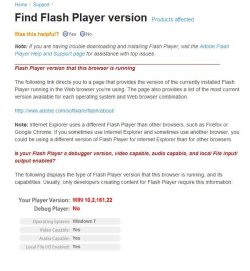
The Flash file

I hope that I have it right.
 

Attachments

  • AdobeFlash.png
    AdobeFlash.png
    26.3 KB · Views: 16

My Computer

OS
windows 7 ultimate 64bit
CPU
intel 17
Motherboard
ASUS P6Delux
Memory
DDR3 6gb
Graphics Card(s)
Gigabyye
Monitor(s) Displays
LG Flatron 2486L
Hard Drives
Seagate
Thanks for help. See you tomorrow. I had better go upstairs and join my wife to watch a DVD. It is 7:20pm here in Brisbane. (Sunday).
 

My Computer

OS
windows 7 ultimate 64bit
CPU
intel 17
Motherboard
ASUS P6Delux
Memory
DDR3 6gb
Graphics Card(s)
Gigabyye
Monitor(s) Displays
LG Flatron 2486L
Hard Drives
Seagate
OK, the Flash page does not show you have flash installed. When you try to install, does the installation complete and say it was successful? Because indeed it doesn't appear that Flash is installed. Were you doing the online install? If so, d/l the 2 files I posted from Filehippo, and run both one after the other and let me know if that flash page still doesn't detect flash, you should get a confirmation:

Flash.jpg

Also, again, do both FF and IE give the same result when testing ion the flash page?

A Guy
 

My Computer

Computer type
PC/Desktop
OS
Windows 10 Home x64
CPU
INTEL Core i5-750 Quad-Core 3.37GHz
Motherboard
ASUS P7P55D
Memory
HyperX Fury Black Series 8GB (2 x 4GB) 1866Mhz
Graphics Card(s)
EVGA GeForce GTX 750 Superclocked 1GB 128-Bit GDDR5
Monitor(s) Displays
LG 32MA68HY 32" IPS
Screen Resolution
1920 x 1080
Hard Drives
Samsung 840 Evo 120GB, SEAGATE 500GB Barracuda® 7200.12, SATA 3 Gb/s, 7200 RPM, 16MB cache
PSU
ANTEC TruePower New TP-550, 80 PLUS, 550W
Case
ANTEC Three Hundred Illusion
Cooling
COOLER MASTER Hyper 212 Plus, 4 x 120mm 1 x 140mm Noctua's
Internet Speed
85 + Mbps
Antivirus
Avast
Browser
Vivaldi
Thanks for help. See you tomorrow. I had better go upstairs and join my wife to watch a DVD. It is 7:20pm here in Brisbane. (Sunday).

OK, no problem, it's 1:24am here, have a good time with the wife :)

A Guy
 

My Computer

Computer type
PC/Desktop
OS
Windows 10 Home x64
CPU
INTEL Core i5-750 Quad-Core 3.37GHz
Motherboard
ASUS P7P55D
Memory
HyperX Fury Black Series 8GB (2 x 4GB) 1866Mhz
Graphics Card(s)
EVGA GeForce GTX 750 Superclocked 1GB 128-Bit GDDR5
Monitor(s) Displays
LG 32MA68HY 32" IPS
Screen Resolution
1920 x 1080
Hard Drives
Samsung 840 Evo 120GB, SEAGATE 500GB Barracuda® 7200.12, SATA 3 Gb/s, 7200 RPM, 16MB cache
PSU
ANTEC TruePower New TP-550, 80 PLUS, 550W
Case
ANTEC Three Hundred Illusion
Cooling
COOLER MASTER Hyper 212 Plus, 4 x 120mm 1 x 140mm Noctua's
Internet Speed
85 + Mbps
Antivirus
Avast
Browser
Vivaldi
I've been through this issue before when i was using XP back then. I followed the instructions HERE. Well it worked for me at least. You should give it a try.

:)
 
Last edited:

My Computer

Computer Manufacturer/Model Number
D3f's Customs
OS
Win 7 Ultimate SP1 x64
CPU
Intel Pentium Dual Core E5300 OC'd @ 3GHz
Motherboard
Asus P5G41-M LE
Memory
Kingston 2x2GB DDR2-800 Dual Channel SDRAM
Graphics Card(s)
Integrated Intel GMA X4500
Sound Card
Realtek 5.1 HD Audio (ALC887)
Monitor(s) Displays
LG Flatron W1943S @ 60Hz
Screen Resolution
1360 x 768
Hard Drives
Internal - WD Caviar Blue 500GB, External - WD My Passport Essential 500GB
PSU
Headway 450w PSU
Case
Pixxo Slim Black mATX Case
Cooling
Stock Cpu Fan, 1 x Top Case Fan
Keyboard
Logitech K120
Mouse
Logitech LS1 Laser Mouse
Internet Speed
17.66Mb/s Down, 0.82Mb/s Up
Other Info
Creative SBS A300 2.1 Speaker System, LG GH22NS50 22x Internal Super-Multi DVD-RW, 2Wire 5012NV Wireless Modem Router
I'm just curious as to what version of Java you have. Look in Programs and Features. The lastest is JRE 6U24
 

My Computer

Computer type
PC/Desktop
Computer Manufacturer/Model Number
Bruce ... somewhere in his 40's
OS
Windows 7 Ultimate 32bit SP1
CPU
Intel(R) Core(TM)2 Quad CPU @ 2.40GHz, 2400 MHz
Motherboard
INTEL/D975XBX2
Memory
4 GB
Graphics Card(s)
ATI Radeon HD 2600 Pro
Monitor(s) Displays
Samsung SyncMaster 914v
Screen Resolution
1280 x 1024
Hard Drives
2/500GB each ... ST3500630AS ATA Device.
One is not connected
PSU
Rocketfish 700 W
Case
G.Skill Gigabyte Chassis
Keyboard
Standard PS/2 Keyboard
Mouse
Microsoft PS/2 Mouse
Internet Speed
DSL
Antivirus
Avira Internet Security
Browser
IE 11
Other Info
ATI HDMI Audio
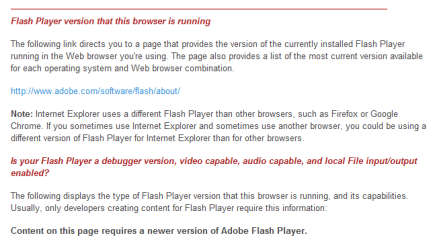
Copy Of Flash Player install from Adobe Site

Thanks . Here is the copy of the page:
 

Attachments

  • Flash player.png
    Flash player.png
    11.6 KB · Views: 3

My Computer

OS
windows 7 ultimate 64bit
CPU
intel 17
Motherboard
ASUS P6Delux
Memory
DDR3 6gb
Graphics Card(s)
Gigabyye
Monitor(s) Displays
LG Flatron 2486L
Hard Drives
Seagate
Sorry i forgot (old age)! Running IE8
 

My Computer

OS
windows 7 ultimate 64bit
CPU
intel 17
Motherboard
ASUS P6Delux
Memory
DDR3 6gb
Graphics Card(s)
Gigabyye
Monitor(s) Displays
LG Flatron 2486L
Hard Drives
Seagate
Hi All,

I tried to view Youtube and a webpage catalogs using MS IE8 32bit. Yes it works. So my problem is/was with the 64bit Adobe Flash (?). With luck the 64bit Flash will work before we have Win 128 bit!!

Again thank you all.:D
 

My Computer

OS
windows 7 ultimate 64bit
CPU
intel 17
Motherboard
ASUS P6Delux
Memory
DDR3 6gb
Graphics Card(s)
Gigabyye
Monitor(s) Displays
LG Flatron 2486L
Hard Drives
Seagate
Adobe Labs - Adobe Flash Player "Square"

This in reference to browsers not the OS. The OS has to be 64bit to have this to begin with. Which yours is 64bit according to your specs.
You need the Flash square for 64bit browsers. This works with IE9 I'm not sure about IE8 64bit.

It is a bit confusing with I beleive 4 different versions of Flash to know which you need.
Mike
 

My Computer

Computer Manufacturer/Model Number
Hopalong/ Godzilla
OS
Windows7 Pro 64bit SP-1; Windows XP Pro 32bit
CPU
Intel Core i7-870 Lynnfield 2.93GHz LGA 1156 95W Quad-Core
Motherboard
ASUS P7P55D-E PRO
Memory
8GB@1400MHz Crucial Ballistix DDR3-1600 4x2GB
Graphics Card(s)
ASUS ENGTX460 DirectCU/2DI/1GD5 1GB 256-bit GDDR5
Sound Card
VIA Onboard
Monitor(s) Displays
Asus VS248H-P 24"; Samsung SyncMaster 941BW 19"ws
Screen Resolution
1920x1080; 1440x900
Hard Drives
Samsung 830 120GB SSD
Intel 320 120GB SSD
Western Digital Caviar Black WD7501AALS 750GB 7200 RPM SATA 3.0Gb/s
Western Digital Caviar Black WD6401AALS 640GB 7200 RPM SATA 3.0Gb/s
PSU
COOLER MASTER Silent Pro RS850-AMBAJ3-US 850W Modular
Case
COOLER MASTER HAF 932 RC-932-KKN5-GP Black
Cooling
Scythe "Mugen-2 Rev.B" (2 ScytheKaze-Jyuni PWM fans)
Keyboard
Logitech K-320
Mouse
Kensington
Antivirus
Avast Inernet Suite
Browser
IE 9 ; Chrome
Thanks Mike,

All was well for a while, then being a bit careless, I had a popup saying update adobe flash. In a flash (a pun) I clicked the popup and too late it was not from Adobe. I do have a recollection that I did indeed download the 64bit flash from a non adobe site. Now I have reverted to IE8 32bit and all is well. It is frustrating to revert to a lesser system but there you are. I did dl IE 9 and had the same problem. I feel it is with Flash not intergrating (64bit).

Thank you for your response.

Dennis
 

My Computer

OS
windows 7 ultimate 64bit
CPU
intel 17
Motherboard
ASUS P6Delux
Memory
DDR3 6gb
Graphics Card(s)
Gigabyye
Monitor(s) Displays
LG Flatron 2486L
Hard Drives
Seagate
Back
Top