Solved How to remove GWX?

bd74

New member
Member
Local time
1:11 AM
Messages
59
Every day, the windows symbol appears on my taskbar near the time. When I click on it, it asks if I want to upgrade to Windows 10. I cannot install Windows 10 on my computer because it is not compatible, but the windows symbol continues to appear everyday anyway. How do remove/uninstall this thing?

gwx.jpg
 

My Computer

Computer type
PC/Desktop
Computer Manufacturer/Model Number
Compaq Presario CQ5205Y Desktop PC
OS
Windows 7 Home Premium 64-bit SP1
CPU
AMD Sempron Processor LE-1300 2.30 GHz
Memory
4 GB RAM
Graphics Card(s)
Integrated graphics using nVidia GeForce 6150SE
Sound Card
Integrated Realtek ALC888S Audio
Screen Resolution
1280x1024
Hard Drives
250 GB
Internet Speed
12 Mbps
Browser
Firefox

My Computer

Computer type
PC/Desktop
Computer Manufacturer/Model Number
Custom assembled by me :}
OS
Win-7-Pro64bit 7-H-Prem-64bit
CPU
i7-5930K 2nd i9-9940x both water blocked VRM's too
Motherboard
ASUS SABERTOOTH X99 2nd ASUS x299 Apex
Memory
Trident-z 3200C14 2nd Trident-z 3600C16
Graphics Card(s)
EVGA 1080ti ftw3 2nd Titan Xp both water blocked
Sound Card
Built-in Realtek
Monitor(s) Displays
1-AOC G2460PG 24"G-Sync 144Hz/ 2nd 1-ASUS VG248QE 24" 144Hz
Screen Resolution
1920 x 1080 144Hz
Hard Drives
2-Samsung M.2 Evo & Evo Plus
2-Samsung 850 EVO 500GB SSD's/ 3-2.5 W.D. Black 1tb-&3-1tb/3-3.5 WD Black 1tb hdd's
PSU
EVGA SuperNOVA 1000-P2 2nd 1200-P2
Case
2-Corsair Obsidian Series 450D Black ATX Mid Tower
Cooling
Custom water loops
Keyboard
Logitech G710+/ 2nd Logitech G910
Mouse
2-RedDragon M901 Perdition 16400 dpi Gaming mouse = wired
Internet Speed
Comcast Ping 19ms 89.31mbps download speed 6.12mbps upload
Antivirus
Malwarebytes Pro/ Superantispyware Pro
Browser
FireFox & Pale moon
Other Info
2nd ASUS X299 Apex/Intel i9-9940x with Custom water loop/7H-Prem-x64/Corsair 450D case/Ram Trident-z 3600C16 4x8gb / Samsung970Evo plus 500gb SSD/Dual ssd EZ swap evo/PSU EVGA SuperNova 1200w-P2 80+Platinum/GPU Titan Xp /8-ML-140 on push-pull on 2-280GTX rads

My Computer

Computer type
PC/Desktop
Computer Manufacturer/Model Number
Self Built
OS
Win 10 Pro x64
CPU
Intel I5-2500K @3.3GHz
Motherboard
Asrock P67 Extreme4
Memory
16GB G.Skill Ripjaws X (4x4GB)
Graphics Card(s)
EVGA GeForce 750 Ti SC 2GB
Sound Card
ASUS Xonar DG 5.1 Channels 24-bit 96KHz PCI Interface Sound
Monitor(s) Displays
auria eq2367
Screen Resolution
1920 x 1080
Hard Drives
250GB Samsung 850 EVO SSD
1TB WD Blue
1TB Hitachi
PSU
SeaSonic X 650W 80 Plus Gold
Case
Corsair Obsidian 750D
Cooling
Corsair H60, Three 140mm case fans
Keyboard
Logitech Wireless Keyboard K520
Mouse
Logitech Wireless Mouse M310
Internet Speed
Wave Broadband ~ 100 dn 5 up
Antivirus
Windows Defender, Malwarebytes Premium
Browser
Edge, IE11, Chrome
Other Info
Laptop specs: HP g7-1365dx /
CPU: AMD A6-3420M APU with Radeon(tm) HD Graphics /
RAM: Crucial 8Gb (2x4Gb) /
SSD: Crucial M4-CT128M4SSD2 ATA Device/ FW 000F /
GFX: AMD Radeon HD 6520G /
OS: Windows 10 Pro x64
Just uninstall KB 3035583 update and hide it whenever it appears again.
 

My Computer

OS
Win 7 Ult 64-bit
CPU
AMD Athlon 455 3core
Memory
6 Gb 1333Mhz
Graphics Card(s)
GForce 545 1,5Gb 192-bit
Monitor(s) Displays
LG IPS234
Hard Drives
1tb
Case
Acer Predator
You can`t install every update that comes out.

Set your windows update like Mike has suggested.

My list, not all pertain to Windows 10

Updates not to Install

KB2876229 SKYPE, If you want Skype then install it.
KB2923545 RDP
KB2970228
KB3035583
KB2990214
KB3021917
KB3068708 Telemetry
KB2592687
KB2660075
KB2506928
KB2952664 x2
KB3050265
KB2726535
KB2994023
KB3022345 Replaced by KB3068708 Telemetry

KB3022345 Caused false sfc result
KB2545698 (IE9)
KB3065987
KB3077715
KB3078667
KB3080149 Telemetry
KB3075249 Telemetry
KB2999226
KB3083710
KB3097966
KB3095649
KB3102810 Fixes slow Windows update, I don`t need it.
KB3107998
KB3097877 Cause sidebar to stop working
KB3102429 Foreign Currency update (Useless)
KB3112343 Windows Update Client
KB3135445 Windows Update Client
KB3123862 Windows 10
KB3118401 Update for Universal C Runtime in Windows (not needed)
KB3121255 Not needed for Windows 7
 

My Computer

Computer type
PC/Desktop
Computer Manufacturer/Model Number
Skylake Special #666
OS
Windows 10 Pro x64
CPU
Intel Core i7 6700K
Motherboard
Asus Sabertooth Z170 Mark 1
Memory
GSkill TridentZ RGB 16GB 3600 16-16-16-36
Graphics Card(s)
EVGA GTX 980 Ti SC x2
Sound Card
Realtek High Definition
Monitor(s) Displays
AOC G2460PG
Screen Resolution
1920 x 1080 144Hz
Hard Drives
Samsung 860 Pro 256GB, Seagate Barracuda 4TB x2
PSU
EVGA 1000 P2, EVGA White Custom Braided Cables
Case
Corsair Vengeance C70 Gunmetal Black
Cooling
Corsair H100i v2, Corsair ML120 x2, Thermal Grizzly Kryonaut
Keyboard
Logitech G910 Orion Spectrum
Mouse
Logitech G700s
Internet Speed
Verizon Fios Quantum Gateway 75/75
Antivirus
Windows Defender, Malwarebytes Free 3.8.3
Browser
Chrome
Other Info
Corsair SP120 x4, LG Blu-ray Drive, Durabrand HT-395 100 Watt Dolby Digital Amp, Corsair H2100 Wireless 7.1 Headset
Thanks all
 

My Computer

Computer type
PC/Desktop
Computer Manufacturer/Model Number
Compaq Presario CQ5205Y Desktop PC
OS
Windows 7 Home Premium 64-bit SP1
CPU
AMD Sempron Processor LE-1300 2.30 GHz
Memory
4 GB RAM
Graphics Card(s)
Integrated graphics using nVidia GeForce 6150SE
Sound Card
Integrated Realtek ALC888S Audio
Screen Resolution
1280x1024
Hard Drives
250 GB
Internet Speed
12 Mbps
Browser
Firefox
Just uninstall KB 3035583 update and hide it whenever it appears again.
I agree with uninstalling KB3035583. Reboot.

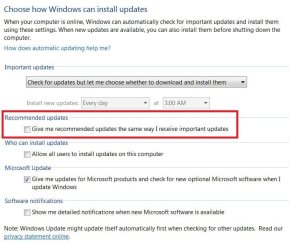
After re-boot, do a Windows Update -> "check for updates", and you should see KB3035583 again. Un-check it, and right-click and select "hide update". It will not show up again in Windows Update.

Finally, to completely eliminate the icon in the Notification Area which might still be present, the approach I've taken is to using the free "GWX Control Panel" program, to permanently eliminate the icon itself.

You'll never again be bothered or dunned.
 

My Computer

Computer type
PC/Desktop
Computer Manufacturer/Model Number
Home-built, two systems (1) and (2)
OS
Windows 7 Pro x64 (1), Win7 Pro X64 (2)
CPU
i5-3350p 3.1Ghz/6MB-cache (1); E8400 3.0Ghz/6MB-cache (2)
Motherboard
ASUS P8Z77-V Pro (1); ASUS P5Q3 (2)
Memory
8GB PC3-12800 DDR3 (1); 4GB PC3-10600 DDR3 (2)
Graphics Card(s)
ATI HD7750 (1), (see TV cards); ATI R7 250 (2)
Sound Card
Realtek ALC892 HD Audio (1); Realtek ALC1200 HD Audio (2)
Monitor(s) Displays
Eizo HD2441W LCD, Eizo S2433W (1); Eizo 24" S2433W (2)
Screen Resolution
1920x1200, 1920x1200 (1); 1920x1200 (2)
Hard Drives
(1) 1TB SATA-II (7200RPM), 2x2TB SATA-III (7200RPM), 250GB SATA-III (10000RPM) for OS; 2x2TB external USB 3.0

(2) 320GB SATA-II (7200RPM), 750GB SATA-II (7200RPM), 150GB SATA-II (10000RPM) for OS; 2TB external USB 3.0
PSU
Nesteq ECS-6001 600W (1); Nesteq ECS-5001 500W (2)
Case
Acousti-Case 360 (1) and (2)
Cooling
Noctua NH-U12P SE2 for CPU, 2x120mm case fans (1) and (2)
Keyboard
IBM PS/2 (1) and (2)
Mouse
Logitech MX Revolution wireless (1); Microsoft wired (2)
Internet Speed
100mbps down / 10mbps up
Antivirus
Microsoft Security Essentials; Malwarebyte Anti-Malware Pro
Browser
Firefox
Other Info
Ceton InfiniTV 4-tuner cablecard-enabled TV card as well as Hauppauge HVR-2250 OTA/ATSC 2-tuner TV card in (1), running under Win7 WMC
Back
Top