
Hi,
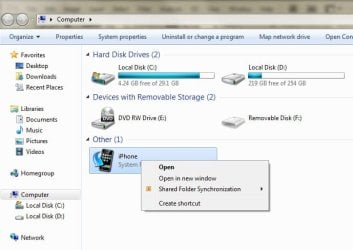
Does anybody know how to remove iPhone system folder icon from Windows Explorer?
Look at attachment (2.jpg). When I tried to right-click the icon, that’s the only thing I got. No properties, no delete, nothing…
When I tried to click properties from the top of the Windows Explorer, I got a warning box shown in attachment (1.jpg).
I tried to boot to safe mode, it was still the same… I got no option to remove it.
I tried to uncheck all Apple services and boot the PC, still not solve the problem.
I can’t remove it because I couldn’t find the folder location. I could delete the folder with many ways (command prompt, etc.) if I could just find its location.
I’m not a fan of Apple. So, I don’t like to see Apple folder on my Windows Explorer. It happened when I connect my friend’s iPod to my PC just to see his collection on iTunes. It never happened with my iPod. That system folder never showed up when I connect my iPod.
Can somebody help me??
Greg
Does anybody know how to remove iPhone system folder icon from Windows Explorer?
Look at attachment (2.jpg). When I tried to right-click the icon, that’s the only thing I got. No properties, no delete, nothing…
When I tried to click properties from the top of the Windows Explorer, I got a warning box shown in attachment (1.jpg).
I tried to boot to safe mode, it was still the same… I got no option to remove it.
I tried to uncheck all Apple services and boot the PC, still not solve the problem.
I can’t remove it because I couldn’t find the folder location. I could delete the folder with many ways (command prompt, etc.) if I could just find its location.
I’m not a fan of Apple. So, I don’t like to see Apple folder on my Windows Explorer. It happened when I connect my friend’s iPod to my PC just to see his collection on iTunes. It never happened with my iPod. That system folder never showed up when I connect my iPod.
Can somebody help me??
Greg
Attachments

My Computer
- OS
- Windows 7 Ultimate x86

