
You are using an out of date browser. It may not display this or other websites correctly.
You should upgrade or use an alternative browser.
You should upgrade or use an alternative browser.
Solved How to Remove OS in dual boot?
- Thread starter Inaynl
- Start date

Hi,
Please refer to this:
http://www.sevenforums.com/tutorials/210983-dual-boot-delete-os.html
Regards,
Golden
Please refer to this:
http://www.sevenforums.com/tutorials/210983-dual-boot-delete-os.html
Regards,
Golden
My Computer
- Computer type
- PC/Desktop
- Computer Manufacturer/Model Number
- Golden Mk. I.4
- OS
- Windows 10 Pro x64 ; Xubuntu x64
- CPU
- Intel i7 860 @ 2.80 GHz O/C'ed to 4.0GHz
- Motherboard
- Gigabyte P55A-UD3R Rev.1. Award BIOS F13
- Memory
- 16GB Corsair Vengance DDR3 @ 661 MHz Dual Channel (9-9-9-24)
- Graphics Card(s)
- EVGA NVidia GTX 560 1024MB
- Sound Card
- Realtek Integrated
- Monitor(s) Displays
- Dual Samsung SyncMaster 2494HS
- Screen Resolution
- 1920*1080 and 1920*1080
- Hard Drives
- 1*Samsung 840 EVO 120GB SSD;
1*OCZ Vertex 2 60GB SSD;
2*Samsung F3 SpinPoint 1TB in RAID0;
1*Samsung F1 SpinPoint 1TB;
2*Western Digital 1TB External USB 3.0
1*Western Digital 500GB External USB 3.0
1*Seagate 500GB External USB 2.0
- PSU
- Thermaltake ToughPower QFan 750W
- Case
- Thermaltake Element S VK60001W2Z
- Cooling
- Corsair H60 Water Cooling, 2*230mm and 2*80mm case fans
- Keyboard
- Logitech G110
- Mouse
- Logitech MX518
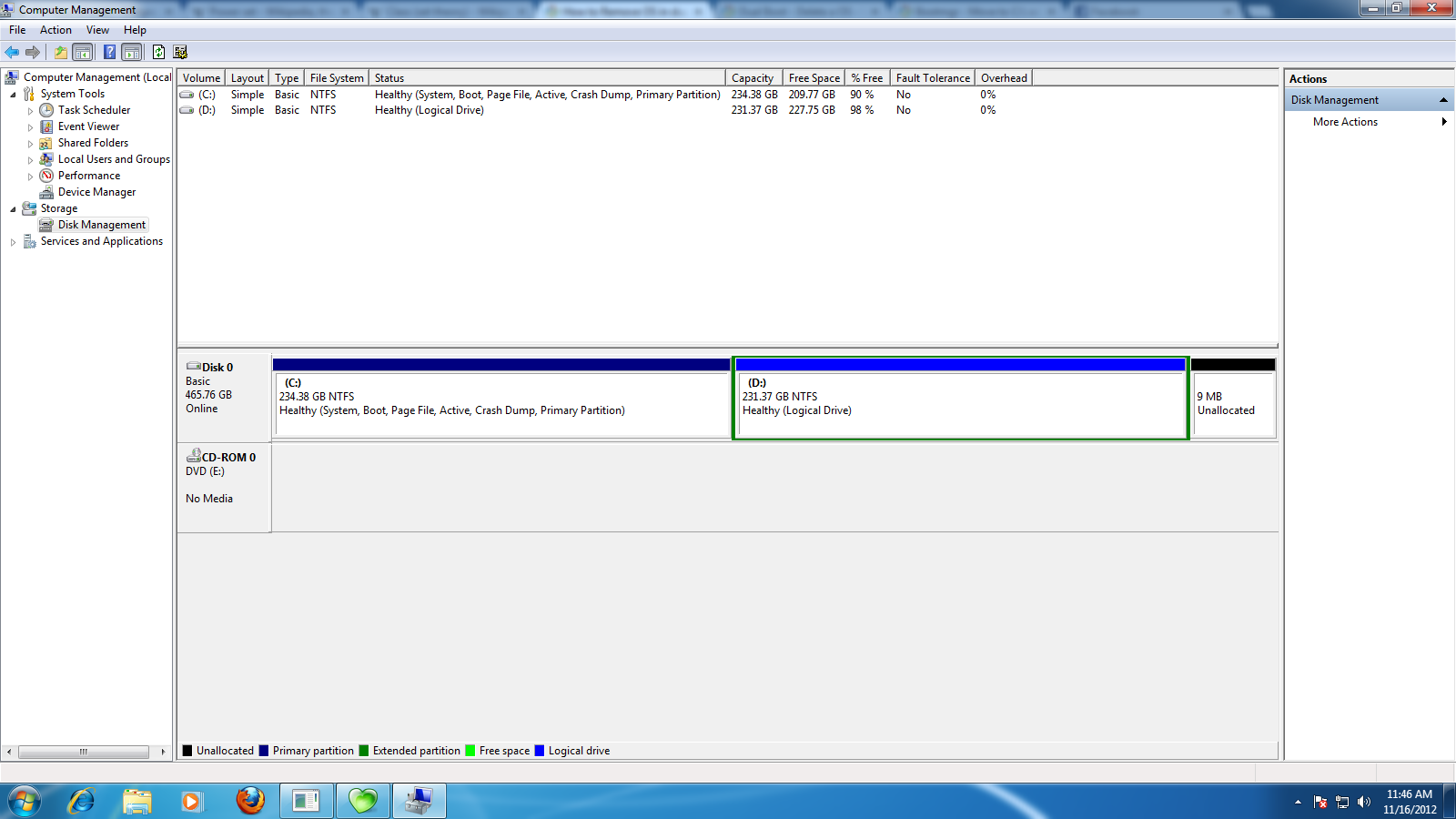
hmm i looked at the guide but i dont know what is the active partition between the two?
Here's whats on my Disk Management
( C: ) Simple Basic NTFS Healthy(System,Boot,Page File,Active,Crash Dump,Primary Partition)
( D: ) Simple Basic NTFS Healthy(Logical Drive)
Here's whats on my Disk Management
( C: ) Simple Basic NTFS Healthy(System,Boot,Page File,Active,Crash Dump,Primary Partition)
( D: ) Simple Basic NTFS Healthy(Logical Drive)
My Computer
- OS
- Windows 7 Ultimate x64
hmm i looked at the guide but i dont know what is the active partition between the two?
It looks like C:.......but.........post a screen capture image of Disk Management so we can be 100% sure.
My Computer
- Computer type
- PC/Desktop
- Computer Manufacturer/Model Number
- Golden Mk. I.4
- OS
- Windows 10 Pro x64 ; Xubuntu x64
- CPU
- Intel i7 860 @ 2.80 GHz O/C'ed to 4.0GHz
- Motherboard
- Gigabyte P55A-UD3R Rev.1. Award BIOS F13
- Memory
- 16GB Corsair Vengance DDR3 @ 661 MHz Dual Channel (9-9-9-24)
- Graphics Card(s)
- EVGA NVidia GTX 560 1024MB
- Sound Card
- Realtek Integrated
- Monitor(s) Displays
- Dual Samsung SyncMaster 2494HS
- Screen Resolution
- 1920*1080 and 1920*1080
- Hard Drives
- 1*Samsung 840 EVO 120GB SSD;
1*OCZ Vertex 2 60GB SSD;
2*Samsung F3 SpinPoint 1TB in RAID0;
1*Samsung F1 SpinPoint 1TB;
2*Western Digital 1TB External USB 3.0
1*Western Digital 500GB External USB 3.0
1*Seagate 500GB External USB 2.0
- PSU
- Thermaltake ToughPower QFan 750W
- Case
- Thermaltake Element S VK60001W2Z
- Cooling
- Corsair H60 Water Cooling, 2*230mm and 2*80mm case fans
- Keyboard
- Logitech G110
- Mouse
- Logitech MX518

My Computer
- Computer type
- PC/Desktop
- Computer Manufacturer/Model Number
- Golden Mk. I.4
- OS
- Windows 10 Pro x64 ; Xubuntu x64
- CPU
- Intel i7 860 @ 2.80 GHz O/C'ed to 4.0GHz
- Motherboard
- Gigabyte P55A-UD3R Rev.1. Award BIOS F13
- Memory
- 16GB Corsair Vengance DDR3 @ 661 MHz Dual Channel (9-9-9-24)
- Graphics Card(s)
- EVGA NVidia GTX 560 1024MB
- Sound Card
- Realtek Integrated
- Monitor(s) Displays
- Dual Samsung SyncMaster 2494HS
- Screen Resolution
- 1920*1080 and 1920*1080
- Hard Drives
- 1*Samsung 840 EVO 120GB SSD;
1*OCZ Vertex 2 60GB SSD;
2*Samsung F3 SpinPoint 1TB in RAID0;
1*Samsung F1 SpinPoint 1TB;
2*Western Digital 1TB External USB 3.0
1*Western Digital 500GB External USB 3.0
1*Seagate 500GB External USB 2.0
- PSU
- Thermaltake ToughPower QFan 750W
- Case
- Thermaltake Element S VK60001W2Z
- Cooling
- Corsair H60 Water Cooling, 2*230mm and 2*80mm case fans
- Keyboard
- Logitech G110
- Mouse
- Logitech MX518
 thanks, i think i might not remove windows xp anymore too complicated steps
Read the tutorial, its not that complicated. We can help if you need it.
My Computer
- Computer type
- PC/Desktop
- Computer Manufacturer/Model Number
- Golden Mk. I.4
- OS
- Windows 10 Pro x64 ; Xubuntu x64
- CPU
- Intel i7 860 @ 2.80 GHz O/C'ed to 4.0GHz
- Motherboard
- Gigabyte P55A-UD3R Rev.1. Award BIOS F13
- Memory
- 16GB Corsair Vengance DDR3 @ 661 MHz Dual Channel (9-9-9-24)
- Graphics Card(s)
- EVGA NVidia GTX 560 1024MB
- Sound Card
- Realtek Integrated
- Monitor(s) Displays
- Dual Samsung SyncMaster 2494HS
- Screen Resolution
- 1920*1080 and 1920*1080
- Hard Drives
- 1*Samsung 840 EVO 120GB SSD;
1*OCZ Vertex 2 60GB SSD;
2*Samsung F3 SpinPoint 1TB in RAID0;
1*Samsung F1 SpinPoint 1TB;
2*Western Digital 1TB External USB 3.0
1*Western Digital 500GB External USB 3.0
1*Seagate 500GB External USB 2.0
- PSU
- Thermaltake ToughPower QFan 750W
- Case
- Thermaltake Element S VK60001W2Z
- Cooling
- Corsair H60 Water Cooling, 2*230mm and 2*80mm case fans
- Keyboard
- Logitech G110
- Mouse
- Logitech MX518

- Local time
- 1:46 AM
- Messages
- 50,634
It appears you didn't boot the Win7 DVD to install and instead ran it from XP, which locked out the C letter so you don't have Win7 on C as it always is when correctly installed from boot. So I would consider reinstalling it correctly from boot while deleting all partitions during a Clean Install Windows 7.
If you want to keep what you have then since D is a Logical partition which cannot have the System boot files written to it, you must first convert it to Logical. Download free Partition Wizard Boot CD, burn to CD using Windows Image Burner, then boot CD, rightclick D, select Modify>Set to Primary, click OK.
Next rightclick D to Modify>Set to Active, OK.
Then click on HD to highlight it, from Disk tab select Rebuild MBR, OK, Apply all steps.
If Win7 doesn't start at reboot, boot into Win7 DVD or REpair CD to run Startup Repair - Run up to 3 Separate Times until Win7 starts and holds the System flag.
You now know Win7 can boot from its own partition, so you can boot the PW CD, rightclick C to delete, click OK, then rightclick D to Resize, slide left border all the way to left, OK, APply both steps. Partition Wizard Move/Resize Partition Video Help.
If you want to keep what you have then since D is a Logical partition which cannot have the System boot files written to it, you must first convert it to Logical. Download free Partition Wizard Boot CD, burn to CD using Windows Image Burner, then boot CD, rightclick D, select Modify>Set to Primary, click OK.
Next rightclick D to Modify>Set to Active, OK.
Then click on HD to highlight it, from Disk tab select Rebuild MBR, OK, Apply all steps.
If Win7 doesn't start at reboot, boot into Win7 DVD or REpair CD to run Startup Repair - Run up to 3 Separate Times until Win7 starts and holds the System flag.
You now know Win7 can boot from its own partition, so you can boot the PW CD, rightclick C to delete, click OK, then rightclick D to Resize, slide left border all the way to left, OK, APply both steps. Partition Wizard Move/Resize Partition Video Help.
- Local time
- 1:46 AM
- Messages
- 50,634
Do other disks boot in the PC? I would not mess with AIO if it will not boot. Use the latest official installer ISO.
Where did you get Win7? How are you activating it?
Where did you get Win7? How are you activating it?

You may like to download a ISO from a good source like:
Windows Download and Shop - Microsoft Windows
Windows Download and Shop - Microsoft Windows
My Computer
- OS
- ME/XP/Vista/Win7
