How to remove properties from context menu and/or shortcut tab?

futbolplayer88

New member
Local time
5:24 AM
Messages
3
Good day peeps,

I have a question for the masses.

I am deploying 12 computers out into the field for use in a semi-public environment. These computers are on our domain, have their own OU and blocked inheritance is on. I have been able to lock almost everything down using GPO and Registry hacking except the removal of the properties menu from the right click context menu and/or the shortcut tab in the properties context menu.

I have scoured the web looking for this solution, and I have seen a lot of postings of this issue but no one has been able to give a solution.

Current Locked down list(using GPO and Registry):
Removed open file location on start menu and properties context menu
Removed shortcut context menu
Removed new context menu
Removed send to context menu

I was wondering if anybody would know the registry key for either?
 

My Computer My Computer

At a glance

Windows 7 Enterprise x648GB
Computer type
PC/Desktop
Computer Manufacturer/Model Number
Asus
OS
Windows 7 Enterprise x64
Memory
8GB

My Computer My Computer

At a glance

Windows 10 ProAMD Ryzen 5 2400G Processor with Radeon RX Ve...G.SKILL Ripjaws V Series 16GB (2 x 8GB) 288-P...2047MB NVIDIA GeForce GTX 1060 6GB (EVGA)
Computer type
PC/Desktop
Computer Manufacturer/Model Number
Custom Built
OS
Windows 10 Pro
CPU
AMD Ryzen 5 2400G Processor with Radeon RX Vega 11 Graphics
Motherboard
ASRock X470 Master SLI/AC AM4 AMD Promontory X470 SATA 6Gb/s
Memory
G.SKILL Ripjaws V Series 16GB (2 x 8GB) 288-Pin DDR4 SDRAM D
Graphics Card(s)
2047MB NVIDIA GeForce GTX 1060 6GB (EVGA)
Sound Card
Motherboard Built in
Monitor(s) Displays
Acer R240HY bidx 23.8-Inch IPS HDMI DVI VGA (1920 x 1080) Wi
Screen Resolution
1920 x 1080
Hard Drives
1TB Sandisk SSD PLUS (Main drive)
500 GB Seagate 7200 RPM (Games)
500 GB Western Digital 7200 RPM (Virtual Machines)
PSU
CORSAIR TX Series TX650M 650W 80+ Gold Modular Power Supply
Case
CORSAIR CARBIDE SPEC-02 Mid-Tower Gaming Case, Red LED Fan
Cooling
220mm, two 120mm, and four 60mm fans
Keyboard
Wired Dell keyboard
Mouse
Wireless Logitech mouse
Internet Speed
250mb down, 30mb up
Antivirus
Panda Cloud Antivirus
Browser
Chrome-ish x64
Other Info
Your awesome for reading this.
I just checked my gpo and the computer context menu is already disabled.

The problem is that disabling the context menu in general will not work because the cut, copy, and paste functions will not be there.

These computers are being used for kids also so I can not get rid of that function. I know the control c and v will still work but not everyone knows that unfortunately.

I found that article a couple weeks ago and I searched through the registry for keywords but still was not able to find the properties key. I even tried all the programs that were suggested but still did not help unless I was just not seeing it.

I appreciate your help!
 

My Computer My Computer

At a glance

Windows 7 Enterprise x648GB
Computer type
PC/Desktop
Computer Manufacturer/Model Number
Asus
OS
Windows 7 Enterprise x64
Memory
8GB
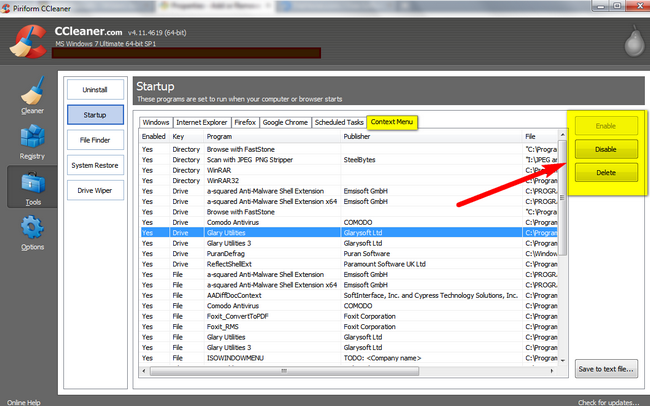
In addition CCleaner has an option to disable/remove/enable context menu. See below.

Z2bWgJO.png
 

My Computer My Computer

At a glance

Windows 7 Ultimate x32
Computer type
PC/Desktop
OS
Windows 7 Ultimate x32
Hard Drives
WD 320gb/500gb/1TB
Seagate 500gb/1TB
In addition CCleaner has an option to disable/remove/enable context menu. See below.

Z2bWgJO.png
 

My Computer My Computer

At a glance

Windows 7 Ultimate x32
Computer type
PC/Desktop
OS
Windows 7 Ultimate x32
Hard Drives
WD 320gb/500gb/1TB
Seagate 500gb/1TB
Ccleaner did show the properties context menu item.

I have accepted the fact I will not be able to disable this so I make an Acronis image of the computer.
 

My Computer My Computer

At a glance

Windows 7 Enterprise x648GB
Computer type
PC/Desktop
Computer Manufacturer/Model Number
Asus
OS
Windows 7 Enterprise x64
Memory
8GB
Back
Top