How to remove second Windows Install

Tomination

New member
Local time
6:01 PM
Messages
29
Hi Guys, I got an SSD and installed Windows, its working great, but on my Files Hard Disk i still have the windows partition with windows installed on it.

I want to format the partition and merge it with my other partition of the same drive.

Windows wont let me because it has windows installed on it, does anybody know how i can force it to get rid of that windows install.

I dont want it anymore but its still taking up space :(
 

My Computer

OS
Windows 7, 64 Bit
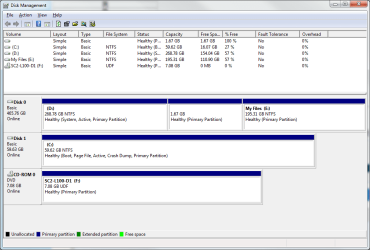
Hi i am not sure how to tell if my disk is marked System Active in Disk Management?

@Theog: I should have that image attached :)

In the image its D i want to get rid of, as C has my new install :) I want to merge it into the other partition on that disk

Thanks for your replies :)
 

Attachments

  • Untitled.png
    Untitled.png
    24.2 KB · Views: 101

My Computer

OS
Windows 7, 64 Bit
Unplug Disk0 D HD, plug its data cable into Disk1 C making sure it remains first HD to boot in BIOS setup.

Boot the Win7 DVD Repair console or Repair CD to Startup Repair - Run 3 Separate Times to write the System boot files to C until Win7 boots on its own.

After Win7 starts, power down to plug back in D HD, boot free Partition Wizard CD to Delete D, then Resize remaining data partition to the left.
 

My Computer

OS
ME/XP/Vista/Win7
Hello.


After you get the Windows System boot files (re)created to the new Windows 7 C: partition on the SSD; reconnect the HDD and use Windows disk management to delete the old D: partition so it becomes unallocated space, use the outline in Step Three (disregard the first 2 steps) to recover that unallocated space into the E: partition.

You will also need to delete the 1.67GB partition first, if there's no data on it.


My Computer

Computer Manufacturer/Model Number
* BFK Customs *
OS
W 7 64-bit Ultimate
CPU
Intel Q9550 Yorkfield
Motherboard
ASUS P5Q Pro
Memory
8GB Dominator 8500C5D
Graphics Card(s)
ATI : XFX 5870
Sound Card
Realtek HD Audio 7-1
Monitor(s) Displays
1x 47" LCD HDMI & 3x 26" LCD HDMI
Screen Resolution
1920x1080P & 1920x1200
Hard Drives
1x 80GB Intel X25-M G2 SSD : 1x 500GB & 1x 640GB WD Caviar Black(s)
PSU
Corsair 620HX
Case
Cooler Master RC-690
Cooling
Tuniq Tower 120, 2x 140mm and 3x 120mm case fans
Keyboard
Microsoft 500
Mouse
Razer Diamondback 3G
Internet Speed
14 Mb/s
Other Info
1x Koutech 3Gb/s SATA HDD Hot Swap Rack
Back
Top