Solved How to Remove Window DVD Maker

cgrim29588

Banned
Local time
9:27 PM
Messages
109
Location
South Carolina USA
How do I remove the Windows DVD Maker? I looked in Programs and Features and didn't see it listed and I even went into Turn Windows features on and off and couldn't find it there. Help I don't need Windows DVD Maker I user another program to create DVDs
 

My Computer

Computer Manufacturer/Model Number
Dell Inspiron 570 Desktop Dell Inspiron 570 Desktop
OS
Windows 7 Home Premium 64 Bit
CPU
AMD Sempron Barton 0.13 um Architecture
Motherboard
Dell Motherboard
Memory
2GB2 Dual Channel DDR3 SDRAM3 at 1066MHz- 2 DIMMs
Graphics Card(s)
Integrated ATI Radeon HD4200 Graphics
Sound Card
Realtek AC '97 Audio for VIA Audio Controller
Monitor(s) Displays
Integrated 7.1 Channel Audio
Screen Resolution
1024 X 768
Hard Drives
320GB4 Serial ATA Hard Drive (7200RPM) w/DataBurst Cache™
Case
Inspiron 570 Minitower
Keyboard
Dell USB Entry Keyboard
Mouse
Dell USB Optical Mouse
Other Info
16X DVD+/-RW Drive
Besides the fact that you cannot remove it, what is the point - why would you want to remove it.
 

My Computer

Computer Manufacturer/Model Number
HP, Dell, Gateway, Toshiba - 4 laptops and 2 desktops
OS
Vista, Windows7, Mint Mate, Zorin, Windows 8
CPU
from 1.6GHz Duo to i7
Monitor(s) Displays
2x HP w2207
Hard Drives
5x HDD, 7x SSD, 12x Externals
Keyboard
with trackball - no mices
Mouse
Trackball mice
Internet Speed
DSL 6000
I said in my post I don't need it as I use another program to burn DVDs
 

My Computer

Computer Manufacturer/Model Number
Dell Inspiron 570 Desktop Dell Inspiron 570 Desktop
OS
Windows 7 Home Premium 64 Bit
CPU
AMD Sempron Barton 0.13 um Architecture
Motherboard
Dell Motherboard
Memory
2GB2 Dual Channel DDR3 SDRAM3 at 1066MHz- 2 DIMMs
Graphics Card(s)
Integrated ATI Radeon HD4200 Graphics
Sound Card
Realtek AC '97 Audio for VIA Audio Controller
Monitor(s) Displays
Integrated 7.1 Channel Audio
Screen Resolution
1024 X 768
Hard Drives
320GB4 Serial ATA Hard Drive (7200RPM) w/DataBurst Cache™
Case
Inspiron 570 Minitower
Keyboard
Dell USB Entry Keyboard
Mouse
Dell USB Optical Mouse
Other Info
16X DVD+/-RW Drive
I don't know why you want to uninstall Windows DVD Maker. Just use your other program and forget about the Windows DVD Maker.
 

My Computer

Computer type
PC/Desktop
Computer Manufacturer/Model Number
Self Built
OS
Win 10 Pro x64
CPU
Intel I5-2500K @3.3GHz
Motherboard
Asrock P67 Extreme4
Memory
16GB G.Skill Ripjaws X (4x4GB)
Graphics Card(s)
EVGA GeForce 750 Ti SC 2GB
Sound Card
ASUS Xonar DG 5.1 Channels 24-bit 96KHz PCI Interface Sound
Monitor(s) Displays
auria eq2367
Screen Resolution
1920 x 1080
Hard Drives
250GB Samsung 850 EVO SSD
1TB WD Blue
1TB Hitachi
PSU
SeaSonic X 650W 80 Plus Gold
Case
Corsair Obsidian 750D
Cooling
Corsair H60, Three 140mm case fans
Keyboard
Logitech Wireless Keyboard K520
Mouse
Logitech Wireless Mouse M310
Internet Speed
Wave Broadband ~ 100 dn 5 up
Antivirus
Windows Defender, Malwarebytes Premium
Browser
Edge, IE11, Chrome
Other Info
Laptop specs: HP g7-1365dx /
CPU: AMD A6-3420M APU with Radeon(tm) HD Graphics /
RAM: Crucial 8Gb (2x4Gb) /
SSD: Crucial M4-CT128M4SSD2 ATA Device/ FW 000F /
GFX: AMD Radeon HD 6520G /
OS: Windows 10 Pro x64
I'm also running out of HD space, so removing it will give me more space on the HD.
 

My Computer

Computer Manufacturer/Model Number
Dell Inspiron 570 Desktop Dell Inspiron 570 Desktop
OS
Windows 7 Home Premium 64 Bit
CPU
AMD Sempron Barton 0.13 um Architecture
Motherboard
Dell Motherboard
Memory
2GB2 Dual Channel DDR3 SDRAM3 at 1066MHz- 2 DIMMs
Graphics Card(s)
Integrated ATI Radeon HD4200 Graphics
Sound Card
Realtek AC '97 Audio for VIA Audio Controller
Monitor(s) Displays
Integrated 7.1 Channel Audio
Screen Resolution
1024 X 768
Hard Drives
320GB4 Serial ATA Hard Drive (7200RPM) w/DataBurst Cache™
Case
Inspiron 570 Minitower
Keyboard
Dell USB Entry Keyboard
Mouse
Dell USB Optical Mouse
Other Info
16X DVD+/-RW Drive
How do I remove the Windows DVD Maker? I looked in Programs and Features and didn't see it listed and I even went into Turn Windows features on and off and couldn't find it there. Help I don't need Windows DVD Maker I user another program to create DVDs

Hi, Welcome to SF,

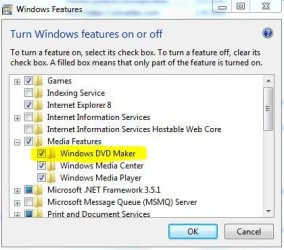
You could Find it under Program Features > Turn Windows features on or off > Media Features > Windows DVD Maker Uncheck it that should do the trick

DVD.JPG

Hope this help,
Captain
 

My Computer

Computer Manufacturer/Model Number
Samsung NP550P5C-S02IN
OS
Windows 7 Ultimate - 64-bit | Windows 8 Pro - 64-bit
CPU
Intel® Core™ i7 Processor 3,610QM (2.30Hz, 6MB L3 Cach
Memory
8 GB
Graphics Card(s)
NVIDIA® GeForce® GT 650M 2GB Graphics, Optimus™ techno
Sound Card
SoundAlive™ JBL 3 Speakers (With sub-Woofer)
Monitor(s) Displays
39.62cm (15.6) SuperBright 300nit HD+ LED Display
Screen Resolution
1,600 x 900, Anti-Reflective
Hard Drives
1TB S-ATA II Hard Drive (5,400RPM)
And save about a grand total of 90 MB after, not going to help a whole lot.

Looking at your specs you would be far better off getting a bigger hard drive than looking here and there trying to save a few MB's, a 40 GB drive isn't big enough for much of anything these days (my music collection wouldn't fit on it).
 

My Computer

Computer type
PC/Desktop
Computer Manufacturer/Model Number
Me
OS
Win 7 Ultimate x64
CPU
FX-8350 @ 4.6 GHz so far
Motherboard
Asus M5A97 EVO
Memory
ADATA XPG V1 Series Black 8GB DDR3 1600
Graphics Card(s)
Sapphire R9 270x Dual-X
Sound Card
Xonar DGX w/ Corsair Vengence 1300
Monitor(s) Displays
Acer S232HL Abid
Screen Resolution
1920x1080
Hard Drives
120 GB OCZ Vertex 3
500 GB Seagate 7200.12
PSU
Antec Earthwatts 650W Green
Case
Antec Three Hundred
Cooling
Cooler Master 212 EVO
Keyboard
Logitech G510
Mouse
Logitech G500s
Internet Speed
35000/3000
How do I remove the Windows DVD Maker? I looked in Programs and Features and didn't see it listed and I even went into Turn Windows features on and off and couldn't find it there. Help I don't need Windows DVD Maker I user another program to create DVDs

Hi, Welcome to SF,

You could Find it under Program Features > Turn Windows features on or off > Media Features > Windows DVD Maker Uncheck it that should do the trick

View attachment 46534

Hope this help,
Captain


Shyam, are you sure this actually uninstalls the feature or does it just inactivate it?
 

My Computer

Computer Manufacturer/Model Number
HP, Dell, Gateway, Toshiba - 4 laptops and 2 desktops
OS
Vista, Windows7, Mint Mate, Zorin, Windows 8
CPU
from 1.6GHz Duo to i7
Monitor(s) Displays
2x HP w2207
Hard Drives
5x HDD, 7x SSD, 12x Externals
Keyboard
with trackball - no mices
Mouse
Trackball mice
Internet Speed
DSL 6000
Hello Cgrim,

Using Windows Features to turn off Windows DVD Maker will not uninstall it from the computer. It only turns that feature off so that it does not show up in Windows 7 instead until turned back on. The actual files are still stored on your computer.

About the only thing you can do is get a larger HDD, or uninstall other items.

Sorry. :(
 

My Computer

Computer type
PC/Desktop
Computer Manufacturer/Model Number
Self built custom
OS
64-bit Windows 11 Pro for Workstations
CPU
Intel i7-8700K OC'd to 5 GHz
Motherboard
ASUS ROG Maximus XI Formula Z390
Memory
64 GB (4x16GB) G.SKILL TridentZ RGB DDR4 3600 MHz
Graphics Card(s)
ASUS ROG-STRIX-GTX1080TI-O11G-GAMING
Sound Card
Integrated
Monitor(s) Displays
2 x Samsung Odyssey G7 27"
Screen Resolution
2560x1440
Hard Drives
1TB Samsung 990 PRO M.2,
4TB Samsung 990 PRO PRO M.2,
TerraMaster F8 SSD Plus NAS
PSU
Seasonic Prime Titanium 850W
Case
Thermaltake Core P3
Cooling
Corsair Hydro H115i
Keyboard
Logitech wireless K800
Mouse
Logitech MX Master 4
Internet Speed
2 Gb/s Download and 100 Mb/s Upload
Antivirus
Malwarebyte Anti-Malware Premium
Browser
Google Chrome
Other Info
Logitech Z625 speaker system,
Logitech BRIO 4K Pro webcam,
HP Color LaserJet Pro MFP M477fdn,
APC SMART-UPS RT 1000 XL - SURT1000XLI,
Galaxy S23 Plus phone
Hello Cgrim,

Using Windows Features to turn off Windows DVD Maker will not uninstall it from the computer. It only turns that feature off so that it does not show up in Windows 7 instead until turned back on. The actual files are still stored on your computer.

About the only thing you can do is get a larger HDD, or uninstall other items.

Sorry. :(

Thanks Shawn for clarifying that. I figured it was that way because no uninstaller gets involved.
 

My Computer

Computer Manufacturer/Model Number
HP, Dell, Gateway, Toshiba - 4 laptops and 2 desktops
OS
Vista, Windows7, Mint Mate, Zorin, Windows 8
CPU
from 1.6GHz Duo to i7
Monitor(s) Displays
2x HP w2207
Hard Drives
5x HDD, 7x SSD, 12x Externals
Keyboard
with trackball - no mices
Mouse
Trackball mice
Internet Speed
DSL 6000
You're welcome Wolfgang. Anytime. :)
 

My Computer

Computer type
PC/Desktop
Computer Manufacturer/Model Number
Self built custom
OS
64-bit Windows 11 Pro for Workstations
CPU
Intel i7-8700K OC'd to 5 GHz
Motherboard
ASUS ROG Maximus XI Formula Z390
Memory
64 GB (4x16GB) G.SKILL TridentZ RGB DDR4 3600 MHz
Graphics Card(s)
ASUS ROG-STRIX-GTX1080TI-O11G-GAMING
Sound Card
Integrated
Monitor(s) Displays
2 x Samsung Odyssey G7 27"
Screen Resolution
2560x1440
Hard Drives
1TB Samsung 990 PRO M.2,
4TB Samsung 990 PRO PRO M.2,
TerraMaster F8 SSD Plus NAS
PSU
Seasonic Prime Titanium 850W
Case
Thermaltake Core P3
Cooling
Corsair Hydro H115i
Keyboard
Logitech wireless K800
Mouse
Logitech MX Master 4
Internet Speed
2 Gb/s Download and 100 Mb/s Upload
Antivirus
Malwarebyte Anti-Malware Premium
Browser
Google Chrome
Other Info
Logitech Z625 speaker system,
Logitech BRIO 4K Pro webcam,
HP Color LaserJet Pro MFP M477fdn,
APC SMART-UPS RT 1000 XL - SURT1000XLI,
Galaxy S23 Plus phone
Capt.Jack Sparrow-Thanks that helped!
stormy13- My hard drive is on 38.2GB and I was thinking of getting a new hard drive just don't have the money right now.
Brink-What would happen if I deleted the files for the Windows DVD Maker?
 

My Computer

Computer Manufacturer/Model Number
Dell Inspiron 570 Desktop Dell Inspiron 570 Desktop
OS
Windows 7 Home Premium 64 Bit
CPU
AMD Sempron Barton 0.13 um Architecture
Motherboard
Dell Motherboard
Memory
2GB2 Dual Channel DDR3 SDRAM3 at 1066MHz- 2 DIMMs
Graphics Card(s)
Integrated ATI Radeon HD4200 Graphics
Sound Card
Realtek AC '97 Audio for VIA Audio Controller
Monitor(s) Displays
Integrated 7.1 Channel Audio
Screen Resolution
1024 X 768
Hard Drives
320GB4 Serial ATA Hard Drive (7200RPM) w/DataBurst Cache™
Case
Inspiron 570 Minitower
Keyboard
Dell USB Entry Keyboard
Mouse
Dell USB Optical Mouse
Other Info
16X DVD+/-RW Drive
Cgrim,

They are buried deep in some unknown CAB protected operating system files. You would not be able to delete them, and attempting to do so may result in having to resintall Windows 7. It's not worth trying for what very little space (MBs) you could possibly gain back. :(
 

My Computer

Computer type
PC/Desktop
Computer Manufacturer/Model Number
Self built custom
OS
64-bit Windows 11 Pro for Workstations
CPU
Intel i7-8700K OC'd to 5 GHz
Motherboard
ASUS ROG Maximus XI Formula Z390
Memory
64 GB (4x16GB) G.SKILL TridentZ RGB DDR4 3600 MHz
Graphics Card(s)
ASUS ROG-STRIX-GTX1080TI-O11G-GAMING
Sound Card
Integrated
Monitor(s) Displays
2 x Samsung Odyssey G7 27"
Screen Resolution
2560x1440
Hard Drives
1TB Samsung 990 PRO M.2,
4TB Samsung 990 PRO PRO M.2,
TerraMaster F8 SSD Plus NAS
PSU
Seasonic Prime Titanium 850W
Case
Thermaltake Core P3
Cooling
Corsair Hydro H115i
Keyboard
Logitech wireless K800
Mouse
Logitech MX Master 4
Internet Speed
2 Gb/s Download and 100 Mb/s Upload
Antivirus
Malwarebyte Anti-Malware Premium
Browser
Google Chrome
Other Info
Logitech Z625 speaker system,
Logitech BRIO 4K Pro webcam,
HP Color LaserJet Pro MFP M477fdn,
APC SMART-UPS RT 1000 XL - SURT1000XLI,
Galaxy S23 Plus phone
Back
Top