How to remove windows 7 hotkeys

torres9

New member
Local time
6:42 AM
Messages
9
Is it possible?

My fn button is broken so i always used 'sound volume hotkeys' program to change the volume by using the win button + up/down arrow key to change the volume on my laptop with xp. But now when i click the win + arrow button it just minimises/maximises whatever window im looking at.

In a perfect world id like to remove the windows hotkeys so i can get that program to work, so just wondering if its possible
 

My Computer

OS
7
Check you laptops' support page for up to date drivers...
 

My Computer

Computer type
PC/Desktop
Computer Manufacturer/Model Number
LENOVO K450 @3.0GHZ
OS
64-bit Windows 8.1 Pro
CPU
Core(TM) i5 CPU 4330 Haswell @ 3.20GHz
Motherboard
LENOVO
Memory
12.00 GB
Graphics Card(s)
Intel(R) HD Graphics
Sound Card
Intel HD integtrated
Monitor(s) Displays
HP 25' ISP Monitor
Screen Resolution
1900/1020
Hard Drives
(1) ST1000DM003-1CH162 (2) Generic STORAGE DEVICE USB Device (3) Generic STORAGE DEVICE USB Device
Internet Speed
100mb down/10mb up
The keyboards fine though, I dont need drivers for it. I just want to get rid of the windows 7 hotkeys so i can use that volume changer program.
 

My Computer

OS
7

My Computer

Computer Manufacturer/Model Number
Dell DXP061
OS
windows 7 RTM
CPU
Intel core 2 6400 @2.13GHz
Motherboard
Dell ??
Memory
2 Gig.
Graphics Card(s)
NVIDIA GeForce 7300 GT
Sound Card
High Definition Audio Device - Microsoft
Monitor(s) Displays
Dell LCD
Screen Resolution
1280 x 1024 75 hertz
Hard Drives
WDC WD2500JS-75NCB3 ATA Device

WDC WD5000AAKS-65YGA0 ATA Device
Keyboard
Logitech Cordless
Mouse
Logitech Cordless
Internet Speed
760k
Is it possible?

My fn button is broken so i always used 'sound volume hotkeys' program to change the volume by using the win button + up/down arrow key to change the volume on my laptop with xp. But now when i click the win + arrow button it just minimises/maximises whatever window im looking at.

In a perfect world id like to remove the windows hotkeys so i can get that program to work, so just wondering if its possible

Disable Windows Hotkeys

  1. Type gpedit.msc in the Start menu’s search box and then press Enter. Note: This guide shows you how to make changes to Windows 7 using Group Policy. Group Policy is not available in Home versions of Windows 7.
  2. Navigate to User Configuration, Administrative Templates, Windows Components, and then select Windows Explorer in the left column of the Group Policy editor.
  3. Double-click Turn off Windows+X Hotkeys in the Settings section of the Group Policy editor.
  4. Select Enable and then click OK to save the changes.
 
I strongly suggest that you try a program that I have installed on all the computers on my network! It has changed my life when doing web work and it is FREE! I promise you that you will NOT be disappointed; in fact, after a few weeks, you'll wonder how you ever did without it!

http://www.skynergy.com/hotkeyz.html

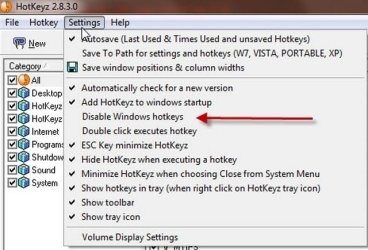
If memory serves, you can disable/enable windows hotkeys from the settings menu; also, there is a function to remap keys. Also, much, much more!

disable windows hotkeys_640.jpg

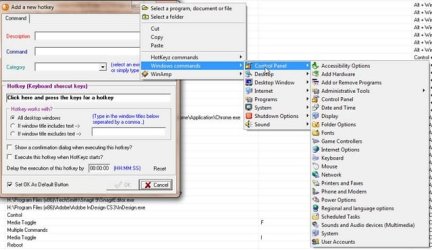
Windows Control Panel_640.jpg

hotkey commands_640.jpg

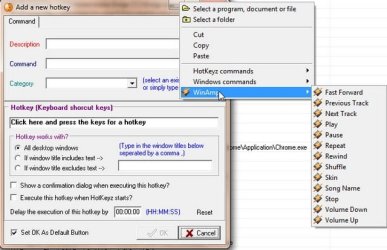
winamp_640.jpg
 
Last edited:

My Computer

Computer type
PC/Desktop
Computer Manufacturer/Model Number
Dell Precision T5610 01
OS
windows 7 Ultimate 64
Works but not that much.

It worked, but not to the full extent. Means, I can assign any key to a command desired by me, but it didn't list all the preassigned keys (so that I could disable them). E.g. windows has taken control of a key command 'Ctrl+ Alt+ Shift+ P' (I don't know which app has taken control of this key combination). And I want to remove this command, but this app doesn't help me here.

Anyway, thanks.
 

My Computer

OS
Windows Seven
Back
Top