How to remove Windows XP gently from PC

solbjerg

New member
Local time
12:08 AM
Messages
15
Location
Copenhagen, Denmark
I think it is not worth it to have Windows XP installed on the other harddisk on my PC anymore. Besides deleting the system restore points in Windows 7, XP is neither faster, nor less resource consuming than Windows 7, as myths will have it.

I recently got into a lot of trouble (MBR missing/corrupt) when I installed Windows XP AFTER the Windows 7 install. So I suppose I should probably not just format the harddisk with the Win XP OS from a dos prompt?

There is a dual boot at present. I have made a Windows 7 system backup, but if I use the rescue CD will it not restore the present bootmanager with dual boot and all?
 
Last edited:

My Computer

Computer Manufacturer/Model Number
Home built
OS
Windows 7 Home Premium
CPU
AMD Athlon XP 3000+
Motherboard
ASUS A7N8X
Memory
2 gb DDR RAM
Graphics Card(s)
ASUS AH 3450 Series
Sound Card
On board
Monitor(s) Displays
Xerox 17" TFT XA7-17i
Screen Resolution
1280 x 1024
Hard Drives
Seagate 40 Gb
Seagate 250 GB
PSU
Enermax EG365AX
Case
Antec Sonata piano black
Cooling
CPU: Thermalright SLK-800U Socket 462 + 2 standard 80 mm fan
Keyboard
Logitech MX 3200
Mouse
Logitech Mx 3200 laser
Internet Speed
10 MB/1 Mb
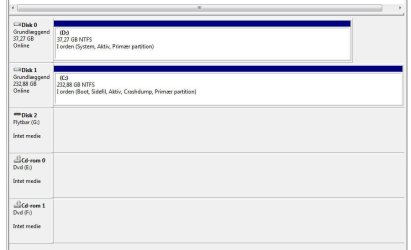
Please post back a screenshot of your full Disk Management drive map, using the Snipping Tool in Start menu, attaching file using paper clip in Reply Box.

We've helped remove 150+ dual boots here successfully since Win7 was released. It only takes following the steps carefully. We can give you the exact steps once we see the screenshot.
 
I think I found the answer to my own question (though not a very gentle solution neither a subtle answer): I formatted the hard disk with the Windows XP OS with the Win7 installation disk, and then - when I got the message that the boot manager was missing - the Win7 installation disk repaired the boot procedure.
 

My Computer

Computer Manufacturer/Model Number
Home built
OS
Windows 7 Home Premium
CPU
AMD Athlon XP 3000+
Motherboard
ASUS A7N8X
Memory
2 gb DDR RAM
Graphics Card(s)
ASUS AH 3450 Series
Sound Card
On board
Monitor(s) Displays
Xerox 17" TFT XA7-17i
Screen Resolution
1280 x 1024
Hard Drives
Seagate 40 Gb
Seagate 250 GB
PSU
Enermax EG365AX
Case
Antec Sonata piano black
Cooling
CPU: Thermalright SLK-800U Socket 462 + 2 standard 80 mm fan
Keyboard
Logitech MX 3200
Mouse
Logitech Mx 3200 laser
Internet Speed
10 MB/1 Mb
Please post back a screenshot of your full Disk Management drive map, using the Snipping Tool in Start menu, attaching file using paper clip in Reply Box.

We've helped remove 150+ dual boots here successfully since Win7 was released. It only takes following the steps carefully. We can give you the exact steps once we see the screenshot.

Hi gregrocker.

Thank you for your answer. I did not see it before I found my own clumpsy solution to my question.

Another time I will be more patient.
 
Last edited:

My Computer

Computer Manufacturer/Model Number
Home built
OS
Windows 7 Home Premium
CPU
AMD Athlon XP 3000+
Motherboard
ASUS A7N8X
Memory
2 gb DDR RAM
Graphics Card(s)
ASUS AH 3450 Series
Sound Card
On board
Monitor(s) Displays
Xerox 17" TFT XA7-17i
Screen Resolution
1280 x 1024
Hard Drives
Seagate 40 Gb
Seagate 250 GB
PSU
Enermax EG365AX
Case
Antec Sonata piano black
Cooling
CPU: Thermalright SLK-800U Socket 462 + 2 standard 80 mm fan
Keyboard
Logitech MX 3200
Mouse
Logitech Mx 3200 laser
Internet Speed
10 MB/1 Mb
So is everything ok?

You might want to post back the screenshot anyway so we can take a look to see if there are any potential problems, as there often are.
 
PS. One problem was that the Win XP OS was not included in Windows 7's boot section (in msconfig), so...
 

My Computer

Computer Manufacturer/Model Number
Home built
OS
Windows 7 Home Premium
CPU
AMD Athlon XP 3000+
Motherboard
ASUS A7N8X
Memory
2 gb DDR RAM
Graphics Card(s)
ASUS AH 3450 Series
Sound Card
On board
Monitor(s) Displays
Xerox 17" TFT XA7-17i
Screen Resolution
1280 x 1024
Hard Drives
Seagate 40 Gb
Seagate 250 GB
PSU
Enermax EG365AX
Case
Antec Sonata piano black
Cooling
CPU: Thermalright SLK-800U Socket 462 + 2 standard 80 mm fan
Keyboard
Logitech MX 3200
Mouse
Logitech Mx 3200 laser
Internet Speed
10 MB/1 Mb
Please post back a screenshot of your full Disk Management drive map, using the Snipping Tool in Start menu, attaching file using paper clip in Reply Box.

We've helped remove 150+ dual boots here successfully since Win7 was released. It only takes following the steps carefully. We can give you the exact steps once we see the screenshot.

I think everything is ok. As least thats what disk management tells me (in Danish)
 

Attachments

  • diskmanagement.jpg
    diskmanagement.jpg
    32.4 KB · Views: 17

My Computer

Computer Manufacturer/Model Number
Home built
OS
Windows 7 Home Premium
CPU
AMD Athlon XP 3000+
Motherboard
ASUS A7N8X
Memory
2 gb DDR RAM
Graphics Card(s)
ASUS AH 3450 Series
Sound Card
On board
Monitor(s) Displays
Xerox 17" TFT XA7-17i
Screen Resolution
1280 x 1024
Hard Drives
Seagate 40 Gb
Seagate 250 GB
PSU
Enermax EG365AX
Case
Antec Sonata piano black
Cooling
CPU: Thermalright SLK-800U Socket 462 + 2 standard 80 mm fan
Keyboard
Logitech MX 3200
Mouse
Logitech Mx 3200 laser
Internet Speed
10 MB/1 Mb
PS. Couldn't find the Snipping Tool, so the above is just a print screen image.
 
Last edited:

My Computer

Computer Manufacturer/Model Number
Home built
OS
Windows 7 Home Premium
CPU
AMD Athlon XP 3000+
Motherboard
ASUS A7N8X
Memory
2 gb DDR RAM
Graphics Card(s)
ASUS AH 3450 Series
Sound Card
On board
Monitor(s) Displays
Xerox 17" TFT XA7-17i
Screen Resolution
1280 x 1024
Hard Drives
Seagate 40 Gb
Seagate 250 GB
PSU
Enermax EG365AX
Case
Antec Sonata piano black
Cooling
CPU: Thermalright SLK-800U Socket 462 + 2 standard 80 mm fan
Keyboard
Logitech MX 3200
Mouse
Logitech Mx 3200 laser
Internet Speed
10 MB/1 Mb
If D: is XP, then it still holds the System MBR which means it cannot be removed without first recovering the MBR into C: Windows 7.

To do this: unplug the XP drive, plug it's cable into Win7 or make sure Win7 is set as first HD to boot in BIOS Setup boot order.

Now boot into Win7 DVD, select Repair My Computer on second screen, click through to Recovery Tools to run Startup Repair up to 3 separate times with reboots in order to write the MBR to Win7 partition.

You can also accomplish this while keeping both drives plugged by marking XP drive inactive before running Startup Repair to recover MBR to Win7. This may also be needed to delete and format the XP drive without override command. Boot into the Win7 DVD Repair console, open a Command Line to type:

DISKPART
LIST DISK
SELECT DISK # (for XP HD)
LIST PARTITION
SELECT PARTITION # (for XP)
INACTIVE
EXIT

If you want to clean the XP disk, then use CLEAN after SELECT DISK #.
 
If D: is XP, then it still holds the System MBR which means it cannot be removed without first recovering the MBR into C: Windows 7.

To do this: unplug the XP drive, plug it's cable into Win7 or make sure Win7 is set as first HD to boot in BIOS Setup boot order.

Now boot into Win7 DVD, select Repair My Computer on second screen, click through to Recovery Tools to run Startup Repair up to 3 separate times with reboots in order to write the MBR to Win7 partition.

You can also accomplish this while keeping both drives plugged by marking XP drive inactive before running Startup Repair to recover MBR to Win7. This may also be needed to delete and format the XP drive without override command. Boot into the Win7 DVD Repair console, open a Command Line to type:

DISKPART
LIST DISK
SELECT DISK # (for XP HD)
LIST PARTITION
SELECT PARTITION # (for XP)
INACTIVE
EXIT

If you want to clean the XP disk, then use CLEAN after SELECT DISK #.

Thank you gregrocker for your detailed help.

You are saying that if I ever remove hard disk 0, the D: drive, (which is now empty and formatted so I can use it as storage) I will have trouble.

Right now the D: hard disk is formatted by(?) Windows 7's and ready for storage and I see no problems.

I will, however, in the nearest future, rearrange the hard disk setup. Right now C (hard disk 1) is slave and D (hard disk 0) is master (D: was my first hard disk, that is why) and the (very special) cables won't have it otherwise. So I will have to move around both hard disks. My BIOS boots to hard disk 1 as first choice.
 

My Computer

Computer Manufacturer/Model Number
Home built
OS
Windows 7 Home Premium
CPU
AMD Athlon XP 3000+
Motherboard
ASUS A7N8X
Memory
2 gb DDR RAM
Graphics Card(s)
ASUS AH 3450 Series
Sound Card
On board
Monitor(s) Displays
Xerox 17" TFT XA7-17i
Screen Resolution
1280 x 1024
Hard Drives
Seagate 40 Gb
Seagate 250 GB
PSU
Enermax EG365AX
Case
Antec Sonata piano black
Cooling
CPU: Thermalright SLK-800U Socket 462 + 2 standard 80 mm fan
Keyboard
Logitech MX 3200
Mouse
Logitech Mx 3200 laser
Internet Speed
10 MB/1 Mb
You can accomplish a very quick removal of XP (or Vista) by formatting the XP HDD (or partition) using any of the common live disk managers which boot from cd or flash drive (gParted, acronis, etc) then using your windows 7 install media to repair the MBR.
 
You can accomplish a very quick removal of XP (or Vista) by formatting the XP HDD (or partition) using any of the common live disk managers which boot from cd or flash drive (gParted, acronis, etc) then using your windows 7 install media to repair the MBR.

Thanks to you, too. Most of the MBR problems with Vista and Win7 are almost new to me and really perplex me, as I am "brought up" in the good old DOS tradition (which still worked in Win XP).

My problems are not easier by the fact, that my Win7 OS is installed on HD 1 (and not HD 0). Must change the order of hard disks according to the advice from gregrocker.
 

My Computer

Computer Manufacturer/Model Number
Home built
OS
Windows 7 Home Premium
CPU
AMD Athlon XP 3000+
Motherboard
ASUS A7N8X
Memory
2 gb DDR RAM
Graphics Card(s)
ASUS AH 3450 Series
Sound Card
On board
Monitor(s) Displays
Xerox 17" TFT XA7-17i
Screen Resolution
1280 x 1024
Hard Drives
Seagate 40 Gb
Seagate 250 GB
PSU
Enermax EG365AX
Case
Antec Sonata piano black
Cooling
CPU: Thermalright SLK-800U Socket 462 + 2 standard 80 mm fan
Keyboard
Logitech MX 3200
Mouse
Logitech Mx 3200 laser
Internet Speed
10 MB/1 Mb
My problems are not easier by the fact, that my Win7 OS is installed on HD 1 (and not HD 0). Must change the order of hard disks according to the advice from gregrocker.

Maybe not. You reported back that your Win7 drive is already set as first HD to boot in BIOS boot order (after DVD?). That was the point in switching the cable or checking the BIOS boot order to assure Win7 is first HD to boot.

Having a data drive in DISK0 position is okay as long as it doesn't become marked active, because a Windows installer will see it as first active drive and place the MBR there. We see this all the time here.

In your case, you had XP on DISK0 which kept the MBR when Win7 was installed as per normal. Now with the removal of XP, the System MBR needs to be returned to Win7.

This is accomplished by using the DISKPART commands given to mark XP inactive, then running Startup Repair from the booted Win7 DVD to rewrite the MBR to Win7.

You can then confirm in Disk Mgmt. that System has changed to Win7 and, as long as it is first HD in BIOS boot order, it will boot normally and the old XP drive is no longer System or Active and can be repartioned and formatted as desired.
 
My problems are not easier by the fact, that my Win7 OS is installed on HD 1 (and not HD 0). Must change the order of hard disks according to the advice from gregrocker.

Maybe not. You reported back that your Win7 drive is already set as first HD to boot in BIOS boot order (after DVD?). That was the point in switching the cable or checking the BIOS boot order to assure Win7 is first HD to boot.

Having a data drive in DISK0 position is okay as long as it doesn't become marked active, because a Windows installer will see it as first active drive and place the MBR there. We see this all the time here.

In your case, you had XP on DISK0 which kept the MBR when Win7 was installed as per normal. Now with the removal of XP, the System MBR needs to be returned to Win7.

This is accomplished by using the DISKPART commands given to mark XP inactive, then running Startup Repair from the booted Win7 DVD to rewrite the MBR to Win7.

You can then confirm in Disk Mgmt. that System has changed to Win7 and, as long as it is first HD in BIOS boot order, it will boot normally and the old XP drive is no longer System or Active and can be repartioned and formatted as desired.

Hi gregrocker.

I thank you for your good advice and educational information. All is okay now and I have learned a great deal about MBR and where it is located (and have studied a bit more on my own on the subject).

I intend, though, to change the order of hard disks some day, as I have learned that the bios/cpu's first choice would be to look for a MBR in the first physical harddisk unless I mark the disk0 as inactive. BIOS search order is now: floppy, DVD, HD1.
 
Last edited:

My Computer

Computer Manufacturer/Model Number
Home built
OS
Windows 7 Home Premium
CPU
AMD Athlon XP 3000+
Motherboard
ASUS A7N8X
Memory
2 gb DDR RAM
Graphics Card(s)
ASUS AH 3450 Series
Sound Card
On board
Monitor(s) Displays
Xerox 17" TFT XA7-17i
Screen Resolution
1280 x 1024
Hard Drives
Seagate 40 Gb
Seagate 250 GB
PSU
Enermax EG365AX
Case
Antec Sonata piano black
Cooling
CPU: Thermalright SLK-800U Socket 462 + 2 standard 80 mm fan
Keyboard
Logitech MX 3200
Mouse
Logitech Mx 3200 laser
Internet Speed
10 MB/1 Mb
Hi Kirtsten-

I think it is a good idea to have data drives in a lower position just for the reasons you give.

So when you are ready to recover the MBR to;Win7, use the steps given earlier to mark the data drive inactive, make sure the Win7 drive is marked active (as it is now) and set first to boot, then boot the Win7 DVD Repair console to run Startup Repair up to 3 separate times to write the MBR onto Win7.

http://www.sevenforums.com/tutorials/681-startup-repair.html?ltr=S
 
Hi gregrocker.

Once again, thank you. (Strange thing that one must run repair three separate times, before new values are written to the MBR. I have learned it the hard way... and by you, of course.)
 
Last edited:

My Computer

Computer Manufacturer/Model Number
Home built
OS
Windows 7 Home Premium
CPU
AMD Athlon XP 3000+
Motherboard
ASUS A7N8X
Memory
2 gb DDR RAM
Graphics Card(s)
ASUS AH 3450 Series
Sound Card
On board
Monitor(s) Displays
Xerox 17" TFT XA7-17i
Screen Resolution
1280 x 1024
Hard Drives
Seagate 40 Gb
Seagate 250 GB
PSU
Enermax EG365AX
Case
Antec Sonata piano black
Cooling
CPU: Thermalright SLK-800U Socket 462 + 2 standard 80 mm fan
Keyboard
Logitech MX 3200
Mouse
Logitech Mx 3200 laser
Internet Speed
10 MB/1 Mb
Startup Repair is automated in Win7 to attempt to repair and then rewrite the MBR after running its myriad tests and fixes.

If there are multiple issues or the MBR doesn't repair after first attempts it may require running up to 3 separate times, because Startup Repair assumes the last fix given will work until you return because a restart proved it didn't.

As long as the Win7 partition is intact and marked Active, it never fails.
 
Back
Top