Solved How to remove XP safely

Gwynneth

New member
Local time
9:20 PM
Messages
6
Hi can anyone help me I upgraded my computer from XP to windows 7 ulitmate 32. I now have a duel boot. I am wondering as I do not use xp anymore can it safely be removed and if so how do I do it. sas I only use windows 7. thanking you in advance. Gwynneth
 

My Computer

Computer Manufacturer/Model Number
HP
OS
windows 7 ultmate 32bit
CPU
Not sure
Motherboard
not sure
Memory
2gb
Graphics Card(s)
not sure
Sound Card
notsure
Hard Drives
1
PSU
notsure
Case
notsue
Cooling
fan

My Computer

Computer Manufacturer/Model Number
custom build
OS
Windows 7 64b Ultimate
CPU
I7-2600 3.40GHz - testing various OC levels..
Motherboard
ASUS Sabretooth
Memory
2x 4Gb DDR3/1333
Graphics Card(s)
GTX570 - testing OC levels
Sound Card
motherboard 7.1 DIG.
Monitor(s) Displays
2x Ilyama 24" E2409HDS-B1 2ms/DVI
Screen Resolution
1920 x 1080
Hard Drives
120 GB Intel Elmcrest SSD
1 TB SATAII 7200RPM/32MB
External 2TB USB3
PSU
Corsair Pro HX850W
Cooling
Coolermaster Hyper V8
Keyboard
Logitech G110
Mouse
Logitech G700
Internet Speed
25Mb
Other Info
CPU: 7,7 RAM: 7,7 GTX: 7,9 GTX 3D : 7,9 SSD 7,6
Overall 7,6 ...... now to speed up the SSD... ;)

Also use a Dell XPS M1710 on Vista 32b
Asus LT on Vista 32
3 older machines still doing fine on Linux/ubuntu but not used much anymore...
how do I stop the duel boot then as someone else did the upgrade for me.Gwynneth
 

My Computer

Computer Manufacturer/Model Number
HP
OS
windows 7 ultmate 32bit
CPU
Not sure
Motherboard
not sure
Memory
2gb
Graphics Card(s)
not sure
Sound Card
notsure
Hard Drives
1
PSU
notsure
Case
notsue
Cooling
fan
how do I stop the duel boot then as someone else did the upgrade for me.Gwynneth

If you (or someone else) just (very recently) did the dualboot install... my choice would be to save any data you need and do a clean install of W7 as in the tutorial I referred to.
If you're not comfortable doing that... then I'm not sure if you'd be comfortable taking out the XP part in your current install...:o

But, if that's what you really want, we'll have a look at that...
First check for that is: are you happy to lose ALL data/files in the XP OS part... there is nothing there that you need? All your personal data/music/files/films/whatever... is saved or on separate HDD that you can already access from W7?
 

My Computer

Computer Manufacturer/Model Number
custom build
OS
Windows 7 64b Ultimate
CPU
I7-2600 3.40GHz - testing various OC levels..
Motherboard
ASUS Sabretooth
Memory
2x 4Gb DDR3/1333
Graphics Card(s)
GTX570 - testing OC levels
Sound Card
motherboard 7.1 DIG.
Monitor(s) Displays
2x Ilyama 24" E2409HDS-B1 2ms/DVI
Screen Resolution
1920 x 1080
Hard Drives
120 GB Intel Elmcrest SSD
1 TB SATAII 7200RPM/32MB
External 2TB USB3
PSU
Corsair Pro HX850W
Cooling
Coolermaster Hyper V8
Keyboard
Logitech G110
Mouse
Logitech G700
Internet Speed
25Mb
Other Info
CPU: 7,7 RAM: 7,7 GTX: 7,9 GTX 3D : 7,9 SSD 7,6
Overall 7,6 ...... now to speed up the SSD... ;)

Also use a Dell XPS M1710 on Vista 32b
Asus LT on Vista 32
3 older machines still doing fine on Linux/ubuntu but not used much anymore...
reply to disk managment

Hi i think i have done this right my computer is HP pavilion t645.uk
 

Attachments

  • disk manergment.PNG
    disk manergment.PNG
    13.3 KB · Views: 12

My Computer

Computer Manufacturer/Model Number
HP
OS
windows 7 ultmate 32bit
CPU
Not sure
Motherboard
not sure
Memory
2gb
Graphics Card(s)
not sure
Sound Card
notsure
Hard Drives
1
PSU
notsure
Case
notsue
Cooling
fan
Looking at your disk management layout Gwynneth, you can't be dual-booting because you only have a recovery partition (D) and a Windows partition (C).

I'm assuming that what your friend did was upgrade your computer from Windows XP to Windows 7.
 

My Computer

Computer Manufacturer/Model Number
HP Pavilion Elite 495UK
OS
Windows 7 Ultimate SP1 64-Bit
CPU
Intel Core i7 870 @ 2.93GHz
Motherboard
MSI 2A9C (CPU1)
Memory
8Gb Dual-Channel DDR3 @ 664MHz
Graphics Card(s)
nVidia GeForce GTX 460 1024MB dedicated RAM
Sound Card
Realtek HD Audio
Monitor(s) Displays
HP2310i
Screen Resolution
1920 x 1080
Hard Drives
1x1954GB Hitachi HDS22020ALA 330 (RAID), 1x1954GB Hitachi External for backup and storage
PSU
460W
Case
HP Elite
Cooling
Air cooled
Keyboard
Logitech K750 solar-powered keyboard
Mouse
Logitech Wireless M180 mouse
Internet Speed
2Mb
Other Info
Pure Avanti Flow Internet Radio with iPod Dock, 64Gb iPod, HP USB Speakers, Sony MDR-V500 Headphones, Sony Vaio F-Series Laptop
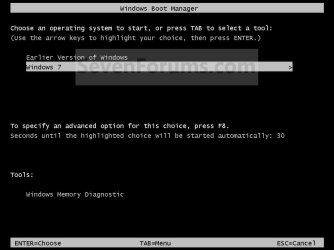
I used too have a screen like that, but not any more,
it only now comes direct into windows 7
I do not know what has happened.
 

My Computer

Computer Manufacturer/Model Number
HP
OS
windows 7 ultmate 32bit
CPU
Not sure
Motherboard
not sure
Memory
2gb
Graphics Card(s)
not sure
Sound Card
notsure
Hard Drives
1
PSU
notsure
Case
notsue
Cooling
fan
Because I do not use it any more and maybe my computer would work faster without the xp
 

My Computer

Computer Manufacturer/Model Number
HP
OS
windows 7 ultmate 32bit
CPU
Not sure
Motherboard
not sure
Memory
2gb
Graphics Card(s)
not sure
Sound Card
notsure
Hard Drives
1
PSU
notsure
Case
notsue
Cooling
fan
Looking at your disk management layout Gwynneth, you can't be dual-booting because you only have a recovery partition (D) and a Windows partition (C).

I'm assuming that what your friend did was upgrade your computer from Windows XP to Windows 7.

Hi i think i have done this right my computer is HP pavilion t645.uk

You do not have Win XP install.
 

My Computer

OS
ME/XP/Vista/Win7
ok thank you for you help bye for now
 

My Computer

Computer Manufacturer/Model Number
HP
OS
windows 7 ultmate 32bit
CPU
Not sure
Motherboard
not sure
Memory
2gb
Graphics Card(s)
not sure
Sound Card
notsure
Hard Drives
1
PSU
notsure
Case
notsue
Cooling
fan
You're very welcome.
 

My Computer

Computer Manufacturer/Model Number
HP Pavilion Elite 495UK
OS
Windows 7 Ultimate SP1 64-Bit
CPU
Intel Core i7 870 @ 2.93GHz
Motherboard
MSI 2A9C (CPU1)
Memory
8Gb Dual-Channel DDR3 @ 664MHz
Graphics Card(s)
nVidia GeForce GTX 460 1024MB dedicated RAM
Sound Card
Realtek HD Audio
Monitor(s) Displays
HP2310i
Screen Resolution
1920 x 1080
Hard Drives
1x1954GB Hitachi HDS22020ALA 330 (RAID), 1x1954GB Hitachi External for backup and storage
PSU
460W
Case
HP Elite
Cooling
Air cooled
Keyboard
Logitech K750 solar-powered keyboard
Mouse
Logitech Wireless M180 mouse
Internet Speed
2Mb
Other Info
Pure Avanti Flow Internet Radio with iPod Dock, 64Gb iPod, HP USB Speakers, Sony MDR-V500 Headphones, Sony Vaio F-Series Laptop
Back
Top