Solved How to repartition on an existing Win 7 system

feelit

New member
Local time
7:34 PM
Messages
16
Re: http://www.sevenforums.com/tutorials/2674-partition-volume-create-new.html

Hello,

I've a fresh Thosiba laptop preconfigured with Win 7 64 bits.

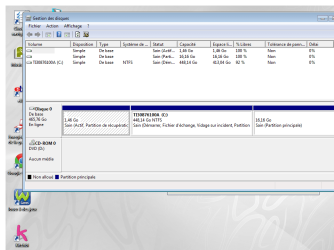
Currently, I see 3 partitions:
1, 4Gb for Recovery
444Gb with Win7
17 Gb as third one


I want to have on one partition Win 7 and another the data, ideally a 3rd for swap/temp

Can someone give the URL to achieve that.

With Diskmgmt.msc ??

thanks
 

My Computer My Computer

At a glance

Win 7 64 bits French
OS
Win 7 64 bits French
Hello feelit, welcome to Seven Forums!


It would be best if you post a snip of a maximized Windows 7 disk management for us to look at first.

But if those are all Primary partitions and actually in the order you show them then use this to shrink the right side of the Windows partition, that will give you an Extended partition by default.

Then use Method One for some ideas for data storage.


My Computer My Computer

At a glance

W 7 64-bit UltimateIntel Q9550 Yorkfield8GB Dominator 8500C5DATI : XFX 5870
Computer Manufacturer/Model Number
* BFK Customs *
OS
W 7 64-bit Ultimate
CPU
Intel Q9550 Yorkfield
Motherboard
ASUS P5Q Pro
Memory
8GB Dominator 8500C5D
Graphics Card(s)
ATI : XFX 5870
Sound Card
Realtek HD Audio 7-1
Monitor(s) Displays
1x 47" LCD HDMI & 3x 26" LCD HDMI
Screen Resolution
1920x1080P & 1920x1200
Hard Drives
1x 80GB Intel X25-M G2 SSD : 1x 500GB & 1x 640GB WD Caviar Black(s)
PSU
Corsair 620HX
Case
Cooler Master RC-690
Cooling
Tuniq Tower 120, 2x 140mm and 3x 120mm case fans
Keyboard
Microsoft 500
Mouse
Razer Diamondback 3G
Internet Speed
14 Mb/s
Other Info
1x Koutech 3Gb/s SATA HDD Hot Swap Rack
If your PC came preloaded with Win7, there is most probably a fourth partition you did not mention -- the boot partition containing the Win7 loader files.

I good tool to use for repartitioning is the Minitool Partition Wizard -- which can be downloaded for FREE from their site, burned to CD, and then be used to do partitioning work.
 

My Computer My Computer

At a glance

Win7 Pro 32-bit, Win8 Pro 32-bitAMD Phenom II X6 1090T4GB ddr3 1300AMD HD 4290 onboard
Computer type
PC/Desktop
Computer Manufacturer/Model Number
Custom
OS
Win7 Pro 32-bit, Win8 Pro 32-bit
CPU
AMD Phenom II X6 1090T
Motherboard
Gigabyte
Memory
4GB ddr3 1300
Graphics Card(s)
AMD HD 4290 onboard
Sound Card
Builtin Realtek HD Audio
Monitor(s) Displays
Samsung 24" widescreen, LG 23" widescreen
Screen Resolution
1920x1200/1920x1080
Hard Drives
Kingston 256GB SSD
Keyboard
Logitech Illuminated Keyboard
Mouse
Logitech M705 wireless mouse
Antivirus
Norton Av 2013
Browser
IE v10
Everything you need is here to get a perfect Clean Reinstall - Factory OEM Windows 7.

It will help you decide if you want to keep your Recovery and Tools partition or delete all partitions during install, or you can do it later after you decide you don't need them for sure and/or they don't run any longer.
 
To Bare Foot Kid:

Thanks, it's what I though, have you already tried?
In case I do a system recovery, do I need to "de-shrink", or should I create a new recovery from the current state?

To gregrocker:
Bare Foot Kid is easier, any issue with it??

Thanks
 

Attachments

  • Win7.png
    Win7.png
    70.9 KB · Views: 15

My Computer My Computer

At a glance

Win 7 64 bits French
OS
Win 7 64 bits French
Since you can have four Primary partitions then you can simply shrink it in Disk Mgmt and create a New partition in the shrink space.

Only if you are adding a fifth partition will you need to convert the new partition to Logical so you can add additional adjacent Logical partitions.

To shrink it Disk Mgmt: Partition or Volume - Shrink

To create a new partition in that shrink space: Partition or Volume - Create New

To do a factory reset, you may need to remove the data from the new partition, delete and Extend C into the space. But you can wait to see what Factory Recovery says. Be sure to make your Recovery disks so you have a backup method in case the partition stops working.
 
> Since you can have four Primary partitions
Four??? I only see 3

I plan for Win7 a partition of 60Gb and the rest for data
Would you make an additional partition for swap/temp data as sometimes I wonder if applications can really make use of that?

Thanks
 

My Computer My Computer

At a glance

Win 7 64 bits French
OS
Win 7 64 bits French
>Since you can have four Primary partitions
Four??? I only see 3

The key word in Greg's answer was "can".

He didn't say you had 4 partitions.

I don't see any need for a swap or temp partition.
 

My Computer My Computer

At a glance

Windows 7 Home Premium SP1, 64-bitIntel Skylake i5-6600K, not overclocked8 GB HyperX DDR4-2666 (2 x 4 GB)none; graphics are integrated on CPU
Computer type
PC/Desktop
Computer Manufacturer/Model Number
Ignatz Special; 4 speed manual gearbox; factory air conditioning; one of one
OS
Windows 7 Home Premium SP1, 64-bit
CPU
Intel Skylake i5-6600K, not overclocked
Motherboard
AsRock Z170M Extreme 4, micro ATX
Memory
8 GB HyperX DDR4-2666 (2 x 4 GB)
Graphics Card(s)
none; graphics are integrated on CPU
Sound Card
onboard: Realtek ALC1150; external: USB Behringer UF0-202
Monitor(s) Displays
Dell S2340M 23 inch IPS
Screen Resolution
1600 x 900
Hard Drives
System: Crucial MX100 series SSD, 128 GB;
Data: Samsung Spinpoint 103SJ, 1 TB;
Backup: WD Caviar Green WD30EZRX-00D8PB0, 3 TB
PSU
Rosewill SilentNight 500 watt fanless, semi-modular
Case
Antec Solo II
Cooling
Noctua NH-U12S; Noctua F12 intake, Noctua S12A exhaust
Keyboard
Microsoft 200 6JH-00001 USB
Mouse
Dell or Microsoft optical wired; USB
Antivirus
Microsoft Security Essentials and Malwarebytes Premium
Browser
Pale Moon
Other Info
All fans PWM; speeds at idle: CPU circa 500 rpm; intake circa 600 rpm; exhaust circa 600 rpm; CPU temps 27 idle and 47 C load in a warm room (27 C/81 F) when running Intel Extreme Tuning Utility stress test.
Windows 7 disk management creates the 4th created partition as an Extended by default, if you want a 4th Primary you will need to use an elevated command window using the commands below.


diskpart

select disk ? | ? = your disk number, disk 0 in this OPs case

create partition primary size=? | ? the desired size in MB

exit

exit

As Greg says DO NOT ever accept a Dynamic disk.


My Computer My Computer

At a glance

W 7 64-bit UltimateIntel Q9550 Yorkfield8GB Dominator 8500C5DATI : XFX 5870
Computer Manufacturer/Model Number
* BFK Customs *
OS
W 7 64-bit Ultimate
CPU
Intel Q9550 Yorkfield
Motherboard
ASUS P5Q Pro
Memory
8GB Dominator 8500C5D
Graphics Card(s)
ATI : XFX 5870
Sound Card
Realtek HD Audio 7-1
Monitor(s) Displays
1x 47" LCD HDMI & 3x 26" LCD HDMI
Screen Resolution
1920x1080P & 1920x1200
Hard Drives
1x 80GB Intel X25-M G2 SSD : 1x 500GB & 1x 640GB WD Caviar Black(s)
PSU
Corsair 620HX
Case
Cooler Master RC-690
Cooling
Tuniq Tower 120, 2x 140mm and 3x 120mm case fans
Keyboard
Microsoft 500
Mouse
Razer Diamondback 3G
Internet Speed
14 Mb/s
Other Info
1x Koutech 3Gb/s SATA HDD Hot Swap Rack
Well, worked with diskmgmt.msc but could only shrink to 224gb.
I tried with jkdfrag and ultradefrag to see if defrag could enhance that, nope.

Can I achieved a further shrink with gparted 0.12 under linux?(Partition has 87% free)

How does one knows if a partition is rather at the edge or center of the hdd? Make sense to put restore at centre of hdd as slower.
As Greg says DO NOT ever accept a Dynamic disk.
Wasn't prompted with such a choice.

Thanks.

P.S. Not familiar with diskpart, but seems to create/add partition and destructicte, the later I do not want!
 

My Computer My Computer

At a glance

Win 7 64 bits French
OS
Win 7 64 bits French

My Computer My Computer

At a glance

Windows 7 Home Premium SP1, 64-bitIntel Skylake i5-6600K, not overclocked8 GB HyperX DDR4-2666 (2 x 4 GB)none; graphics are integrated on CPU
Computer type
PC/Desktop
Computer Manufacturer/Model Number
Ignatz Special; 4 speed manual gearbox; factory air conditioning; one of one
OS
Windows 7 Home Premium SP1, 64-bit
CPU
Intel Skylake i5-6600K, not overclocked
Motherboard
AsRock Z170M Extreme 4, micro ATX
Memory
8 GB HyperX DDR4-2666 (2 x 4 GB)
Graphics Card(s)
none; graphics are integrated on CPU
Sound Card
onboard: Realtek ALC1150; external: USB Behringer UF0-202
Monitor(s) Displays
Dell S2340M 23 inch IPS
Screen Resolution
1600 x 900
Hard Drives
System: Crucial MX100 series SSD, 128 GB;
Data: Samsung Spinpoint 103SJ, 1 TB;
Backup: WD Caviar Green WD30EZRX-00D8PB0, 3 TB
PSU
Rosewill SilentNight 500 watt fanless, semi-modular
Case
Antec Solo II
Cooling
Noctua NH-U12S; Noctua F12 intake, Noctua S12A exhaust
Keyboard
Microsoft 200 6JH-00001 USB
Mouse
Dell or Microsoft optical wired; USB
Antivirus
Microsoft Security Essentials and Malwarebytes Premium
Browser
Pale Moon
Other Info
All fans PWM; speeds at idle: CPU circa 500 rpm; intake circa 600 rpm; exhaust circa 600 rpm; CPU temps 27 idle and 47 C load in a warm room (27 C/81 F) when running Intel Extreme Tuning Utility stress test.
Super tool it worked like a charm !

Thanks
 

My Computer My Computer

At a glance

Win 7 64 bits French
OS
Win 7 64 bits French
Back
Top