How to reset Media Center

sgarlinge

New member
Local time
11:43 AM
Messages
2
Hi,

How do I reset Windows Media Center please to default settings?

I understand you should be able to go Tasks, Settings, General - Re-run Windows Media Center Setup. However I only have the following options available under GENERAL;-

STARTUP & WINDOWS BEHAVIOUR
VISUAL & SOUND EFFECTS
AUTOMATIC DOWNLOAD OPTIONS
OPTIMIZATIONS
ABOUT WINDOWS MEDIA CENTER
PRIVACY

Could someone help please.

Thank you.
 

My Computer My Computer

OS
Windows 7
hi sgarlinge, welcome to the forums.

You might want to try turning Media Center off then on again.

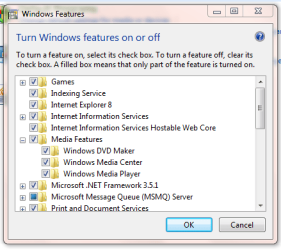
In Control Panel click Programs then 'Turn Windows features on or off' you should be able to De-Select 'Media Center'. After a restart, re-select 'Media Center' in the same way and see if that's reset it to default.

Capture.PNG

Hope this helps :)


AS
 

My Computer My Computer

Computer Manufacturer/Model Number
Fisher Price
OS
Windows 7 RTM (My daddy installed it for me)
Motherboard
I hope not, I need feeding soon
Memory
Getting better by the day
Hi thanks for that.

Its all still there I am afriad.
 

My Computer My Computer

OS
Windows 7
mcupdate.exe -MediaCenterRecoveryTask

run from the windows\ehome directory
 

My Computer My Computer

OS
Windows 7 x64 RTM
hi sgarlinge, welcome to the forums.

You might want to try turning Media Center off then on again.

In Control Panel click Programs then 'Turn Windows features on or off' you should be able to De-Select 'Media Center'. After a restart, re-select 'Media Center' in the same way and see if that's reset it to default.

View attachment 24049

Hope this helps :)


AS
Damn...for you being born a couple of days ago you are already proficient in an OS that isn't even released yet...a prodigy is in the works!:p:geek:
 

My Computer My Computer

Computer Manufacturer/Model Number
Compal JFT02 (Custom Build Laptop)
OS
Windows 7 Home Premium x64 - Mac OS X 10.6.4 x64
CPU
Intel Core 2 Duo T9300 2.5 GHz
Motherboard
JFT02
Memory
4GB Kingston DDR2-800
Graphics Card(s)
NVIDIA Geforce 8600M GT (512MB Model)
Sound Card
Realtek HD Audio
Monitor(s) Displays
WUXGA Standard Laptop Display
Screen Resolution
1680*1050
Hard Drives
Toshiba 320GB 5400RPM Laptop HD
PSU
Standard Laptop Power Supply
Case
Standard Laptop Case
Cooling
Standard Laptop Cooling
Keyboard
Standard Laptop 105 Key-Keyboard
Mouse
Synaptics Touchpad
Internet Speed
Verizion Online DSL 3360/864 kbs (dl/up)
old post i know but to reset windows media centre open it up and go down to settings > General > windows media centre setup > and then run setup again it will then prompt you about it being reset back to default
 

My Computer My Computer

Computer Manufacturer/Model Number
custom
OS
windows 7 ultimate x64
CPU
AMD Athlon II X3 445 Rana 45nm Technology
Motherboard
BIOSTAR Group N68S3B
Memory
8gbram
Graphics Card(s)
32MB GeForce 7025 / nForce 630a (Biostar Microtech Int'l)
Screen Resolution
1280x1024
Hard Drives
488GB Seagate ST350041 3AS SCSI Disk Device (ATA)
PSU
400w ?
Keyboard
usb
Mouse
usb
No options to redo settings in WMC

I'm running as an administrator, Windows 7 SP1 Home Premium with all updates. I've installed new drivers for the tuner card, and want to rescan channels. When I select Windows Media Center from the Start menu, the only options available are "Frequent/Play Live TV" and "Tasks/TV Program Guide". All I can do go to Play Live TV and view the old channels. I've tried the two suggestions above; neither had any effect, mcupdate appeared to do absolutely nothing. How do I get all the normal options back into the startup menus?
 

My Computer My Computer

Computer type
Laptop
Computer Manufacturer/Model Number
Dell Latitude E6440
OS
Windows 7 Home Premium 64bit
CPU
Intel Core i7
Memory
16GB
Hard Drives
Samsung SSD
From https://www.silicondust.com/forum/viewtopic.php?t=12216

Sometimes, especially when lots of problems show up, it is easier to reset Media Center and start over to make sure everything is working in concert together. To do a Media Center reset, perform the following:

1. Please close WMC and open Task Scheduler (Start > All Programs > Accessories > System Tools > Task Scheduler
2. Expand Task Scheduler Library, the Microsoft, and click on Media Center
3. Right click on MediaCenterRecoveryTask and choose Run. You will not get any indication of anything happening.
4. Open WMC. It will tell you that a serious error occurred, and take you to the initial setup screen
5. Go through the TV setup wizard to set up your tuners, channel lineup, etc.
 

My Computer My Computer

Computer type
PC/Desktop
Computer Manufacturer/Model Number
Custom
OS
Widows 7 Home Premium
CPU
AMD Athlon x4 750K Quad core 3.40 GHz
Motherboard
ASUS F2A85-M PRO
Memory
8 MB
Graphics Card(s)
VGA SAPPHIRE|100358L HD7770 1G
Rovi guides wrong

When I set up WMC after doing a Recovery reset, all three offered sources (SF/Sacto, SF/Oakland/SJ, and Oakland) populated a grid which had significant errors. For example, 60' which is on 5.1 at 7PM Sunday was shown by all three as on at 10PM. Any idea what I am doing wrong?? Or is WMC finally dead?
 

My Computer My Computer

Computer type
Laptop
Computer Manufacturer/Model Number
Lenovo
OS
Windows 7 Home Premium 32bit
Looks dead to me. I solved the problem by moving to a spot where I can' get OTA TV, so I stopped watching it altogether.
 

My Computer My Computer

Computer type
Laptop
Computer Manufacturer/Model Number
Dell Latitude E6440
OS
Windows 7 Home Premium 64bit
CPU
Intel Core i7
Memory
16GB
Hard Drives
Samsung SSD
Back
Top