
How to resize a Virtual Hard Disk in VirtualBox

TE7

New member
Member
Local time
4:59 PM
Messages
35
Location
Myrtle Beach, SC
You can use the following link to resize your virtual hard disk:

Trivial Proof: Resizing a VirtualBox Virtual Hard Disk

Tips:

1. For a dynamic size virtual hard disk, you can just use the VBoxManage modifyhd --resize command, as explained in the link.

2. For a fixed size virtual hard disk, you must first clone the virtual hard disk, and then resize the clone, as explained in the link. When you clone a fixed disk, the clone is a dynamic sized disk by default.

Emphasize: You cannot just resize a FIXED size virtual disk.

2a. You can then replace the original virtual hard disk with the clone in the settings for the virtual machine in:

In the VirtualBox settings for the virtual machine (Settings --> Storage --> Controller for the .vdi file --> click the round disks button in the top right to choose which .vdi to boot from).

2b. You can then go to:

In the main VirtualBox window, File --> Virtual Media Manager, and delete the old .vdi file (Remove option).

Note: When you resize, the number you give to the command is in megabytes, so in my case I wanted to resize from 8 GB to 12 GB, so I used --resize 12288.

3. If the host is Windows, here are some tips:

- Use Windows Explorer to go to the folder that contains the .vdi file to work on.

- Hold down the shift key, right click, and choose Open Cammand Window Here.

- When using VBoxManage, all paths and file names that contain spaces must be enclosed in quotations.

- For example, in my case I had to use:

- "C:\Program Files\Oracle\VirtualBox\VBoxManage.exe" clonehd "Ubuntu 11.10 64 bit.vdi" "Ubuntu 11.10 64 bit clone.vdi" --existing

- The same applies for the VBoxManage modifyhd --resize command.

4. If you are cloning linux, and then resizing, and then using GParted afterward, as explained in the link, here are some tips:

- In my case, I had a swap partition. What I did was to delete the swap partition, resize my cloned partition (leaving enough space to add the swap back again afterwards), and then added a new swap partition at the end of the virtual hard drive. I found this the easiest way to do it.

5. For cloning, there's an option for it in the Virtual Media Manager (Copy option, I guess), but I didn't try it yet. That might be easier, as I've read online.

I hope these tips are helpful.
 

My Computer My Computer

At a glance

Microsoft Windows 7 Home Premium 64-bit SP1Intel(R) Core(TM) i5-2310 CPU @ 2.90GHz8.00 GBAMD RADEON HD 6670
Computer Manufacturer/Model Number
Dell XPS 8300
OS
Microsoft Windows 7 Home Premium 64-bit SP1
CPU
Intel(R) Core(TM) i5-2310 CPU @ 2.90GHz
Motherboard
Dell Inc. 0Y2MRG
Memory
8.00 GB
Graphics Card(s)
AMD RADEON HD 6670
Sound Card
(1) AMD High Definition Audio Device (2) Sound Blaster X-F
Monitor(s) Displays
23" LCD
Screen Resolution
1920 x 1080 x 32 bits (4294967296 colors) @ 60 Hz
Hard Drives
(1) WDC WD10EALX-759BA1 (2) Generic- Compact Flash USB Device (3) Generic- MS/MS-Pro USB Device (4) Generic- SD/MMC USB Device (5) Generic- SM/xD-Picture USB Device
There is a utility that can do this sort of thing via a GUI. CloneVDI
 

My Computer My Computer

At a glance

Microsoft Windows 7 Home Premium 64-bit Servi...Intel(R) Core(TM) i3 CPU M 330 @ 2.13GHz8 GB DDR3Intel(R) HD Graphics
Computer type
Laptop
Computer Manufacturer/Model Number
Hewlett-Packard/G62-107SA Notebook
OS
Microsoft Windows 7 Home Premium 64-bit Service Pack 1
CPU
Intel(R) Core(TM) i3 CPU M 330 @ 2.13GHz
Motherboard
Hewlett-Packard 1425
Memory
8 GB DDR3
Graphics Card(s)
Intel(R) HD Graphics
Sound Card
Realtek High Definition Audio
Monitor(s) Displays
Builtin
Screen Resolution
1366 x 768 x 32 bits (4294967296 colors) @ 60 Hz
Hard Drives
250 GB SATA Hard Disk Drive 7200 rpm
2TB Seagate GoFlex USB 2 Drive
1TB Iomega Prestige USB 2 Drive
1.5TB Iomega Prestige USB 2 Drive (Samsung)
2TB WD MyBook Live NAS.
Mouse
Logitech Anywhere MX
Internet Speed
152 Mbs download 10 Mbs upload
Antivirus
Norton 360
Browser
Chrome
  • Like
Reactions: TE7
I checked out the link. Looks good. After the clone I think you still might need to use GParted, though. I'm not sure. Any thoughts on that?
 

My Computer My Computer

At a glance

Microsoft Windows 7 Home Premium 64-bit SP1Intel(R) Core(TM) i5-2310 CPU @ 2.90GHz8.00 GBAMD RADEON HD 6670
Computer Manufacturer/Model Number
Dell XPS 8300
OS
Microsoft Windows 7 Home Premium 64-bit SP1
CPU
Intel(R) Core(TM) i5-2310 CPU @ 2.90GHz
Motherboard
Dell Inc. 0Y2MRG
Memory
8.00 GB
Graphics Card(s)
AMD RADEON HD 6670
Sound Card
(1) AMD High Definition Audio Device (2) Sound Blaster X-F
Monitor(s) Displays
23" LCD
Screen Resolution
1920 x 1080 x 32 bits (4294967296 colors) @ 60 Hz
Hard Drives
(1) WDC WD10EALX-759BA1 (2) Generic- Compact Flash USB Device (3) Generic- MS/MS-Pro USB Device (4) Generic- SD/MMC USB Device (5) Generic- SM/xD-Picture USB Device
Yes you would have to resize the partitions but I guess you would have to do that with VboxManage. How successful that would be would depend on the OS. I have had problems with Linux not recognizing that a disk had increased in size.
 

My Computer My Computer

At a glance

Microsoft Windows 7 Home Premium 64-bit Servi...Intel(R) Core(TM) i3 CPU M 330 @ 2.13GHz8 GB DDR3Intel(R) HD Graphics
Computer type
Laptop
Computer Manufacturer/Model Number
Hewlett-Packard/G62-107SA Notebook
OS
Microsoft Windows 7 Home Premium 64-bit Service Pack 1
CPU
Intel(R) Core(TM) i3 CPU M 330 @ 2.13GHz
Motherboard
Hewlett-Packard 1425
Memory
8 GB DDR3
Graphics Card(s)
Intel(R) HD Graphics
Sound Card
Realtek High Definition Audio
Monitor(s) Displays
Builtin
Screen Resolution
1366 x 768 x 32 bits (4294967296 colors) @ 60 Hz
Hard Drives
250 GB SATA Hard Disk Drive 7200 rpm
2TB Seagate GoFlex USB 2 Drive
1TB Iomega Prestige USB 2 Drive
1.5TB Iomega Prestige USB 2 Drive (Samsung)
2TB WD MyBook Live NAS.
Mouse
Logitech Anywhere MX
Internet Speed
152 Mbs download 10 Mbs upload
Antivirus
Norton 360
Browser
Chrome
I think that's what using GParted does. After I had cloned, then resized the clone, I used GParted to increase the new clone size in the partition within the virtual disk. When you clone, and then resize, it just increases the size of the virtual disk, not the partition containing the virtual OS. GParted lets you increase the size of the OS partition inside the virtual disk. Before using GParted, when I booted the clone, System Monitor showed the same size as the original. But after using GParted, the new size was reflected in the clone.
 

My Computer My Computer

At a glance

Microsoft Windows 7 Home Premium 64-bit SP1Intel(R) Core(TM) i5-2310 CPU @ 2.90GHz8.00 GBAMD RADEON HD 6670
Computer Manufacturer/Model Number
Dell XPS 8300
OS
Microsoft Windows 7 Home Premium 64-bit SP1
CPU
Intel(R) Core(TM) i5-2310 CPU @ 2.90GHz
Motherboard
Dell Inc. 0Y2MRG
Memory
8.00 GB
Graphics Card(s)
AMD RADEON HD 6670
Sound Card
(1) AMD High Definition Audio Device (2) Sound Blaster X-F
Monitor(s) Displays
23" LCD
Screen Resolution
1920 x 1080 x 32 bits (4294967296 colors) @ 60 Hz
Hard Drives
(1) WDC WD10EALX-759BA1 (2) Generic- Compact Flash USB Device (3) Generic- MS/MS-Pro USB Device (4) Generic- SD/MMC USB Device (5) Generic- SM/xD-Picture USB Device
Yes. I think the problem I had was that I moved a partition and Linux didn't like it, but then I'm not an expert on either partitioning or Linux.
 

My Computer My Computer

At a glance

Microsoft Windows 7 Home Premium 64-bit Servi...Intel(R) Core(TM) i3 CPU M 330 @ 2.13GHz8 GB DDR3Intel(R) HD Graphics
Computer type
Laptop
Computer Manufacturer/Model Number
Hewlett-Packard/G62-107SA Notebook
OS
Microsoft Windows 7 Home Premium 64-bit Service Pack 1
CPU
Intel(R) Core(TM) i3 CPU M 330 @ 2.13GHz
Motherboard
Hewlett-Packard 1425
Memory
8 GB DDR3
Graphics Card(s)
Intel(R) HD Graphics
Sound Card
Realtek High Definition Audio
Monitor(s) Displays
Builtin
Screen Resolution
1366 x 768 x 32 bits (4294967296 colors) @ 60 Hz
Hard Drives
250 GB SATA Hard Disk Drive 7200 rpm
2TB Seagate GoFlex USB 2 Drive
1TB Iomega Prestige USB 2 Drive
1.5TB Iomega Prestige USB 2 Drive (Samsung)
2TB WD MyBook Live NAS.
Mouse
Logitech Anywhere MX
Internet Speed
152 Mbs download 10 Mbs upload
Antivirus
Norton 360
Browser
Chrome
I tried the CloneVDI tool to increase the size of a Linux (Lubuntu) virtual drive. It cloned and gave me a new DYNAMIC sized .vdi file. I chose to increase the partition size, along with the virtual disk size, but the result was no OS partition increase. I think the presence of the swap file may have confused that aspect of it. I still had to use GParted to increase the size of the the OS partition to max out the size of the new cloned virtual disk.
 

My Computer My Computer

At a glance

Microsoft Windows 7 Home Premium 64-bit SP1Intel(R) Core(TM) i5-2310 CPU @ 2.90GHz8.00 GBAMD RADEON HD 6670
Computer Manufacturer/Model Number
Dell XPS 8300
OS
Microsoft Windows 7 Home Premium 64-bit SP1
CPU
Intel(R) Core(TM) i5-2310 CPU @ 2.90GHz
Motherboard
Dell Inc. 0Y2MRG
Memory
8.00 GB
Graphics Card(s)
AMD RADEON HD 6670
Sound Card
(1) AMD High Definition Audio Device (2) Sound Blaster X-F
Monitor(s) Displays
23" LCD
Screen Resolution
1920 x 1080 x 32 bits (4294967296 colors) @ 60 Hz
Hard Drives
(1) WDC WD10EALX-759BA1 (2) Generic- Compact Flash USB Device (3) Generic- MS/MS-Pro USB Device (4) Generic- SD/MMC USB Device (5) Generic- SM/xD-Picture USB Device
If I remember correctly I didn't ask it to increase the partition size and then when I tried to resize the partition in openSUSE it showed no room for expansion and the old disk size. I think the problem lay in the default partition layout in openSUSE. Swap, System partition, Data partition. When I tried with a bootable GParted I increased both the system and data partition which of course involved moving the data partition. openSUSI wouldn't boot so at that point since it was a new install I just reinstalled with the new partition sizes.
 

My Computer My Computer

At a glance

Microsoft Windows 7 Home Premium 64-bit Servi...Intel(R) Core(TM) i3 CPU M 330 @ 2.13GHz8 GB DDR3Intel(R) HD Graphics
Computer type
Laptop
Computer Manufacturer/Model Number
Hewlett-Packard/G62-107SA Notebook
OS
Microsoft Windows 7 Home Premium 64-bit Service Pack 1
CPU
Intel(R) Core(TM) i3 CPU M 330 @ 2.13GHz
Motherboard
Hewlett-Packard 1425
Memory
8 GB DDR3
Graphics Card(s)
Intel(R) HD Graphics
Sound Card
Realtek High Definition Audio
Monitor(s) Displays
Builtin
Screen Resolution
1366 x 768 x 32 bits (4294967296 colors) @ 60 Hz
Hard Drives
250 GB SATA Hard Disk Drive 7200 rpm
2TB Seagate GoFlex USB 2 Drive
1TB Iomega Prestige USB 2 Drive
1.5TB Iomega Prestige USB 2 Drive (Samsung)
2TB WD MyBook Live NAS.
Mouse
Logitech Anywhere MX
Internet Speed
152 Mbs download 10 Mbs upload
Antivirus
Norton 360
Browser
Chrome
I haven't tried the process with a separate data partition. I've just tried once with the command line (Ubuntu) and once with CloneVDI (Lubuntu). Both of those virtual machines didn't have a separate data partition. I can see how that gets tricky if you move the partitions instead of just resizing from end of one partition.
 

My Computer My Computer

At a glance

Microsoft Windows 7 Home Premium 64-bit SP1Intel(R) Core(TM) i5-2310 CPU @ 2.90GHz8.00 GBAMD RADEON HD 6670
Computer Manufacturer/Model Number
Dell XPS 8300
OS
Microsoft Windows 7 Home Premium 64-bit SP1
CPU
Intel(R) Core(TM) i5-2310 CPU @ 2.90GHz
Motherboard
Dell Inc. 0Y2MRG
Memory
8.00 GB
Graphics Card(s)
AMD RADEON HD 6670
Sound Card
(1) AMD High Definition Audio Device (2) Sound Blaster X-F
Monitor(s) Displays
23" LCD
Screen Resolution
1920 x 1080 x 32 bits (4294967296 colors) @ 60 Hz
Hard Drives
(1) WDC WD10EALX-759BA1 (2) Generic- Compact Flash USB Device (3) Generic- MS/MS-Pro USB Device (4) Generic- SD/MMC USB Device (5) Generic- SM/xD-Picture USB Device
It's an interesting setup. Although I called it a data partition it also holds any programs you have installed just leaving the first partition entirely for the OS.
 

My Computer My Computer

At a glance

Microsoft Windows 7 Home Premium 64-bit Servi...Intel(R) Core(TM) i3 CPU M 330 @ 2.13GHz8 GB DDR3Intel(R) HD Graphics
Computer type
Laptop
Computer Manufacturer/Model Number
Hewlett-Packard/G62-107SA Notebook
OS
Microsoft Windows 7 Home Premium 64-bit Service Pack 1
CPU
Intel(R) Core(TM) i3 CPU M 330 @ 2.13GHz
Motherboard
Hewlett-Packard 1425
Memory
8 GB DDR3
Graphics Card(s)
Intel(R) HD Graphics
Sound Card
Realtek High Definition Audio
Monitor(s) Displays
Builtin
Screen Resolution
1366 x 768 x 32 bits (4294967296 colors) @ 60 Hz
Hard Drives
250 GB SATA Hard Disk Drive 7200 rpm
2TB Seagate GoFlex USB 2 Drive
1TB Iomega Prestige USB 2 Drive
1.5TB Iomega Prestige USB 2 Drive (Samsung)
2TB WD MyBook Live NAS.
Mouse
Logitech Anywhere MX
Internet Speed
152 Mbs download 10 Mbs upload
Antivirus
Norton 360
Browser
Chrome
That's the first I've heard of a separate partition that holds both data and programs. That's neat. I'll have to check it out. How does openSUSE compare to other Linux distros? Any advantages or drawbacks?
 

My Computer My Computer

At a glance

Microsoft Windows 7 Home Premium 64-bit SP1Intel(R) Core(TM) i5-2310 CPU @ 2.90GHz8.00 GBAMD RADEON HD 6670
Computer Manufacturer/Model Number
Dell XPS 8300
OS
Microsoft Windows 7 Home Premium 64-bit SP1
CPU
Intel(R) Core(TM) i5-2310 CPU @ 2.90GHz
Motherboard
Dell Inc. 0Y2MRG
Memory
8.00 GB
Graphics Card(s)
AMD RADEON HD 6670
Sound Card
(1) AMD High Definition Audio Device (2) Sound Blaster X-F
Monitor(s) Displays
23" LCD
Screen Resolution
1920 x 1080 x 32 bits (4294967296 colors) @ 60 Hz
Hard Drives
(1) WDC WD10EALX-759BA1 (2) Generic- Compact Flash USB Device (3) Generic- MS/MS-Pro USB Device (4) Generic- SD/MMC USB Device (5) Generic- SM/xD-Picture USB Device
It seems a solid system if a bit heavyweight with the default KDE desktop. I myself prefer Linux Mint with the lightweight LXDE desktop. Ubuntu has gone downhill in it's latest releases IMO which is why I am looking at others.
 

My Computer My Computer

At a glance

Microsoft Windows 7 Home Premium 64-bit Servi...Intel(R) Core(TM) i3 CPU M 330 @ 2.13GHz8 GB DDR3Intel(R) HD Graphics
Computer type
Laptop
Computer Manufacturer/Model Number
Hewlett-Packard/G62-107SA Notebook
OS
Microsoft Windows 7 Home Premium 64-bit Service Pack 1
CPU
Intel(R) Core(TM) i3 CPU M 330 @ 2.13GHz
Motherboard
Hewlett-Packard 1425
Memory
8 GB DDR3
Graphics Card(s)
Intel(R) HD Graphics
Sound Card
Realtek High Definition Audio
Monitor(s) Displays
Builtin
Screen Resolution
1366 x 768 x 32 bits (4294967296 colors) @ 60 Hz
Hard Drives
250 GB SATA Hard Disk Drive 7200 rpm
2TB Seagate GoFlex USB 2 Drive
1TB Iomega Prestige USB 2 Drive
1.5TB Iomega Prestige USB 2 Drive (Samsung)
2TB WD MyBook Live NAS.
Mouse
Logitech Anywhere MX
Internet Speed
152 Mbs download 10 Mbs upload
Antivirus
Norton 360
Browser
Chrome
I also have Linux Mint (Gnome) in VirtualBox. I use the cinnamon desktop. I have installed new themes for it, although the cinnamon themes thread in the Linux Mint forums has disappeared since then. I like it pretty well. I haven't tried the LXDE desktop yet.
 

My Computer My Computer

At a glance

Microsoft Windows 7 Home Premium 64-bit SP1Intel(R) Core(TM) i5-2310 CPU @ 2.90GHz8.00 GBAMD RADEON HD 6670
Computer Manufacturer/Model Number
Dell XPS 8300
OS
Microsoft Windows 7 Home Premium 64-bit SP1
CPU
Intel(R) Core(TM) i5-2310 CPU @ 2.90GHz
Motherboard
Dell Inc. 0Y2MRG
Memory
8.00 GB
Graphics Card(s)
AMD RADEON HD 6670
Sound Card
(1) AMD High Definition Audio Device (2) Sound Blaster X-F
Monitor(s) Displays
23" LCD
Screen Resolution
1920 x 1080 x 32 bits (4294967296 colors) @ 60 Hz
Hard Drives
(1) WDC WD10EALX-759BA1 (2) Generic- Compact Flash USB Device (3) Generic- MS/MS-Pro USB Device (4) Generic- SD/MMC USB Device (5) Generic- SM/xD-Picture USB Device
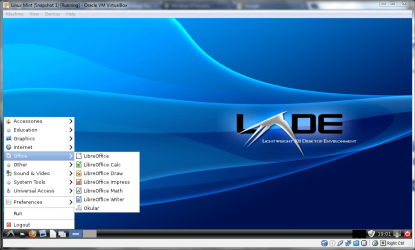
It's the most Windows like. It even has a start menu.

screenshot140_2012-03-17.png
 

My Computer My Computer

At a glance

Microsoft Windows 7 Home Premium 64-bit Servi...Intel(R) Core(TM) i3 CPU M 330 @ 2.13GHz8 GB DDR3Intel(R) HD Graphics
Computer type
Laptop
Computer Manufacturer/Model Number
Hewlett-Packard/G62-107SA Notebook
OS
Microsoft Windows 7 Home Premium 64-bit Service Pack 1
CPU
Intel(R) Core(TM) i3 CPU M 330 @ 2.13GHz
Motherboard
Hewlett-Packard 1425
Memory
8 GB DDR3
Graphics Card(s)
Intel(R) HD Graphics
Sound Card
Realtek High Definition Audio
Monitor(s) Displays
Builtin
Screen Resolution
1366 x 768 x 32 bits (4294967296 colors) @ 60 Hz
Hard Drives
250 GB SATA Hard Disk Drive 7200 rpm
2TB Seagate GoFlex USB 2 Drive
1TB Iomega Prestige USB 2 Drive
1.5TB Iomega Prestige USB 2 Drive (Samsung)
2TB WD MyBook Live NAS.
Mouse
Logitech Anywhere MX
Internet Speed
152 Mbs download 10 Mbs upload
Antivirus
Norton 360
Browser
Chrome
I just downloaded it. I will install it in VirtualBox now.
 

My Computer My Computer

At a glance

Microsoft Windows 7 Home Premium 64-bit SP1Intel(R) Core(TM) i5-2310 CPU @ 2.90GHz8.00 GBAMD RADEON HD 6670
Computer Manufacturer/Model Number
Dell XPS 8300
OS
Microsoft Windows 7 Home Premium 64-bit SP1
CPU
Intel(R) Core(TM) i5-2310 CPU @ 2.90GHz
Motherboard
Dell Inc. 0Y2MRG
Memory
8.00 GB
Graphics Card(s)
AMD RADEON HD 6670
Sound Card
(1) AMD High Definition Audio Device (2) Sound Blaster X-F
Monitor(s) Displays
23" LCD
Screen Resolution
1920 x 1080 x 32 bits (4294967296 colors) @ 60 Hz
Hard Drives
(1) WDC WD10EALX-759BA1 (2) Generic- Compact Flash USB Device (3) Generic- MS/MS-Pro USB Device (4) Generic- SD/MMC USB Device (5) Generic- SM/xD-Picture USB Device
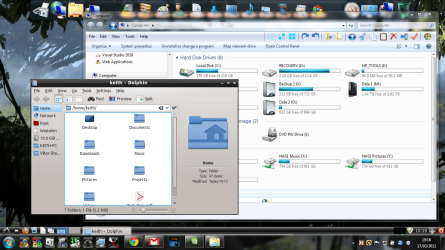
I started with the KDE desktop and added it later.

It works very well in Seamless mode too.

screenshot141_2012-03-17.png
 

My Computer My Computer

At a glance

Microsoft Windows 7 Home Premium 64-bit Servi...Intel(R) Core(TM) i3 CPU M 330 @ 2.13GHz8 GB DDR3Intel(R) HD Graphics
Computer type
Laptop
Computer Manufacturer/Model Number
Hewlett-Packard/G62-107SA Notebook
OS
Microsoft Windows 7 Home Premium 64-bit Service Pack 1
CPU
Intel(R) Core(TM) i3 CPU M 330 @ 2.13GHz
Motherboard
Hewlett-Packard 1425
Memory
8 GB DDR3
Graphics Card(s)
Intel(R) HD Graphics
Sound Card
Realtek High Definition Audio
Monitor(s) Displays
Builtin
Screen Resolution
1366 x 768 x 32 bits (4294967296 colors) @ 60 Hz
Hard Drives
250 GB SATA Hard Disk Drive 7200 rpm
2TB Seagate GoFlex USB 2 Drive
1TB Iomega Prestige USB 2 Drive
1.5TB Iomega Prestige USB 2 Drive (Samsung)
2TB WD MyBook Live NAS.
Mouse
Logitech Anywhere MX
Internet Speed
152 Mbs download 10 Mbs upload
Antivirus
Norton 360
Browser
Chrome
I'm running Linux Mint LXDE in VirtualBox now. Very similar to Lubuntu. I tried Kubuntu but had problems with the update manager. It wasn't ready for prime time.
 

My Computer My Computer

At a glance

Microsoft Windows 7 Home Premium 64-bit SP1Intel(R) Core(TM) i5-2310 CPU @ 2.90GHz8.00 GBAMD RADEON HD 6670
Computer Manufacturer/Model Number
Dell XPS 8300
OS
Microsoft Windows 7 Home Premium 64-bit SP1
CPU
Intel(R) Core(TM) i5-2310 CPU @ 2.90GHz
Motherboard
Dell Inc. 0Y2MRG
Memory
8.00 GB
Graphics Card(s)
AMD RADEON HD 6670
Sound Card
(1) AMD High Definition Audio Device (2) Sound Blaster X-F
Monitor(s) Displays
23" LCD
Screen Resolution
1920 x 1080 x 32 bits (4294967296 colors) @ 60 Hz
Hard Drives
(1) WDC WD10EALX-759BA1 (2) Generic- Compact Flash USB Device (3) Generic- MS/MS-Pro USB Device (4) Generic- SD/MMC USB Device (5) Generic- SM/xD-Picture USB Device
Yes Lubuntu is LDXE as well but I had problems with installing it. Malwarebytes real time protection objected to some of the addresses it was trying to connect to during installation.
 

My Computer My Computer

At a glance

Microsoft Windows 7 Home Premium 64-bit Servi...Intel(R) Core(TM) i3 CPU M 330 @ 2.13GHz8 GB DDR3Intel(R) HD Graphics
Computer type
Laptop
Computer Manufacturer/Model Number
Hewlett-Packard/G62-107SA Notebook
OS
Microsoft Windows 7 Home Premium 64-bit Service Pack 1
CPU
Intel(R) Core(TM) i3 CPU M 330 @ 2.13GHz
Motherboard
Hewlett-Packard 1425
Memory
8 GB DDR3
Graphics Card(s)
Intel(R) HD Graphics
Sound Card
Realtek High Definition Audio
Monitor(s) Displays
Builtin
Screen Resolution
1366 x 768 x 32 bits (4294967296 colors) @ 60 Hz
Hard Drives
250 GB SATA Hard Disk Drive 7200 rpm
2TB Seagate GoFlex USB 2 Drive
1TB Iomega Prestige USB 2 Drive
1.5TB Iomega Prestige USB 2 Drive (Samsung)
2TB WD MyBook Live NAS.
Mouse
Logitech Anywhere MX
Internet Speed
152 Mbs download 10 Mbs upload
Antivirus
Norton 360
Browser
Chrome
I had Malwarebytes real-time protection on my old XP system. I didn't like it too much, with all of the popups from the system tray. On my new Win 7 PC I have Norton Antivirus and Comodo firewall, with the free version of Malwarebytes. That setup seems to work pretty well. If I stick with the Linux Mint LXDE, I might just delete my Lubuntu VM.
 

My Computer My Computer

At a glance

Microsoft Windows 7 Home Premium 64-bit SP1Intel(R) Core(TM) i5-2310 CPU @ 2.90GHz8.00 GBAMD RADEON HD 6670
Computer Manufacturer/Model Number
Dell XPS 8300
OS
Microsoft Windows 7 Home Premium 64-bit SP1
CPU
Intel(R) Core(TM) i5-2310 CPU @ 2.90GHz
Motherboard
Dell Inc. 0Y2MRG
Memory
8.00 GB
Graphics Card(s)
AMD RADEON HD 6670
Sound Card
(1) AMD High Definition Audio Device (2) Sound Blaster X-F
Monitor(s) Displays
23" LCD
Screen Resolution
1920 x 1080 x 32 bits (4294967296 colors) @ 60 Hz
Hard Drives
(1) WDC WD10EALX-759BA1 (2) Generic- Compact Flash USB Device (3) Generic- MS/MS-Pro USB Device (4) Generic- SD/MMC USB Device (5) Generic- SM/xD-Picture USB Device
I just noticed that there is a new release. I may download that tomorrow.
 

My Computer My Computer

At a glance

Microsoft Windows 7 Home Premium 64-bit Servi...Intel(R) Core(TM) i3 CPU M 330 @ 2.13GHz8 GB DDR3Intel(R) HD Graphics
Computer type
Laptop
Computer Manufacturer/Model Number
Hewlett-Packard/G62-107SA Notebook
OS
Microsoft Windows 7 Home Premium 64-bit Service Pack 1
CPU
Intel(R) Core(TM) i3 CPU M 330 @ 2.13GHz
Motherboard
Hewlett-Packard 1425
Memory
8 GB DDR3
Graphics Card(s)
Intel(R) HD Graphics
Sound Card
Realtek High Definition Audio
Monitor(s) Displays
Builtin
Screen Resolution
1366 x 768 x 32 bits (4294967296 colors) @ 60 Hz
Hard Drives
250 GB SATA Hard Disk Drive 7200 rpm
2TB Seagate GoFlex USB 2 Drive
1TB Iomega Prestige USB 2 Drive
1.5TB Iomega Prestige USB 2 Drive (Samsung)
2TB WD MyBook Live NAS.
Mouse
Logitech Anywhere MX
Internet Speed
152 Mbs download 10 Mbs upload
Antivirus
Norton 360
Browser
Chrome
Back
Top