
eXPerimentator
New member
- Local time
- 7:08 PM
- Messages
- 2
Hi y'all
Lately I have added Win8 to my Win7 x64 PC, so it is now dual-boot.
After that I have taken an Image of the system drive(s) using the built-in imaging function of Win7.
Now in trying to restore this Image file I had to realize that both Win7 AND Win8 using their built-in restore functions refuse to write back that image file
Of course, from now on I will use 3rd party software for that,
but is there any way I still might succeed?

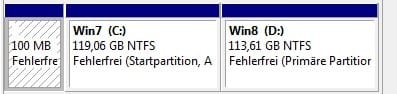
(attached is my systemdrive layout)
Thanx in advance, eXPerimentator
Lately I have added Win8 to my Win7 x64 PC, so it is now dual-boot.
After that I have taken an Image of the system drive(s) using the built-in imaging function of Win7.
Now in trying to restore this Image file I had to realize that both Win7 AND Win8 using their built-in restore functions refuse to write back that image file
Of course, from now on I will use 3rd party software for that,
but is there any way I still might succeed?
(attached is my systemdrive layout)
Thanx in advance, eXPerimentator
Attachments
My Computer
At a glance
Win 7 Professional x64Intel I716 GB
- Computer type
- PC/Desktop
- Computer Manufacturer/Model Number
- Custom
- OS
- Win 7 Professional x64
- CPU
- Intel I7
- Motherboard
- ASUS P9X79
- Memory
- 16 GB
- Antivirus
- Norton
- Browser
- Firefox

