How to revert some aspects of the Windows 7 Taskbar back to Vista?

Lord Justice

New member
Local time
3:43 PM
Messages
2
Hello,

I just recently purchased a new Laptop, which comes with Windows 7. I have been using Windows Vista for about 2 and a half years now, and I'd like to retain as many features of Vista as I can in 7. Mostly with the Taskbar, which I prefer in Vista's style. I'm not clear on the terminology used for what I'm trying to do, so I couldn't really find a tutorial. However, I have taken some pictures, hopefully that will help.

Ok, so. Bascially, I'd like to have what's in the pictures on Windows 7, instead of what 7 normally uses. Is this possible? I'm not sure how much information I need to give to be clear, hopefully the pictures suffice.

Thanks for any help.
 

Attachments
  • Hover Example.jpg
    Hover Example.jpg
    10.3 KB · Views: 135
  • Click Example.jpg
    Click Example.jpg
    4.4 KB · Views: 134
  • Icon Tray Closed Example.jpg
    Icon Tray Closed Example.jpg
    2.1 KB · Views: 133
  • Icon Tray Open Example.jpg
    Icon Tray Open Example.jpg
    3 KB · Views: 133

My Computer My Computer

At a glance

Windows 7 Home Premium 64 BitIntel Core i5
Computer Manufacturer/Model Number
Asus 52F
OS
Windows 7 Home Premium 64 Bit
CPU
Intel Core i5
Not sure what the pictures are showing. But you can enable Quick Launch Bar using this tutorial:

http://www.sevenforums.com/tutorials/888-quick-launch-enable-disable.html?filter[2]=Taskbar%20Start%20Menu

The ToolBar from a folder I did for awhile. But having to mouse over slows me down. Instead I use RocketDock and StandAlone Stacks. Both are free.

http://www.chrisnsoft.com/standalonestack

http://rocketdock.com/

I run them both on W7 and Vista. W7 the TaskBar and snap effects take a bit of adjustment. Once you take advantage you miss it on Vista though. Esp. stuff like pin to taskbar. You can pin files to the shortcut of the app that uses them. I have a sorted list of folder sets that I open with a program I wrote that opens the folders and places then on the desktop as a set. Neat stuff like that.

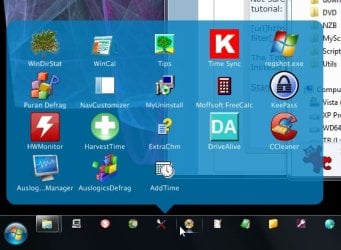
StandAlone Stacks you get this effect:

stackshot.jpg
 

My Computer My Computer

At a glance

Windows 7 32 bitAMD 5200+ dual core2 GBNVidia GeForce 6150SE 128 MB
Computer Manufacturer/Model Number
HP Media Center
OS
Windows 7 32 bit
CPU
AMD 5200+ dual core
Memory
2 GB
Graphics Card(s)
NVidia GeForce 6150SE 128 MB
Monitor(s) Displays
CRT
Screen Resolution
1280x1024
Hard Drives
500 GB Sata internal :

SIIG USB 3.0 docking stations w/WD Caviar Black 6 Gb/s drives
Keyboard
PS/2
Mouse
PS/2 Wheel Mouse
Other Info
SIIG USB 3.0 PCIexpress card.
Hello,

Thanks for the tips and the programs. I already used the Quick Launch tutorial, and it's working fantastic. Thanks for the help. I looked at Rocketdock however, and it seems that it doesn't support Windows 7 64-Bit? That's what I'm running on the new Laptop. Also, to clarify on the pictures:

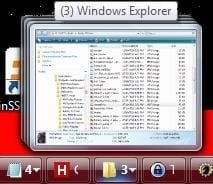
The first shows when a mouse hovers over a toolbar button (This is all in Vista) it shows a window which cannot be interacted with. In 7, you can place your mouse over the window and open the folder, etc. Honestly, I'd prefer for it to just disappear like Vista did.

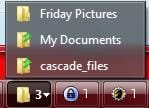
The second picture shows when you click the toolbar button. In Vista, it comes up with a simple menu going up with text of the titles of the various windows. In 7, it does something similar, but rather instead loads rather large pictures (Which don't seem to really help anything, but I digress) and comes up horizontally across the taskbar. I'd prefer to switch back to a simple text only vertical menu in 7 if possible.

Lastly, the last two pictures show an open and closed icon tray. In Vista, it opened and closed into the Taskbar, compressing the toolbar buttons. In 7, it creates a floating menu window. I'm wondering if 7 can be returned to an icon tray that pushes back into the Toolbar.

Edit: Hm, apparently the Basic Theme returns the second thing, the menu with text. However, is there way a way of getting this with Aero? I really do like the look of Aero and would prefer to keep it.
 
Last edited:

My Computer My Computer

At a glance

Windows 7 Home Premium 64 BitIntel Core i5
Computer Manufacturer/Model Number
Asus 52F
OS
Windows 7 Home Premium 64 Bit
CPU
Intel Core i5
RocketDock hasn't been updated in a while. But I run it fine of Vista 64 bit. As for stuff to do with the Taskbar I would look through this tutorials section:

http://www.sevenforums.com/tutorials/?filter[2]=Taskbar%20Start%20Menu

If you search the web with "Windows Seven taskbar like Vista" you'll get some articles complete with screen shots. Here's one:

Change the Windows 7 Taskbar to Work Like Vista - How-To Geek

A floating launcher is likely to be more configurable. You can find quite a few free ones on the big download sites.

Here's one you may wish to give a look:

LaunchBar Commander - Mouser - Software - DonationCoder.com
 

My Computer My Computer

At a glance

Windows 7 32 bitAMD 5200+ dual core2 GBNVidia GeForce 6150SE 128 MB
Computer Manufacturer/Model Number
HP Media Center
OS
Windows 7 32 bit
CPU
AMD 5200+ dual core
Memory
2 GB
Graphics Card(s)
NVidia GeForce 6150SE 128 MB
Monitor(s) Displays
CRT
Screen Resolution
1280x1024
Hard Drives
500 GB Sata internal :

SIIG USB 3.0 docking stations w/WD Caviar Black 6 Gb/s drives
Keyboard
PS/2
Mouse
PS/2 Wheel Mouse
Other Info
SIIG USB 3.0 PCIexpress card.
Back
Top