How to run a batch , .bat, flle as administrator

blockie

New member
Member
VIP
Local time
11:30 PM
Messages
605
Location
in Assisted Care facility, Calif
I run a batch file from the Windows scheduler and get an error 5, 'access denied'. If i run the batch file as administrator I have access and everything is OK except I must answer the UAC popup. The question is "How can I run the batch file from the scheduler with admin privileges and NOT have to answer the UAC question"?
 

My Computer My Computer

Computer type
Laptop
Computer Manufacturer/Model Number
Asus
OS
W7 Ultimate
CPU
2.2 bh Intel Core i3-2330M
Motherboard
Asustek Computer Inc. P53E 1.0
Memory
4MB
Graphics Card(s)
On Board
Sound Card
On Board
Monitor(s) Displays
On Board
Screen Resolution
1366 X 768
Hard Drives
ST9500423AS
ST2000DM USB Backup Drive External
Hello William,

You might see if using Option Five in the tutorial below on the .bat file to always have it "Run as administrator" may work when running it with Task Scheduler, but you'll still get the UAC prompt.
To not get the UAC prompt, you might see if using the method in the tutorial below to run the .bat set as above may help.
Hope this helps. :)
 

My Computer My Computer

Computer type
PC/Desktop
Computer Manufacturer/Model Number
Self built custom
OS
64-bit Windows 11 Pro for Workstations
CPU
Intel i7-8700K OC'd to 5 GHz
Motherboard
ASUS ROG Maximus XI Formula Z390
Memory
64 GB (4x16GB) G.SKILL TridentZ RGB DDR4 3600 MHz
Graphics Card(s)
ASUS ROG-STRIX-GTX1080TI-O11G-GAMING
Sound Card
Integrated
Monitor(s) Displays
2 x Samsung Odyssey G7 27"
Screen Resolution
2560x1440
Hard Drives
1TB Samsung 990 PRO M.2,
4TB Samsung 990 PRO PRO M.2,
TerraMaster F8 SSD Plus NAS
PSU
Seasonic Prime Titanium 850W
Case
Thermaltake Core P3
Cooling
Corsair Hydro H115i
Keyboard
Logitech wireless K800
Mouse
Logitech MX Master 4
Internet Speed
2 Gb/s Download and 100 Mb/s Upload
Antivirus
Malwarebyte Anti-Malware Premium
Browser
Google Chrome
Other Info
Logitech Z625 speaker system,
Logitech BRIO 4K Pro webcam,
HP Color LaserJet Pro MFP M477fdn,
APC SMART-UPS RT 1000 XL - SURT1000XLI,
Galaxy S23 Plus phone
Try setting the "Run with highest privileges" checkbox on the general tab of the scheduled tasks properties.
 

My Computer My Computer

Computer type
PC/Desktop
Computer Manufacturer/Model Number
HP
OS
Windows 7 Pro 64 bit
CPU
Xeon W3520
Memory
8 GB
Graphics Card(s)
Nvidia Geforce 210
Brink,
I tried option 5 and the RUN AS ADMIN is greyed out and I cannot access it to put a check mark in it. I am the only user of this computer and do have admin privilege.
Bill
 

My Computer My Computer

Computer type
Laptop
Computer Manufacturer/Model Number
Asus
OS
W7 Ultimate
CPU
2.2 bh Intel Core i3-2330M
Motherboard
Asustek Computer Inc. P53E 1.0
Memory
4MB
Graphics Card(s)
On Board
Sound Card
On Board
Monitor(s) Displays
On Board
Screen Resolution
1366 X 768
Hard Drives
ST9500423AS
ST2000DM USB Backup Drive External
How does the elevated shortcut from the second tutorial run for you using the .bat as is when creating it?
 

My Computer My Computer

Computer type
PC/Desktop
Computer Manufacturer/Model Number
Self built custom
OS
64-bit Windows 11 Pro for Workstations
CPU
Intel i7-8700K OC'd to 5 GHz
Motherboard
ASUS ROG Maximus XI Formula Z390
Memory
64 GB (4x16GB) G.SKILL TridentZ RGB DDR4 3600 MHz
Graphics Card(s)
ASUS ROG-STRIX-GTX1080TI-O11G-GAMING
Sound Card
Integrated
Monitor(s) Displays
2 x Samsung Odyssey G7 27"
Screen Resolution
2560x1440
Hard Drives
1TB Samsung 990 PRO M.2,
4TB Samsung 990 PRO PRO M.2,
TerraMaster F8 SSD Plus NAS
PSU
Seasonic Prime Titanium 850W
Case
Thermaltake Core P3
Cooling
Corsair Hydro H115i
Keyboard
Logitech wireless K800
Mouse
Logitech MX Master 4
Internet Speed
2 Gb/s Download and 100 Mb/s Upload
Antivirus
Malwarebyte Anti-Malware Premium
Browser
Google Chrome
Other Info
Logitech Z625 speaker system,
Logitech BRIO 4K Pro webcam,
HP Color LaserJet Pro MFP M477fdn,
APC SMART-UPS RT 1000 XL - SURT1000XLI,
Galaxy S23 Plus phone
How does the elevated shortcut from the second tutorial run for you using the .bat as is when creating it?

This is what I am trying to do.
1. Delete excess Macrium image backup files from my external HDD. The oldest ones first. I do this at night when the computer is on but unattended. The files I use to do this are contained in folder MyScripts on the desktop.see attached (capture.jpg)
2. The script in delmacimage.bat file is
"DELOLDER cd/D D:\macrium\images\*.mrimg /Keep:6"
The bat file does, in fact ,deletes the required number of files in the intended folder. When I put it in the schedular is where I get in trouble.
3. Security level is all permissions for user "everyone"
 

Attachments

  • Capture.JPG
    Capture.JPG
    40.4 KB · Views: 1
Last edited:

My Computer My Computer

Computer type
Laptop
Computer Manufacturer/Model Number
Asus
OS
W7 Ultimate
CPU
2.2 bh Intel Core i3-2330M
Motherboard
Asustek Computer Inc. P53E 1.0
Memory
4MB
Graphics Card(s)
On Board
Sound Card
On Board
Monitor(s) Displays
On Board
Screen Resolution
1366 X 768
Hard Drives
ST9500423AS
ST2000DM USB Backup Drive External
Did you check "Run with highest privileges"?
 

My Computer My Computer

Computer type
PC/Desktop
Computer Manufacturer/Model Number
Self built custom
OS
64-bit Windows 11 Pro for Workstations
CPU
Intel i7-8700K OC'd to 5 GHz
Motherboard
ASUS ROG Maximus XI Formula Z390
Memory
64 GB (4x16GB) G.SKILL TridentZ RGB DDR4 3600 MHz
Graphics Card(s)
ASUS ROG-STRIX-GTX1080TI-O11G-GAMING
Sound Card
Integrated
Monitor(s) Displays
2 x Samsung Odyssey G7 27"
Screen Resolution
2560x1440
Hard Drives
1TB Samsung 990 PRO M.2,
4TB Samsung 990 PRO PRO M.2,
TerraMaster F8 SSD Plus NAS
PSU
Seasonic Prime Titanium 850W
Case
Thermaltake Core P3
Cooling
Corsair Hydro H115i
Keyboard
Logitech wireless K800
Mouse
Logitech MX Master 4
Internet Speed
2 Gb/s Download and 100 Mb/s Upload
Antivirus
Malwarebyte Anti-Malware Premium
Browser
Google Chrome
Other Info
Logitech Z625 speaker system,
Logitech BRIO 4K Pro webcam,
HP Color LaserJet Pro MFP M477fdn,
APC SMART-UPS RT 1000 XL - SURT1000XLI,
Galaxy S23 Plus phone
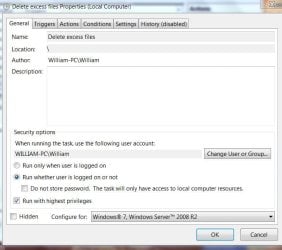
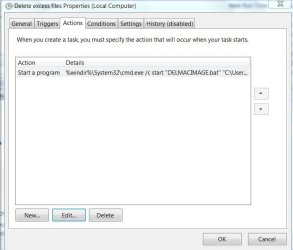
Yes. see attached (3 files)
The arguments for the Action tab are:
/c start "DELMACIMAGE.bat" "C:\Users\William\Desktop\MyScripts\"DELMACIMAGE.BAT "

The shortcut for this does not work. I don't get any error msg's but it does not delete any files either. The only thing that happens is the desktop "blinks" when I use the shortcut. Blink means it looks like a cmd window opens for a fraction of a second

DELMACIMAGE.BAT does delete the excess files. The cmd window opens and the action (deletion of files) can be seen.
The new shortcut just "blinks".
 

Attachments

  • Capture.JPG
    Capture.JPG
    54.6 KB · Views: 3
  • Capture1.JPG
    Capture1.JPG
    41.3 KB · Views: 4
  • Capture2.JPG
    Capture2.JPG
    50.3 KB · Views: 3

My Computer My Computer

Computer type
Laptop
Computer Manufacturer/Model Number
Asus
OS
W7 Ultimate
CPU
2.2 bh Intel Core i3-2330M
Motherboard
Asustek Computer Inc. P53E 1.0
Memory
4MB
Graphics Card(s)
On Board
Sound Card
On Board
Monitor(s) Displays
On Board
Screen Resolution
1366 X 768
Hard Drives
ST9500423AS
ST2000DM USB Backup Drive External
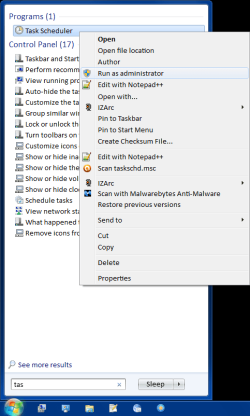
Did you start the Task Scheduler using the "Run as administrator" option (in the context menu)?
Task Scheduler - Start Menu.png
Did the Task Scheduler ask for your Administrator password when you were finalising the task?

Does it make any difference if you change the user from "William" to "Administrator"?
 

My Computer My Computer

Computer type
PC/Desktop
Computer Manufacturer/Model Number
n/a
OS
W7 Ultimate SP1, LM19.2 MATE, W10 Home 1703, W10 Pro 1703 VM, #All 64 bit
CPU
AMD Phenom II x6 1100T, 3.3 GHz
Motherboard
ASUS M4A88T-M/USB3 (AM3)
Memory
12GB DDR3 1333 G-Skill (4GB x 2), G-Skill (2GB x 2)
Graphics Card(s)
NVIDIA GeForce GTX 660
Sound Card
Realtek?
Monitor(s) Displays
Samsung S23B350
Screen Resolution
1920x1080
Hard Drives
WD Green 2TB (SATA), WD Green 3TB (SATA), WD Blue 4TB (SATA), WD Blue 6TB (SATA)
PSU
Cooler Master
Case
Antec GX300 Tower
Cooling
3x Antec TRICOOL 120mm Fans
Mouse
Wired Optical
Internet Speed
DSL
Antivirus
Avast
Browser
Pale Moon (64 bit)
Other Info
2018-12-27 Upgraded HDDs
2015-12-10 Upgraded case, graphics card, storage
2015-08-15 Upgraded motherboard & RAM
2015-07-15 Upgraded LM17.1 to LM17.2
lehnerus2000

1. I did as the tutorial said.
2. Yes, I was asked for the password and I put it in.
3. William is an Administrater. But I will change it tomorrow. I also have a everyone user with full privilege.
 

My Computer My Computer

Computer type
Laptop
Computer Manufacturer/Model Number
Asus
OS
W7 Ultimate
CPU
2.2 bh Intel Core i3-2330M
Motherboard
Asustek Computer Inc. P53E 1.0
Memory
4MB
Graphics Card(s)
On Board
Sound Card
On Board
Monitor(s) Displays
On Board
Screen Resolution
1366 X 768
Hard Drives
ST9500423AS
ST2000DM USB Backup Drive External
Just a thought.
Do you have a option for Systems to have full permission.
 

My Computer My Computer

Computer type
PC/Desktop
Computer Manufacturer/Model Number
Home made Desktop
OS
Windows 10 Pro. 64/ version 1709 Windows 7 Pro/64
CPU
Intel i7-6800K @ 4.3
Motherboard
ASUS X-99 Deluxe II
Memory
Corsair Platinum 16 gig @2400
Graphics Card(s)
EVGA GTX 1070 OC
Monitor(s) Displays
Asus 27" LED LCD/VE278Q
Screen Resolution
1920-1080 or 1280-720 HDMI
Hard Drives
INTEL SSD 730-240 Gb Sata 3.0/
PSU
EVGA Platium 1200W
Case
Phanteks Luxe Tempered Glass 8 fans/ one radiator
Cooling
XSPC/ Water Cooled CPU
Keyboard
Das 4 Professional
Mouse
Logitech M705/MX Anywhere 2-S
Internet Speed
100 mbits
Antivirus
Microsoft Security Essentials/ Malwarebytes Premium 3.0/ SAS
Browser
I.E. 11 default/Firefox/ ISP Time Warner Cable/Spectrum
Other Info
LG BluRay Burner/
Sound system-KLipsch-THX/
Icy Dock ssd Hot Swap bays.
Administrators Group != Administrator

lehnerus2000
...
3. William is an Administrater. But I will change it tomorrow. I also have a everyone user with full privilege.

Human users (i.e. you and me) don't get "full administrator power", even though Windows says we are in the Administrators Group.

The built-in Administrator (i.e. Username: "Administrator") has more power.

On my PC, I'm an administrator and I have received the "You don't have permission to do this. Contact the Administrator" message, when I have been attempting to perform operations.
Though the last time was so long ago that I can't remember what I was trying to do. :o
 

My Computer My Computer

Computer type
PC/Desktop
Computer Manufacturer/Model Number
n/a
OS
W7 Ultimate SP1, LM19.2 MATE, W10 Home 1703, W10 Pro 1703 VM, #All 64 bit
CPU
AMD Phenom II x6 1100T, 3.3 GHz
Motherboard
ASUS M4A88T-M/USB3 (AM3)
Memory
12GB DDR3 1333 G-Skill (4GB x 2), G-Skill (2GB x 2)
Graphics Card(s)
NVIDIA GeForce GTX 660
Sound Card
Realtek?
Monitor(s) Displays
Samsung S23B350
Screen Resolution
1920x1080
Hard Drives
WD Green 2TB (SATA), WD Green 3TB (SATA), WD Blue 4TB (SATA), WD Blue 6TB (SATA)
PSU
Cooler Master
Case
Antec GX300 Tower
Cooling
3x Antec TRICOOL 120mm Fans
Mouse
Wired Optical
Internet Speed
DSL
Antivirus
Avast
Browser
Pale Moon (64 bit)
Other Info
2018-12-27 Upgraded HDDs
2015-12-10 Upgraded case, graphics card, storage
2015-08-15 Upgraded motherboard & RAM
2015-07-15 Upgraded LM17.1 to LM17.2
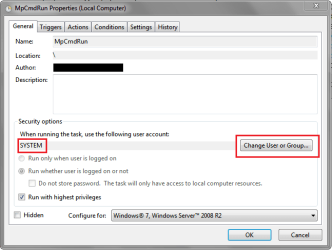
Try changing the user to SYSTEM and see if the task works the way you want.

MSESP01.PNG
 

My Computer My Computer

Computer type
PC/Desktop
Computer Manufacturer/Model Number
home built
OS
Multi-Boot W7_Pro_x64 W8.1_Pro_x64 W10_Pro_x64 +Linux_VMs +Chromium_VM
CPU
AMD Athlon II x4 620
Motherboard
Gigabyte GA-MA785G-UD3H
Memory
6GB GSkill DDR2 800
Graphics Card(s)
AMD 4670 GPU + AMD 4200 IGP
Sound Card
on board Realtek ALC889A
Monitor(s) Displays
RCA 40" LCD TV, Insignia 32" LCD TV, HP 15" LCD monitor
Screen Resolution
1680 x 1050
Hard Drives
OCZ Vertex 3 120GB,
Samsung F3 1TB (3),
Several others - WD, Seagate, Hitachi, ...
PSU
Corsair 500 W
Case
Rosewill mid tower
Cooling
CM 90mm rifle
Keyboard
Gyration wireless, Logitech wireless, Dell USB wired
Mouse
Gyration wireless, Logitech wireless, V7 USB wired
Internet Speed
Spectrum - 100Mbps D / 10Mbps U
Antivirus
Avast, MBAM3, EMET, WinPatrol
Browser
Pale Moon, Firefox, IE
Other Info
2 multi-boot PC's
Mainly HTPC/Office/Gen purpose (no gaming).
Trendnet USB KVM.
LG DVD burner/Blue Ray Player.
Tray system for removable SATA backup drives.

Not currently OCd, under-volted.
I use Hybrid sleep, rarely re-boot or shutdown.

Hauppauge HD-PVR, Avermedia PCIe TV Tuner, Hauppauge PCI TV Tuner.
Thanks to everyone, But on further investigation of Macrium Reflect, I found that I could put an option in the vmx file that deleted old backups automatically. So this thread becomes not solved but not needed.
 

My Computer My Computer

Computer type
Laptop
Computer Manufacturer/Model Number
Asus
OS
W7 Ultimate
CPU
2.2 bh Intel Core i3-2330M
Motherboard
Asustek Computer Inc. P53E 1.0
Memory
4MB
Graphics Card(s)
On Board
Sound Card
On Board
Monitor(s) Displays
On Board
Screen Resolution
1366 X 768
Hard Drives
ST9500423AS
ST2000DM USB Backup Drive External
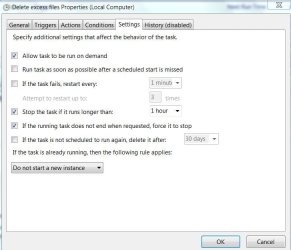
Sorry to resurrect this old thread, but I am dealing with the exact same problem. I have followed each item in the previous posts, but no luck.

I do have one more piece of information, though. When I remove the the argument to run the batch file in Task Scheduler the CMD window will open as Administrator. When I add the argument back it will not open as Administrator.

Can anyone provide insight into this problem?

Much Thanks.
 

My Computer My Computer

Computer type
PC/Desktop
OS
Windows 7 64bit
Try with this test batch file. It only prints 2 things, if it's running as administrator or not, and the parameters.

Code:
@ECHO OFF
AT > NUL
IF %ERRORLEVEL% EQU 0 (
    ECHO Administrator=YES
) ELSE (
    ECHO Administrator=NO
)
set PARAMS=
SET /A COUNT=0
:CHECKPARAMS
SET /A COUNT+=1
IF [%1]==[] GOTO CONT
IF [%COUNT%]==[1] (
    set PARAMS=%1
) ELSE (
    set PARAMS=%PARAMS% %1
) 
SHIFT
GOTO CHECKPARAMS
:CONT
echo Parameters: %PARAMS%
echo.
pause
When I try to run it from Task Scheduler as admin(Run with highest privileges) and arguments: param1 param2
Administrator=YES Parameters: param1 param2 Press any key to continue . . .

Also test if the option "Run only when user is logged on" makes a difference.
 

My Computer My Computer

Computer type
Laptop
Computer Manufacturer/Model Number
HP Elitebook 8540p
OS
Windows 7 Pro 32
CPU
Intel(R) Core(TM) i5 CPU M 540 @ 2.53GHz
Motherboard
Hewlett-Packard 1521
Memory
4,00 GB (Usable 2,98)
Graphics Card(s)
NVIDIA NVS 5100M
Sound Card
NVIDIA High Definition Audio
Screen Resolution
1600x900
Hard Drives
INTEL SSDSA2CW120G3
Antivirus
F-Secure Internet Security
Browser
IE, Firefox, Opera
Other Info
Sandboxie,
SRP (Software Restriction Policy),
EMET (Enhanced Mitigation Experience Toolkit),
WFC (Windows Firewall Control by BiniSoft),
Malwarebytes Premium
I made a a batch file.
I called it test.bat when I saved it.
Then I create a shortcut of the real test.bat so I have a test.bat - Shortcut
I then Right-click on the test.bat - Shortcut and then I choose properties and then I select advanced in the properties section.
When you have done that there will be a new box you can mark as "Run as administrator".

Try that for starters.
 

My Computer My Computer

Computer type
PC/Desktop
Computer Manufacturer/Model Number
Custum Build
OS
Windows 8.1 x64-bit, Ubuntu 14.04
CPU
AMD FX-8350 Black Edition
Motherboard
ASUS Crosshair V Formula-Z, Socket-AM3+
Memory
16GB
Graphics Card(s)
GTX 580
Hard Drives
x2 250GB SSD
x2 1TB Green HDD
x1 500GB HDD
Antivirus
Microsoft Security Essentials
Browser
Morzilla Firefox
Mikkel, thanks for the reply. I tried that, but the batch file is to be run unattended so I will not be around to accept the UAC message.


Tookeri,
I can't modify the batch file. Also it looks like it requires user interaction, which needs to be avoided.


Thanks
 

My Computer My Computer

Computer type
PC/Desktop
OS
Windows 7 64bit
@bender123, I meant you could add a new scheduled task with this test file to see if that works. It works for me so if it works for you too then it's probably an issue with your other batch file or the properties of its scheduled task. This will verify if it's possible from a scheduled task to start a batch file with parameters as administrator.

It doesn't require interaction. The "pause" is there only so you can verify the output, but you could just close the window. It's just a one-time test, nothing you should keep.
The troubleshooting for your issue has to start somewhere and this was my idea for starting point.
 

My Computer My Computer

Computer type
Laptop
Computer Manufacturer/Model Number
HP Elitebook 8540p
OS
Windows 7 Pro 32
CPU
Intel(R) Core(TM) i5 CPU M 540 @ 2.53GHz
Motherboard
Hewlett-Packard 1521
Memory
4,00 GB (Usable 2,98)
Graphics Card(s)
NVIDIA NVS 5100M
Sound Card
NVIDIA High Definition Audio
Screen Resolution
1600x900
Hard Drives
INTEL SSDSA2CW120G3
Antivirus
F-Secure Internet Security
Browser
IE, Firefox, Opera
Other Info
Sandboxie,
SRP (Software Restriction Policy),
EMET (Enhanced Mitigation Experience Toolkit),
WFC (Windows Firewall Control by BiniSoft),
Malwarebytes Premium
Thanks, Tookeri!

I misunderstood the purpose of your script. I do see a difference in the output when I select/deselect "Run with highest privileges".

I just realized when my Scheduled Task is run it uses taskeng.exe and not cmd.exe. Maybe there is a difference in the way these applications display the privileges?
 

My Computer My Computer

Computer type
PC/Desktop
OS
Windows 7 64bit
Back
Top