
Solved How to run “installer” as admin. on vista

AA light

New member
Power User
Local time
8:42 PM
Messages
54
How to run “installer” as admin. on vista

Hello All,

I would like to run “installer” (window script command) from window AIK files (window 7) as administrator yet no runas admin. in the context menu .

Checking compatibility also unable to select runas admin. option. I logged in as administrator now.
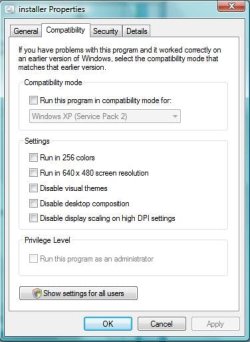


runas is disable.jpg

Would you suggest how to run such file as admin on vista system , please ?
 

My Computer My Computer

At a glance

Windows 7 Ultimate 32 bit , Window 7Intel(R) Core(TM) i5 CPUM 430 @ 2.27GHz, Inte...2.00 GB,NVIDIA GeForce 310M
Computer type
PC/Desktop
Computer Manufacturer/Model Number
Acer Aspire 4740G , Acer Aspire4930
OS
Windows 7 Ultimate 32 bit , Window 7
CPU
Intel(R) Core(TM) i5 CPUM 430 @ 2.27GHz, Intel core duo pro
Motherboard
Acer Aspire 4740 Acer Aspire4930
Memory
2.00 GB,
Graphics Card(s)
NVIDIA GeForce 310M
Sound Card
(1) Realtek High Definition Audio (2) NVIDIA High Definiti
Monitor(s) Displays
Mobile PC Display
Screen Resolution
1366x768
Hard Drives
WDC WD5000BEVT-22A0RT0 ATA Device , 500 GB
Mouse
TECFON
tried opening command prompt and type "Net user administrator /active:yes" without quotation , log off and log on again as admin , there would be runas administrator appears in the context menu .
 

My Computer My Computer

At a glance

Windows 7 Ultimate 32 bit , Window 7Intel(R) Core(TM) i5 CPUM 430 @ 2.27GHz, Inte...2.00 GB,NVIDIA GeForce 310M
Computer type
PC/Desktop
Computer Manufacturer/Model Number
Acer Aspire 4740G , Acer Aspire4930
OS
Windows 7 Ultimate 32 bit , Window 7
CPU
Intel(R) Core(TM) i5 CPUM 430 @ 2.27GHz, Intel core duo pro
Motherboard
Acer Aspire 4740 Acer Aspire4930
Memory
2.00 GB,
Graphics Card(s)
NVIDIA GeForce 310M
Sound Card
(1) Realtek High Definition Audio (2) NVIDIA High Definiti
Monitor(s) Displays
Mobile PC Display
Screen Resolution
1366x768
Hard Drives
WDC WD5000BEVT-22A0RT0 ATA Device , 500 GB
Mouse
TECFON
I think you would need to go into Show settings for all users and set Admin for all users or be logged in as Admin to run the installer. That's security for you. Someone else might know a better way.

TJG :)
 

My Computer My Computer

At a glance

Windows 7 Home Premium 32bitsIntel Pentium 4 521DDR2 4096MBytesATI Radeon HD 2400 Series
Computer Manufacturer/Model Number
Dell Dimension E510
OS
Windows 7 Home Premium 32bits
CPU
Intel Pentium 4 521
Motherboard
Dell Inc. ORD203
Memory
DDR2 4096MBytes
Graphics Card(s)
ATI Radeon HD 2400 Series
Sound Card
On-Board Sigma Tel High Definition Audio
Monitor(s) Displays
Dell ST2210 1920x1080x60 hertz
Hard Drives
320 SATA
500 SATA
PSU
Antec 430 Watts
Case
Dell
Cooling
Standard Fans
Hello TJG , I tried going to Show settings for all users before yet also unable to set Admin for all users, the option is also in grey color and unselectable. I think i already logged in as admin at that time since there is no other account on the log on screen , checking the account already identified as administrator. Nonetheless, when i run installer , it was failed.

However, after using command "Net user administrator /active:yes" , there is " administrator " account appears additionally from the normal account.

What should I do run the installer securely , please ?

I still open for other suggestions, if anyone have the better way , please kindly advise.
 

My Computer My Computer

At a glance

Windows 7 Ultimate 32 bit , Window 7Intel(R) Core(TM) i5 CPUM 430 @ 2.27GHz, Inte...2.00 GB,NVIDIA GeForce 310M
Computer type
PC/Desktop
Computer Manufacturer/Model Number
Acer Aspire 4740G , Acer Aspire4930
OS
Windows 7 Ultimate 32 bit , Window 7
CPU
Intel(R) Core(TM) i5 CPUM 430 @ 2.27GHz, Intel core duo pro
Motherboard
Acer Aspire 4740 Acer Aspire4930
Memory
2.00 GB,
Graphics Card(s)
NVIDIA GeForce 310M
Sound Card
(1) Realtek High Definition Audio (2) NVIDIA High Definiti
Monitor(s) Displays
Mobile PC Display
Screen Resolution
1366x768
Hard Drives
WDC WD5000BEVT-22A0RT0 ATA Device , 500 GB
Mouse
TECFON
Back
Top