How to safely install Windows XP partition from inside Windows 7?

mulambo

New member
Member
VIP
Local time
5:04 PM
Messages
110
I think Windows 7 has taken total control over my hdd, as I've tried partitioning it once and it forced me to undo, format and re-install it all again.

So I was wondering, is there a way to safely install another partition that I can boot from Windows 7 ... without a virtual machine?
I mean something that I can start from Windows 7: ideally, I first start of Windows 7, then launch this program and it sends me to a partition, a real partition that can manage all devices without virtual interaction (I've already tried VMWare Workstation, it's fine... but a bit messy and it doesn't give total control about it).

I'm asking this because I love to play old games which only run on Windows XP or older systems and because it seems compatibility mode doesn't just work for them.
 

My Computer My Computer

At a glance

Windows 7, 64bit pro
Computer type
PC/Desktop
OS
Windows 7, 64bit pro
You cant boot 7 then boot another windows you have to choose at start. Can you post a screen shot from disk manager showing all the details at the top so we can see any problems
 

My Computer My Computer

At a glance

win 8 32 bit
Computer type
PC/Desktop
OS
win 8 32 bit
You cant boot 7 then boot another windows you have to choose at start. Can you post a screen shot from disk manager showing all the details at the top so we can see any problems
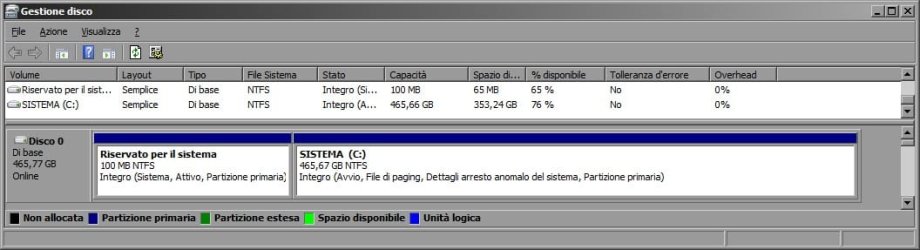
Here it its, please note that it's the Italian version ("Gestione Disco" : Disk Manager, I guess) with XP theme (not the glossy one).
I know I can make a partition from here, but previously I tried to (with Partition Magic, not this Disk Manager, though) and the system broke (had to format and reinstall it all)... I got a Windows XP Isntallation Disc

screengestionedisco.jpg
 

My Computer My Computer

At a glance

Windows 7, 64bit pro
Computer type
PC/Desktop
OS
Windows 7, 64bit pro
There is a problem when you duel boot you must install oldest windows first this is because the boot system is different on new versions so if you insall xp now it won understand the new boot system as its booting from the first parition so it will rewrite the boot as it wont understand the first parition.
You can shrink c and create a new active parition and install xp but you would have to then mess with a bootload to add 7 back onto the menu
 

My Computer My Computer

At a glance

win 8 32 bit
Computer type
PC/Desktop
OS
win 8 32 bit
mulambo:

Are you sure your computer can run and has driver support for Windows XP?
You have not provided a description of it, so we do not know if it can or not.

If your computer is already running Windows 7, and then you divide its HDD into 2 partitions, and then you install Windows XP in the new partition, you may no longer be able to boot to and use Windows 7.
 

My Computer My Computer

At a glance

Windows 7 Professional SP1 64-bitIntel Core i7-4790 3.60 GHz32 GB DDR3-1600 MHzIntegrated Intel HD Graphics 4600
Computer type
PC/Desktop
Computer Manufacturer/Model Number
Dell OptiPlex 9020
OS
Windows 7 Professional SP1 64-bit
CPU
Intel Core i7-4790 3.60 GHz
Memory
32 GB DDR3-1600 MHz
Graphics Card(s)
Integrated Intel HD Graphics 4600
Monitor(s) Displays
Viewsonic 32" LCD
Hard Drives
Kingston SATA 3 240 GB SSD
Internet Speed
Spectrum Internet 1000 Mbps
I see... well, I think that most probably the best option for me is to use a specific machine for XP games then...
 

My Computer My Computer

At a glance

Windows 7, 64bit pro
Computer type
PC/Desktop
OS
Windows 7, 64bit pro
The only windows installer that you can launch inside of 7 is either 7 or a compatible upgrade version. You can't do a lower version and likely your xp disk is 32 bit so you have an additional incompatibility. The installer runs on the installed version of windows and you can't specify another partition. As stated installing xp will overwrite the bootloader and you'll only be able to boot into xp. There is a application that can restore the 7 bootloader however it is dangerous and can completely erase the bootloader altogether. The 7 disk might be able to recover it using a repair but you don't have a disk. The easiest and safest process will be to do a clean install of xp and then 7 unless you are an advanced user. You will need to get a 7 disk for that though. You won't be able to use the imaging partition that's installed. Dual booting windows is tricky especially if you are wanting to use a older version. You have to know what you are doing.

However that doesn't factor in compatibility once you get xp running. Without the proper drivers you won't have internet, good graphics, or audio. You mentioned gaming. You'll want audio and graphics for that. Also stated you haven't provided any information on your computer so we can't help you determine if there are xp drivers.
 

My Computers My Computers

  • At a glance

    Windows 7 pro/Windows 10 ProIntel i7 860 Quad core 2.8 ghz8 gbATI Radeon HD 5770 1 gb ram
    Computer type
    PC/Desktop
    Computer Manufacturer/Model Number
    HP Pavillion Elite HPE-250f
    OS
    Windows 7 pro/Windows 10 Pro
    CPU
    Intel i7 860 Quad core 2.8 ghz
    Memory
    8 gb
    Graphics Card(s)
    ATI Radeon HD 5770 1 gb ram
    Monitor(s) Displays
    Alienware 25 AW2521HF & Viewsonic
    Screen Resolution
    1920 x1080 & 1680x1050
    Hard Drives
    WD blue 1 tb & 500 gb.
    Browser
    FF of course.
    Other Info
    https://www.bestbuy.com/site/hp-pavilion-elite-desktop-intel-core-i7-processor-8gb-memory-1tb-hard-drive/9921493.p?skuId=9921493
  • At a glance

    Windows 2012 R2 Data center/Linux Minti3 9100 3.6GHz, 8M cache, 4C/4T8GB 2666MT/s DDR4 ECC UDIMM
    Computer type
    PC/Desktop
    System Manufacturer/Model Number
    Dell Poweredge T140
    OS
    Windows 2012 R2 Data center/Linux Mint
    CPU
    i3 9100 3.6GHz, 8M cache, 4C/4T
    Memory
    8GB 2666MT/s DDR4 ECC UDIMM
    Monitor(s) Displays
    Viewsonic
    Screen Resolution
    1680x1050
    Hard Drives
    1 TB & 750 GB
    Other Info
    https://www.dell.com/en-us/work/shop/productdetailstxn/poweredge-t140?~ck=bt
First, post the make and model of your computer you want to dual boot. Or the motherboard and CPU.

Follow these steps to a "T" if your hardware can run XP. Installing XP as a second OS

I personally don't use more than one partition in an effort to mitigate data loss. Not only can cross contamination occur from malware or what ever, but partitions can go *poof* and simply disappear. Which means you need to use partition recovery software. My method is more than one hard drive and a hard drive selector 5.25 bay made by Kingwin. Hard Drive Power Switch Wholesale... Turn ON and off HDDs

Amazon.com

I also use one of these for a two for one.


Installing XP as a second OS
 

My Computer My Computer

At a glance

Windows 7 Ultimate x64
Computer type
PC/Desktop
OS
Windows 7 Ultimate x64
First, post the make and model of your computer you want to dual boot. Or the motherboard and CPU.

Follow these steps to a "T" if your hardware can run XP. Installing XP as a second OS

I personally don't use more than one partition in an effort to mitigate data loss. Not only can cross contamination occur from malware or what ever, but partitions can go *poof* and simply disappear. Which means you need to use partition recovery software. My method is more than one hard drive and a hard drive selector 5.25 bay made by Kingwin. Hard Drive Power Switch Wholesale... Turn ON and off HDDs

Amazon.com

I also use one of these for a two for one.


Installing XP as a second OS

Well, thanks, but as said before the risk of losing partition is high, I've already managed to run an XP machine... it isn't that great, but it can run most of the retrogames I would probably encounter..
 

My Computer My Computer

At a glance

Windows 7, 64bit pro
Computer type
PC/Desktop
OS
Windows 7, 64bit pro
Back
Top