How to save & move Outlook settings, etc.?

The program for backing up Outlook at outlookbackup.com is a fraud! Do not trust it with your data!

Tw33k, I read their "fine print" and, I was prepared to try the program and buy it if it worked, however it says that the trial only backs up the PST files. That is not the hard part. The hard part is the Outlook settings, such as email accounts, SMS accounts, and Options. Did you try a version of the program which did this, or did you buy the program before you tried it?

Please do let me know. :sick:
I have the full version and like I said, it saved everything.
 

My Computer My Computer

Computer Manufacturer/Model Number
tw33k
OS
Windows 7 Ultimate (x64) SP1
CPU
Intel 3770k 4.6GHz
Motherboard
ASUS Maximus V Formula
Memory
8GB (2x 4GB) Crucial Ballistix
Graphics Card(s)
Sapphire 7950 (1060/1600)
Sound Card
On Board Realtek HD Audio
Monitor(s) Displays
27" Acer B273HU (via HDMI)
Screen Resolution
2048 x 1152
Hard Drives
Crucial M4 128GB
2TB WD Black
1TB Samsung F3 SATA
1TB WD Elite External
2TB WD USB 3.0
PSU
Corsair AX750 Gold
Case
Corsair Obsidian 800DW
Cooling
Corsair H100 (2x AP-121/2x UK-3000 push/pull)
Keyboard
Microsoft Wireless 5000
Mouse
Microsoft Wireless 5000
Internet Speed
5mb/s
Other Info
Logitech z-2300 2.1 speakers
Lamptron FC-5 v2
Back Up or Copy Your Outlook Mail, Contacts and Other Data

To create a copy of your mail, contacts, calendar and other data in Outlook for backup or copying:

  • Go to your Outlook folder in Windows Explorer.
  • Highlight all files ending in ".pst".
    • Make sure in particular your selection includes "outlook.pst" and "archive.pst".
    • If you have Windows Explorer configured not to show file extensions for known formats, look for Microsoft Office Outlook Personal Folders files.
  • Select Edit | Copy from the menu to copy the selected files.
  • Open the folder where you want to put your backup copies in Windows Explorer.
    • Ideally, this will be on another computer, on a removable disk stored far away from your home, somewhere on the Internet, or at least on a different hard disk.
  • Select Edit | Paste from the menu to paste your .pst files to the backup location
Restore from Your Outlook Backup

Your backup copy of Outlook data is now in place, ready to be restored when you need it.

Restore Outlook Mail, Contacts and Other Data from a Backup

To restore your mail, contacts and other data from a backup copy of an Outlook PST file:

  • Select File | Import and Export... from the menu in Outlook.
  • Select Import from another program or file.
  • Click Next.
  • Highlight Personal Folder File (PST).
  • Click Next again.
  • Now use the Browse button to select the backup copy of the PST file you want to recover from your backup location.
  • Make sure Replace duplicates with items imported is selected.
  • Click Next.
  • Finish the import process with Finish.
Usually, the default import settings work fine, but you may want to tweak them to suit your needs.;)


This is the way I've been doing it for many years.
Works for me.
Goodjob.:D
 

My Computer My Computer

Computer type
PC/Desktop
Computer Manufacturer/Model Number
Self Built
OS
Windows 10 Pro
CPU
Intel i5
Motherboard
I have a fatherboard
Memory
I'm old and lost a few chips
Graphics Card(s)
Yup
Sound Card
Yup
Monitor(s) Displays
Samsung 32" UHD
Screen Resolution
3840 x 2160
Hard Drives
Samsung 860 EVO drives
PSU
450 Watt and some fans that blow
Case
Small tower
Cooling
Yes I am cool. lol
Keyboard
Who needs a keyboard?
Mouse
Logitech Laser G7 wireless
Internet Speed
Zippy fast UP and DOWN
Antivirus
I got a shot
Browser
The new Improved EDGE 2020
If you had read the OP properly you would know that the problem is NOT backing up the pst (that's easy). What he wanted was a way to backup and restore all the other settings. The program I mentioned earlier does it very well.
 

My Computer My Computer

Computer Manufacturer/Model Number
tw33k
OS
Windows 7 Ultimate (x64) SP1
CPU
Intel 3770k 4.6GHz
Motherboard
ASUS Maximus V Formula
Memory
8GB (2x 4GB) Crucial Ballistix
Graphics Card(s)
Sapphire 7950 (1060/1600)
Sound Card
On Board Realtek HD Audio
Monitor(s) Displays
27" Acer B273HU (via HDMI)
Screen Resolution
2048 x 1152
Hard Drives
Crucial M4 128GB
2TB WD Black
1TB Samsung F3 SATA
1TB WD Elite External
2TB WD USB 3.0
PSU
Corsair AX750 Gold
Case
Corsair Obsidian 800DW
Cooling
Corsair H100 (2x AP-121/2x UK-3000 push/pull)
Keyboard
Microsoft Wireless 5000
Mouse
Microsoft Wireless 5000
Internet Speed
5mb/s
Other Info
Logitech z-2300 2.1 speakers
Lamptron FC-5 v2
I have successfully moved my Outlook2007 account from Vista into Windows7..

The only problem is my (former vista) RSS feeds do not update..

I can go to the website and re-subscribe, but then it creates two RSS feed folders for that subscription.. Can I merge those two feeds (that are really the same), or just fix the original feed so it will update?
?
 

My Computer My Computer

Computer Manufacturer/Model Number
Dell M6400
OS
Windows 7
I have successfully moved my Outlook2007 account from Vista into Windows7..

The only problem is my (former vista) RSS feeds do not update..

I can go to the website and re-subscribe, but then it creates two RSS feed folders for that subscription.. Can I merge those two feeds (that are really the same), or just fix the original feed so it will update?
?

You'd have more luck getting help by starting your own thread instead of hijacking someone else's
 

My Computer My Computer

Computer Manufacturer/Model Number
tw33k
OS
Windows 7 Ultimate (x64) SP1
CPU
Intel 3770k 4.6GHz
Motherboard
ASUS Maximus V Formula
Memory
8GB (2x 4GB) Crucial Ballistix
Graphics Card(s)
Sapphire 7950 (1060/1600)
Sound Card
On Board Realtek HD Audio
Monitor(s) Displays
27" Acer B273HU (via HDMI)
Screen Resolution
2048 x 1152
Hard Drives
Crucial M4 128GB
2TB WD Black
1TB Samsung F3 SATA
1TB WD Elite External
2TB WD USB 3.0
PSU
Corsair AX750 Gold
Case
Corsair Obsidian 800DW
Cooling
Corsair H100 (2x AP-121/2x UK-3000 push/pull)
Keyboard
Microsoft Wireless 5000
Mouse
Microsoft Wireless 5000
Internet Speed
5mb/s
Other Info
Logitech z-2300 2.1 speakers
Lamptron FC-5 v2
Wow! Sounds good then...

Tw33k,

Thank you for following up on the thread. So, you purchased the program, tested it, and it restored everything that is not in the Outlook.PST file? I'm talking about the File>Options settings, Email Accounts, SMS Accounts, Rules, and Signatures. :)

Please let me know...

Take good care,
 

My Computer My Computer

Computer Manufacturer/Model Number
HP Pavilion Media Center PC m7350n
OS
Microsoft Windows 7 Home Premium 32-bit 7601 Multiprocessor Free Service Pack 1
CPU
Intel(R) Pentium(R) D CPU 2.80GHz
Motherboard
ASUSTek Computer INC. EMERY
Memory
2.00 GB
Graphics Card(s)
NVIDIA GeForce 6200SE TurboCache(TM)
Sound Card
Realtek High Definition Audio
Monitor(s) Displays
HP L1710 LCD Display
Screen Resolution
1280 x 1024 x 32 bits (4294967296 colors) @ 60 Hz
Hard Drives
(1) SAMSUNG SP2504C (2) EPSON Stylus Storage USB Device (3) Generic USB CF Reader USB Device (4) Generic USB MS Reader USB Device (5) Generic USB SD Reader USB Device (6) Generic USB SM Reader USB Device (7) Seagate FA GoFlex Desk USB Dev
Internet Speed
20+mbps
Windows Easy Transfer

Antonio,

As I suggested before Windows Easy Transfer purports to be able to transfer Email data between machines.
As I have not actually used the application i am currently performing some tests to see if this is a valid claim - The way the program works means that although designed to transfer between machines it should work to restore settings to a re-installed machine also.
As you have said it is not a complete restore solution but I do believe that it may be usable for your purpose, as part of a system restore solution.
I will post back on any findings I make I know that DocBrown has used this application extensively and successfully so you may want to PM him for his thoughts on it's use

Nigel,

Thanks for following up on this thread. I would be very grateful if you could find out what this program does, particularly for Outlook, and the Windows customizations that have been made.

I will await your reply.
 

My Computer My Computer

Computer Manufacturer/Model Number
HP Pavilion Media Center PC m7350n
OS
Microsoft Windows 7 Home Premium 32-bit 7601 Multiprocessor Free Service Pack 1
CPU
Intel(R) Pentium(R) D CPU 2.80GHz
Motherboard
ASUSTek Computer INC. EMERY
Memory
2.00 GB
Graphics Card(s)
NVIDIA GeForce 6200SE TurboCache(TM)
Sound Card
Realtek High Definition Audio
Monitor(s) Displays
HP L1710 LCD Display
Screen Resolution
1280 x 1024 x 32 bits (4294967296 colors) @ 60 Hz
Hard Drives
(1) SAMSUNG SP2504C (2) EPSON Stylus Storage USB Device (3) Generic USB CF Reader USB Device (4) Generic USB MS Reader USB Device (5) Generic USB SD Reader USB Device (6) Generic USB SM Reader USB Device (7) Seagate FA GoFlex Desk USB Dev
Internet Speed
20+mbps
Tw33k,

Thank you for following up on the thread. So, you purchased the program, tested it, and it restored everything that is not in the Outlook.PST file? I'm talking about the File>Options settings, Email Accounts, SMS Accounts, Rules, and Signatures. :)

Please let me know...

Take good care,

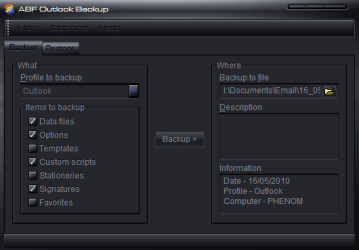
For the 3rd time. It saved and restored everything; settings, rules, signatures...everything.

outlook_backup.PNG
 

My Computer My Computer

Computer Manufacturer/Model Number
tw33k
OS
Windows 7 Ultimate (x64) SP1
CPU
Intel 3770k 4.6GHz
Motherboard
ASUS Maximus V Formula
Memory
8GB (2x 4GB) Crucial Ballistix
Graphics Card(s)
Sapphire 7950 (1060/1600)
Sound Card
On Board Realtek HD Audio
Monitor(s) Displays
27" Acer B273HU (via HDMI)
Screen Resolution
2048 x 1152
Hard Drives
Crucial M4 128GB
2TB WD Black
1TB Samsung F3 SATA
1TB WD Elite External
2TB WD USB 3.0
PSU
Corsair AX750 Gold
Case
Corsair Obsidian 800DW
Cooling
Corsair H100 (2x AP-121/2x UK-3000 push/pull)
Keyboard
Microsoft Wireless 5000
Mouse
Microsoft Wireless 5000
Internet Speed
5mb/s
Other Info
Logitech z-2300 2.1 speakers
Lamptron FC-5 v2
I *apologize* for the duplicative question

Tw33k,

I am sorry, I must have missed one of your confirmations. So, I apologize for my duplicative question. But I really very much appreciate your confirmation. THANKS! :D
 

My Computer My Computer

Computer Manufacturer/Model Number
HP Pavilion Media Center PC m7350n
OS
Microsoft Windows 7 Home Premium 32-bit 7601 Multiprocessor Free Service Pack 1
CPU
Intel(R) Pentium(R) D CPU 2.80GHz
Motherboard
ASUSTek Computer INC. EMERY
Memory
2.00 GB
Graphics Card(s)
NVIDIA GeForce 6200SE TurboCache(TM)
Sound Card
Realtek High Definition Audio
Monitor(s) Displays
HP L1710 LCD Display
Screen Resolution
1280 x 1024 x 32 bits (4294967296 colors) @ 60 Hz
Hard Drives
(1) SAMSUNG SP2504C (2) EPSON Stylus Storage USB Device (3) Generic USB CF Reader USB Device (4) Generic USB MS Reader USB Device (5) Generic USB SD Reader USB Device (6) Generic USB SM Reader USB Device (7) Seagate FA GoFlex Desk USB Dev
Internet Speed
20+mbps
Tw33k,

I am sorry, I must have missed one of your confirmations. So, I apologize for my duplicative question. But I really very much appreciate your confirmation. THANKS! :D

My pleasure. i'm glad you posed the question in the first place. It was in finding a solution to your first post that led me to this program. And seriously, it really works as good as they say it does.
 

My Computer My Computer

Computer Manufacturer/Model Number
tw33k
OS
Windows 7 Ultimate (x64) SP1
CPU
Intel 3770k 4.6GHz
Motherboard
ASUS Maximus V Formula
Memory
8GB (2x 4GB) Crucial Ballistix
Graphics Card(s)
Sapphire 7950 (1060/1600)
Sound Card
On Board Realtek HD Audio
Monitor(s) Displays
27" Acer B273HU (via HDMI)
Screen Resolution
2048 x 1152
Hard Drives
Crucial M4 128GB
2TB WD Black
1TB Samsung F3 SATA
1TB WD Elite External
2TB WD USB 3.0
PSU
Corsair AX750 Gold
Case
Corsair Obsidian 800DW
Cooling
Corsair H100 (2x AP-121/2x UK-3000 push/pull)
Keyboard
Microsoft Wireless 5000
Mouse
Microsoft Wireless 5000
Internet Speed
5mb/s
Other Info
Logitech z-2300 2.1 speakers
Lamptron FC-5 v2
WOW, did a search for exactly this, couldn't find it and made a post... third google page was this post! :o

I am going to try the 30 day trial and I hope I can get it to work. I still can not believe that M$ does not offer a solid way to back up or move your outlook from 1 PC to the New One w/o wanting to kill someone in the interim :(

PS.: The trial version does not do anything for you... you must purchase the app. :mad:
 

My Computer My Computer

Computer type
PC/Desktop
Computer Manufacturer/Model Number
Custom Built... Intel/Nvidia/ASRock
OS
Windows 7 x64 (Ultimate)
CPU
Intel i5-4670K
Motherboard
ASRock Z87 Extreme 6
Memory
8GBs Ripjaws 2133Mhz
Graphics Card(s)
Asus GTX660 (2GBs)
Sound Card
Onboard Realtek HD
Monitor(s) Displays
Acer AL2216W
Screen Resolution
1680 x 1050
Hard Drives
Samsung 840 SSD 120GBs
Samsung 750GB 32MB cache
1.5 TB
PSU
PC Cooling 750w Silencer
Case
Thermaltake Spedo Advance
Cooling
Std Cooler
Keyboard
Logitech G15
Mouse
Logitech G9
Internet Speed
Comcast 20Mbit
Antivirus
Avast
Browser
Firefox
Hi Tweek may i ask, are you using windows blinds? or a different program? on page 3 topic 28.. i love the color of that window and text. could you provide me info on this beautiful skin you are using or how you accomplished this cool window theme please?
Thank you for your time!


Tw33k,

Thank you for following up on the thread. So, you purchased the program, tested it, and it restored everything that is not in the Outlook.PST file? I'm talking about the File>Options settings, Email Accounts, SMS Accounts, Rules, and Signatures. :)

Please let me know...

Take good care,

For the 3rd time. It saved and restored everything; settings, rules, signatures...everything.

View attachment 73218
 

My Computer My Computer

OS
Windows 7
Back
Top