How to search for specific file on computer?

paulyjames

New member
Member
VIP
Local time
12:59 AM
Messages
657
My old sager laptop no longer worked. I however was able to transfer files from it to an external hard drive. Im trying to find this file on it. However, i cannot find it. That was in window 7. My new computer is windows 10.


I know the name of the file but i cannot find it. I do not know the name of the folder. So does that mean if i type the file and its not there, that means the file is 100 percent not on my external?
 

My Computer My Computer

Computer type
Laptop
OS
Windows 10 Pro
Don't know much about File Seach in Windows 10.

An external drive would be a "non-indexed" location in Windows 7. Personally I keep windows search disabled and use third party replacements. One of those that is supposed to work in Windows 10 is:


You would need the LITE version which is freeware. Try the portable version for test purposes.

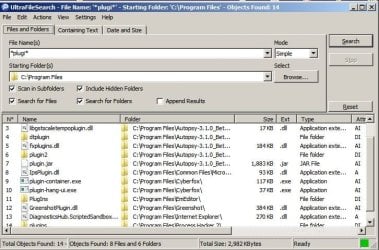
Example: Search for file names containing the text string "plugi" - use asterisks * for wildcards.

UltraFileSearch.jpg

Or see other options for finding specific words or phrases in a file's contents.
 
Last edited:

My Computer My Computer

Computer type
Laptop
Computer Manufacturer/Model Number
ASUS
OS
Microsoft Windows 7 Home Premium 64-bit 7601 Multiprocessor Free Service Pack 1
CPU
AMD C-60 APU with Radeon(tm) HD Graphics
Motherboard
ASUSTeK COMPUTER INC. X501U
Memory
4.00 GB
Graphics Card(s)
AMD Radeon HD 6290 Graphics
Sound Card
(1) AMD High Definition Audio Device (2) Realtek High Defi
Screen Resolution
1366 x 768 x 32 bits (4294967296 colors) @ 60 Hz
Hard Drives
Hitachi HTS545050A7E380 SATA Disk Device
Antivirus
Comodo CIS & FW, SecureAplus App Whitelisting, Threatfire
Browser
Cyberfox 64bit, Opera 64bit, Airfox
Other Info
Spy-The-Spy, HitmanPro.Alert, Norton Connect Safe, MJRegWatcher, BitDefender TrafficLight, Voodoo Shield, Zemana AntiMalware
You could ask Cortana to find it for you!
 

My Computer My Computer

Computer type
PC/Desktop
Computer Manufacturer/Model Number
Custom Built By Me.
OS
Windows 10 Pro 64 bit
CPU
AMD FX 9590 8 Core Black Edition
Motherboard
MSI 990FXA GAMING (MS-7893)
Memory
Corsair Vengeance 16GB DDR3
Graphics Card(s)
AMD Radeon (TM) R9 380 Gaming Series
Sound Card
AMD High Definition
Monitor(s) Displays
Samsung 32" 60Hz 4ms Curved PLS LED
Screen Resolution
1920 X 1080
Hard Drives
C: 223 GB SSD = E: 465 GB HDD = F: 931 GB HDD = G: 149 GB HDD = H: 931 GB HDD
PSU
EVGA Supernova NEX750B 750W ATX EPS12V 80PLUS Bronze
Case
Cool Master
Cooling
Noctua NH-D15 Premium Cooler with 2x NF-A15 PWM 140mm Fan
Internet Speed
Fiber Optic: Download 332.7 Mbps / Upload 331.5 Mbps
Antivirus
Windows Defender
Browser
Slimjet (64bit)
Another great search tool is Everything, free from voidtools.com.

It works great in W 7 and I'd guess it works in W 10 also.

It finds files as quick as you can type part of the name. It works ONLY on file names, not content.
 

My Computer My Computer

Computer type
PC/Desktop
Computer Manufacturer/Model Number
Ignatz Special; 4 speed manual gearbox; factory air conditioning; one of one
OS
Windows 7 Home Premium SP1, 64-bit
CPU
Intel Skylake i5-6600K, not overclocked
Motherboard
AsRock Z170M Extreme 4, micro ATX
Memory
8 GB HyperX DDR4-2666 (2 x 4 GB)
Graphics Card(s)
none; graphics are integrated on CPU
Sound Card
onboard: Realtek ALC1150; external: USB Behringer UF0-202
Monitor(s) Displays
Dell S2340M 23 inch IPS
Screen Resolution
1600 x 900
Hard Drives
System: Crucial MX100 series SSD, 128 GB;
Data: Samsung Spinpoint 103SJ, 1 TB;
Backup: WD Caviar Green WD30EZRX-00D8PB0, 3 TB
PSU
Rosewill SilentNight 500 watt fanless, semi-modular
Case
Antec Solo II
Cooling
Noctua NH-U12S; Noctua F12 intake, Noctua S12A exhaust
Keyboard
Microsoft 200 6JH-00001 USB
Mouse
Dell or Microsoft optical wired; USB
Antivirus
Microsoft Security Essentials and Malwarebytes Premium
Browser
Pale Moon
Other Info
All fans PWM; speeds at idle: CPU circa 500 rpm; intake circa 600 rpm; exhaust circa 600 rpm; CPU temps 27 idle and 47 C load in a warm room (27 C/81 F) when running Intel Extreme Tuning Utility stress test.
Just want to agree with ignatzatsonic about using Everything. I have used it for some years, never fails. If you have a few drives connected, give it a second or two - wait until its screen fills up. Link below.

Everything Search Engine
 

My Computer My Computer

Computer type
PC/Desktop
Computer Manufacturer/Model Number
Self Build
OS
Windows 7 Professional 64 bit (and Linux Mint)
CPU
AMD FX 8320 8-core
Motherboard
MSI 990FXA-GD65
Memory
16 Gig DDR3
Graphics Card(s)
Sapphire Radeon Dual-X R9 280X 3GB
Sound Card
Onboard sound
Monitor(s) Displays
ProLiteE2483HS
Screen Resolution
1920 x 1080 (60Hz)
Hard Drives
SanDisk 250GB SSD SATAIII
Seagate 500GB as Program Install drive, inc redirected System Folders
USB 500GB (Seagate) Backup, everything
Toshiba 80GB 2.5 inch w/ Linux Mint
PSU
Integrator 700 Watt
Case
Xcase
Cooling
Thermalright Truespirit-90M. Tower. Superb
Keyboard
Old Dell (very)
Mouse
Trust wireless. Rusted contact w/added aluminium foil clump
Internet Speed
Not bad
Antivirus
Kaspersky 2016
Browser
Opera
Other Info
Age 65, me, not the machine.
Don't like modern jazz, sport, marzipan, noisy pillows, being cold, most TV programmes, Windows 10, unfair division of wealth, toothache, gristle, bears and sharks, and anything that doesn't work.
No need to make this more difficult by downloading and installing external search engines when Windows can do it with ease.

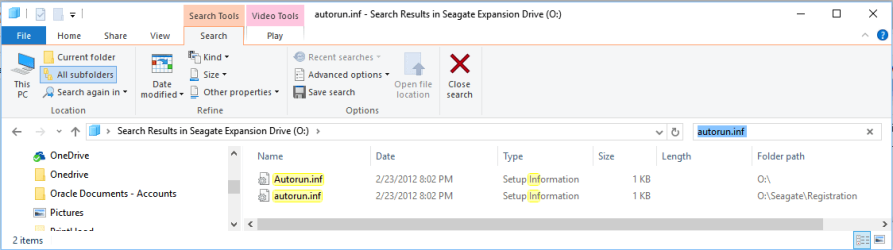
Open File Explorer, select the external drive, then type the name of the file you want to search for in the search box in the upper right. Depending on how large the drive is, it might take some time but it will find all instances of that file name on the drive. There's also options available to be able to narrow down the search if you know the date the file was created or how large it is. The drive I did the search on is a 4TB drive with 3.5TB of data on it. Took about 20 seconds for Windows to find 2 instances of the file I searched for. Here's a screenshot:
 

Attachments

  • 2016-10-08.png
    2016-10-08.png
    14.8 KB · Views: 3

My Computer My Computer

Computer type
PC/Desktop
Computer Manufacturer/Model Number
Home Built desktop, Dell G15 5511 Gaming laptop,MS Surface Pro 7 tablet
OS
W10 Pro desktop, W11 laptop, W11 Pro tablet (all 64-bit)
CPU
3.7Ghz 8700K i7, i7-11800H, i7-1065G7
Motherboard
ASUS TUF Z370-Pro Gaming in desktop
Memory
16G desktop, 16G laptop, 4G tablet
Graphics Card(s)
AMD Radeon RX580, RTX 3060, Intel Iris Plus
Sound Card
High Definition Audio (Built-in to mobo)
Monitor(s) Displays
Samsung U32J59 32" (2x), 15.6", 12"
Screen Resolution
3840x2160, 3840x2160, 1920x1080, 2160x1440
Hard Drives
500G SSD for OS; 2T, 10T & 15T HDDs for Data on Desktop, 1TB SSD laptop, 128G SSD tablet.
PSU
Corsair CX 750M
Case
Antec 100
Cooling
CM 212+
Keyboard
IBM Model M - used continuously since 1986
Mouse
Microsoft Pro IntelliMouse
Internet Speed
400M down 8M up
Antivirus
Windows Defender
Browser
FireFox
Other Info
Built my first computer (8Mhz 8088cpu, 640K RAM, 20MB HDD, 2 360K floppy drives) in 1985 and have been building them for myself, relatives and friends ever since.
Each to his own. I've lived with both. "Everything" is better, in my opinion, and it does not make searching harder - quite the opposite. You say potato...
 

My Computer My Computer

Computer type
PC/Desktop
Computer Manufacturer/Model Number
Self Build
OS
Windows 7 Professional 64 bit (and Linux Mint)
CPU
AMD FX 8320 8-core
Motherboard
MSI 990FXA-GD65
Memory
16 Gig DDR3
Graphics Card(s)
Sapphire Radeon Dual-X R9 280X 3GB
Sound Card
Onboard sound
Monitor(s) Displays
ProLiteE2483HS
Screen Resolution
1920 x 1080 (60Hz)
Hard Drives
SanDisk 250GB SSD SATAIII
Seagate 500GB as Program Install drive, inc redirected System Folders
USB 500GB (Seagate) Backup, everything
Toshiba 80GB 2.5 inch w/ Linux Mint
PSU
Integrator 700 Watt
Case
Xcase
Cooling
Thermalright Truespirit-90M. Tower. Superb
Keyboard
Old Dell (very)
Mouse
Trust wireless. Rusted contact w/added aluminium foil clump
Internet Speed
Not bad
Antivirus
Kaspersky 2016
Browser
Opera
Other Info
Age 65, me, not the machine.
Don't like modern jazz, sport, marzipan, noisy pillows, being cold, most TV programmes, Windows 10, unfair division of wealth, toothache, gristle, bears and sharks, and anything that doesn't work.
Just downloaded and tried Everything. I think I just found my new search engine! Thanks for the link BobFairmead! Never did like the Windows search engine.
 

My Computer My Computer

Computer type
PC/Desktop
Computer Manufacturer/Model Number
Custom Built By Me.
OS
Windows 10 Pro 64 bit
CPU
AMD FX 9590 8 Core Black Edition
Motherboard
MSI 990FXA GAMING (MS-7893)
Memory
Corsair Vengeance 16GB DDR3
Graphics Card(s)
AMD Radeon (TM) R9 380 Gaming Series
Sound Card
AMD High Definition
Monitor(s) Displays
Samsung 32" 60Hz 4ms Curved PLS LED
Screen Resolution
1920 X 1080
Hard Drives
C: 223 GB SSD = E: 465 GB HDD = F: 931 GB HDD = G: 149 GB HDD = H: 931 GB HDD
PSU
EVGA Supernova NEX750B 750W ATX EPS12V 80PLUS Bronze
Case
Cool Master
Cooling
Noctua NH-D15 Premium Cooler with 2x NF-A15 PWM 140mm Fan
Internet Speed
Fiber Optic: Download 332.7 Mbps / Upload 331.5 Mbps
Antivirus
Windows Defender
Browser
Slimjet (64bit)
Each to his own. I've lived with both. "Everything" is better, in my opinion, and it does not make searching harder - quite the opposite. You say potato...
It made the OP's job "harder" because he needed to download and install a 3rd party utility when it wasn't needed. He wasn't complaining that Windows searches were slow or hard, he just didn't know how to do it.

I never said anything good or bad about "Everything", only that Windows could easily do what he asked.
 

My Computer My Computer

Computer type
PC/Desktop
Computer Manufacturer/Model Number
Home Built desktop, Dell G15 5511 Gaming laptop,MS Surface Pro 7 tablet
OS
W10 Pro desktop, W11 laptop, W11 Pro tablet (all 64-bit)
CPU
3.7Ghz 8700K i7, i7-11800H, i7-1065G7
Motherboard
ASUS TUF Z370-Pro Gaming in desktop
Memory
16G desktop, 16G laptop, 4G tablet
Graphics Card(s)
AMD Radeon RX580, RTX 3060, Intel Iris Plus
Sound Card
High Definition Audio (Built-in to mobo)
Monitor(s) Displays
Samsung U32J59 32" (2x), 15.6", 12"
Screen Resolution
3840x2160, 3840x2160, 1920x1080, 2160x1440
Hard Drives
500G SSD for OS; 2T, 10T & 15T HDDs for Data on Desktop, 1TB SSD laptop, 128G SSD tablet.
PSU
Corsair CX 750M
Case
Antec 100
Cooling
CM 212+
Keyboard
IBM Model M - used continuously since 1986
Mouse
Microsoft Pro IntelliMouse
Internet Speed
400M down 8M up
Antivirus
Windows Defender
Browser
FireFox
Other Info
Built my first computer (8Mhz 8088cpu, 640K RAM, 20MB HDD, 2 360K floppy drives) in 1985 and have been building them for myself, relatives and friends ever since.

My Computer My Computer

Computer type
PC/Desktop
Computer Manufacturer/Model Number
Custom assembled by me :}
OS
Win-7-Pro64bit 7-H-Prem-64bit
CPU
i7-5930K 2nd i9-9940x both water blocked VRM's too
Motherboard
ASUS SABERTOOTH X99 2nd ASUS x299 Apex
Memory
Trident-z 3200C14 2nd Trident-z 3600C16
Graphics Card(s)
EVGA 1080ti ftw3 2nd Titan Xp both water blocked
Sound Card
Built-in Realtek
Monitor(s) Displays
1-AOC G2460PG 24"G-Sync 144Hz/ 2nd 1-ASUS VG248QE 24" 144Hz
Screen Resolution
1920 x 1080 144Hz
Hard Drives
2-Samsung M.2 Evo & Evo Plus
2-Samsung 850 EVO 500GB SSD's/ 3-2.5 W.D. Black 1tb-&3-1tb/3-3.5 WD Black 1tb hdd's
PSU
EVGA SuperNOVA 1000-P2 2nd 1200-P2
Case
2-Corsair Obsidian Series 450D Black ATX Mid Tower
Cooling
Custom water loops
Keyboard
Logitech G710+/ 2nd Logitech G910
Mouse
2-RedDragon M901 Perdition 16400 dpi Gaming mouse = wired
Internet Speed
Comcast Ping 19ms 89.31mbps download speed 6.12mbps upload
Antivirus
Malwarebytes Pro/ Superantispyware Pro
Browser
FireFox & Pale moon
Other Info
2nd ASUS X299 Apex/Intel i9-9940x with Custom water loop/7H-Prem-x64/Corsair 450D case/Ram Trident-z 3600C16 4x8gb / Samsung970Evo plus 500gb SSD/Dual ssd EZ swap evo/PSU EVGA SuperNova 1200w-P2 80+Platinum/GPU Titan Xp /8-ML-140 on push-pull on 2-280GTX rads
Regardless, the search engines being discussed work in both OSes.

I had never tried either "Everything" or "UltraFileSearch" that have been mentioned in this thread so I downloaded both of them and tried them out.

"UltraFileSearch" has a nice GUI that makes it easy to input your search criteria. It seemed slower to me than the Windows Search built-in to File Explorer.

"Everything" is a very fast and powerful search tool but I would never recommend it to a novice user. My main dislike for it is that it literally searched everywhere. It defaults to searching your entire system, so in my test search for "autorun.inf" that I knew was on the O: drive, instead of "Everything" finding the 2 occurrences of the file on the O: drive, it listed about 40 occurrences of the file across all of the drives in my system. To it's credit, it found all of those occurrences in less time than it took Windows or UltraFileSearch to find only the occurrences on the O: drive. It took me awhile of reading the Help to figure out how to tell "Everything" to only search the O: drive, had to do an AND search "O:\" autorun.inf (a blank between the 2 search arguments tells it to search the O: drive AND for autorun.inf) which returned only the 2 found on the O: drive.

For myself, I still prefer the Windows search tool over these 2 alternatives, mostly because it does what I need and I don't need to learn how to do things a different way. If you want something that is very easy to use then "UltraFileSearch" might be best for you, if you want something more powerful but harder to learn then "Everything" is for you.
 

My Computer My Computer

Computer type
PC/Desktop
Computer Manufacturer/Model Number
Home Built desktop, Dell G15 5511 Gaming laptop,MS Surface Pro 7 tablet
OS
W10 Pro desktop, W11 laptop, W11 Pro tablet (all 64-bit)
CPU
3.7Ghz 8700K i7, i7-11800H, i7-1065G7
Motherboard
ASUS TUF Z370-Pro Gaming in desktop
Memory
16G desktop, 16G laptop, 4G tablet
Graphics Card(s)
AMD Radeon RX580, RTX 3060, Intel Iris Plus
Sound Card
High Definition Audio (Built-in to mobo)
Monitor(s) Displays
Samsung U32J59 32" (2x), 15.6", 12"
Screen Resolution
3840x2160, 3840x2160, 1920x1080, 2160x1440
Hard Drives
500G SSD for OS; 2T, 10T & 15T HDDs for Data on Desktop, 1TB SSD laptop, 128G SSD tablet.
PSU
Corsair CX 750M
Case
Antec 100
Cooling
CM 212+
Keyboard
IBM Model M - used continuously since 1986
Mouse
Microsoft Pro IntelliMouse
Internet Speed
400M down 8M up
Antivirus
Windows Defender
Browser
FireFox
Other Info
Built my first computer (8Mhz 8088cpu, 640K RAM, 20MB HDD, 2 360K floppy drives) in 1985 and have been building them for myself, relatives and friends ever since.
@ Strollin

I mentioned a third party search utility in this thread because windows search did not locate the files on the OP#s external drive. Anyway I have a few file search utilities handy and do not like windows search so keep it disabled. One of those is "Everything Search" portable but it's not my "go to" search app. If you want speed try taking SwiftSearch (portable) for a test run.

It searches MFT on NTFS formatted drives only and it locates files with lightning speed. I launch it from an Elevated shortcut. It searches folder and file names and accepts wildcards (asetrisks)
 

My Computer My Computer

Computer type
Laptop
Computer Manufacturer/Model Number
ASUS
OS
Microsoft Windows 7 Home Premium 64-bit 7601 Multiprocessor Free Service Pack 1
CPU
AMD C-60 APU with Radeon(tm) HD Graphics
Motherboard
ASUSTeK COMPUTER INC. X501U
Memory
4.00 GB
Graphics Card(s)
AMD Radeon HD 6290 Graphics
Sound Card
(1) AMD High Definition Audio Device (2) Realtek High Defi
Screen Resolution
1366 x 768 x 32 bits (4294967296 colors) @ 60 Hz
Hard Drives
Hitachi HTS545050A7E380 SATA Disk Device
Antivirus
Comodo CIS & FW, SecureAplus App Whitelisting, Threatfire
Browser
Cyberfox 64bit, Opera 64bit, Airfox
Other Info
Spy-The-Spy, HitmanPro.Alert, Norton Connect Safe, MJRegWatcher, BitDefender TrafficLight, Voodoo Shield, Zemana AntiMalware
@ Strollin

I mentioned a third party search utility in this thread because windows search did not locate the files on the OP#s external drive. Anyway I have a few file search utilities handy and do not like windows search so keep it disabled. One of those is "Everything Search" portable but it's not my "go to" search app. If you want speed try taking SwiftSearch (portable) for a test run.

It searches MFT on NTFS formatted drives only and it locates files with lightning speed. I launch it from an Elevated shortcut. It searches folder and file names and accepts wildcards (asetrisks)

Very simplistic I like it. One for me to carry around on my thumb drive.
 

My Computer My Computer

Computer type
PC/Desktop
Computer Manufacturer/Model Number
Custom Built By Me.
OS
Windows 10 Pro 64 bit
CPU
AMD FX 9590 8 Core Black Edition
Motherboard
MSI 990FXA GAMING (MS-7893)
Memory
Corsair Vengeance 16GB DDR3
Graphics Card(s)
AMD Radeon (TM) R9 380 Gaming Series
Sound Card
AMD High Definition
Monitor(s) Displays
Samsung 32" 60Hz 4ms Curved PLS LED
Screen Resolution
1920 X 1080
Hard Drives
C: 223 GB SSD = E: 465 GB HDD = F: 931 GB HDD = G: 149 GB HDD = H: 931 GB HDD
PSU
EVGA Supernova NEX750B 750W ATX EPS12V 80PLUS Bronze
Case
Cool Master
Cooling
Noctua NH-D15 Premium Cooler with 2x NF-A15 PWM 140mm Fan
Internet Speed
Fiber Optic: Download 332.7 Mbps / Upload 331.5 Mbps
Antivirus
Windows Defender
Browser
Slimjet (64bit)
SwiftSearch works pretty good but not enough of an improvement over the Windows search tool that I would start using it instead.

The Windows search tool has always done everything I needed. On top of that, I probably would never remember to invoke SwiftSearch instead of the Windows search tool since I almost always have several File Explorer dialogs open when I'm working and it's very easy for me to simply type in my search in one of them rather than invoke a different program.

I'm glad we had this discussion though as it gave me a chance to try some of these other search tools and some other members have stated that they will use one of them instead of the Windows tool.
 

My Computer My Computer

Computer type
PC/Desktop
Computer Manufacturer/Model Number
Home Built desktop, Dell G15 5511 Gaming laptop,MS Surface Pro 7 tablet
OS
W10 Pro desktop, W11 laptop, W11 Pro tablet (all 64-bit)
CPU
3.7Ghz 8700K i7, i7-11800H, i7-1065G7
Motherboard
ASUS TUF Z370-Pro Gaming in desktop
Memory
16G desktop, 16G laptop, 4G tablet
Graphics Card(s)
AMD Radeon RX580, RTX 3060, Intel Iris Plus
Sound Card
High Definition Audio (Built-in to mobo)
Monitor(s) Displays
Samsung U32J59 32" (2x), 15.6", 12"
Screen Resolution
3840x2160, 3840x2160, 1920x1080, 2160x1440
Hard Drives
500G SSD for OS; 2T, 10T & 15T HDDs for Data on Desktop, 1TB SSD laptop, 128G SSD tablet.
PSU
Corsair CX 750M
Case
Antec 100
Cooling
CM 212+
Keyboard
IBM Model M - used continuously since 1986
Mouse
Microsoft Pro IntelliMouse
Internet Speed
400M down 8M up
Antivirus
Windows Defender
Browser
FireFox
Other Info
Built my first computer (8Mhz 8088cpu, 640K RAM, 20MB HDD, 2 360K floppy drives) in 1985 and have been building them for myself, relatives and friends ever since.
Back
Top