How to see a list of installed updates on a non-running system?

Marty McFly

New member
Member
VIP
Local time
10:10 PM
Messages
120
Location
UK
My PC broke and I'm currently setting up a new one...

I can still access the old hard drive and I'd like to find a list of all the updates I had installed, so I can set up the new PC just the same. Is there any easy way to see this list without booting the system?
 

My Computer My Computer

At a glance

Windows 7 Home Premium 64bit
OS
Windows 7 Home Premium 64bit
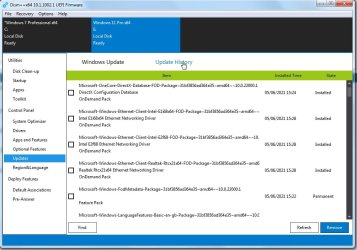
dism++

select the offline os in the top pane

click "open session"

select Updates in the left pane

click Update history

dism++-update-history.jpg

OR
from admin cmd prompt:

Dism /image:E: /Get-Packages
 

My Computers My Computers

  • At a glance

    7 X64i5 84002x8gb 3200mhz
    Computer type
    PC/Desktop
    OS
    7 X64
    CPU
    i5 8400
    Motherboard
    gigabyte b365m ds3h
    Memory
    2x8gb 3200mhz
    Hard Drives
    various
    PSU
    pure power 11 400w cm
    Case
    Coolermaster
    Cooling
    cryorig m9i
  • At a glance

    7x64g54008gb ddr4 2400
    Computer type
    PC/Desktop
    OS
    7x64
    CPU
    g5400
    Motherboard
    ga b365m ds3h
    Memory
    8gb ddr4 2400
    PSU
    xfx pro 450w
Thank you so much SIW2!

That was a really quick answer, too! :-)
 

My Computer My Computer

At a glance

Windows 7 Home Premium 64bit
OS
Windows 7 Home Premium 64bit
Back
Top