
You are using an out of date browser. It may not display this or other websites correctly.
You should upgrade or use an alternative browser.
You should upgrade or use an alternative browser.
How to set 'numlock' on by default
- Thread starter ironhead2
- Start date

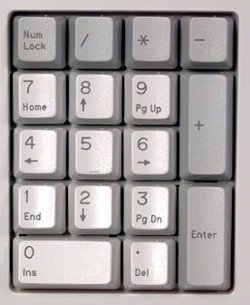
You should have a numlock key on your keyboard at the top, ususally buy the number pad.
My Computer
- Computer type
- PC/Desktop
- Computer Manufacturer/Model Number
- Custom Build
- OS
- W7 Pro x64 SP1 | W10 Pro IP x64 | W8.1 Pro x64 VM | Linux Mint VM
- CPU
- i7-4790k @ 4GHz (4.4GHz Boost)
- Motherboard
- ASUS Sabertooth Z87 (BIOS Rev 2004)
- Memory
- 16GB DDR3 Kingston HyperX Fury @ 1600MHz CL 9-9-9-27
- Graphics Card(s)
- EVGA GTX 980 Classified
- Sound Card
- Realtek Onboard
- Monitor(s) Displays
- Samsung S27D390
- Screen Resolution
- 1920 x 1080
- Hard Drives
- 240GB Intel 520 Series SSD |
Samsung 850 EVO 120GB SSD |
2TB WD Caviar Black |
2TB WD Caviar Black |
2TB WD Caviar Green
- PSU
- Corsair HX850-80 Gold Modular
- Case
- Cooler Master Silencio 650
- Cooling
- Corsair H80i w/2 x Corsair SP120 | 2 x 120mm Noctua NF-S12B
- Keyboard
- Microsoft Sidewinder X4
- Mouse
- Gigabyte M6900 optical
- Internet Speed
- 152mb
- Antivirus
- F-Secure
- Browser
- Firefox 38.0
- Other Info
- Backup Rig: Win 7 Pro 64-bit | AMD A10-5800k | ASUS F2A85-V Pro | 8GB Samsung DDR3 @1600MHz | 120GB Toshiba SDD | 2TB Seagate HDD | Cooler Master Silencio 550
Do you have the drivers installed for your keyboard?
My Computer
- Computer type
- PC/Desktop
- Computer Manufacturer/Model Number
- Custom Build
- OS
- W7 Pro x64 SP1 | W10 Pro IP x64 | W8.1 Pro x64 VM | Linux Mint VM
- CPU
- i7-4790k @ 4GHz (4.4GHz Boost)
- Motherboard
- ASUS Sabertooth Z87 (BIOS Rev 2004)
- Memory
- 16GB DDR3 Kingston HyperX Fury @ 1600MHz CL 9-9-9-27
- Graphics Card(s)
- EVGA GTX 980 Classified
- Sound Card
- Realtek Onboard
- Monitor(s) Displays
- Samsung S27D390
- Screen Resolution
- 1920 x 1080
- Hard Drives
- 240GB Intel 520 Series SSD |
Samsung 850 EVO 120GB SSD |
2TB WD Caviar Black |
2TB WD Caviar Black |
2TB WD Caviar Green
- PSU
- Corsair HX850-80 Gold Modular
- Case
- Cooler Master Silencio 650
- Cooling
- Corsair H80i w/2 x Corsair SP120 | 2 x 120mm Noctua NF-S12B
- Keyboard
- Microsoft Sidewinder X4
- Mouse
- Gigabyte M6900 optical
- Internet Speed
- 152mb
- Antivirus
- F-Secure
- Browser
- Firefox 38.0
- Other Info
- Backup Rig: Win 7 Pro 64-bit | AMD A10-5800k | ASUS F2A85-V Pro | 8GB Samsung DDR3 @1600MHz | 120GB Toshiba SDD | 2TB Seagate HDD | Cooler Master Silencio 550

There will be a setting in your BIOS/UEFI to enable NUMLOCK on by default. Usually under Hardware or on board devices or like that.
Welcome to Seven Forums.
Welcome to Seven Forums.
My Computer
- Computer type
- PC/Desktop
- Computer Manufacturer/Model Number
- Home Built Desktop By DataTech
- OS
- Windows 7 Ultimate X64 SP1
- CPU
- Intel i5-2550K, Differing ~4.4-4.8GHz No built in GPU
- Motherboard
- ASUS P8Z68-V PRO/GEN3
- Memory
- 16GB G.Skill Sniper 1866MHz @ 2133MHz 2x8GB
- Graphics Card(s)
- ASUS GTX650TIB-DC2OC-2GD5, (650TI Boost)
- Sound Card
- Onboard Realtek 5-1
- Monitor(s) Displays
- Samsung P2570HD
- Screen Resolution
- 1920x1080
- Hard Drives
- Samsung 840 Pro 256GB SSD for OS, 500GB Seagate Constellation (Enterprise drive) for Data
- PSU
- Corsair HX650W
- Case
- Inwin Dragon Rider
- Cooling
- Hyper 212 EVO w/two Noctua fans, push-pull, @1300 RPM
- Keyboard
- E-Z Eyes, bright yellow keys with large characters
- Mouse
- steelseries SENSEI Laser Pro Gaming
- Internet Speed
- 48-51Mbs Mbs down, 11 Mbs up Xfinity Cable
- Antivirus
- Norton Internet Security 2013
- Browser
- IE 10, Opera, Pale Moon if needed
- Other Info
- 4 case fans, LG BluRay-RE, ASUS DVD-RW, Mr. Fusion power supply, 1.21 gigawatts.

I experienced the same problem myself; fortunately, the solution is simple. For some reason, the default value of some of the registry keys (not all) were changed in windows 7, which causes the system to apparently ignore the InitialKeyboardIndicators settings in the other locations. All that is requireded is the performance of a search of the registry using regedit for that key. It is important to use the find function to locate ALL keyboard keys forInitialKeyboardIndicators and set them to the same value setting. The value options are as follows:
0 - Turn all indicators Off (NumLock, CapsLock, ScrollLock)
1 - Turn CapsLock On
2 - Turn NumLock On
3 - Turn CapsLock and NumLock On
4 - Turn ScrollLock On
5 - Turn CapsLock and ScrollLock On
6 - Turn NumLock and ScrollLock On
7 - Turn all indicators On (NumLock, CapsLock, ScrollLock)
In my case, the string value was some 7 or 8 digit number such as 21765430. These entries are the cause of the reboot change in the num lock status. If you want it on when you boot, set the string value to 2 in all the keys with numeric values. Problem solved!
0 - Turn all indicators Off (NumLock, CapsLock, ScrollLock)
1 - Turn CapsLock On
2 - Turn NumLock On
3 - Turn CapsLock and NumLock On
4 - Turn ScrollLock On
5 - Turn CapsLock and ScrollLock On
6 - Turn NumLock and ScrollLock On
7 - Turn all indicators On (NumLock, CapsLock, ScrollLock)
In my case, the string value was some 7 or 8 digit number such as 21765430. These entries are the cause of the reboot change in the num lock status. If you want it on when you boot, set the string value to 2 in all the keys with numeric values. Problem solved!
My Computer
- Computer type
- PC/Desktop
- Computer Manufacturer/Model Number
- Custom Bulid/Self made
- OS
- Windows 11 x64
- CPU
- i5 2500K @ 3.3 GHz
- Motherboard
- ASUS P8 Z77 V pro
- Memory
- 16 GB DDR 3 @ 1600Mhz
- Graphics Card(s)
- MSI 1050TI 4GB OC version
- Sound Card
- On Board (Realtek HD audio)
- Monitor(s) Displays
- Samsung 22" LCD
- Screen Resolution
- 1920*1080
- Hard Drives
- Seagate 1 TB, WD 1TB, Seagate 2 TB ( I use a lot of space)
- PSU
- coolermaster 750 W
- Case
- Coolermaster HAF912
- Cooling
- Coolermaster hyper 212 EVO
- Keyboard
- Samsung
- Mouse
- Dell Wireless
- Internet Speed
- Wireless 50 Mbps
- Antivirus
- AVG 2016 Internet Security
- Browser
- Google Chrome

Can you post a photo of your keyboard Number Keys, like the one Boozad posted? If you press the "NumLock" key, a light should come on somewhere on the Keyboard, usually above the Number Keypad.
When you press the "CapsLock" key, does that light anything?
Failing that, follow Archer's very good advice.
When you press the "CapsLock" key, does that light anything?
Failing that, follow Archer's very good advice.
Last edited:
My Computer
- Computer type
- PC/Desktop
- Computer Manufacturer/Model Number
- bertison
- OS
- Windows 7/64 HPremium.
- CPU
- AMD FX-6300.
- Motherboard
- Asus M5A78L-M LE/USB3.
- Memory
- Corsair (2x4) GB DDR3 CMXGX3M2A1337CL9.
- Graphics Card(s)
- NVidia/Gigabyte GT730 (2GB) GDDR5.
- Sound Card
- Onboard.
- Monitor(s) Displays
- Iiyama PLE2407HDS.
- Screen Resolution
- 1920 x 1280
- Hard Drives
- Desktop: 1TB. WD10EZEX-00BN5A0.
Zyxel nsa310 NAS: 2TB Seagate Barracuda 7200.14.
Cache Drive: Sandisk SDSSDRC032G.
Laptop Lenovo B50/80 128 GB SSD.
- PSU
- Corsair 750M.
- Case
- Coolermaster N300.
- Cooling
- FRONT: (2X) 140mm. TOP: (1x) 120mm. REAR: (1x) 120mm.
- Keyboard
- Logitech K290
- Mouse
- Trust Optical Wired
- Internet Speed
- 15 Mb Down, 0.55 Up.
- Antivirus
- Kaspersky Total Security 2017, Hitman Pro.
- Browser
- Firefox.
- Other Info
- NETWORK:
Sky "Q box" and router.
Desktop & NAS - 30 Metres Cat6 Ethernet wired, via TP-Link 4-port switch.
Lenovo B50/80 Laptop, 2x Wileyfox phones, Lenovo TAB3-8 tablet - all wireless.
Grandchildren, their parents and friends as bandwidth 'parasites' at various times!