How to set permissions in windows server 2012 ?

Adonix44

New member
Local time
3:04 AM
Messages
16
Hello,..

There are suppose some pre-made groups in windows server 2012,..like guest, remote desktop users, administrator, administrators...etc...

So i want to know that how to modify "administrators" group settings to limit/disable some permissions without affecting "administrator" group !

Kindly help me.

Thanks :)
 

My Computer My Computer

Computer type
PC/Desktop
Computer Manufacturer/Model Number
custom build
OS
Windows 7 Ultimate x64
CPU
Intel i7 4790k
Memory
8
Hi,

Which permissions/privileges in particular where you looking to remove from administrators?
 

My Computer My Computer

Computer type
PC/Desktop
OS
Windows 10, Windows 8.1 Pro, Windows 7 Professional, OS X El Capitan
Hi,

Which permissions/privileges in particular where you looking to remove from administrators?

Well disabling permissions like task manager access, control panel access, group policy access or network setting access,..like these things to disable for "administrators" group !
 

My Computer My Computer

Computer type
PC/Desktop
Computer Manufacturer/Model Number
custom build
OS
Windows 7 Ultimate x64
CPU
Intel i7 4790k
Memory
8
All of these programs (except for Group Policy) can be disabled though the Group Policy Editor.

The settings to deny all users access to the Task Manager, Control Panel, the Registry editor, and network settings follow respectively,
  • User Configuration -> Administrative Templates -> System -> Ctrl+Alt+Del Options -> Remove Task Manager
  • User Configuration -> Administrative Templates -> Control Panel -> Prohibit access to Control Panel and PC settings
  • User Configuration -> Administrative Templates -> System -> Prevent access to registry editing tools
  • User Configuration -> Administrative Templates -> Network -> Network Connections -> (lots of settings to play around with here)

To disable Group Policy itself, there isn't a group policy setting obviously, but you can edit a registry key for that,
Code:
reg add "HKCU\Software\Policies\Microsoft\MMC\{8FC0B734-A0E1-11D1-A7D3-0000F87571E3}" /v Restrict_Run /t REG_DWORD /d 1 /f
and to enable access to Group Policy again,
Code:
reg add "HKCU\Software\Policies\Microsoft\MMC\{8FC0B734-A0E1-11D1-A7D3-0000F87571E3}" /v Restrict_Run /t REG_DWORD /d 0 /f
 

My Computer My Computer

Computer type
PC/Desktop
OS
Windows 10, Windows 8.1 Pro, Windows 7 Professional, OS X El Capitan
Dear Pyprohly,..

These settings will block access of "Administrator" group also :'(
I only want to deny these things from "Administrators" group.
 

My Computer My Computer

Computer type
PC/Desktop
Computer Manufacturer/Model Number
custom build
OS
Windows 7 Ultimate x64
CPU
Intel i7 4790k
Memory
8
Attempting to limit what an administrator can do is an exercise in futility. Any limitations you might set in place can be removed by any other administrator. All administrators are equal. Any administrator can change the password of any other account (including the built in Administrator account) without knowing the existing password. The Administrator account has no special rights or privileges. The only practical thing that sets this account apart is that it is not influenced by UAC and it cannot be deleted.

All of this is by design and cannot be changed.

By "administrator" I mean any member of the "Administrators" group.

Any problems you are having with administrators need to be solved by non technical means. This includes setting company policies that all must follow and with appropriate consequences for those who do not.
 

My Computer My Computer

Computer type
PC/Desktop
Computer Manufacturer/Model Number
HP
OS
Windows 7 Pro 64 bit
CPU
Xeon W3520
Memory
8 GB
Graphics Card(s)
Nvidia Geforce 210
There are other built-in groups you could study to see if any of them fit your needs. In an Active Directory environment, you can fine tune some administrators by creating a custom group and delegating rights and permissions which they cannot bypass, but on a standalone server I am not sure if this can be done (not saying impossible, just haven't done myself).

Some detail https://technet.microsoft.com/en-us/library/cc700835.aspx
 

My Computer My Computer

Computer type
PC/Desktop
Computer Manufacturer/Model Number
Custom Build
OS
Windows 7 Ultimate x64 SP1
CPU
AMD Phenom 2 1090T
Motherboard
Gigabyte GA-890FXA-UD5
Memory
2x8GB Kingston HyperX Fury Black 1600Mhz Unganged
Graphics Card(s)
MSI GTX 970 Gaming 4G
Sound Card
Realtek On-Board HD 7.1 Audio / Logitech G35
Monitor(s) Displays
3xAcer GD245HQ
Screen Resolution
1920x1080
Hard Drives
Samsung 850 Pro 512GB SSD - OS /
WD Caviar Black SATA 3 - 1 TBx2 - Dynamic RAID 0 /
WD Caviar Green SATA 2 - 640GBx2 - Dynamic RAID 0 /
WD Caviar Green SATA 2 - 640GB - Internal Backup /
Seagate Barracude SATA 3 - 3TB - External Backup/ Sync
PSU
HighPower 1000W
Case
Cooler Master HAF 932
Cooling
Noctua NH-D14
Keyboard
Logitech G19
Mouse
Logitech G500
Internet Speed
100/4 Mbit Cable (100GB quota)
Antivirus
ZoneAlarm Extreme Security / MBAM Pro / MBAE Free / SAS Free
Browser
IE 11 - Firefox - Chrome
Other Info
Logitech F710/ G27/ G940/ Z5500 // TrackIR 5 // Nvidia 3D Surround Vision
In a domain setting you can restrict the rights of a local administrator. On the domain controller itself there are no local groups. In a stand alone server this is an exercise in futility. Nothing in the original post suggests there is a domain.
 

My Computer My Computer

Computer type
PC/Desktop
Computer Manufacturer/Model Number
HP
OS
Windows 7 Pro 64 bit
CPU
Xeon W3520
Memory
8 GB
Graphics Card(s)
Nvidia Geforce 210
True that LMiller. Perhaps OP can tell us what kind of rights he wants to give to these "admins" and maybe we can advice on what can be done (if possible).
 

My Computer My Computer

Computer type
PC/Desktop
Computer Manufacturer/Model Number
Custom Build
OS
Windows 7 Ultimate x64 SP1
CPU
AMD Phenom 2 1090T
Motherboard
Gigabyte GA-890FXA-UD5
Memory
2x8GB Kingston HyperX Fury Black 1600Mhz Unganged
Graphics Card(s)
MSI GTX 970 Gaming 4G
Sound Card
Realtek On-Board HD 7.1 Audio / Logitech G35
Monitor(s) Displays
3xAcer GD245HQ
Screen Resolution
1920x1080
Hard Drives
Samsung 850 Pro 512GB SSD - OS /
WD Caviar Black SATA 3 - 1 TBx2 - Dynamic RAID 0 /
WD Caviar Green SATA 2 - 640GBx2 - Dynamic RAID 0 /
WD Caviar Green SATA 2 - 640GB - Internal Backup /
Seagate Barracude SATA 3 - 3TB - External Backup/ Sync
PSU
HighPower 1000W
Case
Cooler Master HAF 932
Cooling
Noctua NH-D14
Keyboard
Logitech G19
Mouse
Logitech G500
Internet Speed
100/4 Mbit Cable (100GB quota)
Antivirus
ZoneAlarm Extreme Security / MBAM Pro / MBAE Free / SAS Free
Browser
IE 11 - Firefox - Chrome
Other Info
Logitech F710/ G27/ G940/ Z5500 // TrackIR 5 // Nvidia 3D Surround Vision
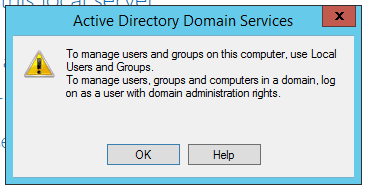
Could anyone tell how to fix the issue shown in img file attached ?
Without this fix i can't able to access anything :(
 

Attachments

  • Captuggre.PNG
    Captuggre.PNG
    3.5 KB · Views: 9

My Computer My Computer

Computer type
PC/Desktop
Computer Manufacturer/Model Number
custom build
OS
Windows 7 Ultimate x64
CPU
Intel i7 4790k
Memory
8
That is not an error. It is providing 2 choices which you must choose as appropriate. We have no way of knowing what that might be.

It would help a great deal if you could describe what problem you are having. Then we could probably make some suggestions as to how to proceed.
 

My Computer My Computer

Computer type
PC/Desktop
Computer Manufacturer/Model Number
HP
OS
Windows 7 Pro 64 bit
CPU
Xeon W3520
Memory
8 GB
Graphics Card(s)
Nvidia Geforce 210
I want to open "gpmc.msc" but it's showing that popup and hence i can't able to open it properly !
I need to give "administrator" account domain admin rights, but failed to give,..so kindly tell the procedure to give domain admin rights to "administrator" group so that i can then access "gpmc.msc" ,..i am playing all these things in windows server 2012 :p
Kindly help.
 

My Computer My Computer

Computer type
PC/Desktop
Computer Manufacturer/Model Number
custom build
OS
Windows 7 Ultimate x64
CPU
Intel i7 4790k
Memory
8
You haven't told us if you have an Active Directory or Workgroup network.

Gpmc.msc is for Active Directory
Gpedit.msc for standalone/Workgroup Computers
 

My Computer My Computer

Computer type
PC/Desktop
Computer Manufacturer/Model Number
Custom Build
OS
Windows 7 Ultimate x64 SP1
CPU
AMD Phenom 2 1090T
Motherboard
Gigabyte GA-890FXA-UD5
Memory
2x8GB Kingston HyperX Fury Black 1600Mhz Unganged
Graphics Card(s)
MSI GTX 970 Gaming 4G
Sound Card
Realtek On-Board HD 7.1 Audio / Logitech G35
Monitor(s) Displays
3xAcer GD245HQ
Screen Resolution
1920x1080
Hard Drives
Samsung 850 Pro 512GB SSD - OS /
WD Caviar Black SATA 3 - 1 TBx2 - Dynamic RAID 0 /
WD Caviar Green SATA 2 - 640GBx2 - Dynamic RAID 0 /
WD Caviar Green SATA 2 - 640GB - Internal Backup /
Seagate Barracude SATA 3 - 3TB - External Backup/ Sync
PSU
HighPower 1000W
Case
Cooler Master HAF 932
Cooling
Noctua NH-D14
Keyboard
Logitech G19
Mouse
Logitech G500
Internet Speed
100/4 Mbit Cable (100GB quota)
Antivirus
ZoneAlarm Extreme Security / MBAM Pro / MBAE Free / SAS Free
Browser
IE 11 - Firefox - Chrome
Other Info
Logitech F710/ G27/ G940/ Z5500 // TrackIR 5 // Nvidia 3D Surround Vision
Back
Top