How to set SATA configuration to AHCI

blumesan

New member
Member
Local time
4:56 AM
Messages
88
I have just finished migrating my win7 o/s to a new SSD.
Everything works fine. No problem booting up.

As a next step I wished to enable AHCI. First I check the two registry entries as described in this tutorial
http://www.sevenforums.com/tutorials/61869-ahci-enable-windows-7-vista.html
(page 1) and ensured that both Start entries were 0.

Rebooted and entered BIOS setup program.
Changed the SATA configuration to AHCI.
Checked the Boot order next. It absolutely refused the option to select the SSD (with O/S) as the first boot drive. In fact it does not display that drive anywhere in the boot list.
Only when I go back and change SATA configuration to IDE can I then select the proper boot drive.

Bottom line, no AHCI :cry:

Any suggestions?

PS I had first posted this question in the tutorial thread cited above; that is an older thread and got no response. Therefore please forgive this double posting.


My Computer My Computer

At a glance

Win 7 x64Intel i716GBRadeon HD4670
Computer type
PC/Desktop
Computer Manufacturer/Model Number
custom build
OS
Win 7 x64
CPU
Intel i7
Motherboard
Asus P6TD-Deluxe
Memory
16GB
Graphics Card(s)
Radeon HD4670
Monitor(s) Displays
HP LP2475w
Hard Drives
2x WDC WD7501AALD
Browser
IE
Which SATA port is the SSD connect to?
 

My Computer My Computer

At a glance

Windows 10 Pro x64, Windows 8.1 Pro x64, Wind...INTEL i9-7920X LGA 206664 GB (4 X 16 GB) G-Skill V Series DDR4 3200 ...EVGA GTX 1060 SC 3 GB
Computer type
PC/Desktop
Computer Manufacturer/Model Number
Custom Built
OS
Windows 10 Pro x64, Windows 8.1 Pro x64, Windows 7 Ultimate x64 SP1,
CPU
INTEL i9-7920X LGA 2066
Motherboard
Gigabyte X299-WU8 F3
Memory
64 GB (4 X 16 GB) G-Skill V Series DDR4 3200 Quad Channel
Graphics Card(s)
EVGA GTX 1060 SC 3 GB
Sound Card
Realtek Onboard ALC1220
Monitor(s) Displays
2 x Samsung S27E310
Screen Resolution
1920x1080
Hard Drives
Samsung 2 x 970 EVO Plus 500 GB NVMe
1 x 6TB WD 6003FZBX SATA
1 x 6TB WD 60EFRX SATA
12 x 3TB WD 30EFRX SATA
PSU
Seasonic X-1050
Case
Thermaltake Armor+
Cooling
Corsair H80i V2 Liquid AOI Cooler
Keyboard
Logitech G510s
Mouse
Logitech MX Master 2S
Internet Speed
200 Mb/s
Antivirus
ESET NOD32 13.1
Browser
EDGE (Dev, Canary, Beta), Chrome
Other Info
ASUS RT-AC68U router
Malwarebytes 4.0.4

My Computer My Computer

At a glance

Win 7 x64Intel i716GBRadeon HD4670
Computer type
PC/Desktop
Computer Manufacturer/Model Number
custom build
OS
Win 7 x64
CPU
Intel i7
Motherboard
Asus P6TD-Deluxe
Memory
16GB
Graphics Card(s)
Radeon HD4670
Monitor(s) Displays
HP LP2475w
Hard Drives
2x WDC WD7501AALD
Browser
IE
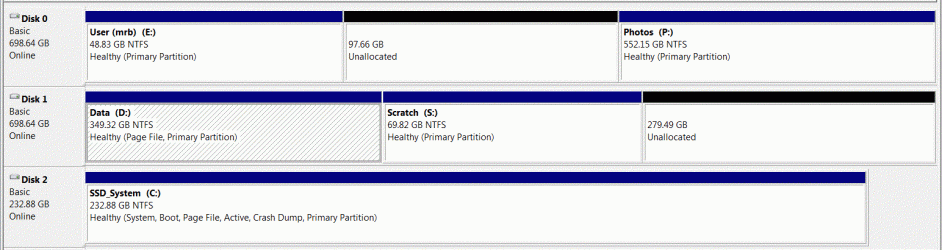
The boot priority now is the SSD (C:\ system files), otherwise I couldn't boot or be on-line.

Disk Management:
 

Attachments

  • DskMgmt.GIF
    DskMgmt.GIF
    71.8 KB · Views: 5

My Computer My Computer

At a glance

Win 7 x64Intel i716GBRadeon HD4670
Computer type
PC/Desktop
Computer Manufacturer/Model Number
custom build
OS
Win 7 x64
CPU
Intel i7
Motherboard
Asus P6TD-Deluxe
Memory
16GB
Graphics Card(s)
Radeon HD4670
Monitor(s) Displays
HP LP2475w
Hard Drives
2x WDC WD7501AALD
Browser
IE

My Computer My Computer

At a glance

Win 7 x64Intel i716GBRadeon HD4670
Computer type
PC/Desktop
Computer Manufacturer/Model Number
custom build
OS
Win 7 x64
CPU
Intel i7
Motherboard
Asus P6TD-Deluxe
Memory
16GB
Graphics Card(s)
Radeon HD4670
Monitor(s) Displays
HP LP2475w
Hard Drives
2x WDC WD7501AALD
Browser
IE
No, haven't tried that. What makes you think it will make a difference?
Sometimes when things don't work as expected it helps to get back to basics. I've noticed with my builds that it works best for the BIOS to see the HDD/SSD on the first connection [SATA 1] for booting then add other drives to ports 2 through 4, 6 or 8. Sometimes the Optical drive has to be on SATA port 2. Check the motherboard manual as some SATA ports are colored different from others, usually a reason for that.
 

My Computer My Computer

At a glance

Windows 7 Ultimate 64-bit, Windows 8.1 64-bit...
Computer type
PC/Desktop
Computer Manufacturer/Model Number
Customs, Dell, Gateway, HP, Toshiba, Acer, ASUS
OS
Windows 7 Ultimate 64-bit, Windows 8.1 64-bit, Mac OS X 10.10, Linux Mint 17, Windows 10 Pro TP
Keyboard
Microsoft
Mouse
Microsoft
Put the SSD on sata port 0 or 1, whichever your motherboard starts first with, it is labeled in small letters.

If the 1st 2 ports are 6 Gbps and the rest are only 3 Gbps, then yes it makes a difference.

Check the motherboard manual or find the motherboard specs online.
 
Last edited:

My Computer My Computer

At a glance

Windows 10 Pro x64Intel Core i7 6700KGSkill TridentZ RGB 16GB 3600 16-16-16-36EVGA GTX 980 Ti SC x2
Computer type
PC/Desktop
Computer Manufacturer/Model Number
Skylake Special #666
OS
Windows 10 Pro x64
CPU
Intel Core i7 6700K
Motherboard
Asus Sabertooth Z170 Mark 1
Memory
GSkill TridentZ RGB 16GB 3600 16-16-16-36
Graphics Card(s)
EVGA GTX 980 Ti SC x2
Sound Card
Realtek High Definition
Monitor(s) Displays
AOC G2460PG
Screen Resolution
1920 x 1080 144Hz
Hard Drives
Samsung 860 Pro 256GB, Seagate Barracuda 4TB x2
PSU
EVGA 1000 P2, EVGA White Custom Braided Cables
Case
Corsair Vengeance C70 Gunmetal Black
Cooling
Corsair H100i v2, Corsair ML120 x2, Thermal Grizzly Kryonaut
Keyboard
Logitech G910 Orion Spectrum
Mouse
Logitech G700s
Internet Speed
Verizon Fios Quantum Gateway 75/75
Antivirus
Windows Defender, Malwarebytes Free 3.8.3
Browser
Chrome
Other Info
Corsair SP120 x4, LG Blu-ray Drive, Durabrand HT-395 100 Watt Dolby Digital Amp, Corsair H2100 Wireless 7.1 Headset
Have tried the various suggestions, so far no luck.
Any other ideas?
 

My Computer My Computer

At a glance

Win 7 x64Intel i716GBRadeon HD4670
Computer type
PC/Desktop
Computer Manufacturer/Model Number
custom build
OS
Win 7 x64
CPU
Intel i7
Motherboard
Asus P6TD-Deluxe
Memory
16GB
Graphics Card(s)
Radeon HD4670
Monitor(s) Displays
HP LP2475w
Hard Drives
2x WDC WD7501AALD
Browser
IE
Not having re read the thread again, but windows has to be installed in AHCI mode. You can`t install in IDE then switch it, or copy over an image that was from a system set to IDE, that`s why the drive doesn`t boot after you switched it.

You`ll have to do a clean install, but first having AHCI enabled in the bios. :(
 

My Computer My Computer

At a glance

Windows 10 Pro x64Intel Core i7 6700KGSkill TridentZ RGB 16GB 3600 16-16-16-36EVGA GTX 980 Ti SC x2
Computer type
PC/Desktop
Computer Manufacturer/Model Number
Skylake Special #666
OS
Windows 10 Pro x64
CPU
Intel Core i7 6700K
Motherboard
Asus Sabertooth Z170 Mark 1
Memory
GSkill TridentZ RGB 16GB 3600 16-16-16-36
Graphics Card(s)
EVGA GTX 980 Ti SC x2
Sound Card
Realtek High Definition
Monitor(s) Displays
AOC G2460PG
Screen Resolution
1920 x 1080 144Hz
Hard Drives
Samsung 860 Pro 256GB, Seagate Barracuda 4TB x2
PSU
EVGA 1000 P2, EVGA White Custom Braided Cables
Case
Corsair Vengeance C70 Gunmetal Black
Cooling
Corsair H100i v2, Corsair ML120 x2, Thermal Grizzly Kryonaut
Keyboard
Logitech G910 Orion Spectrum
Mouse
Logitech G700s
Internet Speed
Verizon Fios Quantum Gateway 75/75
Antivirus
Windows Defender, Malwarebytes Free 3.8.3
Browser
Chrome
Other Info
Corsair SP120 x4, LG Blu-ray Drive, Durabrand HT-395 100 Watt Dolby Digital Amp, Corsair H2100 Wireless 7.1 Headset

My Computer My Computer

At a glance

Win 7 x64Intel i716GBRadeon HD4670
Computer type
PC/Desktop
Computer Manufacturer/Model Number
custom build
OS
Win 7 x64
CPU
Intel i7
Motherboard
Asus P6TD-Deluxe
Memory
16GB
Graphics Card(s)
Radeon HD4670
Monitor(s) Displays
HP LP2475w
Hard Drives
2x WDC WD7501AALD
Browser
IE
Is this a UEFI BIOS? If so then you'll need Windows Boot Manager listed first to boot.

What happened when SSD is plugged into SATA1 with all other drives unplugged? Was waiting to hear.
 
Point is AHCI has to be enabled in the bios, first, before an install.

Regardless of what that says.

Or you are not doing it correctly.
 

My Computer My Computer

At a glance

Windows 10 Pro x64Intel Core i7 6700KGSkill TridentZ RGB 16GB 3600 16-16-16-36EVGA GTX 980 Ti SC x2
Computer type
PC/Desktop
Computer Manufacturer/Model Number
Skylake Special #666
OS
Windows 10 Pro x64
CPU
Intel Core i7 6700K
Motherboard
Asus Sabertooth Z170 Mark 1
Memory
GSkill TridentZ RGB 16GB 3600 16-16-16-36
Graphics Card(s)
EVGA GTX 980 Ti SC x2
Sound Card
Realtek High Definition
Monitor(s) Displays
AOC G2460PG
Screen Resolution
1920 x 1080 144Hz
Hard Drives
Samsung 860 Pro 256GB, Seagate Barracuda 4TB x2
PSU
EVGA 1000 P2, EVGA White Custom Braided Cables
Case
Corsair Vengeance C70 Gunmetal Black
Cooling
Corsair H100i v2, Corsair ML120 x2, Thermal Grizzly Kryonaut
Keyboard
Logitech G910 Orion Spectrum
Mouse
Logitech G700s
Internet Speed
Verizon Fios Quantum Gateway 75/75
Antivirus
Windows Defender, Malwarebytes Free 3.8.3
Browser
Chrome
Other Info
Corsair SP120 x4, LG Blu-ray Drive, Durabrand HT-395 100 Watt Dolby Digital Amp, Corsair H2100 Wireless 7.1 Headset
Is this a UEFI BIOS? If so then you'll need Windows Boot Manager listed first to boot.

What happened when SSD is plugged into SATA1 with all other drives unplugged? Was waiting to hear.

UEFI BIOS: don't know what that is.
With SSD plugged into SATA1: Unable to see the SSD in the boot order. Unable to boot. Asks me to insert disk in optical drive.
 

My Computer My Computer

At a glance

Win 7 x64Intel i716GBRadeon HD4670
Computer type
PC/Desktop
Computer Manufacturer/Model Number
custom build
OS
Win 7 x64
CPU
Intel i7
Motherboard
Asus P6TD-Deluxe
Memory
16GB
Graphics Card(s)
Radeon HD4670
Monitor(s) Displays
HP LP2475w
Hard Drives
2x WDC WD7501AALD
Browser
IE
Point is AHCI has to be enabled in the bios, first, before an install.

Regardless of what that says.

Or you are not doing it correctly.

Not sure what you mean. Is the tutorial I cited incorrect? Or am I not following it correctly?
The tutorial spells it out very clearly, and I followed all the steps.
 

My Computer My Computer

At a glance

Win 7 x64Intel i716GBRadeon HD4670
Computer type
PC/Desktop
Computer Manufacturer/Model Number
custom build
OS
Win 7 x64
CPU
Intel i7
Motherboard
Asus P6TD-Deluxe
Memory
16GB
Graphics Card(s)
Radeon HD4670
Monitor(s) Displays
HP LP2475w
Hard Drives
2x WDC WD7501AALD
Browser
IE
I keep telling you, you enable AHCI in the bios but when you do the switch from IDE to AHCI, that`s why windows won`t boot. or the drive isn` seen etc.

Windows has to be installed in AHCI in order to run in AHCI.

You migrated a system that was installed in IDE mode, now you are trying to switch it AHCI, not gonna work.
 

My Computer My Computer

At a glance

Windows 10 Pro x64Intel Core i7 6700KGSkill TridentZ RGB 16GB 3600 16-16-16-36EVGA GTX 980 Ti SC x2
Computer type
PC/Desktop
Computer Manufacturer/Model Number
Skylake Special #666
OS
Windows 10 Pro x64
CPU
Intel Core i7 6700K
Motherboard
Asus Sabertooth Z170 Mark 1
Memory
GSkill TridentZ RGB 16GB 3600 16-16-16-36
Graphics Card(s)
EVGA GTX 980 Ti SC x2
Sound Card
Realtek High Definition
Monitor(s) Displays
AOC G2460PG
Screen Resolution
1920 x 1080 144Hz
Hard Drives
Samsung 860 Pro 256GB, Seagate Barracuda 4TB x2
PSU
EVGA 1000 P2, EVGA White Custom Braided Cables
Case
Corsair Vengeance C70 Gunmetal Black
Cooling
Corsair H100i v2, Corsair ML120 x2, Thermal Grizzly Kryonaut
Keyboard
Logitech G910 Orion Spectrum
Mouse
Logitech G700s
Internet Speed
Verizon Fios Quantum Gateway 75/75
Antivirus
Windows Defender, Malwarebytes Free 3.8.3
Browser
Chrome
Other Info
Corsair SP120 x4, LG Blu-ray Drive, Durabrand HT-395 100 Watt Dolby Digital Amp, Corsair H2100 Wireless 7.1 Headset
I don't see UEFI in the specs for your Motherboard - P6TD Deluxe - ASUS.
More importantly there is no EFI System partition in your Disk Mgmt screenshot so that rules it out.

Your BIOS may require that you set the SSD as the Primary hard drive first before it will be the first HD to boot in BIOS setup. Is it listed as first to boot in Boot Order when plugged into another port?

I also notice there is a System file moved to another hard drive. Possibly if you turn off the paging file and then turn it back on for C following Change Virtual Memory Paging File this may stop whatever is blocking AHCI : Enable in Windows 7 / Vista as I can't remember it not working before. But having a system file on another drive does catch my attention as possible interference for making such a significant change without reinstall.
 
Last edited:
I keep telling you, you enable AHCI in the bios but when you do the switch from IDE to AHCI, that`s why windows won`t boot. or the drive isn` seen etc.

Windows has to be installed in AHCI in order to run in AHCI.

You migrated a system that was installed in IDE mode, now you are trying to switch it AHCI, not gonna work.

In other words, the tutorial I cited (AHCI : Enable in Windows 7 after OS install) is just plain wrong???
 

My Computer My Computer

At a glance

Win 7 x64Intel i716GBRadeon HD4670
Computer type
PC/Desktop
Computer Manufacturer/Model Number
custom build
OS
Win 7 x64
CPU
Intel i7
Motherboard
Asus P6TD-Deluxe
Memory
16GB
Graphics Card(s)
Radeon HD4670
Monitor(s) Displays
HP LP2475w
Hard Drives
2x WDC WD7501AALD
Browser
IE
I don't see UEFI in the specs for your Motherboard - P6TD Deluxe - ASUS.
More importantly there is no EFI System partition in your Disk Mgmt screenshot so that rules it out.

Your BIOS may require that you set the SSD as the Primary hard drive first before it will be the first HD to boot in BIOS setup. Is it listed as first to boot in Boot Order when plugged into another port?

I also notice there is a System file moved to another hard drive. Possibly if you turn off the paging file and then turn it back on for C this may stop whatever is blocking AHCI : Enable in Windows 7 / Vista
as I can't remember it not working before. But having a system file on another drive does catch my attention as possible interference for making such a significant change without reinstall.

The SSD is listed in BIOS as first to boot in Boot Order--because I set it that way. Thereafter, when I switch to AHCI in the BIOS, the SSD does not appear at all in the Boot Order.

I assume you refer to "User" files (Pictures, Music, Videos) which I have moved to the E:\ drive after migrating the OS. This was the recommended procedure to make more room on the SSD.

How do I turn off the page file on C:\?
 

My Computer My Computer

At a glance

Win 7 x64Intel i716GBRadeon HD4670
Computer type
PC/Desktop
Computer Manufacturer/Model Number
custom build
OS
Win 7 x64
CPU
Intel i7
Motherboard
Asus P6TD-Deluxe
Memory
16GB
Graphics Card(s)
Radeon HD4670
Monitor(s) Displays
HP LP2475w
Hard Drives
2x WDC WD7501AALD
Browser
IE
Back
Top