How to set static ip address in printer

nazeemrahaman

New member
Local time
2:43 AM
Messages
16
Hi friends


In my office more then 150 peoples working . my question is i set ip address of the printer 220 but now it's changed for 203. please tel me how can set ip address static and product the printer.

i hope my friends help me. thanks

Regard

Nazeem rahaman
 

My Computer My Computer

Computer Manufacturer/Model Number
Hp
OS
Windows 7 Home Premium 64bit
CPU
7100
Motherboard
intel
Graphics Card(s)
2.50
Sound Card
30
Monitor(s) Displays
24
Hard Drives
500
Hello,

Can you give us the make and model of the printer?

Normally they have a web interface that you can log onto and change it to a static IP address.


Dave
 

My Computer My Computer

Computer type
PC/Desktop
Computer Manufacturer/Model Number
Custom
OS
Windows 7 Ultimate x64
CPU
Intel Core i7 2600K (O/C 4.7GHz)
Motherboard
Asus ROG Maximus IV Extreme-Z - Intel Z68 Chipset
Memory
8GB Corsair Vengeance LP, DDR3, 1600Mhz
Graphics Card(s)
Nvidia GTX 460 Graphics Card
Sound Card
Onboard
Monitor(s) Displays
Dell E228WFP
Hard Drives
2 x 500GB Samsung SpinPoint Drives (1 for OS, 1 for Data and Apps)
PSU
CoolerMaster 1000W
Case
CoolerMaster HAF
Cooling
Air
Internet Speed
Fibre - 60MB Down, 30MB Up
Antivirus
ESET NOD32 Antivirus
Hi friends


In my office more then 150 peoples working . my question is i set ip address of the printer 220 but now it's changed for 203. please tel me how can set ip address static and product the printer.

i hope my friends help me. thanks

Regard

Nazeem rahaman

Nazeem, welcome to the windows 7 forums.

One question, are you the administrator of the network? also do you have the login credentials for the printer? Also many printers have a configuration screen for tcp/ip and it is there that you can set the fixed ip for the printer and tell it not to use DHCP. As was stated earlier, it might help if we knew what make/model of printer your talking about..
Rich
 

My Computer My Computer

Computer type
Laptop
Computer Manufacturer/Model Number
Toshiba Laptop Qosimo X870
OS
Windows 7 Pro x64 SP1
CPU
Intel Core I7
Motherboard
Toshiba Qosmio
Memory
16 Gigs
Graphics Card(s)
NVIDIA GeForce GTX 670M
Monitor(s) Displays
17.7" laptop
Screen Resolution
1600 x 900
Hard Drives
256 Gig SanDisk SSD for C
256 Gig Intel SSD for D
Internet Speed
50/25 FIOS
Antivirus
Vipre (all you can eat for 10 machines)
Browser
IE and FF
Other Info
I have dos 6.22, wfwg 3.11, win98, 2000 and xp VHD's available for testing. MS's Virtual PC works great.
Hi friends


In my office more then 150 peoples working . my question is i set ip address of the printer 220 but now it's changed for 203. please tel me how can set ip address static and product the printer.

i hope my friends help me. thanks

Regard

Nazeem rahaman

Nazeem, welcome to the windows 7 forums.

One question, are you the administrator of the network? also do you have the login credentials for the printer? Also many printers have a configuration screen for tcp/ip and it is there that you can set the fixed ip for the printer and tell it not to use DHCP. As was stated earlier, it might help if we knew what make/model of printer your talking about..
Rich

Thanks richnrockville

sorry friend my printer model is Toshiba 2040. i got the solution change the ip address manually in machine and click static.

In my company have four department purchasing , Design, Procurement and Hr .
i like to create folder each department in machine with password . please tel how can i create folder with password in machine .

I hope my friends can help me.

Thanks

Regard

Nazeem Rahaman
 

My Computer My Computer

Computer Manufacturer/Model Number
Hp
OS
Windows 7 Home Premium 64bit
CPU
7100
Motherboard
intel
Graphics Card(s)
2.50
Sound Card
30
Monitor(s) Displays
24
Hard Drives
500
Nazeem:
"In my company have four department purchasing , Design, Procurement and Hr .
i like to create folder each department in machine with password . please tel how can i create folder with password in machine ."

If you are talking about the printer and not a server folder. I don't believe that printers can have folders.
You can restrict use of a printer by the security tab so that others can use the printer.(at least on many printers)

If your talking about folders on a common machine or server, that also can be controlled by sharing the folder and setting the access via the security tab on the properties of the folder.

Rich
 

My Computer My Computer

Computer type
Laptop
Computer Manufacturer/Model Number
Toshiba Laptop Qosimo X870
OS
Windows 7 Pro x64 SP1
CPU
Intel Core I7
Motherboard
Toshiba Qosmio
Memory
16 Gigs
Graphics Card(s)
NVIDIA GeForce GTX 670M
Monitor(s) Displays
17.7" laptop
Screen Resolution
1600 x 900
Hard Drives
256 Gig SanDisk SSD for C
256 Gig Intel SSD for D
Internet Speed
50/25 FIOS
Antivirus
Vipre (all you can eat for 10 machines)
Browser
IE and FF
Other Info
I have dos 6.22, wfwg 3.11, win98, 2000 and xp VHD's available for testing. MS's Virtual PC works great.
Nazeem:
"In my company have four department purchasing , Design, Procurement and Hr .
i like to create folder each department in machine with password . please tel how can i create folder with password in machine ."

If you are talking about the printer and not a server folder. I don't believe that printers can have folders.
You can restrict use of a printer by the security tab so that others can use the printer.(at least on many printers)

If your talking about folders on a common machine or server, that also can be controlled by sharing the folder and setting the access via the security tab on the properties of the folder.

Rich

Greeting Mr. Rich

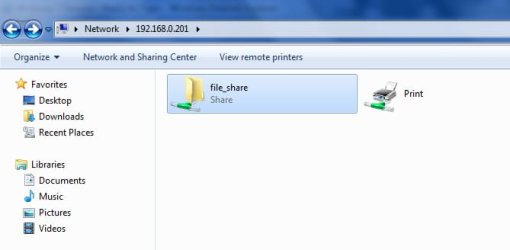
Thanks for the reply . In my toshiba 2040 machine have scan option. when i scan how can i retrieve files from toshiba printer . currently i retrive the data through attached image.


i put the ip address to the browser but i don't know how to retrive files.
i try to retrive data from browser but i'm could'nt sucess .please tel me how to retrive data form browser. .
How can create folder from machine . and give the password that folder.
Please help me . i 'm begainer for networking .i hope my friends can help me.

thanks

Regard

Nazeem Rahaman
 

Attachments

  • sample.jpg
    sample.jpg
    32.8 KB · Views: 26

My Computer My Computer

Computer Manufacturer/Model Number
Hp
OS
Windows 7 Home Premium 64bit
CPU
7100
Motherboard
intel
Graphics Card(s)
2.50
Sound Card
30
Monitor(s) Displays
24
Hard Drives
500
Nazeem, is this printer/scanner/fax a e-STUDIO2040C (you said it was Toshiba 2040)

I need the full make/model number to proceed much further and try to help you.
Also, is the printer on an active directory network?

Rich
 

My Computer My Computer

Computer type
Laptop
Computer Manufacturer/Model Number
Toshiba Laptop Qosimo X870
OS
Windows 7 Pro x64 SP1
CPU
Intel Core I7
Motherboard
Toshiba Qosmio
Memory
16 Gigs
Graphics Card(s)
NVIDIA GeForce GTX 670M
Monitor(s) Displays
17.7" laptop
Screen Resolution
1600 x 900
Hard Drives
256 Gig SanDisk SSD for C
256 Gig Intel SSD for D
Internet Speed
50/25 FIOS
Antivirus
Vipre (all you can eat for 10 machines)
Browser
IE and FF
Other Info
I have dos 6.22, wfwg 3.11, win98, 2000 and xp VHD's available for testing. MS's Virtual PC works great.
Nazeem, is this printer/scanner/fax a e-STUDIO2040C (you said it was Toshiba 2040)

I need the full make/model number to proceed much further and try to help you.
Also, is the printer on an active directory network?

Rich
Greeting Mr. Rich

sorry rich i forget to put machine name printer/scanner/fax a e-STUDIO2040C.
i hope u give solution . i'm bagainer of Networking ..
i attech file for my browser images. please refer this .

in browser how can i retrive data . please tel me...

Regard

Nazeem Rahaman
 
Last edited:

My Computer My Computer

Computer Manufacturer/Model Number
Hp
OS
Windows 7 Home Premium 64bit
CPU
7100
Motherboard
intel
Graphics Card(s)
2.50
Sound Card
30
Monitor(s) Displays
24
Hard Drives
500
This is pretty simple. I admin Toshiba MFDs at work.

You need to go into the webpage of the printer OR you can do it on the LCD panel itself.

On the LCP,

1) press the User Function button
2) (on the LCD) hit the Admin tab.
3) enter the admin passsword, try 123456.
4) Go into Network icon
5) IPV4 icon

There you can set to Static IP, and put in the details.

Your printer will need to be on the network via Ethernet cable.
 

My Computer My Computer

Computer Manufacturer/Model Number
Lenovo ThinkPad T60
OS
Windows 7 Ultimate 64Bit
CPU
GenuineIntel Intel(R) Core(TM) DuoCore T2400 @ 1.83GHz
Motherboard
Intel(R) 82801G (ICH7 Family)
Memory
2.00 GB
Graphics Card(s)
Mobile Intel(R) 945 Express Chipset
Sound Card
SoundMAX Integrated Digital HD Audio
Monitor(s) Displays
ThinkPad Display
Screen Resolution
1400x1050
Hard Drives
100Gb SATA
Keyboard
Standard Keyboard
Mouse
HID-compliant Mouse
Internet Speed
Cable Broadband - 54Mbps
Other Info
Intel(R) PRO/1000 PL Network Connection
11a/b/g Wireless LAN Mini PCI Express Adapter
This is pretty simple. I admin Toshiba MFDs at work.

You need to go into the webpage of the printer OR you can do it on the LCD panel itself.

On the LCP,

1) press the User Function button
2) (on the LCD) hit the Admin tab.
3) enter the admin passsword, try 123456.
4) Go into Network icon
5) IPV4 icon

There you can set to Static IP, and put in the details.

Your printer will need to be on the network via Ethernet cable.

Dear Mr. Aem

Thanks Mr. Aem If i scan files in my machine (Toshiba) how can i retrive files from browser please tel procedure . i hope u help me.


Regard,

Nazeem Rahaman
 

My Computer My Computer

Computer Manufacturer/Model Number
Hp
OS
Windows 7 Home Premium 64bit
CPU
7100
Motherboard
intel
Graphics Card(s)
2.50
Sound Card
30
Monitor(s) Displays
24
Hard Drives
500

My Computer My Computer

Computer Manufacturer/Model Number
Lenovo ThinkPad T60
OS
Windows 7 Ultimate 64Bit
CPU
GenuineIntel Intel(R) Core(TM) DuoCore T2400 @ 1.83GHz
Motherboard
Intel(R) 82801G (ICH7 Family)
Memory
2.00 GB
Graphics Card(s)
Mobile Intel(R) 945 Express Chipset
Sound Card
SoundMAX Integrated Digital HD Audio
Monitor(s) Displays
ThinkPad Display
Screen Resolution
1400x1050
Hard Drives
100Gb SATA
Keyboard
Standard Keyboard
Mouse
HID-compliant Mouse
Internet Speed
Cable Broadband - 54Mbps
Other Info
Intel(R) PRO/1000 PL Network Connection
11a/b/g Wireless LAN Mini PCI Express Adapter
Back
Top