
I want to be able to set properties for each folder uniquely like I could in Vista/XP, etc.
I have several folders that I keep open at all times that have links to often used programs.
For example, I have one folder that has all my development programs. I have another that has all my Poker programs, another that has all my security programs, etc.I find this a better way to organize my many programs than to leave icons on the desktop.
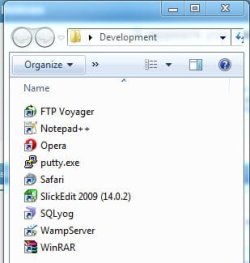
I want to be able to configure these folders differently than other folders. In these folders all I want to see is a list of the programs. No file sizes, no dates, etc and I want to be able to define the size and location of the folder. I can do this for one folder. When I open up another folder it now has the same properties as the last - and I don't want that to happen. I want to set my normal file folders one way and my program folders another. I have the following folder options set:
Open each folder in its own window
Launch folder windows in a separate process
Restore previous folder windows at login
The attached image is how I want my program folders to look. My file folders I to leave as normal.
W7 Ultimate
I have several folders that I keep open at all times that have links to often used programs.
For example, I have one folder that has all my development programs. I have another that has all my Poker programs, another that has all my security programs, etc.I find this a better way to organize my many programs than to leave icons on the desktop.
I want to be able to configure these folders differently than other folders. In these folders all I want to see is a list of the programs. No file sizes, no dates, etc and I want to be able to define the size and location of the folder. I can do this for one folder. When I open up another folder it now has the same properties as the last - and I don't want that to happen. I want to set my normal file folders one way and my program folders another. I have the following folder options set:
Open each folder in its own window
Launch folder windows in a separate process
Restore previous folder windows at login
The attached image is how I want my program folders to look. My file folders I to leave as normal.
W7 Ultimate
Attachments
My Computer
- Computer Manufacturer/Model Number
- home built
- OS
- W7
- CPU
- Q9550
- Motherboard
- GIGABYTE GA-EP45-UD3P
- Memory
- 8G
- Graphics Card(s)
- 7300GT 512MB x 2
- Sound Card
- on mb
- Monitor(s) Displays
- 1 24" 2433BW, 2 19" FP92G+
- Hard Drives
- Western Digital Caviar Black WD6401AALS 640GB
several usb drives
- PSU
- CORSAIR CMPSU-650TX 650W ATX12V / EPS12V
- Case
- rocketfish