
Solved How to Set-up a Static DNS IP Address?

MissSherlock

New member
Member
VIP
Local time
10:50 AM
Messages
131
Hi All,

I need some help sorting out this mess.

System: Windows 7-64 bit (Home Premium)
Router: Asus RT-n66u (LAN connection)
connected to my ISP Modem.

I gather this is a problem with Windows (can't figure out global DNS).

How do I set-up a static DNS IP address? Are there open source addresses available?

I've read that it is best not to change the actual static IP address for my network card because it might create issues with DHCP.

Local Area Connections are currently set-up for "obtain an IP address automatically" and the same for the DNS server. DHCP is enabled.

Is it easier to change this in my router (DNS) and then leave Win7 alone?


Thanks, ms:D
 
Last edited:

My Computer My Computer

At a glance

Windows 7 Home Premium 64bitIntel Core i7-3770, CPU @ 3.4 GHz16 GB RM (4 cores)NVIDIA GeForce GT 630,
Computer type
PC/Desktop
Computer Manufacturer/Model Number
Asus CM-6870
OS
Windows 7 Home Premium 64bit
CPU
Intel Core i7-3770, CPU @ 3.4 GHz
Motherboard
Asus
Memory
16 GB RM (4 cores)
Graphics Card(s)
NVIDIA GeForce GT 630,
Sound Card
Realtek HD Audio standard
Monitor(s) Displays
Asus VE248Q
Screen Resolution
1920 x 1080
Hard Drives
2 TB
PSU
300W
Case
Asus
Cooling
Smart Cooling System and Q-Fan
Keyboard
Microsoft Wireless
Mouse
Microsoft Laser 3500 Wireless
Internet Speed
25 mbps or greater
Antivirus
Bitdefender Total Security 2018
Browser
Firefox/Chrome/IE
Other Info
Firewall - Bitdefender 2018
Printer: HP Officejet Pro 8600 Plus (wireless)
There are lots of free DNS servers on the Internet.

What problems are you having with your current DNS setting?
 

My Computer My Computer

At a glance

W7 Pro SP1 64biti78GBIntel HD Graphics
Computer type
Laptop
Computer Manufacturer/Model Number
Employer provided Dell Latitude
OS
W7 Pro SP1 64bit
CPU
i7
Memory
8GB
Graphics Card(s)
Intel HD Graphics
Hard Drives
crappy SSD
Antivirus
Employer mandated Symantec Endpoint Protection
Browser
Pale Moon 64bit, IE11 64bit & Chrome 64bit
I just found this Link here wich not only shows you how to configure your routers DNS but also shows you how to get some additional safety from using "OpenDNS" servers wich can protect your network from some known malicious websites etc.

I would suggest you make your router work proper and not change your PC. If you add another device to your Network it would just work aswell without need to reconfigure that aswell.

Find a list of free public DNS Servers here.
 

My Computer My Computer

At a glance

Windows 7/8 Pro 64biti5-4670Corsair 16GBGigabyte GeForce 760
Computer type
PC/Desktop
Computer Manufacturer/Model Number
Custom Build
OS
Windows 7/8 Pro 64bit
CPU
i5-4670
Motherboard
Asus Gryphon
Memory
Corsair 16GB
Graphics Card(s)
Gigabyte GeForce 760
Hard Drives
Intel SSD - 180Gb
Hi All,

I need some help sorting out this mess.

System: Windows 7-64 bit (Home Premium)
Router: Asus RT-n66u (LAN connection)
connected to my ISP Modem.

I gather this is a problem with Windows (can't figure out global DNS).

How do I set-up a static DNS IP address? Are there open source addresses available?

I've read that it is best not to change the actual static IP address for my network card because it might create issues with DHCP.

Local Area Connections are currently set-up for "obtain an IP address automatically" and the same for the DNS server. DHCP is enabled.

Is it easier to change this in my router (DNS) and then leave Win7 alone?


Thanks, ms:D

Yes it's easier and preferred to set up the DNS servers in the routers settings rather than going into the IPv4 properties and entering the DNS info there.

As for using static IP's. It's required that you use static IP's which are outside the DHCP's range of IP assignments in order to avoid any IP conflicts.
 

My Computer My Computer

At a glance

Windows 7 Ult, Windows 8.1 Pro,Q9650-4.275GHz, E8600 4.5GHz, E6750-3.8GHzG.Skill PC2 9600 1200Mhz 5 5 5 15 2TGTX480
Computer type
PC/Desktop
Computer Manufacturer/Model Number
Home built
OS
Windows 7 Ult, Windows 8.1 Pro,
CPU
Q9650-4.275GHz, E8600 4.5GHz, E6750-3.8GHz
Motherboard
Evga 780i FTW
Memory
G.Skill PC2 9600 1200Mhz 5 5 5 15 2T
Graphics Card(s)
GTX480
Sound Card
Asus Xonar D2
Monitor(s) Displays
HannsG
Screen Resolution
1680X1050
Hard Drives
GSkill Phoenix Pro 120GB SSD
PSU
ThermalTake Toughpower 1000Watt modular
Case
ThermalTake XaserV
Cooling
Xigmatek S1283
Keyboard
Logitech G15
Mouse
Logitech G9
Internet Speed
T1
Hi Frost, Usernameissues and chev65,

Thanks for the info. :)

As for using static IP's. It's required that you use static IP's which are outside the DHCP's range of IP assignments in order to avoid any IP conflicts.

In this particular case, I just wanted to change the static DNS addresses rather than my IP. Does that still affect the DHCP's range. If so, what are the ranges?

Best, ms:)
 

My Computer My Computer

At a glance

Windows 7 Home Premium 64bitIntel Core i7-3770, CPU @ 3.4 GHz16 GB RM (4 cores)NVIDIA GeForce GT 630,
Computer type
PC/Desktop
Computer Manufacturer/Model Number
Asus CM-6870
OS
Windows 7 Home Premium 64bit
CPU
Intel Core i7-3770, CPU @ 3.4 GHz
Motherboard
Asus
Memory
16 GB RM (4 cores)
Graphics Card(s)
NVIDIA GeForce GT 630,
Sound Card
Realtek HD Audio standard
Monitor(s) Displays
Asus VE248Q
Screen Resolution
1920 x 1080
Hard Drives
2 TB
PSU
300W
Case
Asus
Cooling
Smart Cooling System and Q-Fan
Keyboard
Microsoft Wireless
Mouse
Microsoft Laser 3500 Wireless
Internet Speed
25 mbps or greater
Antivirus
Bitdefender Total Security 2018
Browser
Firefox/Chrome/IE
Other Info
Firewall - Bitdefender 2018
Printer: HP Officejet Pro 8600 Plus (wireless)
No the DNS settings don't really effect the DHCP's range.

The ranges are different depending on the router. The DHCP range is usually somewhere between these two numbers. 192.168.0.2-192.168.0.254

You can enter static DNS IP's in the IPv4 properties.
 

My Computer My Computer

At a glance

Windows 7 Ult, Windows 8.1 Pro,Q9650-4.275GHz, E8600 4.5GHz, E6750-3.8GHzG.Skill PC2 9600 1200Mhz 5 5 5 15 2TGTX480
Computer type
PC/Desktop
Computer Manufacturer/Model Number
Home built
OS
Windows 7 Ult, Windows 8.1 Pro,
CPU
Q9650-4.275GHz, E8600 4.5GHz, E6750-3.8GHz
Motherboard
Evga 780i FTW
Memory
G.Skill PC2 9600 1200Mhz 5 5 5 15 2T
Graphics Card(s)
GTX480
Sound Card
Asus Xonar D2
Monitor(s) Displays
HannsG
Screen Resolution
1680X1050
Hard Drives
GSkill Phoenix Pro 120GB SSD
PSU
ThermalTake Toughpower 1000Watt modular
Case
ThermalTake XaserV
Cooling
Xigmatek S1283
Keyboard
Logitech G15
Mouse
Logitech G9
Internet Speed
T1
Hi Chevy,

I'm finding things are getting more difficult rather than user-friendly with routers, etc.

This is a new router and lots of things are buried under various headings. I think on this router you have to input the primary and secondary DNS IP Addresses when you set-up the router. There doesn't appear to be any place where you can change these numbers within the general panel.

I called Asus Support are they were quite useless.

I'll have to keep checking myself online.

Best, ms
 

My Computer My Computer

At a glance

Windows 7 Home Premium 64bitIntel Core i7-3770, CPU @ 3.4 GHz16 GB RM (4 cores)NVIDIA GeForce GT 630,
Computer type
PC/Desktop
Computer Manufacturer/Model Number
Asus CM-6870
OS
Windows 7 Home Premium 64bit
CPU
Intel Core i7-3770, CPU @ 3.4 GHz
Motherboard
Asus
Memory
16 GB RM (4 cores)
Graphics Card(s)
NVIDIA GeForce GT 630,
Sound Card
Realtek HD Audio standard
Monitor(s) Displays
Asus VE248Q
Screen Resolution
1920 x 1080
Hard Drives
2 TB
PSU
300W
Case
Asus
Cooling
Smart Cooling System and Q-Fan
Keyboard
Microsoft Wireless
Mouse
Microsoft Laser 3500 Wireless
Internet Speed
25 mbps or greater
Antivirus
Bitdefender Total Security 2018
Browser
Firefox/Chrome/IE
Other Info
Firewall - Bitdefender 2018
Printer: HP Officejet Pro 8600 Plus (wireless)
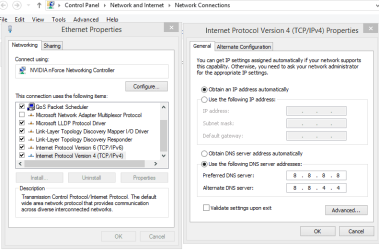
Yes just go to network connections via the Control Panel then right click properties then highlight IPv4 and click the properties button again.

I've typed in Google's DNS server's as an example, just hit Ok when you are done etc. :)
 

Attachments

  • DNS STATIC SET IPV4.PNG
    DNS STATIC SET IPV4.PNG
    18.9 KB · Views: 0

My Computer My Computer

At a glance

Windows 7 Ult, Windows 8.1 Pro,Q9650-4.275GHz, E8600 4.5GHz, E6750-3.8GHzG.Skill PC2 9600 1200Mhz 5 5 5 15 2TGTX480
Computer type
PC/Desktop
Computer Manufacturer/Model Number
Home built
OS
Windows 7 Ult, Windows 8.1 Pro,
CPU
Q9650-4.275GHz, E8600 4.5GHz, E6750-3.8GHz
Motherboard
Evga 780i FTW
Memory
G.Skill PC2 9600 1200Mhz 5 5 5 15 2T
Graphics Card(s)
GTX480
Sound Card
Asus Xonar D2
Monitor(s) Displays
HannsG
Screen Resolution
1680X1050
Hard Drives
GSkill Phoenix Pro 120GB SSD
PSU
ThermalTake Toughpower 1000Watt modular
Case
ThermalTake XaserV
Cooling
Xigmatek S1283
Keyboard
Logitech G15
Mouse
Logitech G9
Internet Speed
T1
Hi Chevy,

Thanks so much for the photoshots for Win7.

Do I need to also include this info on the router? I'm wondering if it would work on the router since my IP is dynamic?

Cheers, ms
 

My Computer My Computer

At a glance

Windows 7 Home Premium 64bitIntel Core i7-3770, CPU @ 3.4 GHz16 GB RM (4 cores)NVIDIA GeForce GT 630,
Computer type
PC/Desktop
Computer Manufacturer/Model Number
Asus CM-6870
OS
Windows 7 Home Premium 64bit
CPU
Intel Core i7-3770, CPU @ 3.4 GHz
Motherboard
Asus
Memory
16 GB RM (4 cores)
Graphics Card(s)
NVIDIA GeForce GT 630,
Sound Card
Realtek HD Audio standard
Monitor(s) Displays
Asus VE248Q
Screen Resolution
1920 x 1080
Hard Drives
2 TB
PSU
300W
Case
Asus
Cooling
Smart Cooling System and Q-Fan
Keyboard
Microsoft Wireless
Mouse
Microsoft Laser 3500 Wireless
Internet Speed
25 mbps or greater
Antivirus
Bitdefender Total Security 2018
Browser
Firefox/Chrome/IE
Other Info
Firewall - Bitdefender 2018
Printer: HP Officejet Pro 8600 Plus (wireless)
Hi Chevy,

Thanks so much for the photoshots for Win7.

Do I need to also include this info on the router? I'm wondering if it would work on the router since my IP is dynamic?

Cheers, ms

For static DNS you only need to enter it where I showed in IPv4.

When the router handles the DNS then the ipconfig/all will show the router's default gateway IP as the DNS server.
 

My Computer My Computer

At a glance

Windows 7 Ult, Windows 8.1 Pro,Q9650-4.275GHz, E8600 4.5GHz, E6750-3.8GHzG.Skill PC2 9600 1200Mhz 5 5 5 15 2TGTX480
Computer type
PC/Desktop
Computer Manufacturer/Model Number
Home built
OS
Windows 7 Ult, Windows 8.1 Pro,
CPU
Q9650-4.275GHz, E8600 4.5GHz, E6750-3.8GHz
Motherboard
Evga 780i FTW
Memory
G.Skill PC2 9600 1200Mhz 5 5 5 15 2T
Graphics Card(s)
GTX480
Sound Card
Asus Xonar D2
Monitor(s) Displays
HannsG
Screen Resolution
1680X1050
Hard Drives
GSkill Phoenix Pro 120GB SSD
PSU
ThermalTake Toughpower 1000Watt modular
Case
ThermalTake XaserV
Cooling
Xigmatek S1283
Keyboard
Logitech G15
Mouse
Logitech G9
Internet Speed
T1
Hi Chev,

I changed both the Home Local Area Connection (LAC) and the Public LAC (Tap 32 v9 adapter).

Brilliant! Fingers crossed, it's working like a charm.

I did an ipconfig /all and I can see the DNS address as Google. Did a couple of DNS Leaks Tests and my personal IP address cannot be seen.

Many many thanks Chev.

Cheers, ms :):):)
 
Last edited:

My Computer My Computer

At a glance

Windows 7 Home Premium 64bitIntel Core i7-3770, CPU @ 3.4 GHz16 GB RM (4 cores)NVIDIA GeForce GT 630,
Computer type
PC/Desktop
Computer Manufacturer/Model Number
Asus CM-6870
OS
Windows 7 Home Premium 64bit
CPU
Intel Core i7-3770, CPU @ 3.4 GHz
Motherboard
Asus
Memory
16 GB RM (4 cores)
Graphics Card(s)
NVIDIA GeForce GT 630,
Sound Card
Realtek HD Audio standard
Monitor(s) Displays
Asus VE248Q
Screen Resolution
1920 x 1080
Hard Drives
2 TB
PSU
300W
Case
Asus
Cooling
Smart Cooling System and Q-Fan
Keyboard
Microsoft Wireless
Mouse
Microsoft Laser 3500 Wireless
Internet Speed
25 mbps or greater
Antivirus
Bitdefender Total Security 2018
Browser
Firefox/Chrome/IE
Other Info
Firewall - Bitdefender 2018
Printer: HP Officejet Pro 8600 Plus (wireless)
Back
Top