how to setup a network name to work like SSID on lan network.

markush4422

New member
Local time
9:52 PM
Messages
6
Hi I read a forum on how to change your network name and icon but have a network that i would like to setup if you plug in the network cable it must change or identify it as that network automatically. with Icon and business name.

Can some one help please?
 

My Computer My Computer

At a glance

win7 ultimate X64
OS
win7 ultimate X64
Welcome to Seven Forums,

Is your Network on a Homegroup, Workgroup or Domain (with a Server)?
 

My Computer My Computer

At a glance

Win7 & Win8 64bitIntel i5
Computer Manufacturer/Model Number
Lenovo Desktop/Samsung Laptop
OS
Win7 & Win8 64bit
CPU
Intel i5
Internet Speed
Charter-20 Mbps
Antivirus
Avast
Browser
FF, IE9 and Chrome
Hi 2xg its an normal workgroup network.
 

My Computer My Computer

At a glance

win7 ultimate X64
OS
win7 ultimate X64
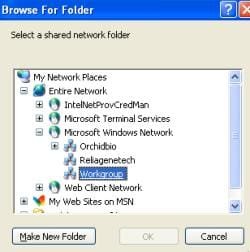
I hope that this is what you meant, please see attached picture. In My Network Places, there's a Workgroup Name called Workgroup. In reality, you should be able to create a more Unique Name other than Workgroup.
How to create a Workgroup?
 

Attachments

  • workgroup.jpg
    workgroup.jpg
    10.9 KB · Views: 534

My Computer My Computer

At a glance

Win7 & Win8 64bitIntel i5
Computer Manufacturer/Model Number
Lenovo Desktop/Samsung Laptop
OS
Win7 & Win8 64bit
CPU
Intel i5
Internet Speed
Charter-20 Mbps
Antivirus
Avast
Browser
FF, IE9 and Chrome
Or Follow this,

Right Click on "MyComputer"

On the right, Click "Change Settings"

Then Click "Change"

Then Rename the "Workgroup" To anything you want.

Ensure you do this too all PC's on the network.
 

My Computer My Computer

At a glance

Windows 7 Home PreQ8200 Intell 2.333DDR3 1333 4gigAti HD4870
Computer Manufacturer/Model Number
Home Build.
OS
Windows 7 Home Pre
CPU
Q8200 Intell 2.333
Motherboard
Asus P5Q3 Delux
Memory
DDR3 1333 4gig
Graphics Card(s)
Ati HD4870
Sound Card
Onboard Soundmax. 7.1
Monitor(s) Displays
1, 20" Samsung
Screen Resolution
1600/900
PSU
Good enough
Case
Le Shark
Cooling
FAN FAN FAN FAN, Thermaltake Minitype 90 with speed fan 4.
Keyboard
Standard, Gaming Wolfking
Mouse
Cm-storm-inferno-wired-gaming-mouse
Internet Speed
Sky Crappy upto 20meg I get a whapping 5.8mbs.
Hi guys thanks for all the reply's

both of these will work but it is both manual not auto when a new computer gets plugged into my network they will see "Network 9" not "SatioBS" the aim is so that i works like an SSID on wireless when you go to a hotspot in mcdonalds it says "mcdonads hotspot" not "network10"> so when someone that has never been on my network plug in they see "SatioBS" not "network x"
 

My Computer My Computer

At a glance

win7 ultimate X64
OS
win7 ultimate X64
i run a win7 server and in very basic dhcp one adapter is internet and the other adapter is the one that connects to an HP5500G switch, to monitor the network.
 

My Computer My Computer

At a glance

win7 ultimate X64
OS
win7 ultimate X64
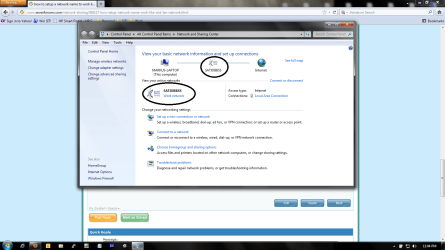
this is an attachment that will help to understand this better, the marked areas i want to automate when someone plug into my switchUntitled.png
 

My Computer My Computer

At a glance

win7 ultimate X64
OS
win7 ultimate X64
I'm not sure what your asking is possible given that the router is designed for a one name only network...I think. You might want to put in a service ticket to your routers help/support department and see it they can't get you squared away. You've raised an interesting question/point, one that I would be very interested in. Let me know what you find out.
 

My Computer My Computer

At a glance

Windows 7 Ultimate 64 bitAMD Phenom II X4 965 Black EditionGSkill 4 X 2 GB PC 8500XFX Radeon HD 6790 D
Computer Manufacturer/Model Number
Custom built
OS
Windows 7 Ultimate 64 bit
CPU
AMD Phenom II X4 965 Black Edition
Motherboard
Gigabyte GA-MA790X-DS4
Memory
GSkill 4 X 2 GB PC 8500
Graphics Card(s)
XFX Radeon HD 6790 D
Sound Card
On board RealTek HD
Monitor(s) Displays
Dual monitors:Samsung SyncMaster S20B300
Screen Resolution
1600 X 900
Hard Drives
Seagate Barracuda 1TB (primary)
Seagate Barracuda 2 X 320 GB
PSU
Ultra X4 750 watt fully modular
Case
Thermaltake Overseer RX 1 full tower
Cooling
Core-Contact 92 mm CPU Cooler
Keyboard
Logitech G510
Mouse
Razor DeathAdder
Internet Speed
50/5 Mbps UL/DL
Other Info
Optical: Super Muliti DVD burner w/lightscribe, Hauppauge WinTV HVR-1800
Hi Bass thanks but the wireless router works fine with the ssid transmitting and when anyone connect to it, it displays "SatioBS" that is what i want for my lan network as well. i can rename very pc manual and change the icon but the router that run"s the adsl connection is not wireless and is connected to a win7 server that is working like a dhcp with 2 lan adapters so that is the question : when a new person starts working for us as he plug's his computer into my network via cable he must get an ip and it must look like the attached image not the normal "home, work or public network" although it will still be a 'work network' the logo and name must be as attached.

I am looking around to see if i can get something that will help me but i will keep everyone up to date.
 

My Computer My Computer

At a glance

win7 ultimate X64
OS
win7 ultimate X64
I have exactly same issue. If you find any solution please let me know.
 
Last edited by a moderator:

My Computer My Computer

At a glance

Windows 7 64 biti54GB
Computer type
Laptop
Computer Manufacturer/Model Number
Dell
OS
Windows 7 64 bit
CPU
i5
Memory
4GB
Hard Drives
500GB
Back
Top