How to share folders between 3 or more PCs?

I can write to main folders like Documents, Pictures etc... I can't write in folder Desktop

edit: tried to share another folder on laptop. From desktop I can write there fine, so there is problem with Desktop folder..

edit2:
- desktop folder - see only:
homegroup: write/read
laptop's name: write/read


other shared folder - see:
Administrators - Owner
homegroup: write/read
laptop's name: write/read
everyone: write/read
 

My Computer My Computer

At a glance

Windows 7 Ultimate 64bitIntel Core 2 Duo E7300, 2666 MHzKingston HyperX 4096 MB (DDR2-667 DDR2 SDRAMATI Radeon HD 4850
Computer type
PC/Desktop
OS
Windows 7 Ultimate 64bit
CPU
Intel Core 2 Duo E7300, 2666 MHz
Motherboard
Gigabyte GA-EP45-DS3R
Memory
Kingston HyperX 4096 MB (DDR2-667 DDR2 SDRAM
Graphics Card(s)
ATI Radeon HD 4850
Sound Card
ATI Radeon HDMI @ ATI RV770
Monitor(s) Displays
Samsung 22"
Screen Resolution
1680x1050
Hard Drives
ST31000340AS ATA Device (1000 GB, 7200 RPM, SATA-II)
Case
Thermaltake Bach VX
Internet Speed
300/30mbps
Antivirus
Avira Free
Browser
Chrome
I can write to main folders like Documents, Pictures etc... I can't write in folder Desktop

edit: tried to share another folder on laptop. From desktop I can write there fine, so there is problem with Desktop folder..

edit2:
- desktop folder - see only:
homegroup: write/read
laptop's name: write/read


other shared folder - see:
Administrators - Owner
homegroup: write/read
laptop's name: write/read
everyone: write/read

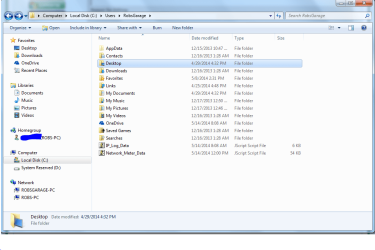
Sharing the Desktop can usually be done the same way.

You just need to start at the C: drive assuming that is the drive the OP system was installed on.

You can see the correct path in the picture, DO NOT start at the Network location, you need to do this from the root of the C: drive so take notice of the path which starts at "Computer" C: drive, Users folder, then Username folder then finally Desktop folder.

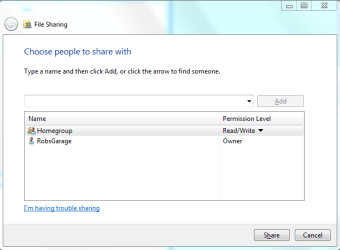
From this point the procedure is the same as before but you need to click on the drop down list and add the "Homegroup" to the list, then add read/write permissions THEN hit the Share button to propagate the share.

Team Viewer won't help at all unless you know EXACTLY WHAT YOU ARE DOING, and it's simply not required for such a simple procedure. The vast majority of people do not know how to do this properly.

These direction are iron clad and very simple to follow. :)
 

Attachments

  • highlight DESKTOP.PNG
    highlight DESKTOP.PNG
    43.3 KB · Views: 0
  • add HOMEGROUP TO LIST.PNG
    add HOMEGROUP TO LIST.PNG
    14.4 KB · Views: 9
  • DESKTOP HOMEGROUP READ WRITE.PNG
    DESKTOP HOMEGROUP READ WRITE.PNG
    14.1 KB · Views: 9
Last edited:

My Computer My Computer

At a glance

Windows 7 Ult, Windows 8.1 Pro,Q9650-4.275GHz, E8600 4.5GHz, E6750-3.8GHzG.Skill PC2 9600 1200Mhz 5 5 5 15 2TGTX480
Computer type
PC/Desktop
Computer Manufacturer/Model Number
Home built
OS
Windows 7 Ult, Windows 8.1 Pro,
CPU
Q9650-4.275GHz, E8600 4.5GHz, E6750-3.8GHz
Motherboard
Evga 780i FTW
Memory
G.Skill PC2 9600 1200Mhz 5 5 5 15 2T
Graphics Card(s)
GTX480
Sound Card
Asus Xonar D2
Monitor(s) Displays
HannsG
Screen Resolution
1680X1050
Hard Drives
GSkill Phoenix Pro 120GB SSD
PSU
ThermalTake Toughpower 1000Watt modular
Case
ThermalTake XaserV
Cooling
Xigmatek S1283
Keyboard
Logitech G15
Mouse
Logitech G9
Internet Speed
T1
so there is no way how to copy files from PC1 to PC2 (in folder Desktop)?
 

My Computer My Computer

At a glance

Windows 7 Ultimate 64bitIntel Core 2 Duo E7300, 2666 MHzKingston HyperX 4096 MB (DDR2-667 DDR2 SDRAMATI Radeon HD 4850
Computer type
PC/Desktop
OS
Windows 7 Ultimate 64bit
CPU
Intel Core 2 Duo E7300, 2666 MHz
Motherboard
Gigabyte GA-EP45-DS3R
Memory
Kingston HyperX 4096 MB (DDR2-667 DDR2 SDRAM
Graphics Card(s)
ATI Radeon HD 4850
Sound Card
ATI Radeon HDMI @ ATI RV770
Monitor(s) Displays
Samsung 22"
Screen Resolution
1680x1050
Hard Drives
ST31000340AS ATA Device (1000 GB, 7200 RPM, SATA-II)
Case
Thermaltake Bach VX
Internet Speed
300/30mbps
Antivirus
Avira Free
Browser
Chrome
I can write to main folders like Documents, Pictures etc... I can't write in folder Desktop

edit: tried to share another folder on laptop. From desktop I can write there fine, so there is problem with Desktop folder..

edit2:
- desktop folder - see only:
homegroup: write/read
laptop's name: write/read


other shared folder - see:
Administrators - Owner
homegroup: write/read
laptop's name: write/read
everyone: write/read

Sharing the Desktop folder is a completely different procedure than sharing a Library.

I had him add the Desktop folder to the Library, then share it that way. If there is a more efficient way to do so you can post it. I don't do homegroups so Im tapped out on my suggestions as far as getting the desktop to be completely shared.

I know how to do it from a VM in Linux but not Windows/Windows... Go figure. :o
 

My Computer My Computer

At a glance

Dual Boot: Windows 8.1 & Server 2012r2 VMs: K...A10 7700 Kavari SteamRoller8GB DDR3 SDRAM PC3-85001024MB ATI AMD Radeon R7 Graphics
Computer type
PC/Desktop
Computer Manufacturer/Model Number
Custom
OS
Dual Boot: Windows 8.1 & Server 2012r2 VMs: Kali Linux, Backbox, Matriux, Windows 8.1
CPU
A10 7700 Kavari SteamRoller
Motherboard
ASUS A88XM-PLUS (FM2+ )
Memory
8GB DDR3 SDRAM PC3-8500
Graphics Card(s)
1024MB ATI AMD Radeon R7 Graphics
Sound Card
Realtek High Definition Audio
Monitor(s) Displays
Samsung
Hard Drives
SSD Crucial 120gb
WD VelociRaptor 1tb
PSU
Rosewill Gaming 650w
Case
Rosewill Galaxy 2
Internet Speed
55/12
Antivirus
Malwarebytes, MSE, SAS
Browser
FireFox, Chrome
so there is no way how to copy files from PC1 to PC2 (in folder Desktop)?
You could still try using Teamviewer. That should work as well.
 

My Computer My Computer

At a glance

Dual Boot: Windows 8.1 & Server 2012r2 VMs: K...A10 7700 Kavari SteamRoller8GB DDR3 SDRAM PC3-85001024MB ATI AMD Radeon R7 Graphics
Computer type
PC/Desktop
Computer Manufacturer/Model Number
Custom
OS
Dual Boot: Windows 8.1 & Server 2012r2 VMs: Kali Linux, Backbox, Matriux, Windows 8.1
CPU
A10 7700 Kavari SteamRoller
Motherboard
ASUS A88XM-PLUS (FM2+ )
Memory
8GB DDR3 SDRAM PC3-8500
Graphics Card(s)
1024MB ATI AMD Radeon R7 Graphics
Sound Card
Realtek High Definition Audio
Monitor(s) Displays
Samsung
Hard Drives
SSD Crucial 120gb
WD VelociRaptor 1tb
PSU
Rosewill Gaming 650w
Case
Rosewill Galaxy 2
Internet Speed
55/12
Antivirus
Malwarebytes, MSE, SAS
Browser
FireFox, Chrome
chev65 you are a tease:)
Advanced sharing.
 

My Computer My Computer

At a glance

Windows 7 Ultimate x64AMD turion 64x2 TL-64 2.2GhzSodimm DDR2 4GBATI Radeon 1250 128MB IGP
Computer Manufacturer/Model Number
HP Compaq 6715B
OS
Windows 7 Ultimate x64
CPU
AMD turion 64x2 TL-64 2.2Ghz
Motherboard
HC030
Memory
Sodimm DDR2 4GB
Graphics Card(s)
ATI Radeon 1250 128MB IGP
Hard Drives
Fujitsu Siemens 500GB sata 3.0 Gb/s
chev65 you are a tease:)
Advanced sharing.

Been there done that so many times. The method I showed is THE ONLY WAY which makes it the best way. :)

As for advanced NTFS sharing, it's a fairly complicated procedure which is one of the reasons they came up with Homegroups in the first place.

If you really want to learn about how NTFS share permissions work then knock yourself out by reading through the following link.

http://msmvps.com/blogs/acefekay/ar...er-access-control-amp-folder-permissions.aspx
 

My Computer My Computer

At a glance

Windows 7 Ult, Windows 8.1 Pro,Q9650-4.275GHz, E8600 4.5GHz, E6750-3.8GHzG.Skill PC2 9600 1200Mhz 5 5 5 15 2TGTX480
Computer type
PC/Desktop
Computer Manufacturer/Model Number
Home built
OS
Windows 7 Ult, Windows 8.1 Pro,
CPU
Q9650-4.275GHz, E8600 4.5GHz, E6750-3.8GHz
Motherboard
Evga 780i FTW
Memory
G.Skill PC2 9600 1200Mhz 5 5 5 15 2T
Graphics Card(s)
GTX480
Sound Card
Asus Xonar D2
Monitor(s) Displays
HannsG
Screen Resolution
1680X1050
Hard Drives
GSkill Phoenix Pro 120GB SSD
PSU
ThermalTake Toughpower 1000Watt modular
Case
ThermalTake XaserV
Cooling
Xigmatek S1283
Keyboard
Logitech G15
Mouse
Logitech G9
Internet Speed
T1
It was the way i was taught as well by myself.;)

Renik has that solved your issues do what chev65 has shown you if you have other folders like this.
 

My Computer My Computer

At a glance

Windows 7 Ultimate x64AMD turion 64x2 TL-64 2.2GhzSodimm DDR2 4GBATI Radeon 1250 128MB IGP
Computer Manufacturer/Model Number
HP Compaq 6715B
OS
Windows 7 Ultimate x64
CPU
AMD turion 64x2 TL-64 2.2Ghz
Motherboard
HC030
Memory
Sodimm DDR2 4GB
Graphics Card(s)
ATI Radeon 1250 128MB IGP
Hard Drives
Fujitsu Siemens 500GB sata 3.0 Gb/s
Back
Top