
You are using an out of date browser. It may not display this or other websites correctly.
You should upgrade or use an alternative browser.
You should upgrade or use an alternative browser.
how to share my hardrive with another pc
- Thread starter kokoz1635
- Start date

Hello,
I just did this myself this morning, so it is fresh in my mind.
In My Computer, right-click on the drive and go to Share With>Advanced Sharing. In the resulting windows, click on Advanced Sharing and give Everyone full permissions.
Hope this helps,
~JK
I just did this myself this morning, so it is fresh in my mind.
In My Computer, right-click on the drive and go to Share With>Advanced Sharing. In the resulting windows, click on Advanced Sharing and give Everyone full permissions.
Hope this helps,
~JK
My Computer
At a glance
Windows 7 Professional x64Intel i7 2600K OC'd @ 4620 MHz16GB GSkill Sniper 2133 Mhz (4x4GB)EVGA GeForce GTX 480 SuperClocked+
- Computer Manufacturer/Model Number
- Custom
- OS
- Windows 7 Professional x64
- CPU
- Intel i7 2600K OC'd @ 4620 MHz
- Motherboard
- Asus P8Z68-V Pro
- Memory
- 16GB GSkill Sniper 2133 Mhz (4x4GB)
- Graphics Card(s)
- EVGA GeForce GTX 480 SuperClocked+
- Sound Card
- Realtek High Definition Audio
- Monitor(s) Displays
- 2x Acer S273HLbmii 27"
- Screen Resolution
- 2 x 1920x1080
- Hard Drives
- 64GB Crucial M4 SSD
Storage: Hitachi 1TB 5400RPM, Samsung 1.5TB 5400RPM
- PSU
- Corsair HW Series 750w (modular)
- Case
- Cooler Master HAF 932 Advanced Blue Edition
- Cooling
- CM Hyper 212+ CPU cooler, 3x 230mm + 1x 140mm case fans
- Keyboard
- Logitech MK320 (wireless)
- Mouse
- Logitech MK320 (wireless)
- Internet Speed
- 30 Mb/s : 2 Mb/s

I will say give the folder's full permission also that you need inside the Hard Drive
Hope that helps
Hope that helps
My Computer
At a glance
Windows 7 and MACNVIDIA 9200 GT
- Computer Manufacturer/Model Number
- Microsoft
- OS
- Windows 7 and MAC
- Graphics Card(s)
- NVIDIA 9200 GT
- Sound Card
- NvIdiA

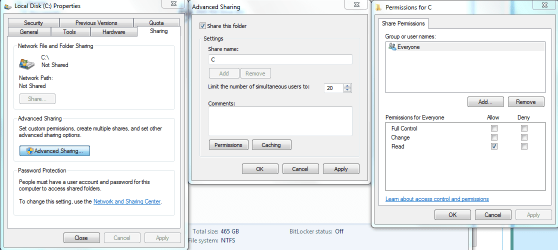
Although sharing the entire driver is not advisable due to security reasons, I had this picture laying around that shows the process pretty well.
Just right click the drive you want to share, hit the share with button then advanced sharing then advanced sharing again, put the check mark to share this folder in the middle window then hit apply, then hit the permissions button. You will also need to put check marks in the permissions window on the right and hit the apply button.
Just right click the drive you want to share, hit the share with button then advanced sharing then advanced sharing again, put the check mark to share this folder in the middle window then hit apply, then hit the permissions button. You will also need to put check marks in the permissions window on the right and hit the apply button.
Attachments
My Computer
At a glance
Windows 7 Ult, Windows 8.1 Pro,Q9650-4.275GHz, E8600 4.5GHz, E6750-3.8GHzG.Skill PC2 9600 1200Mhz 5 5 5 15 2TGTX480
- Computer type
- PC/Desktop
- Computer Manufacturer/Model Number
- Home built
- OS
- Windows 7 Ult, Windows 8.1 Pro,
- CPU
- Q9650-4.275GHz, E8600 4.5GHz, E6750-3.8GHz
- Motherboard
- Evga 780i FTW
- Memory
- G.Skill PC2 9600 1200Mhz 5 5 5 15 2T
- Graphics Card(s)
- GTX480
- Sound Card
- Asus Xonar D2
- Monitor(s) Displays
- HannsG
- Screen Resolution
- 1680X1050
- Hard Drives
- GSkill Phoenix Pro 120GB SSD
- PSU
- ThermalTake Toughpower 1000Watt modular
- Case
- ThermalTake XaserV
- Cooling
- Xigmatek S1283
- Keyboard
- Logitech G15
- Mouse
- Logitech G9
- Internet Speed
- T1