
You are using an out of date browser. It may not display this or other websites correctly.
You should upgrade or use an alternative browser.
You should upgrade or use an alternative browser.
How to share network connection with wii?
- Thread starter zooploi
- Start date


You'll be plugging your wii into the computer for this.
1. Plug in your console (WII, Xbox 360, PS3) and allow it to acquiring ip address.
2. click on the Windows button and type "network and sharing center" and enter
3. on the left right under manage wireless networks, should say change adapter settings click that
4. right click local area connection and disable it.
5. right click local area connection and click properties.
6. there should be a tab that says sharing go to that tab.
7. there is a box that says allow other network users to connect through this computers internet connection. uncheck it if it is checked.
8.hit ok then right click local area connection and enable it.
9 now select both your wireless network connection and the local area connection and right click and it should have the option to bridge connections. when you click bridge it will do its thing and should work when its done.
1. Plug in your console (WII, Xbox 360, PS3) and allow it to acquiring ip address.
2. click on the Windows button and type "network and sharing center" and enter
3. on the left right under manage wireless networks, should say change adapter settings click that
4. right click local area connection and disable it.
5. right click local area connection and click properties.
6. there should be a tab that says sharing go to that tab.
7. there is a box that says allow other network users to connect through this computers internet connection. uncheck it if it is checked.
8.hit ok then right click local area connection and enable it.
9 now select both your wireless network connection and the local area connection and right click and it should have the option to bridge connections. when you click bridge it will do its thing and should work when its done.
My Computer
At a glance
Windows 7 x64Intel i7 2600kG.skill Ripjaw 16gigs @ 1866Nvidia gtx580 (evga)
- Computer Manufacturer/Model Number
- Insane hobo technologies. ;-)
- OS
- Windows 7 x64
- CPU
- Intel i7 2600k
- Motherboard
- Asrock z68 extreme 4 gen 3
- Memory
- G.skill Ripjaw 16gigs @ 1866
- Graphics Card(s)
- Nvidia gtx580 (evga)
- Sound Card
- Integrated HD audio + hdmi
- Monitor(s) Displays
- 24" ASUS widescreen + 42" insignia
- Screen Resolution
- 1080p (1920x1080)
- Hard Drives
- 128 Samsung 830
256 Samsung 840
3 x 1tb storage drive (various)
1 western digital 1tb (eSATA)
1 Seagate 1tb (eSATA)
- PSU
- 1 kilowatt SLI/Crossfire rated Silverstone modular
- Case
- NZXT Phantom + additional 220 fan
- Cooling
- Zalmann
- Keyboard
- Microsoft wireless 3000 (v2)
- Mouse
- MS - wireless 5000 (bluetrack)
- Internet Speed
- depends on if you ask me or my provider.
- Other Info
- The above information is provided as is, and the author assumes no responsibility for issues it may cause with your sanity or fanboyism.
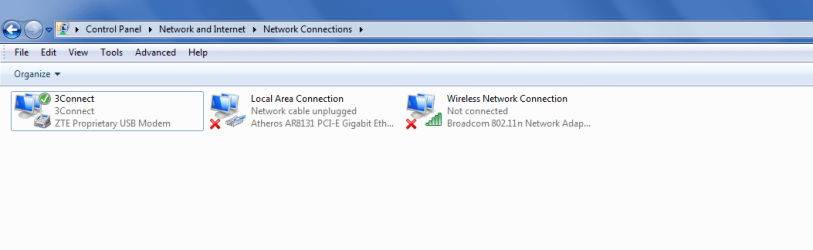
I got all the way up to the last step, but it came up with this:
To create a Network Bridge, you must select at least two LAN or High-Speed Internet connections that are not being used by Internet Connection Sharing.
What should I do? there is also another network connection which says 3connect, what do I do instead? And thanks for helping :3
I added an attachment of the connections, if that'll help.
To create a Network Bridge, you must select at least two LAN or High-Speed Internet connections that are not being used by Internet Connection Sharing.
What should I do? there is also another network connection which says 3connect, what do I do instead? And thanks for helping :3
I added an attachment of the connections, if that'll help.
Attachments
Last edited:
My Computer
At a glance
Windows 7
- OS
- Windows 7
You will want to join the main connection (the one your computer uses) with the connection the wii is using. That is a strange looking set up. I'm not 100% sure it'll work like that. It would probably be easier if the wii was physically connected to the machine which is not what I'm being shown in that image.
My Computer
At a glance
Windows 7 x64Intel i7 2600kG.skill Ripjaw 16gigs @ 1866Nvidia gtx580 (evga)
- Computer Manufacturer/Model Number
- Insane hobo technologies. ;-)
- OS
- Windows 7 x64
- CPU
- Intel i7 2600k
- Motherboard
- Asrock z68 extreme 4 gen 3
- Memory
- G.skill Ripjaw 16gigs @ 1866
- Graphics Card(s)
- Nvidia gtx580 (evga)
- Sound Card
- Integrated HD audio + hdmi
- Monitor(s) Displays
- 24" ASUS widescreen + 42" insignia
- Screen Resolution
- 1080p (1920x1080)
- Hard Drives
- 128 Samsung 830
256 Samsung 840
3 x 1tb storage drive (various)
1 western digital 1tb (eSATA)
1 Seagate 1tb (eSATA)
- PSU
- 1 kilowatt SLI/Crossfire rated Silverstone modular
- Case
- NZXT Phantom + additional 220 fan
- Cooling
- Zalmann
- Keyboard
- Microsoft wireless 3000 (v2)
- Mouse
- MS - wireless 5000 (bluetrack)
- Internet Speed
- depends on if you ask me or my provider.
- Other Info
- The above information is provided as is, and the author assumes no responsibility for issues it may cause with your sanity or fanboyism.
The Wii should acquire a ip address when you hook it to the computer.
It should do that regardless of anything else. It won't see the internet until the connection is bridged though.
Regardless here is some extended configuration information I came across this guy seems to know what he's talking about.
You may want to research the connection settings for the wireless you specifically have, many of them use the 198.162 ip config though.
It should do that regardless of anything else. It won't see the internet until the connection is bridged though.
Regardless here is some extended configuration information I came across this guy seems to know what he's talking about.
On the host computer, follow these steps to share the Internet connection:
1.Log on to the host computer as Administrator or as Owner.
2.Click Start, and then click Control Panel.
3.Click Network and Internet Connections.
4.Click Network Connections.
5.Right-click the connection that you use to connect to the Internet ( In my case the Vodafone Mobile Connection ). For example, if you connect to the Internet by using a modem, right-click the connection that you want under Dial-up.
6.Click Properties.
7.Click the Advanced tab.
8.Under Internet Connection Sharing, select the Allow other network users to connect through this computer's Internet connection check box.
9.If you are sharing a dial-up Internet connection, select the Establish a dial-up connection whenever a computer on my network attempts to access the Internet check box if you want to permit your computer to automatically connect to the Internet.
10.Click OK. You receive the following message: When Internet Connection Sharing is enabled, your LAN adapter will be set to use IP
address 192.168.0.1. Your computer may lose connectivity with other computers on your network. If these other computers have static IP addresses, it is a good idea to set them to obtain their IP addresses automatically. Are you sure you want to enable Internet Connection Sharing?
11.Click Yes.
The instructions above are good for the Host side. The only part I have different is the Establish a dial-up connection whenever a computer on my network attempts to access the Internet is not checked on mine, I dial up on the PC before attempting connection on the Wii but it might work for you.
Also, ensure that under 'Home Networking Connection' that 'Local Area Connection' is selected ( this is the wired connection to you router).
( UPDATE: automatic dial didn't work for me so I just manually do it before trying to connect Wii/PSP/DS/Xbox360 to internet )
Wii Setup
-----------
On the Wii side "automatic detection" is not good. Has worked but is very hit and miss, once in a blue moon for me, so I set the values manually.
IP Address
192.168.0.2 ( Last number can be any unique number in range 2 - 255 )
Subnet Mask
255.255.255.0
Default Router
192.168.0.1 ( Must be this when sharing internet connection )
Primary DNS
192.168.0.1
Secondary DNS
000.000.000.000
I have a Linksys WRT54GS v5.1 with default settings ( return to factory defaults by holding the reset button for about 20 seconds ). Hence no firewall or security settings.
Connects 99.9% of the time now. The 0.1% could be just poor signal on my Vodafone Mobile Broadband dongle. I even connected my PSP using the same method. Works fine. Also my NDS can now go online with the above method. So too can my Xbox360, although this is wired to my router and so DHCP seems to work ok for it too.
As a sanity check I hooked up another old wireless router, a ZyXEL P-660HW-D1 instead of the Linksys, also reset to factor defaults. This works fine too.
Happy Days. Next step is to enable WEP/WPA security and try it out but I don't expect any issues here.
Hope this helps some people.
UPDATE: WEP working ok. WPA working ok ( NDS doesn't support this ).
Did try WPA2 but PSP doesn't support this. So WEP is needed to cover all consoles.
Forgot to say how I originally got the above settings. When I wired my Xbox360 to the router it correctly setup automatically with those settings so tried them on the Wii ( with unique IP address ). It was the 'Primary DNS' setting that I had been missing on previous attempts, I had just left this blank.
NOTE: if you need to connect to your router then you need to uncheck the box 'Allow other network users to connect through this computer's Internet connection' and disconnect from the internet. Otherwise, for me anyway I cannot connect to my router to change security settings etc. Just re-check the box before dialing back up and trying to connect your console to the internet again.
You may want to research the connection settings for the wireless you specifically have, many of them use the 198.162 ip config though.
My Computer
At a glance
Windows 7 x64Intel i7 2600kG.skill Ripjaw 16gigs @ 1866Nvidia gtx580 (evga)
- Computer Manufacturer/Model Number
- Insane hobo technologies. ;-)
- OS
- Windows 7 x64
- CPU
- Intel i7 2600k
- Motherboard
- Asrock z68 extreme 4 gen 3
- Memory
- G.skill Ripjaw 16gigs @ 1866
- Graphics Card(s)
- Nvidia gtx580 (evga)
- Sound Card
- Integrated HD audio + hdmi
- Monitor(s) Displays
- 24" ASUS widescreen + 42" insignia
- Screen Resolution
- 1080p (1920x1080)
- Hard Drives
- 128 Samsung 830
256 Samsung 840
3 x 1tb storage drive (various)
1 western digital 1tb (eSATA)
1 Seagate 1tb (eSATA)
- PSU
- 1 kilowatt SLI/Crossfire rated Silverstone modular
- Case
- NZXT Phantom + additional 220 fan
- Cooling
- Zalmann
- Keyboard
- Microsoft wireless 3000 (v2)
- Mouse
- MS - wireless 5000 (bluetrack)
- Internet Speed
- depends on if you ask me or my provider.
- Other Info
- The above information is provided as is, and the author assumes no responsibility for issues it may cause with your sanity or fanboyism.
Similar threads
- Replies
- 9
- Views
- 4K

- Replies
- 3
- Views
- 6K
- Replies
- 6
- Views
- 37K