Solved How to show the hidden system drive (100 mb)?

addas

New member
Member
Local time
2:53 PM
Messages
66
Hello Everybody!
Please I want to see the hidden system drive (100 mb), because the bootmgr.exe is there and I want to replace it for my boot screen changer! PLEASE ANYONE TELL ME HOW!!! :cry:

Thanks!
addas
 

My Computer My Computer

At a glance

Windows 8 Pro with WMC 64-bitIntel Core 2 Duo T6400
Computer type
Laptop
Computer Manufacturer/Model Number
Acer Aspire 4935G
OS
Windows 8 Pro with WMC 64-bit
CPU
Intel Core 2 Duo T6400
Motherboard
Acer Aspire 4935 Board
Screen Resolution
1366 X 768
Case
Laptop
Internet Speed
4 mbps
I'm pretty sure you don't need to access that partition to change your boot manager. If so, then that would be my warning sign to not continue.
 

My Computer My Computer

At a glance

Windows 7 Ultimate x64 SP1Intel Core i7-260012 GB Patriot Extreme DDR3-1333Nvidia GTX 470
OS
Windows 7 Ultimate x64 SP1
CPU
Intel Core i7-2600
Motherboard
Gigabyte GA-P67A-UD3P-B3
Memory
12 GB Patriot Extreme DDR3-1333
Graphics Card(s)
Nvidia GTX 470
Monitor(s) Displays
Dell UltraSharp 2209WA
Hard Drives
OCZ Agility3 240 GB, WD5001AALS, WD7501AALS
PSU
OCZ ModStream 700W
Case
CoolerMaster HAF 912 Advanced
Cooling
CoolerMaster Hyper 212 Plus
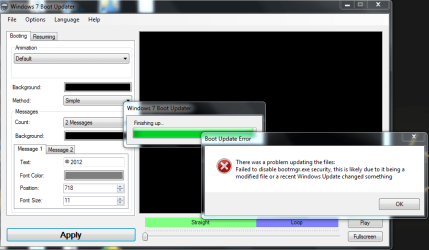
Can you help me with my error without showing the hidden system drive? This is the error attached!

Thanks!
addas
 

Attachments

  • Boot ERROR.PNG
    Boot ERROR.PNG
    30.1 KB · Views: 78

My Computer My Computer

At a glance

Windows 8 Pro with WMC 64-bitIntel Core 2 Duo T6400
Computer type
Laptop
Computer Manufacturer/Model Number
Acer Aspire 4935G
OS
Windows 8 Pro with WMC 64-bit
CPU
Intel Core 2 Duo T6400
Motherboard
Acer Aspire 4935 Board
Screen Resolution
1366 X 768
Case
Laptop
Internet Speed
4 mbps
DeaconFrost is right about one thing: what you're wanting to do is risky. If you're going to modify the bootmgr file, at least make a backup copy of it first. Anything goes wrong, you can then restore that backup using your Windows recovery disc in the command prompt.

That said, making the system partition accessible is easily done by assigning a drive letter to it from Disk Management.
 

My Computer My Computer

At a glance

Windows 7 Professional SP1 32-bitIntel Core 2 Duo E6600 2.4GHz4GB DDR2-667 (4x1GB in dual-channel config)nVidia GeForce 9800 GT
Computer type
PC/Desktop
Computer Manufacturer/Model Number
Custom-built
OS
Windows 7 Professional SP1 32-bit
CPU
Intel Core 2 Duo E6600 2.4GHz
Motherboard
Asus PL5D2
Memory
4GB DDR2-667 (4x1GB in dual-channel config)
Graphics Card(s)
nVidia GeForce 9800 GT
Sound Card
Creative X-Fi XtremeMusic
Monitor(s) Displays
Acer P236H
Screen Resolution
1920x1200 (DVI)
Hard Drives
OCZ SSD Vertex Plus 60GB SATA (Firmware 3.55), 64MB cache
Hitachi HD321KJ SATA, 320GB, 7200rpm, 16MB cache
PSU
Antec TruePower 2.0
Case
Cooler Master Centurion
Cooling
Too many fans
Keyboard
Standard
Mouse
Microsoft wireless optical mouse
Internet Speed
AT&T U-verse (18mbit/sec)
Antivirus
Microsoft Security Essentials
Browser
Firefox
Other Info
Other devices:
Compaq CQ-60 laptop
Google Nexus 7 (2012) tablet
Nvidia SHIELD tablet (US/LTE)
Hardkernel ODROID-XU single-board computer (Samsung Exynos 5420)
Quote from Coder for life.

"This error is because you modified the files already and the program cannot modify already modified files. You need to use "Options > Restore Backups". In the next version the program will be able to modify files that have been previously modified and this error won't show up as often."
 

My Computer My Computer

At a glance

Windows 7 Ultimate x64 sp1Intel i5 4590 Haswell refresh 3.30GHz(3.7GHz ...G.Skill Ripjaws F3-12800CL9D-8GBRL 16GB (4x4G...Gigabyte GeForce GT 740 4GB
Computer type
PC/Desktop
Computer Manufacturer/Model Number
Custom 2014 Upgrade.
OS
Windows 7 Ultimate x64 sp1
CPU
Intel i5 4590 Haswell refresh 3.30GHz(3.7GHz Turbo) Quad.
Motherboard
Gigabyte GA-H97-HD3 LGA 1150
Memory
G.Skill Ripjaws F3-12800CL9D-8GBRL 16GB (4x4GB) (1600MHz)
Graphics Card(s)
Gigabyte GeForce GT 740 4GB
Sound Card
Onboard. Realtek High Definition Audio
Monitor(s) Displays
Asus VW266H x 2
Screen Resolution
1920x1200 @ 60Hz
Hard Drives
Samsung 840 EVO 120GB SSD /
Samsung 850 Pro Series 1TB SSD x 2 /
Western Digital WD Black 1TB /
Western Digital VelociRaptor 150 GB.
PSU
Corsair 650 hx modular
Case
Cooler Master
Cooling
3x fans
Keyboard
Logitech Media Keyboard 600
Mouse
Logitech Performance Mouse MX
Internet Speed
Cable Broadband 100mbs/D, 2mbs/U
Antivirus
MSE, Malwarebytes, AdwCleaner, SUPERAntiSpyware
Browser
Mozilla Firefox, Google Chrome
Other Info
1GB DataRam
@rustberger nothing happened! The annoying error didn't go!
@
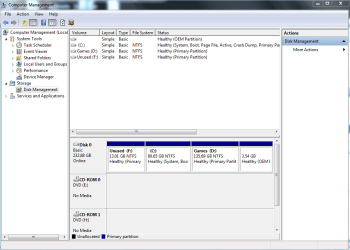
Corazon I know that I need to put letter on the drive, but the problem is there is NO DRIVE!!!
I uploaded the picture of the disk management.
I think OEM is the hidden partition but when I right click on OEM partition it shows only help!!!
Please HELP ME!!!
*Unused Partition is a partition I made!! It came with no name with my windows, so I named it Unused!

Thanks!
Regards,
addas
 

Attachments

  • Management Nothing.PNG
    Management Nothing.PNG
    29.5 KB · Views: 93

My Computer My Computer

At a glance

Windows 8 Pro with WMC 64-bitIntel Core 2 Duo T6400
Computer type
Laptop
Computer Manufacturer/Model Number
Acer Aspire 4935G
OS
Windows 8 Pro with WMC 64-bit
CPU
Intel Core 2 Duo T6400
Motherboard
Acer Aspire 4935 Board
Screen Resolution
1366 X 768
Case
Laptop
Internet Speed
4 mbps
C is your active partition, so that's where bootmgr is. No need to unlock OEM-partition
 

My Computer My Computer

At a glance

Microsoft Windows 7 Home Premium 64-bits 7601...Intel(R) Core(TM) i3 CPU M 370 @ 2.40GHz4,00 GBATI Mobility Radeon HD 5400 Series
Computer type
Laptop
Computer Manufacturer/Model Number
ACER ASPIRE 5742G
OS
Microsoft Windows 7 Home Premium 64-bits 7601 Multiprocessor Free Service Pack 1
CPU
Intel(R) Core(TM) i3 CPU M 370 @ 2.40GHz
Motherboard
Acer Aspire 5742G
Memory
4,00 GB
Graphics Card(s)
ATI Mobility Radeon HD 5400 Series
Sound Card
(1) AMD High Definition Audio Device (2) Realtek High Defi
Screen Resolution
1366 x 768 x 32 bits (4294967296 colors) @ 60 Hz
Hard Drives
WDC WD5000BEVT-22ZAT0
Thanks everyone!
PROBLEM SOLVED!
Thanks to Kaktussoft because she told me where I find bootmgr (without extension)!
Special Thanks to
DeaconFrost & Corazon & rustberger because they helped me a lot !!!

I attached the success!

Regards,
Happy addas :)
 

Attachments

  • SUCCESS.PNG
    SUCCESS.PNG
    52.4 KB · Views: 107

My Computer My Computer

At a glance

Windows 8 Pro with WMC 64-bitIntel Core 2 Duo T6400
Computer type
Laptop
Computer Manufacturer/Model Number
Acer Aspire 4935G
OS
Windows 8 Pro with WMC 64-bit
CPU
Intel Core 2 Duo T6400
Motherboard
Acer Aspire 4935 Board
Screen Resolution
1366 X 768
Case
Laptop
Internet Speed
4 mbps
Back
Top