
Solved How to slow down fan speed?

Golden

000
VIP
SF Team
Local time
10:33 PM
Messages
19,301
Location
South Australia
G'day hardware geeks.....

My Thermaltake Element S case has two inbuilt 22cm fans that plug directly into the PSU. They are a little bit noisy, and I was looking to lower their RPM to take the edge off the whir.

Initially, I was considering purchasing a dedicated fan control to fit into a spare 5.25" drive bay, but a colleague suggested I might try and "cross-over" the yellow 6v cable from the PSU with the red 12v cable to the fan, to halve the RPM of the fan.

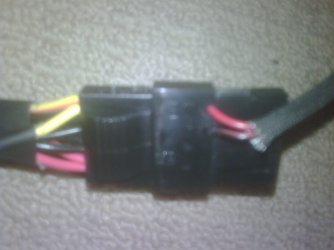
However, when I opened the case and examined the psu ---> fan connection, I noticed it already appears to be crossed-over as in the photo below (apologies for the poor quality).

The photo shows the yellow cable from the PSU on the left, connected to the red cable from the fan on the right. Thus, the fan is already running at half its RPM? Am I correct?

Regards,
Golden
 

Attachments
  • conn.jpg
    conn.jpg
    93.5 KB · Views: 10

My Computer My Computer

Computer type
PC/Desktop
Computer Manufacturer/Model Number
Golden Mk. I.4
OS
Windows 10 Pro x64 ; Xubuntu x64
CPU
Intel i7 860 @ 2.80 GHz O/C'ed to 4.0GHz
Motherboard
Gigabyte P55A-UD3R Rev.1. Award BIOS F13
Memory
16GB Corsair Vengance DDR3 @ 661 MHz Dual Channel (9-9-9-24)
Graphics Card(s)
EVGA NVidia GTX 560 1024MB
Sound Card
Realtek Integrated
Monitor(s) Displays
Dual Samsung SyncMaster 2494HS
Screen Resolution
1920*1080 and 1920*1080
Hard Drives
1*Samsung 840 EVO 120GB SSD;
1*OCZ Vertex 2 60GB SSD;
2*Samsung F3 SpinPoint 1TB in RAID0;
1*Samsung F1 SpinPoint 1TB;
2*Western Digital 1TB External USB 3.0
1*Western Digital 500GB External USB 3.0
1*Seagate 500GB External USB 2.0
PSU
Thermaltake ToughPower QFan 750W
Case
Thermaltake Element S VK60001W2Z
Cooling
Corsair H60 Water Cooling, 2*230mm and 2*80mm case fans
Keyboard
Logitech G110
Mouse
Logitech MX518
this is not necessarily the case for the molex connection - the fan only needs 2 connectors for it to have power - as is the case with all 5 of my fans buddy. - I would recommend getting a molex to silent cable http://www.erodov.com/forums/imagehosting/56894e5f4f8e4796f.jpg
it looks like that pic - you can then also daisy chain your fans along with connecting them to a fan controller bay (pretty cheap for us aussies and no postage sometimes) but remember that reducing fan speed = increased heat...
 

My Computer My Computer

Computer Manufacturer/Model Number
Self Made
OS
Windows 7 Ultimate x64
CPU
Core 2 quad Q9550 2.93Ghz OC'd to 4.2
Motherboard
XFX 790i Ultra (tri SLI)
Memory
8GB Gskill DDR3 1600Mhz
Graphics Card(s)
2x Gtx 280 (SLI) Asus
Sound Card
Creative Xi-Fi Titanium Fatality 1 Ty
Monitor(s) Displays
Alienware 120Hz 23'' 1920x1080, 2x Benq G2420 1920x1080 24"
Screen Resolution
1920x1080 *3
Hard Drives
2x Samsung Spinpoint F1's 750GB HDD
1x Samsung Spinpoint 2TB
PSU
Antec 850 watt
Case
Cooler Master Centurion
Cooling
8x 8'' Fans, Coolermaster CPU Cooler.
Keyboard
Logitech G19, Logitech Dinovo Edge, Logitech Dinovo Mini
Mouse
Logitech G9x and Logitech G7
Internet Speed
13Mb Down, 1.3 Mb Up
Other Info
Logitech Z5500 5.1 Surround Speakers,
Nvidia 3D Vision
No, the fan is running at 12V since the standard colour coding of power cables from the PSU is Yellow 12V, Red 5V, and Black 0V (ground). To make the fan run slower (approximately 45% in comparison), you need to arrange it so that the red lead from the fan is connected to the red lead at the molex connector. That way, the fan will be fed with just 5V as opposed to 12V.
 

My Computer My Computer

Computer type
PC/Desktop
Computer Manufacturer/Model Number
Dwarf Dwf/11/2012 r09/2013
OS
Windows 8.1 Pro RTM x64
CPU
Intel Core-i5-3570K 4-core @ 3.4GHz (Ivy Bridge) (OC 4.4GHz)
Motherboard
ASRock Z77 Extreme4-M
Memory
4 x 4GB DDR3-1600 Corsair Vengeance CMZ8GX3M2A1600C9B (16GB)
Graphics Card(s)
MSI GeForce GTX770 Gaming OC 2GB
Sound Card
Realtek High Definition on board solution (ALC 898)
Monitor(s) Displays
ViewSonic VA1912w Widescreen (VGA)
Screen Resolution
1440x900
Hard Drives
OCZ Agility 3 SSD 120GB SATA III x2 (RAID 0)
Samsung HD501LJ 500GB SATA II x2
Hitachi HDS721010CLA332 1TB SATA II
Iomega 1.5TB Ext USB 2.0
WD 2.0TB Ext USB 3.0
PSU
XFX Pro Series 850W Semi-Modular
Case
Gigabyte IF233
Cooling
1 x 120mm Front Inlet 1 x 120mm Rear Exhaust
Keyboard
Microsoft Comfort Curve Keyboard 3000 (USB)
Mouse
Microsoft Comfort Mouse 3000 for Business (USB)
Internet Speed
NetGear DG834Gv3 ADSL Modem/Router (Ethernet) ~4.0 Mb/s (O2)
Antivirus
Avast! 8.0.1497
Browser
IE 11
Other Info
Optical Drive: HL-DT-ST BD-RE BH10LS30 SATA Bluray
Lexmark S305 Printer/Scanner/Copier (USB)
WEI Score: 8.1/8.1/8.5/8.5/8.25
Asus Eee PC 1011PX Netbook (Windows 7 x86 Starter)
Golden, repeat after me : "You are a muppet. Read your manual where it clearly states yellow = 12v".

Thanks Dwarf, I crossed over red to red with an intermediary molex, therby connecting 5v to 5v, and finally I can here myself think clearly. The silence is defeaning.

All is good. Fans running slower and temperatures actually seem to be a fraction cooler......

Regards,
Golden
 

My Computer My Computer

Computer type
PC/Desktop
Computer Manufacturer/Model Number
Golden Mk. I.4
OS
Windows 10 Pro x64 ; Xubuntu x64
CPU
Intel i7 860 @ 2.80 GHz O/C'ed to 4.0GHz
Motherboard
Gigabyte P55A-UD3R Rev.1. Award BIOS F13
Memory
16GB Corsair Vengance DDR3 @ 661 MHz Dual Channel (9-9-9-24)
Graphics Card(s)
EVGA NVidia GTX 560 1024MB
Sound Card
Realtek Integrated
Monitor(s) Displays
Dual Samsung SyncMaster 2494HS
Screen Resolution
1920*1080 and 1920*1080
Hard Drives
1*Samsung 840 EVO 120GB SSD;
1*OCZ Vertex 2 60GB SSD;
2*Samsung F3 SpinPoint 1TB in RAID0;
1*Samsung F1 SpinPoint 1TB;
2*Western Digital 1TB External USB 3.0
1*Western Digital 500GB External USB 3.0
1*Seagate 500GB External USB 2.0
PSU
Thermaltake ToughPower QFan 750W
Case
Thermaltake Element S VK60001W2Z
Cooling
Corsair H60 Water Cooling, 2*230mm and 2*80mm case fans
Keyboard
Logitech G110
Mouse
Logitech MX518
:ditto: to both.

Good suggestions.

Edit:
Glad to hear (pun intended) you got it sorted ;)
 

My Computer My Computer

Computer type
PC/Desktop
Computer Manufacturer/Model Number
76~2.0
OS
Windows 7 Ult x64 - SP1/ Windows 8 Pro x64
CPU
Intel Core i5-3570K 4.6GHz
Motherboard
Gigabyte GA-Z77X UD3H, f18
Memory
8GB (2X4GB) DDR3 1600 Corsair Vengeance CL8 1.5v
Graphics Card(s)
Sapphire HD 7770 Vapor-X OC 1GB DDR5
Sound Card
Onboard VIA VT2021
Monitor(s) Displays
22" LCD Dell
Screen Resolution
1680x1050
Hard Drives
Samsung 840Pro 128GB SSD,
Seagate Barracuda 500GB SATA2 7200rpm 32MB cache, Seagate Barracuda 1TB SATA2 7200rpm 32MB cache,
PSU
Corsair HX650W
Case
Cooler Master Storm Scout
Cooling
Corsair H80 2x12cm Noctua NF P12 , 2x14cm case fans
Keyboard
Logitech Wave
Mouse
CM Sentinel
Internet Speed
Dismal
Antivirus
Avast
Browser
Opera Next
Other Info
Haswell laptop: HP Envy 17t-j, i7-4700MQ, GeForce 740M 2GB DDR3, 17.3" Full HD 1920x1080, 16GB RAM, Samsung 840 Pro 128GB, 1TB Hitachi 7200 HDD,
Desktop: eSATA ports,
External eSATA Seagate 500GB SATA2 7200rpm,
External WD USB 500GB
Could always solder a resistor along the cable, that will lower the voltage.

Or do as I did for my media pc, I stole a reostat from an old computer cd drive (volume wheel)
I then wired that into a box, that my fans connected to, was only about 2cmx1cm and fitted behind mobo tray.
That way I could vary the fan speed if I ever needed.

Sent from my BlackBerry 9900 using Tapatalk
 

My Computer My Computer

Computer type
PC/Desktop
Computer Manufacturer/Model Number
Built by badgers!!!
OS
Windows 7 Ultimate x64, & Mac OS X 10.9.2
CPU
Intel Core i5 2500k
Motherboard
Asus P8z68 LE
Memory
Corsair Vengence 8gb 1866mhz
Graphics Card(s)
Nvidia GTX 770 OC
Monitor(s) Displays
2x ASUS LED 22" IPS
Screen Resolution
3840x1080
Hard Drives
240GB Crucial M500 SSD
120gb Corsair Force 3 SSD
1TB Western Digital
PSU
Corsair HX650w Modular
Case
Corsair Air 540
Cooling
Corsair H60 Push/Pull
Keyboard
Corsair K70/ Logitech G27 wheel
Mouse
Saitek R.A.T 9
Internet Speed
Too slow!
Other Info
AMD fusion E350N Home server-Windows Home Server 2011 (also made by badgers!)
2011 Macbook 2.4ghz Core2Duo, 4gb ddr3, 120gb Ocz Vertex SSD
Back
Top