How to solve this problem

luckyyousafzai

New member
Local time
9:31 AM
Messages
8
hi,

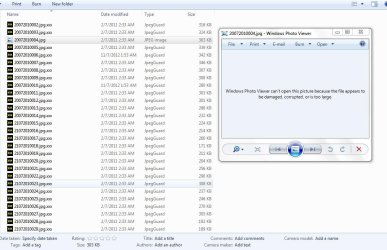
I have a problem with my old images.
I was in search of any folder lock for windows7 and its was windows7 ultimate x86( 32bit) my old PC.
i searched in Google with these words "folder security software for windows 7" but don't know which 1 i was used for this.

after a 1 year approx. now i transfer these from my old hard dist to my new laptop which have windows 7 ultimate x64. but i can't access my images and i don't know which software i was used for this.
Now i want to access these pictures but i can't access it i used jpeg guard but it failsbut it was not that software.
i tried to rename extension from *.jpg.xxx* to *.jpg* but its shows me error on opening.

Please If any 1 can help me my thousands of images are my old data i dont want to loss.
waiting for a reply .
 

Attachments

  • Image Problem1.jpg
    Image Problem1.jpg
    67.3 KB · Views: 49
  • Image Problem2.jpg
    Image Problem2.jpg
    94.3 KB · Views: 31

My Computer

OS
windows 7 ultimate x64

My Computer

Computer type
Laptop
Computer Manufacturer/Model Number
Sager NP9170
OS
Win 7 Pro x64 / Win 10 Pro
CPU
Intel(R) Core(TM) i7-3630QM CPU @ 2.40GHz
Motherboard
CLEVO P170EM
Memory
12 GB
Graphics Card(s)
(1) Intel(R) HD Graphics 4000 (2) NVIDIA GeForce GTX 675M
Sound Card
(1) Realtek High Definition Audio (2) Intel(R) Display Aud
Monitor(s) Displays
17.3
Screen Resolution
1920x1080
Hard Drives
(1) Samsung 860 EVO 500GB(OS) (1) Samsung 860 EVO 500GB(Data)
Keyboard
Backlite
Antivirus
MSE, Malwarebytes Pro
Browser
Firefox
Other Info
DESKTOP: Custom-built.
OS: Win 10 Pro x64.
CASE: Rosewill R5.
CPU: Intel I5 4670K CPU @ 3.40GHz.
CPU COOLER: Cool Master Hyper 212 EVO.
MOTHERBOARD: Asus Z87-A.
MEMORY: Kingston HyperX 2x4 GB.
GPU: Nvidia Geforce 650 TI.
PSU: Corsair TX750.
DRIVES: (1) Samsung 840 120 GB SSD (2) Western Digital blue 500 GB 7200 RPM.
yes Bongo is right, your images are encrypted by JPEGGUARD, so re install it to have your images decrypted.
also renaming the files won't solve the issue.
 

My Computer

OS
Windows 7 Ultimate x64

My Computer

Computer type
Laptop
Computer Manufacturer/Model Number
Sager NP9170
OS
Win 7 Pro x64 / Win 10 Pro
CPU
Intel(R) Core(TM) i7-3630QM CPU @ 2.40GHz
Motherboard
CLEVO P170EM
Memory
12 GB
Graphics Card(s)
(1) Intel(R) HD Graphics 4000 (2) NVIDIA GeForce GTX 675M
Sound Card
(1) Realtek High Definition Audio (2) Intel(R) Display Aud
Monitor(s) Displays
17.3
Screen Resolution
1920x1080
Hard Drives
(1) Samsung 860 EVO 500GB(OS) (1) Samsung 860 EVO 500GB(Data)
Keyboard
Backlite
Antivirus
MSE, Malwarebytes Pro
Browser
Firefox
Other Info
DESKTOP: Custom-built.
OS: Win 10 Pro x64.
CASE: Rosewill R5.
CPU: Intel I5 4670K CPU @ 3.40GHz.
CPU COOLER: Cool Master Hyper 212 EVO.
MOTHERBOARD: Asus Z87-A.
MEMORY: Kingston HyperX 2x4 GB.
GPU: Nvidia Geforce 650 TI.
PSU: Corsair TX750.
DRIVES: (1) Samsung 840 120 GB SSD (2) Western Digital blue 500 GB 7200 RPM.
Re: Please Help Me‏

3:29 AM
Reply ▼
William Bradshaw
To yasir khan
You must know the password in JpegGuard.

Sincerely,
William Bradshaw
Copy Protection and Encryption Software
778-862-1670
From: yasir khan <**********@hotmail.com>
To: [email protected]; [email protected]
Sent: Friday, November 9, 2012 1:37:47 PM
Subject: Please Help Me

Hi,


I have a problem with my old images.
I was in search of any folder lock for windows7 and its was windows7 ultimate x86( 32bit) my old PC.
i searched in Google with these words "folder security software for windows 7" but don't know which 1 i was used for this.

after a 1 year approx. now i transfer these from my old hard dist to my new laptop which have windows 7 ultimate x64. but i can't access my images and i don't know which software i was used for this.
Now i want to access these pictures but i can't access it i used jpeg guard but it failsbut it was not that software.
i tried to rename extension from *.jpg.xxx* to *.jpg* but its shows me error on opening.

Please If any 1 can help me my thousands of images are my old data i dont want to loss.
waiting for a reply


http://www.sevenforums.com/attachme...352238214-how-solve-problm-image-problem1.jpg


http://www.sevenforums.com/attachme...352238214-how-solve-problm-image-problem2.jpg


and i dont know password :(
 

My Computer

OS
windows 7 ultimate x64
Okay let me get this straight. For some reason you found it necessary to make sure nobody but you could view these images? That meant using an encryption software! You MUST have set a password for this softawre.You say you don't know the Password. Do you really mean you have forgotten the password? If the software support department cannot help you I doubt anyone on this Forum can. When you open the software is there no "I have forgotten my password" link? Just be very aware anyone who might offer to hack the password for you. See Forum Rules Number 6!!!!
 

My Computer

Computer type
PC/Desktop
OS
Microsoft Windows 7 Home Premium 64-bit 7601 Multiprocessor Free Service Pack 1
CPU
Intel(R) Core(TM) i7-3770 CPU @ 3.40GHz
Motherboard
ASUSTeK COMPUTER INC. P8H77-M
Memory
8.00 GB
Graphics Card(s)
Intel(R) HD Graphics 4000
Sound Card
On Board
Monitor(s) Displays
Dell 24"
Screen Resolution
1920 x 1080
Hard Drives
(1) INTEL SSDSC2CT180A3 ATA Device (2) ST500DM002-1BD142 ATA Device (3) WDC WD3200AAKS-75L9A0 ATA Device (4) Generic- Compact Flash USB Device (5) Generic- MS/MS-Pro USB Device (6) Generic- SD/MMC USB Device (7) Generic- SM/xD-Picture USB
PSU
500w Corsair
Case
Cooler Master
Cooling
3 Fans
Keyboard
Logitech MK300
Mouse
Logitech WOM
Internet Speed
75Mb
Antivirus
Norton 360
Browser
Firefox, Opera, IE
no its my own pictures and i mentioned years ago i encrypted these pictures but now when i transferred these images from my old harddisk now i forgot password and jpeg guard only encrypt images but i remember this was not jpeg guard
.this softwares was listed when ever we make right click on any folder. and in jpeg guard there is no option for password recovery.
 

My Computer

OS
windows 7 ultimate x64
I don't undeerstand what youare saying here. In the first two lines you say the JPEG Guard encrypted the files and then you say you remeber this was NOT JPEG Guard???
I think you will find that you did use JPEG Guard. When were you last able to view these images? Was that "Years ago" when you say you encrypted them?
If that is the case I think you must bite the bullet and rite them off!
 

My Computer

Computer type
PC/Desktop
OS
Microsoft Windows 7 Home Premium 64-bit 7601 Multiprocessor Free Service Pack 1
CPU
Intel(R) Core(TM) i7-3770 CPU @ 3.40GHz
Motherboard
ASUSTeK COMPUTER INC. P8H77-M
Memory
8.00 GB
Graphics Card(s)
Intel(R) HD Graphics 4000
Sound Card
On Board
Monitor(s) Displays
Dell 24"
Screen Resolution
1920 x 1080
Hard Drives
(1) INTEL SSDSC2CT180A3 ATA Device (2) ST500DM002-1BD142 ATA Device (3) WDC WD3200AAKS-75L9A0 ATA Device (4) Generic- Compact Flash USB Device (5) Generic- MS/MS-Pro USB Device (6) Generic- SD/MMC USB Device (7) Generic- SM/xD-Picture USB
PSU
500w Corsair
Case
Cooler Master
Cooling
3 Fans
Keyboard
Logitech MK300
Mouse
Logitech WOM
Internet Speed
75Mb
Antivirus
Norton 360
Browser
Firefox, Opera, IE
Dude, you're scre\/\/ed, if you forgot the password forget about the pictures.
 

My Computer

Computer type
PC/Desktop
OS
Microsoft Windows 10 Professional / Windows 7 Professional
CPU
Intel i5-3570
Motherboard
Lenovo Mahobay
Memory
16GB DDR3
Graphics Card(s)
AMD Radeon HD 7850 2GB
Sound Card
(1) Realtek HD Audio (2) AMD HD Audio
Monitor(s) Displays
LG LS192WS
Screen Resolution
1440 x 900 @ 32bit color
Hard Drives
(1) SUV300S37A/120G (2) ST3500413AS SATA Disk Device AHCI mode enabled.
PSU
Corsair HX620
Case
Thermaltake V4 Black Edition
Cooling
Cooler Master Hyper 212 + Artic Silver 5 on CPU/GPU
Keyboard
Dell SK-8115
Mouse
Razer Copperhead with MAPED mat (awesome!)
Internet Speed
100 Mbps up/down
Browser
Chrome
Without the password there is nothing, IMHO, you can do. Just forget the images and move on. What were they of anyway?
 

My Computer

Computer type
PC/Desktop
OS
Microsoft Windows 7 Home Premium 64-bit 7601 Multiprocessor Free Service Pack 1
CPU
Intel(R) Core(TM) i7-3770 CPU @ 3.40GHz
Motherboard
ASUSTeK COMPUTER INC. P8H77-M
Memory
8.00 GB
Graphics Card(s)
Intel(R) HD Graphics 4000
Sound Card
On Board
Monitor(s) Displays
Dell 24"
Screen Resolution
1920 x 1080
Hard Drives
(1) INTEL SSDSC2CT180A3 ATA Device (2) ST500DM002-1BD142 ATA Device (3) WDC WD3200AAKS-75L9A0 ATA Device (4) Generic- Compact Flash USB Device (5) Generic- MS/MS-Pro USB Device (6) Generic- SD/MMC USB Device (7) Generic- SM/xD-Picture USB
PSU
500w Corsair
Case
Cooler Master
Cooling
3 Fans
Keyboard
Logitech MK300
Mouse
Logitech WOM
Internet Speed
75Mb
Antivirus
Norton 360
Browser
Firefox, Opera, IE
help.zappersoftware.com/JpegGuard/contents.html
Different Uses

There are several different ways to use this system:
No Password - no password is entered. The system will apply its own password. This means that anyone who runs this program can view the JPEG images but they will not be able to view the images using a standard browser.
Password - a password is entered. This means that you will only be able to view the JPEG images after you enter the correct password.
Several Passwords - different passwords are applied to encrypt different JPEG images. You will have keep track of the passwords that were used to encrypt the images. This is a useful feature if different people are using the same computer. Each person can have their own folder and their own password.
Security

There are 2 basic security features to this system:
Encryption - the JPEG images are encrypted using your own password. This is a very secure encryption system and is virtually an unbreakable encryption code. If anyone tries to decrypt the images without the password they will be unsuccessful.
XXX File Extension - the JPEG images are all set to a file extension of .XXX. This basically hides all of your JPEG images from file searches from the unknowning (your children, your boss, the police, your wife, a hacker, etc.).
Step-By-Step Procedures

When you first start the JpegGuard program it will display the Password Form. You must enter a password that will be used to encrypt and decrypt all of the JPEG images on your computer.
Search for all of your JPEG files. Select Search Files from the menu.
Encrypt your JPEG files. Select Options/Encrypt All from the menu.
After all of your files are encrypted then select files to view. Select View/List XXX from the menu.
Use your up and down arrow keys and hit enter or double click on any listed file. This will then take you to the image form.
Hit enter to return to your List XXX files.
When you close the application, all of the files in the List JPEG and List XXX forms will be saved to disk. They will be loaded the next time that you start the JpegGuard application.
If you make changes to the location and/or names of these files then you should re-generate the List XXX and List JPG by doing another Search Files from your root drive.
After you have encrypted your files you should go through your list of JPEG files (List JPG) to ensure that these unencrypted files are OK to view by anybody. If they are not then encrypt them.


try search jpegguard folder in anywhere,C/windows,local data or anywhere,the password you set must be save in folder..
maybe....
only password you needed
 

My Computer

OS
windows 7 ultimate x32
Memory
My Mamma and My Pappa

My Computer

Computer type
PC/Desktop
OS
Microsoft Windows 7 Home Premium 64-bit 7601 Multiprocessor Free Service Pack 1
CPU
Intel(R) Core(TM) i7-3770 CPU @ 3.40GHz
Motherboard
ASUSTeK COMPUTER INC. P8H77-M
Memory
8.00 GB
Graphics Card(s)
Intel(R) HD Graphics 4000
Sound Card
On Board
Monitor(s) Displays
Dell 24"
Screen Resolution
1920 x 1080
Hard Drives
(1) INTEL SSDSC2CT180A3 ATA Device (2) ST500DM002-1BD142 ATA Device (3) WDC WD3200AAKS-75L9A0 ATA Device (4) Generic- Compact Flash USB Device (5) Generic- MS/MS-Pro USB Device (6) Generic- SD/MMC USB Device (7) Generic- SM/xD-Picture USB
PSU
500w Corsair
Case
Cooler Master
Cooling
3 Fans
Keyboard
Logitech MK300
Mouse
Logitech WOM
Internet Speed
75Mb
Antivirus
Norton 360
Browser
Firefox, Opera, IE
noppp 0% result any way to dycrypt images
I can only repeat yet again:
"Without the password there is nothing, IMHO, you can do. Just forget the images and move on. What were they of anyway?"
You haven't said what the images are? They may be available elsewhere as looking at the files they seem to be a collection!
 

My Computer

Computer type
PC/Desktop
OS
Microsoft Windows 7 Home Premium 64-bit 7601 Multiprocessor Free Service Pack 1
CPU
Intel(R) Core(TM) i7-3770 CPU @ 3.40GHz
Motherboard
ASUSTeK COMPUTER INC. P8H77-M
Memory
8.00 GB
Graphics Card(s)
Intel(R) HD Graphics 4000
Sound Card
On Board
Monitor(s) Displays
Dell 24"
Screen Resolution
1920 x 1080
Hard Drives
(1) INTEL SSDSC2CT180A3 ATA Device (2) ST500DM002-1BD142 ATA Device (3) WDC WD3200AAKS-75L9A0 ATA Device (4) Generic- Compact Flash USB Device (5) Generic- MS/MS-Pro USB Device (6) Generic- SD/MMC USB Device (7) Generic- SM/xD-Picture USB
PSU
500w Corsair
Case
Cooler Master
Cooling
3 Fans
Keyboard
Logitech MK300
Mouse
Logitech WOM
Internet Speed
75Mb
Antivirus
Norton 360
Browser
Firefox, Opera, IE
its pictures of myself and now its very old pictures for me but i would love to see them again. now i didn't remember whether what option was there in jpegGuard in 2009 or 2010 . i still have the data in external hard drive.
 

My Computer

OS
windows 7 ultimate x64
If you don't regard them as very personal, you could post a sample file somwhere, and see if anyone wants to take some time to play around with it, to see if it can be unlocked.
 

My Computer

Computer type
PC/Desktop
Computer Manufacturer/Model Number
Custom
OS
Windows 7 Professional 64-bit
To the best of my knowledge we do NOT crack passwords on this forum or any other forum that z3r010 owns and operates.
 

My Computer

Computer type
PC/Desktop
Computer Manufacturer/Model Number
Home made Desktop
OS
Windows 10 Pro. 64/ version 1709 Windows 7 Pro/64
CPU
Intel i7-6800K @ 4.3
Motherboard
ASUS X-99 Deluxe II
Memory
Corsair Platinum 16 gig @2400
Graphics Card(s)
EVGA GTX 1070 OC
Monitor(s) Displays
Asus 27" LED LCD/VE278Q
Screen Resolution
1920-1080 or 1280-720 HDMI
Hard Drives
INTEL SSD 730-240 Gb Sata 3.0/
PSU
EVGA Platium 1200W
Case
Phanteks Luxe Tempered Glass 8 fans/ one radiator
Cooling
XSPC/ Water Cooled CPU
Keyboard
Das 4 Professional
Mouse
Logitech M705/MX Anywhere 2-S
Internet Speed
100 mbits
Antivirus
Microsoft Security Essentials/ Malwarebytes Premium 3.0/ SAS
Browser
I.E. 11 default/Firefox/ ISP Time Warner Cable/Spectrum
Other Info
LG BluRay Burner/
Sound system-KLipsch-THX/
Icy Dock ssd Hot Swap bays.
Back
Top