How to stop athurx.sys from high cpu usage in nt kernel & system

badhomaks

New member
Local time
12:51 AM
Messages
2
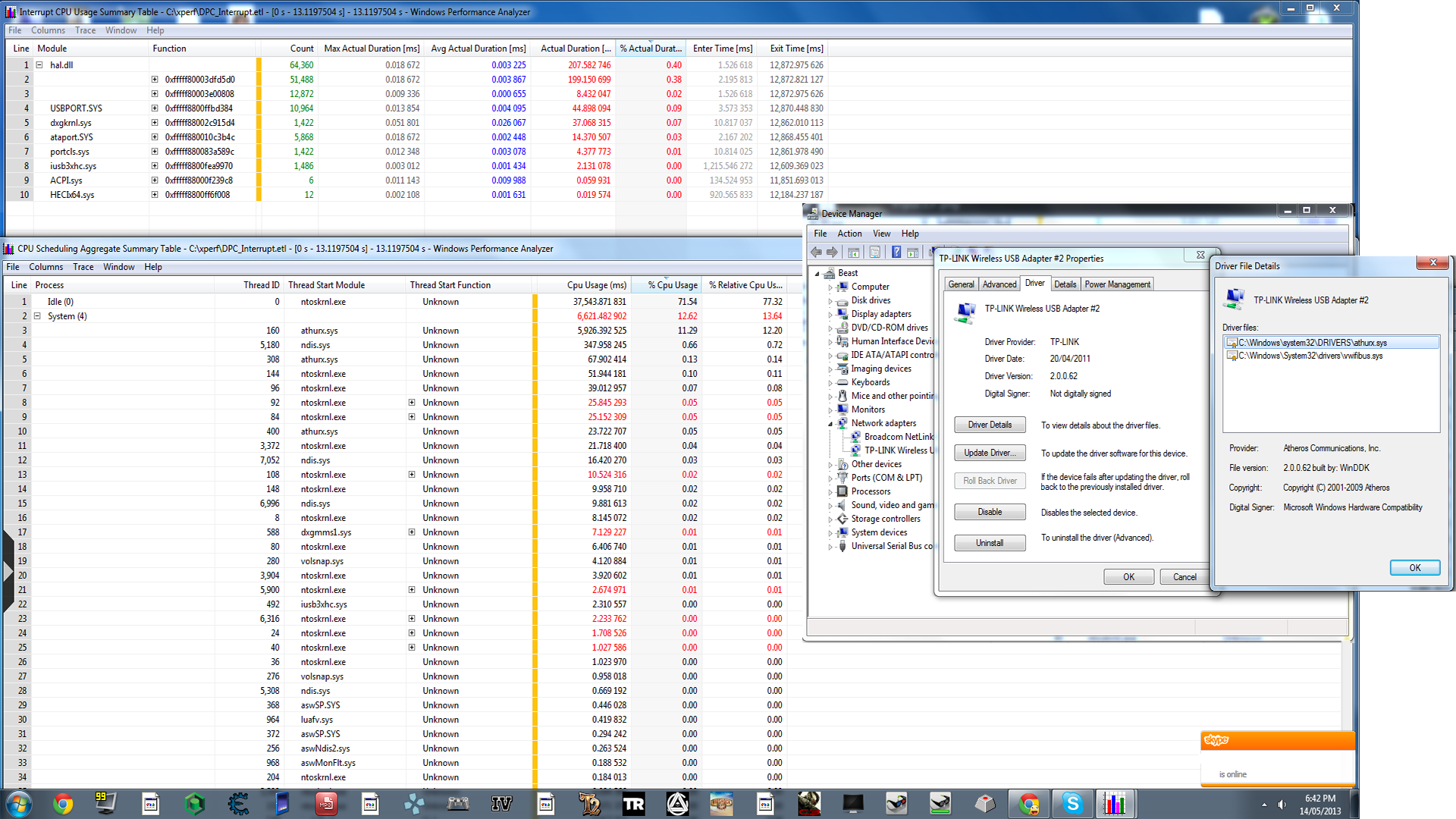
So after running perx and process monitor I was able to single out the reason my nt kernel and system was so high (10-12% usage). Everything goes back to normal when I unplug my wireless router or restart but restarts take too long and plugging my router back in causes the problem to appear within a minute or so again. Any permanent solutions?
 

My Computer My Computer

Computer type
PC/Desktop
OS
Windows 7 Ultimate x64
Browser
Chrome
Hi

First test your network adapters to see if they are at fault as athurx.sys
is a network/wireless driver:

Goto control Panel> System> device manager and disable your LAN first and then
monitor the processor status, does the CPU usage drop?
If so it means you have problem with Lan if not, re-enable the LAN, then try disabling the wifi?

If you find one of these is at fault then try the following or
update the drivers for the devices from your manufacturers website: :ar: ATHEROS drivers for Microsoft Windows (Atheros?????)

   Note
Before you start please create a :ar: System Restore Point


1. Open Control Panel> System> device manager> Network Adapters, Expand and delete all network adaptors.
2. Click the computer icon under the help tab and refresh hardware by "scanning for hardware changes"
3. Adaptors should now be found and reinstalled. Reboot.

Does your issue remain?

Please post back some info and answers:

1. Processor type, amount of RAM (hold Windows logo key , hit Pause/Break key)
2. Hard drive size/free space (open "My Computer", right click on hard drive letter, click "Properties")
3. What Security programs are in use (antivirus, firewall)
4. What do you have plugged into your USB ports? Any external hard drive etc?
5. Have you recently update a driver and are seeing the higher CPU usage after the update?
6. Have you recently install any new hardware on your computer?
7. Is the Firmware/drivers up-to-date for router?
8. Does resetting your router back to factory setting help?

Cheers
Dave

 

My Computer My Computer

Computer type
PC/Desktop
OS
Windows 7 Professional 64bit
CPU
AMD Athlon (tm) X2 5200+ Dual Core 2712 Mhz
Motherboard
Asus
Memory
4GB
Graphics Card(s)
Nividia GeForce 8600 GTS- DIED 25/7/2013 R.I.P
Sound Card
None
Monitor(s) Displays
22" Yuraku LCD (Dont ask)
Screen Resolution
1280x960
Hard Drives
2TB WD Caviar green
PSU
Windy up type
Case
Scout cm Storm
Cooling
Hair dryer on full cool power ;-)
Keyboard
QWERTY
Mouse
Microsoft Special
Internet Speed
BT Infinity 9.38Mb/s Wheeeeeeeeeeeeeeee!!
Antivirus
MSE
Browser
Internet Explore 10 and Chrome
Other Info
Don't shout...I've got a Hangover!
Hi, thanks for replying. Unfortunately the issue is not solved and I have already tried reinstalling and getting the newest drivers. Oh, and I want to clarify that it is a usb network receiver not a wireless router.

I am definitely sure that its the receiver because my cpu goes back to normal when I plug it out or when I disable it in the device manager.

Specs:
Windows 7 x64 ultimate
8GB RAM G Skill 1666MHz (2x4GB)
i5-3570K overclocked to 4.2 GHz
Nvidia Geforce GTX 670 at 1262 MHz and 1.75V
Asrock Z77 Extreme 4 Motherboard
1TB WD Black Hard Drive with 43.1GB free space

Using avast internet security antivirus.

I have a hard drive, mouse, keyboard and the wireless usb receiver in my usb ports (although my usb usage in nt kernel was normal).

I've had this issue for a while but kept putting it off as xperf seemed to complicated to use. But then I finally cracked so I wanted to get rid of this once and for all.

Got the mouse as my last hardware upgrade (Logitech G500) but I don't see it causing the problems as I had the problem for a few months now.

Here's the performance analysis by xperf:
Sts413A.png
 
Last edited:

My Computer My Computer

Computer type
PC/Desktop
OS
Windows 7 Ultimate x64
Browser
Chrome

My Computer My Computer

Computer type
PC/Desktop
OS
Windows 7 Professional 64bit
CPU
AMD Athlon (tm) X2 5200+ Dual Core 2712 Mhz
Motherboard
Asus
Memory
4GB
Graphics Card(s)
Nividia GeForce 8600 GTS- DIED 25/7/2013 R.I.P
Sound Card
None
Monitor(s) Displays
22" Yuraku LCD (Dont ask)
Screen Resolution
1280x960
Hard Drives
2TB WD Caviar green
PSU
Windy up type
Case
Scout cm Storm
Cooling
Hair dryer on full cool power ;-)
Keyboard
QWERTY
Mouse
Microsoft Special
Internet Speed
BT Infinity 9.38Mb/s Wheeeeeeeeeeeeeeee!!
Antivirus
MSE
Browser
Internet Explore 10 and Chrome
Other Info
Don't shout...I've got a Hangover!
Back
Top