How to stop mult Firefox instances on taskbar from shifting positions?

DrRick

New member
Local time
6:51 AM
Messages
4
I've got Win 7 x64 and I'm a trader. I open browser windows in a specific order so I know where to mouse and click on them instantly. I can't afford to be looking around for where they've shifted. But in Win 7 they can shift positions without my wanting them to. example; finance.yahoo,com always seems to move itself farthest to the right after using it, for no reason I can figure. "pin" doesn't seem to do the job. I want all my Firefox browser windows to be in the same order, same position on the taskbar, as I first open them and NOT CHANGE. After they've changed, I can't change them back; I click and hold but they won't move as I move the mouse. How do I keep my browser instances to stay in the position and order I first open them? This problem did not happen in XP.
 

My Computer My Computer

At a glance

windows 7 x64
Computer Manufacturer/Model Number
dell latitude e6510
OS
windows 7 x64
I've got Win 7 x64 and I'm a trader. I open browser windows in a specific order so I know where to mouse and click on them instantly. I can't afford to be looking around for where they've shifted. But in Win 7 they can shift positions without my wanting them to. example; finance.yahoo,com always seems to move itself farthest to the right after using it, for no reason I can figure. "pin" doesn't seem to do the job. I want all my Firefox browser windows to be in the same order, same position on the taskbar, as I first open them and NOT CHANGE. After they've changed, I can't change them back; I click and hold but they won't move as I move the mouse. How do I keep my browser instances to stay in the position and order I first open them? This problem did not happen in XP.

Do you have the taskbar locked?
 

My Computer My Computer

At a glance

Win 8 Release candidate 8400[email protected]4 gigsNvidia 9600M
Computer Manufacturer/Model Number
HP Pavillion dv-7 1005 Tx
OS
Win 8 Release candidate 8400
CPU
[email protected]
Memory
4 gigs
Graphics Card(s)
Nvidia 9600M
Sound Card
HD built-in
Monitor(s) Displays
17" Wxga
Screen Resolution
1440x900
Cooling
none
Internet Speed
45Mb down 5Mb up
yes, the taskbar is locked. I don't change that from day to day.
 

My Computer My Computer

At a glance

windows 7 x64
Computer Manufacturer/Model Number
dell latitude e6510
OS
windows 7 x64
I should add that I can still, with 'lock taskbar' clicked, move OTHER programs around. For example, I can grab my Dreamweaver and move it around the taskbar. But all my Firefox browser windows seem to decide their own relative places after being clicked and I can't grab and move them individually to put them back in their proper order.
 

My Computer My Computer

At a glance

windows 7 x64
Computer Manufacturer/Model Number
dell latitude e6510
OS
windows 7 x64
not a soloution ,but if you install xmarks for firefox ,not only will it back up your bookmarks but whenever you start firefox it will open the tabs you last had open. you will have to set it to do that but i would think it a handy feature if you regularly have the same pages open.

Xmarks | Bookmark Sync and Search
 

My Computer My Computer

At a glance

Microsoft Windows 7 Home Premium 64-bit 7600IIx4 amd athelon 635 processor2x2gbati radeon HD 5450
Computer Manufacturer/Model Number
Hewlett packard/p6512uk
OS
Microsoft Windows 7 Home Premium 64-bit 7600
CPU
IIx4 amd athelon 635 processor
Motherboard
FOXCONN 2AA9
Memory
2x2gb
Graphics Card(s)
ati radeon HD 5450
Sound Card
(1) Realtek High Definition Audio (2) AMD High Definition
Monitor(s) Displays
samsung lcd tv 32"
Screen Resolution
1360x 768
Hard Drives
(1) WDC WD10 01FAES-60Z2A0 SATA Disk Device (2) Maxtor OneTouch USB Device (3) ST310003 33AS USB Device (4) WD My Book 1111 USB Device
PSU
?
Cooling
air!
Keyboard
wireless hp
Mouse
wireless Hp,optical
Internet Speed
1.10mb/s
Antivirus
MSE
Browser
Firefox
Thanks, but I usually 'hibernate' and my firefox windows are there. I just wish they were'nt so damn "willful" about placing themselves w/o my permission. Is this some sort of backdoor thing that the marketing people have wormed their way into? It's a really important thing for users who habitually have many browser windows open to the same places and want them fixed in position so they can click on the right window w/o having to hunt for where it has moved to on it's own while you weren't looking. Very very annoying. Seems like a bug that many must have discovered by now but I've not found the exact proper thread on this in my web hunting. I'm about ready to migrate back to WinXP which doesn' t have this 'feature'.
 

My Computer My Computer

At a glance

windows 7 x64
Computer Manufacturer/Model Number
dell latitude e6510
OS
windows 7 x64
I'm not sure I'm following clearly... if you pin the Firefox shortcut to your taskbar then that's always where it will stay, exactly where you put it. If you open multiple instances (right-click and select Mozilla Firefox at the top of the popup, to open another window instance) they will just be right next to each other.

For example, I have Firefox's shortcut pinned to my taskbar as the third icon to the right of the Start orb. When I open the first instance, I get the icon enlarged into a rectangle. If i right-click on that enlarged icon and select Mozilla Firefox from the popup menu, I get a second instance and a second rectangle immediately to the right of the first rectangle. Repeat again... and I now have three consecutive icons.

It looks like this:

taskbarorder.jpg


You don't have to only use the "pin to taskbar" to get a shortcut placed onto the taskbar, since that method adds it to the end of the line of current icons on the taskbar.

Instead, you can just carefully drag-and-drop a shortcut from the desktop, down over that place on the taskbar where you want it to be... say between two particular existing shortcut icons. Keep the left-button on the mouse held down as you position the dragged desktop shortcut into the space between the two existing icons where you want the third shortcut to go. Windows will then SPREAD out the two icons, making room for your new third icon in between them.

Now you can release the left-button, and presto! Your new shortcut is placed exactly where you wanted it, BETWEEN the two existing icons.

That's how I got my Firefox icon on the left side of my taskbar, because I use it constantly. And by having it on the taskbar (like the WinXP quicklaunch bar) it will always open exactly there into a rectangle, when you launch the first instance. And each subsequent instance will simply be a consecutive rectangle right next to the previous group. Passing the mouse over any of them presents the Aero preview of them all.

Personally, I prefer mulitple tabs to window instances, but it's just personal preference.

 

My Computer My Computer

At a glance

Windows 7 Pro x64 (1), Win7 Pro X64 (2)i5-3350p 3.1Ghz/6MB-cache (1); E8400 3.0Ghz/6...8GB PC3-12800 DDR3 (1); 4GB PC3-10600 DDR3 (2)ATI HD7750 (1), (see TV cards); ATI R7 250 (2)
Computer type
PC/Desktop
Computer Manufacturer/Model Number
Home-built, two systems (1) and (2)
OS
Windows 7 Pro x64 (1), Win7 Pro X64 (2)
CPU
i5-3350p 3.1Ghz/6MB-cache (1); E8400 3.0Ghz/6MB-cache (2)
Motherboard
ASUS P8Z77-V Pro (1); ASUS P5Q3 (2)
Memory
8GB PC3-12800 DDR3 (1); 4GB PC3-10600 DDR3 (2)
Graphics Card(s)
ATI HD7750 (1), (see TV cards); ATI R7 250 (2)
Sound Card
Realtek ALC892 HD Audio (1); Realtek ALC1200 HD Audio (2)
Monitor(s) Displays
Eizo HD2441W LCD, Eizo S2433W (1); Eizo 24" S2433W (2)
Screen Resolution
1920x1200, 1920x1200 (1); 1920x1200 (2)
Hard Drives
(1) 1TB SATA-II (7200RPM), 2x2TB SATA-III (7200RPM), 250GB SATA-III (10000RPM) for OS; 2x2TB external USB 3.0

(2) 320GB SATA-II (7200RPM), 750GB SATA-II (7200RPM), 150GB SATA-II (10000RPM) for OS; 2TB external USB 3.0
PSU
Nesteq ECS-6001 600W (1); Nesteq ECS-5001 500W (2)
Case
Acousti-Case 360 (1) and (2)
Cooling
Noctua NH-U12P SE2 for CPU, 2x120mm case fans (1) and (2)
Keyboard
IBM PS/2 (1) and (2)
Mouse
Logitech MX Revolution wireless (1); Microsoft wired (2)
Internet Speed
100mbps down / 10mbps up
Antivirus
Microsoft Security Essentials; Malwarebyte Anti-Malware Pro
Browser
Firefox
Other Info
Ceton InfiniTV 4-tuner cablecard-enabled TV card as well as Hauppauge HVR-2250 OTA/ATSC 2-tuner TV card in (1), running under Win7 WMC
I should add that I can still, with 'lock taskbar' clicked, move OTHER programs around. For example, I can grab my Dreamweaver and move it around the taskbar. But all my Firefox browser windows seem to decide their own relative places after being clicked and I can't grab and move them individually to put them back in their proper order.

It might be worth mentioning as a FF bug report or feature request. I use FF as backup. But the one thing I notice, if I set it as default browser, it pins itself to the Taskbar without asking me about it. When I switch default back to chromium I have to right click on FF Taskbar button and unpin every time.
 

My Computer My Computer

At a glance

Windows 7 32 bitAMD 5200+ dual core2 GBNVidia GeForce 6150SE 128 MB
Computer Manufacturer/Model Number
HP Media Center
OS
Windows 7 32 bit
CPU
AMD 5200+ dual core
Memory
2 GB
Graphics Card(s)
NVidia GeForce 6150SE 128 MB
Monitor(s) Displays
CRT
Screen Resolution
1280x1024
Hard Drives
500 GB Sata internal :

SIIG USB 3.0 docking stations w/WD Caviar Black 6 Gb/s drives
Keyboard
PS/2
Mouse
PS/2 Wheel Mouse
Other Info
SIIG USB 3.0 PCIexpress card.

My Computer My Computer

At a glance

Windows 7 Pro 64bit build 7601 SP1Intel Core I5 3570K 3.4Ghz w/ Zalman CNPS9900...G.Skill F3-12800CL9D-8GbXL ; 4Gx2EVGA Geforce GTX 770 Superclocked
Computer type
PC/Desktop
Computer Manufacturer/Model Number
Custom Build
OS
Windows 7 Pro 64bit build 7601 SP1
CPU
Intel Core I5 3570K 3.4Ghz w/ Zalman CNPS9900NT RT
Motherboard
MSI Z77A-G45 Gaming
Memory
G.Skill F3-12800CL9D-8GbXL ; 4Gx2
Graphics Card(s)
EVGA Geforce GTX 770 Superclocked
Sound Card
Creative Sound Blaster Z
Monitor(s) Displays
Dual ViewSonic VX2770Smh-LED Black 27"IPS-Panel
Screen Resolution
1920x1080
Hard Drives
Kingston Hyper X 240GB SSD Win8 Pro 64bit 6GB/s Sata III
Intel 335 Series SSD 240GB Win8 Storage 6GB/s Sata III
Intel 320 Series SSD 600GB Storage 3GB/s Sata II
Western Digital Scorpio Black 1TB - Docked via Esata
PSU
Coolermaster GX 750W
Case
Corsair Vengence C70
Cooling
Coolermaster 120mm and Enermax 140mm
Keyboard
Corsair Vengence K70
Mouse
Logitech G500
Internet Speed
22mbps+
Browser
Firefox, Chrome, IE
Other Info
Swan M50W 2.1 speakers
APC UPS
Thermaltake BlacX HDD Dock
Samsung BD Optical Drive
Netgear WNDR4500
Multiple Profiles?

You could try creating multiple FF profiles and then open each one.
Each profile will remember its own bookmark, sessions, downloads, etc..
Each profile should remember its position on the Taskbar.
You can use your existing profile(s) as a template for new ones (e.g. copy it).

To create a new profile:
1 - Open the "Run" box and type "Firefox -P" (without the quotes; remember the space). The FF Profile Manager will open.

2 - Choose "Create Profile".
170508d1313486441-firefox-8-stop-unauthorized-add-ons-their-tracks-ff-create-new-user-01.png

3 - Click "Next".
170509d1313486441-firefox-8-stop-unauthorized-add-ons-their-tracks-ff-create-new-user-02.png

4 - Enter the name for the new profile (e.g. stocks, new, etc.).
170510d1313486441-firefox-8-stop-unauthorized-add-ons-their-tracks-ff-create-new-user-03.png

5 - Click on "Finish".. Your new profile should appear in the list.
170511d1313486441-firefox-8-stop-unauthorized-add-ons-their-tracks-ff-create-new-user-04.png

6 - Repeat until you have created the required number of profiles.

7 - Remember to deselect, "Don't ask at startup".

The next time you start FF, the Profile Manager should open and you can select the desired profile from the list.

To duplicate an existing profile see this post:To run multiple profiles at the same time:
1 - Open the "Run" box and type "firefox.exe -P <profile name> -no-remote" (without the quotes; remember the space; replace the blue section with the profile name). The FF Profile Manager will open.

2 - Repeat as necessary.

You could create a shortcut for each profile:
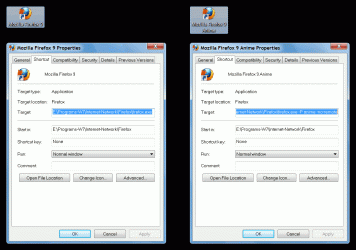
1 - Create a new FF shortcut for each profile and name it (e.g. stocks, new, etc.).

2 - Replace the "firefox.exe" in the "Target:" box, with "firefox.exe -P <profile name> -no-remote"

In this gif I have created a shortcut to my anime profile.
FF Profile Shortcut.gif
 
Last edited:

My Computer My Computer

At a glance

W7 Ultimate SP1, LM19.2 MATE, W10 Home 1703, ...AMD Phenom II x6 1100T, 3.3 GHz12GB DDR3 1333 G-Skill (4GB x 2), G-Skill (2G...NVIDIA GeForce GTX 660
Computer type
PC/Desktop
Computer Manufacturer/Model Number
n/a
OS
W7 Ultimate SP1, LM19.2 MATE, W10 Home 1703, W10 Pro 1703 VM, #All 64 bit
CPU
AMD Phenom II x6 1100T, 3.3 GHz
Motherboard
ASUS M4A88T-M/USB3 (AM3)
Memory
12GB DDR3 1333 G-Skill (4GB x 2), G-Skill (2GB x 2)
Graphics Card(s)
NVIDIA GeForce GTX 660
Sound Card
Realtek?
Monitor(s) Displays
Samsung S23B350
Screen Resolution
1920x1080
Hard Drives
WD Green 2TB (SATA), WD Green 3TB (SATA), WD Blue 4TB (SATA), WD Blue 6TB (SATA)
PSU
Cooler Master
Case
Antec GX300 Tower
Cooling
3x Antec TRICOOL 120mm Fans
Mouse
Wired Optical
Internet Speed
DSL
Antivirus
Avast
Browser
Pale Moon (64 bit)
Other Info
2018-12-27 Upgraded HDDs
2015-12-10 Upgraded case, graphics card, storage
2015-08-15 Upgraded motherboard & RAM
2015-07-15 Upgraded LM17.1 to LM17.2
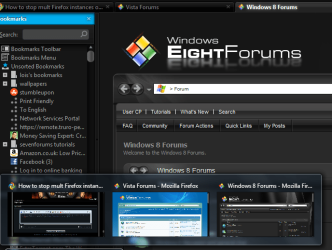
another thing you could do is (in firefox) go tools/options/tabs/check the box for show tab previews in the windows taskbar this will able you to see at a glance which tab is which in an aero peek way.

2012-01-13_0219.png
 
Last edited:

My Computer My Computer

At a glance

Microsoft Windows 7 Home Premium 64-bit 7600IIx4 amd athelon 635 processor2x2gbati radeon HD 5450
Computer Manufacturer/Model Number
Hewlett packard/p6512uk
OS
Microsoft Windows 7 Home Premium 64-bit 7600
CPU
IIx4 amd athelon 635 processor
Motherboard
FOXCONN 2AA9
Memory
2x2gb
Graphics Card(s)
ati radeon HD 5450
Sound Card
(1) Realtek High Definition Audio (2) AMD High Definition
Monitor(s) Displays
samsung lcd tv 32"
Screen Resolution
1360x 768
Hard Drives
(1) WDC WD10 01FAES-60Z2A0 SATA Disk Device (2) Maxtor OneTouch USB Device (3) ST310003 33AS USB Device (4) WD My Book 1111 USB Device
PSU
?
Cooling
air!
Keyboard
wireless hp
Mouse
wireless Hp,optical
Internet Speed
1.10mb/s
Antivirus
MSE
Browser
Firefox
Back
Top