How to stop volume of background applications from lowering...

UberB

New member
Local time
5:39 PM
Messages
23
How do I stop volume of background applications from lowering when I play a game?

Whenever I start a skype call or want to play a game with voice chat, the volume of background applications instantly drops by a significant amount. This is annoying because I want to listen to music while I game and it's just not possible like this.

A quick Google search suggests that this is a common Windows 7 "feature":

audio - Windows 7 lowers applications' volume automatically - Super User

I have applied the fix suggested in the article (Change settings to "do Nothing" when Windows detects communication activity) but this did not work. Any ideas why? I am running a Thinkpad T530 laptop and I have a Realtek sound card.
 

My Computer My Computer

At a glance

Windows 7 Ultimate 32-bitIntel Core 2 Duo P73502 GBMobility Radeon 3470
Computer Manufacturer/Model Number
ASUS X82S
OS
Windows 7 Ultimate 32-bit
CPU
Intel Core 2 Duo P7350
Memory
2 GB
Graphics Card(s)
Mobility Radeon 3470
Sound Card
Realtek HD Audio ALC662
Monitor(s) Displays
14.1" WXGA
Hard Drives
250 GB
Since you have already changed your sound setting to "do nothing" open up Skype and disable both settings in Skype under tools->sound settings, that says "let Skype configure your microphone" & "automaticly change speaker settings" to my knowledge that should work
 

My Computer My Computer

At a glance

Windows 7 Home Premium x64Intel Core i7 860 (Lynnfield)Corsair Vengeance 9,9,9,24 1600Mhz 1.50v 2x4GAsus nVidia 560 GTX
Computer type
PC/Desktop
OS
Windows 7 Home Premium x64
CPU
Intel Core i7 860 (Lynnfield)
Motherboard
Asus P7P55D (LGA1156)
Memory
Corsair Vengeance 9,9,9,24 1600Mhz 1.50v 2x4G
Graphics Card(s)
Asus nVidia 560 GTX
Sound Card
Asus Xonar DG
Monitor(s) Displays
Acer P235H & NEC E201W
Screen Resolution
1920x1080 & 900x1600
Hard Drives
2
PSU
Corsair 650 Modular
Case
Corsair 800D
Cooling
Corsair H80 with Noctua fans
Keyboard
Ducky Shine
Mouse
tT Theron
Internet Speed
100/100
Browser
IE10
In my opinion you are just asking a ASUS X82S to do more than it is designed to do at one time.
 

My Computer My Computer

At a glance

Windows 10 Pro. 64/ version 1709 Windows 7 Pr...Intel i7-6800K @ 4.3Corsair Platinum 16 gig @2400EVGA GTX 1070 OC
Computer type
PC/Desktop
Computer Manufacturer/Model Number
Home made Desktop
OS
Windows 10 Pro. 64/ version 1709 Windows 7 Pro/64
CPU
Intel i7-6800K @ 4.3
Motherboard
ASUS X-99 Deluxe II
Memory
Corsair Platinum 16 gig @2400
Graphics Card(s)
EVGA GTX 1070 OC
Monitor(s) Displays
Asus 27" LED LCD/VE278Q
Screen Resolution
1920-1080 or 1280-720 HDMI
Hard Drives
INTEL SSD 730-240 Gb Sata 3.0/
PSU
EVGA Platium 1200W
Case
Phanteks Luxe Tempered Glass 8 fans/ one radiator
Cooling
XSPC/ Water Cooled CPU
Keyboard
Das 4 Professional
Mouse
Logitech M705/MX Anywhere 2-S
Internet Speed
100 mbits
Antivirus
Microsoft Security Essentials/ Malwarebytes Premium 3.0/ SAS
Browser
I.E. 11 default/Firefox/ ISP Time Warner Cable/Spectrum
Other Info
LG BluRay Burner/
Sound system-KLipsch-THX/
Icy Dock ssd Hot Swap bays.
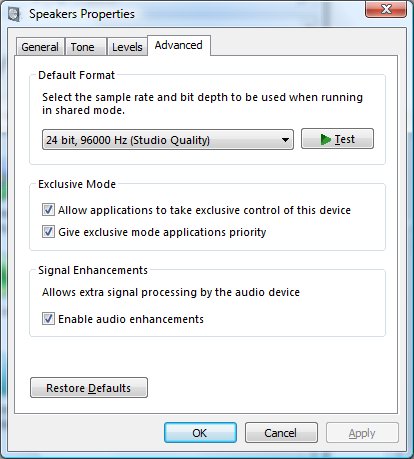
I'm curious if disabling the Exclusive Mode options under the Advanced Speaker Settings will do anything:

speaker-properties-advanced.jpg
 

My Computer My Computer

At a glance

Windows 7 Pro x64Intel Core i7 920Corsair XMS3 12GB (3x2GB) DDR3 1333EVGA GTX 470 1280MB GDDR5 DX11
Computer Manufacturer/Model Number
Me
OS
Windows 7 Pro x64
CPU
Intel Core i7 920
Motherboard
ASUS P6T Deluxe V2
Memory
Corsair XMS3 12GB (3x2GB) DDR3 1333
Graphics Card(s)
EVGA GTX 470 1280MB GDDR5 DX11
Monitor(s) Displays
ASUS VW246H | ACER AL2216W
Screen Resolution
3600x1080
Hard Drives
1x Corsair Vertex 3 SSD (120GB)
1x Corsair Vertex 2 SSD (60GB)
2x Western Digital Black (500GB/1TB)
1x External WD Green eSATA (1TB)
PSU
Corsair 850HX
Case
Velocity Micro FullTower
Keyboard
Logitech G110
Mouse
Logitech G500
Internet Speed
http://www.speedtest.net/result/1226664359.png
Antivirus
MSE
Browser
Chrome
Other Info
Logitech Z-5500 5.1 Surround Sound
Logitech C260 Webcam
Creative Fatal1ty Headset
That's the other setting Bullet. Good catch!
 

My Computer My Computer

At a glance

Windows 7 Pro-x64i7-2600 3.4GHz - 3.8GHz Turbo8Gb - 2x4GB, Muskin 991770 PC3-1333Integrated Intel HD 2000
Computer type
PC/Desktop
Computer Manufacturer/Model Number
Built 2/11/2011
OS
Windows 7 Pro-x64
CPU
i7-2600 3.4GHz - 3.8GHz Turbo
Motherboard
Intel DH67BL-B3
Memory
8Gb - 2x4GB, Muskin 991770 PC3-1333
Graphics Card(s)
Integrated Intel HD 2000
Sound Card
Integrated Intel 10.1 HD, RealTek ALC892
Monitor(s) Displays
Asus LCD VH222H, Haier HL24XSL2a
Screen Resolution
1920x1080, 1920x1080
Hard Drives
Crucial SSD C300-128Gb,
Western Digital WD5002AALX - 500Gb,
Western Digital WD7501AALS - 750Gb
PSU
Seasonic 650W 80+ Gold Modular
Case
Rosewill Defender
Cooling
Stock CPU, Four 120mm case fans, PCH fan added
Keyboard
Logitech EX100 Y-RBH94 Wireless
Mouse
Logitech EX100 M-RCE95 Wireless
Internet Speed
3.0/1.5 Mbs
Antivirus
Microsoft Security Essentials
Browser
Microsoft Internet Explorer 11
Other Info
Antec Veris Premier-Multimedia IR Station,
Cyber Accoustics-3602 Speakers,
AFT XM-5U Card Reader,
Hauppauge TV-HVR-2250,
Sony LX300 USB Turntable
I have applied both settings but still my volume is lowering. I get this in games too (like Dota 2, TF2), not just Skype so I don't think it's a Skype setting. I'm also using a Thinkpad T530, not an Asus X82S.

if i disable my microphone, volume levels are as they should be without being suppressed. However I don't want to do this every time I want to play a game. Help would be appreciated. :)
 

My Computer My Computer

At a glance

Windows 7 Ultimate 32-bitIntel Core 2 Duo P73502 GBMobility Radeon 3470
Computer Manufacturer/Model Number
ASUS X82S
OS
Windows 7 Ultimate 32-bit
CPU
Intel Core 2 Duo P7350
Memory
2 GB
Graphics Card(s)
Mobility Radeon 3470
Sound Card
Realtek HD Audio ALC662
Monitor(s) Displays
14.1" WXGA
Hard Drives
250 GB
Same issue diff comp.

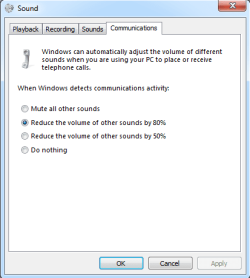
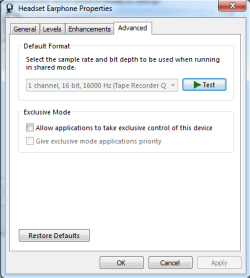
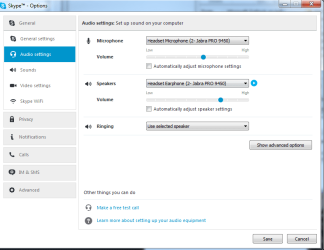
I have this issue on an HP Compaq 6200 Pro. On Win7. I've tried "do nothing" for the communications settings. (See prt screen) I have the check boxes unchecked in Headset Earphone Properties. (see print screen)
Skype Audio Settings. (see attachment).

I've read posts that say Nvidia does it.
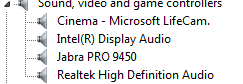
I don't think I have that I have Realtek. (See attachment.)
I'm assuming it's Jabra...

 

Attachments

  • sound video and game.png
    sound video and game.png
    2.4 KB · Views: 5
  • sound communications 80.png
    sound communications 80.png
    8.5 KB · Views: 5
  • Headset earphone properties.png
    Headset earphone properties.png
    11.4 KB · Views: 5
  • Skype audio settings.png
    Skype audio settings.png
    21.6 KB · Views: 0

My Computer My Computer

At a glance

Win7
Computer type
PC/Desktop
OS
Win7
Back
Top