How to tell if Windows host process (Rundll32) is malware or not?

SaraBrown93

New member
Member
Local time
9:44 PM
Messages
62
Greetings,

I am in need of some assistance about the Windows host process (Rundll32). Just today as I was looking through my icons in my taskbar on my standard account, I noticed that there was a process labeled "Windows host process (Rundll32)" and I don't remember ever seeing it before (if not maybe once). But after doing some research, I did the following:

1.) I did a search in my Disk Drive and noticed that the only Rundll32 files on my computer were the ones that are with my amd processor, the default windows location files, and Malwarebytes Pro.

2.) I have done numerous full, quick, and flash scans with Malwarebytes Pro and Microsoft Security Essentials but nothing is detected.

3.) I have tried going into safemode, but it still appears in the list,

4. I logged on into the Administrator account, and noticed that the process labeled "Windows host process (Rundll32)" is not on the list anywhere (I only use the Administrator account for installing programs only, nothing else. I use a standard account for everything else).

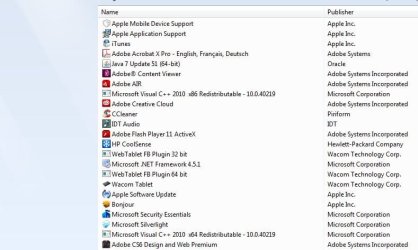
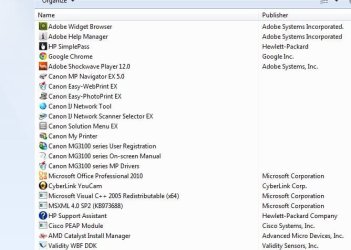
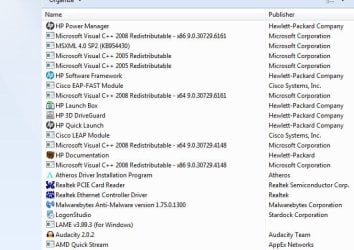
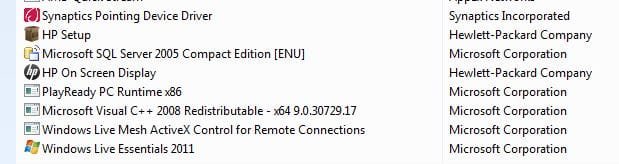
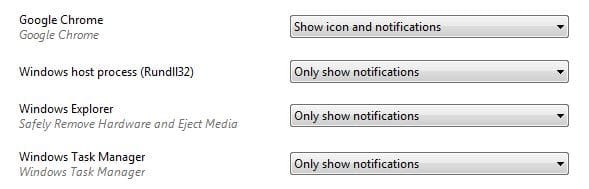
5.) After reading some research, I noticed that it could be some of the programs I have installed on my computer that maybe using it. However; I can not determine which ones it could be. Here is the list of the programs I have installed and what the taskbar looks like.

6.) I viewed my running processes in task manger and it does not appear.

Although the icon has not appeared at all or gives me notifications, it still worries me. So is this a virus that's harmful to my computer? Please let me know.

Thank you so much for your assistance. :)
 

Attachments

  • Capture.JPG
    Capture.JPG
    54.2 KB · Views: 0
  • Capture2.JPG
    Capture2.JPG
    49.3 KB · Views: 48
  • Capture3.JPG
    Capture3.JPG
    57.9 KB · Views: 49
  • Capture4.JPG
    Capture4.JPG
    27.3 KB · Views: 48
  • Capture5.JPG
    Capture5.JPG
    19.5 KB · Views: 48

My Computer My Computer

At a glance

Windows 7 Home Premium 64bit
Computer type
Laptop
Computer Manufacturer/Model Number
HP Pavilion dv6 7000 CTO Entertainment Series
OS
Windows 7 Home Premium 64bit
Antivirus
Malwarebytes AntiMalware Pro & Microsoft Security Essentials
Browser
Internet Explorer 10 and Google Chrome
Determining If RunDll32.exe Is Legitimate or Malicious


Search all drives in Windows for any duplicates of RunDll32.exe. The legitimate copy of RunDll32.exe can be found in \Windows\System32\rundll32.exe. Any other copies should be deleted. The Windows Task Manager can also determine any malicious copies of the file; press ctrl-alt-del to run the task manager, click the "processes" tab and hover the mouse over all instances of RunDll32.exe. The true identity of all malicious copies will show up.
 

My Computer My Computer

At a glance

Windows 7 Ultimate 32bit SP1Intel(R) Core(TM)2 Quad CPU @ 2.40GHz, 2400 MHz4 GBATI Radeon HD 2600 Pro
Computer type
PC/Desktop
Computer Manufacturer/Model Number
Bruce ... somewhere in his 40's
OS
Windows 7 Ultimate 32bit SP1
CPU
Intel(R) Core(TM)2 Quad CPU @ 2.40GHz, 2400 MHz
Motherboard
INTEL/D975XBX2
Memory
4 GB
Graphics Card(s)
ATI Radeon HD 2600 Pro
Monitor(s) Displays
Samsung SyncMaster 914v
Screen Resolution
1280 x 1024
Hard Drives
2/500GB each ... ST3500630AS ATA Device.
One is not connected
PSU
Rocketfish 700 W
Case
G.Skill Gigabyte Chassis
Keyboard
Standard PS/2 Keyboard
Mouse
Microsoft PS/2 Mouse
Internet Speed
DSL
Antivirus
Avira Internet Security
Browser
IE 11
Other Info
ATI HDMI Audio
I did a search on my computer and here are the results. It looks like the only Rundll32 files that appeared were the ones that were already installed on this computer (besides malwarebytes).

I also ran task manager and I did not see no Rundll32 processes running.

I don't know if this helps but I am using a Windows 7 64-bit operating system. Sorry for not mentioning it earlier. I hope somehow this helps.
 

Attachments

  • Capture.JPG
    Capture.JPG
    40.5 KB · Views: 43

My Computer My Computer

At a glance

Windows 7 Home Premium 64bit
Computer type
Laptop
Computer Manufacturer/Model Number
HP Pavilion dv6 7000 CTO Entertainment Series
OS
Windows 7 Home Premium 64bit
Antivirus
Malwarebytes AntiMalware Pro & Microsoft Security Essentials
Browser
Internet Explorer 10 and Google Chrome
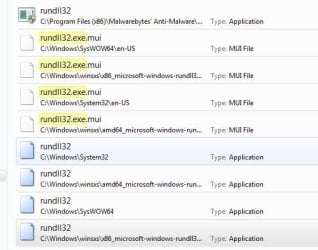
That looks fine to me. A good application to have on hand, is Process Explorer. Read about it here and download: Process Explorer
 

My Computer My Computer

At a glance

Windows 7 Ultimate 32bit SP1Intel(R) Core(TM)2 Quad CPU @ 2.40GHz, 2400 MHz4 GBATI Radeon HD 2600 Pro
Computer type
PC/Desktop
Computer Manufacturer/Model Number
Bruce ... somewhere in his 40's
OS
Windows 7 Ultimate 32bit SP1
CPU
Intel(R) Core(TM)2 Quad CPU @ 2.40GHz, 2400 MHz
Motherboard
INTEL/D975XBX2
Memory
4 GB
Graphics Card(s)
ATI Radeon HD 2600 Pro
Monitor(s) Displays
Samsung SyncMaster 914v
Screen Resolution
1280 x 1024
Hard Drives
2/500GB each ... ST3500630AS ATA Device.
One is not connected
PSU
Rocketfish 700 W
Case
G.Skill Gigabyte Chassis
Keyboard
Standard PS/2 Keyboard
Mouse
Microsoft PS/2 Mouse
Internet Speed
DSL
Antivirus
Avira Internet Security
Browser
IE 11
Other Info
ATI HDMI Audio
Ok. Once downloaded what do I do?
 

My Computer My Computer

At a glance

Windows 7 Home Premium 64bit
Computer type
Laptop
Computer Manufacturer/Model Number
HP Pavilion dv6 7000 CTO Entertainment Series
OS
Windows 7 Home Premium 64bit
Antivirus
Malwarebytes AntiMalware Pro & Microsoft Security Essentials
Browser
Internet Explorer 10 and Google Chrome
Let's see what's going on ...
Download DDS from one of these links:
DDS.com

DDS.pif
  • Disable any script blocking protection (such as Norton Antivirus)
  • Double click the dds icon to run the tool.
  • When done, DDS will open two (2) logs:
    1. DDS.txt
    2. Attach.txt <--- will be minimized in the task tray
  • Save both reports to your desktop.
Include the contents of both logs in your next post.


You can copy and paste the logs, but you can also upload both logs (preferred) by following these instructions:http://www.sevenforums.com/tutorials/9733-screenshots-files-upload-post-seven-forums.html
 

My Computer My Computer

At a glance

Windows 7 Ultimate 32bit SP1Intel(R) Core(TM)2 Quad CPU @ 2.40GHz, 2400 MHz4 GBATI Radeon HD 2600 Pro
Computer type
PC/Desktop
Computer Manufacturer/Model Number
Bruce ... somewhere in his 40's
OS
Windows 7 Ultimate 32bit SP1
CPU
Intel(R) Core(TM)2 Quad CPU @ 2.40GHz, 2400 MHz
Motherboard
INTEL/D975XBX2
Memory
4 GB
Graphics Card(s)
ATI Radeon HD 2600 Pro
Monitor(s) Displays
Samsung SyncMaster 914v
Screen Resolution
1280 x 1024
Hard Drives
2/500GB each ... ST3500630AS ATA Device.
One is not connected
PSU
Rocketfish 700 W
Case
G.Skill Gigabyte Chassis
Keyboard
Standard PS/2 Keyboard
Mouse
Microsoft PS/2 Mouse
Internet Speed
DSL
Antivirus
Avira Internet Security
Browser
IE 11
Other Info
ATI HDMI Audio
Here are the logs you requested. Sorry for not responding back sooner.
 

Attachments

My Computer My Computer

At a glance

Windows 7 Home Premium 64bit
Computer type
Laptop
Computer Manufacturer/Model Number
HP Pavilion dv6 7000 CTO Entertainment Series
OS
Windows 7 Home Premium 64bit
Antivirus
Malwarebytes AntiMalware Pro & Microsoft Security Essentials
Browser
Internet Explorer 10 and Google Chrome
Back
Top