
I have an issue on this laptop that when I open up the lid one of the services that runs under svchost.exe starts eating up CPU cycles/RAM for a long time before computer comes to normal. If I bring up Task Manager and locate the offending svchost.exe process, then right-click it and select "go to services":
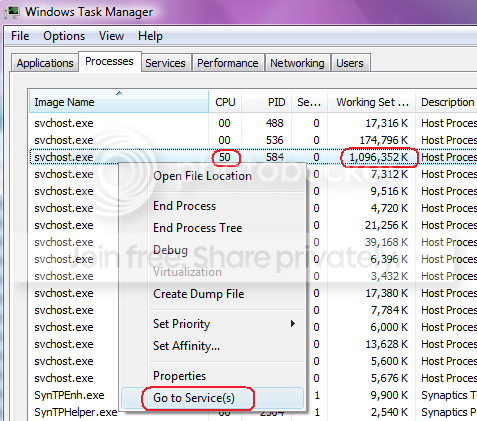
It brings up a whole bunch of them (about 10 or more.)
So I was curious to know if there's an option to tell CPU and RAM usage per service (and not just svchost.exe) so I can kill (stop) the offending one?
It brings up a whole bunch of them (about 10 or more.)
So I was curious to know if there's an option to tell CPU and RAM usage per service (and not just svchost.exe) so I can kill (stop) the offending one?
My Computer
At a glance
Windows
- OS
- Windows