Recently our isp put a cap on our internet usage. Our Isp has a usage tracking page but it only updates every 42 hours and after 2 days it says we have already used 17gb. Really wanna track the usage and see what is exactly using so much internet. I have already tried using NetWorx but im pretty sure its only tracking the usage on my PC and not my router. Anything i can use to track all usage going in and out of my router?
My Computer
At a glance
Microsoft Windows 7 Ultimate 64-bit 7601 Mult...Intel(R) Core(TM) i5-2400 CPU @ 3.10GHz16.00 GBNVIDIA GeForce GTX 660 Ti SC 3GB
Computer type
PC/Desktop
Computer Manufacturer/Model Number
Custom Build
OS
Microsoft Windows 7 Ultimate 64-bit 7601 Multiprocessor Free Service Pack 1
CPU
Intel(R) Core(TM) i5-2400 CPU @ 3.10GHz
Motherboard
ASUSTeK COMPUTER INC. P8H61-M LE/CSM
Memory
16.00 GB
Graphics Card(s)
NVIDIA GeForce GTX 660 Ti SC 3GB
Sound Card
(1) NVIDIA High Definition Audio (2) Realtek High Definiti
Monitor(s) Displays
21.5" HP
Screen Resolution
1600 x 900 x 32 bits (4294967296 colors) @ 60 Hz
Hard Drives
ST31000524AS ATA Device 7200
PSU
OCZ 650W Bronze Plus
Case
Zalman Z9 Plus
Mouse
Razer naga molten edition
Antivirus
Microsoft Security Essentials along with Malwarbytes
Browser
Chrome
Other Info
Love computers but wanting to learn more about troubleshooting and wanting to contribute to this community!
Samsung 128GB 840 Pro SSD (1),
Samsung 4TB 850 EVO SSDs (4)
Samsung 4TB 850 EVO SSDs (16) external backup drives used in 2.5" hot swap bays in the computer.
PSU
Corsair HX750w
Case
Antec Two Hundred v2 (modified)
Cooling
Cooler Master GeminII S524 120mm (fan replaced with a 140mm)
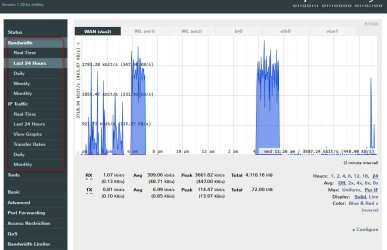
If you feel adventurous, there is custom firmware available for your router. I personally use Shibby's variant of Tomato router firmware which provides all the features you ask about and more...
Currently there are a couple of handfuls of Dlink users running Shibby's Tomato as shown here. OpenlinksysInfo forum is the goto for questions and issues. Firmware is available here. You want the K26ARM link. There is also a forum thread just for Tomato ARM firmware in the forum link provided above. This firmware is rock solid in my experience. Note your bandwidth stats are zeroed on reboot unless you save to USB or another drive.
I would need something a little simpler . Flashing is a little beyond my knowledge atm. It looks great once installed but installing is the hard party. Anything a little easier to install?
My Computer
At a glance
Microsoft Windows 7 Ultimate 64-bit 7601 Mult...Intel(R) Core(TM) i5-2400 CPU @ 3.10GHz16.00 GBNVIDIA GeForce GTX 660 Ti SC 3GB
Computer type
PC/Desktop
Computer Manufacturer/Model Number
Custom Build
OS
Microsoft Windows 7 Ultimate 64-bit 7601 Multiprocessor Free Service Pack 1
CPU
Intel(R) Core(TM) i5-2400 CPU @ 3.10GHz
Motherboard
ASUSTeK COMPUTER INC. P8H61-M LE/CSM
Memory
16.00 GB
Graphics Card(s)
NVIDIA GeForce GTX 660 Ti SC 3GB
Sound Card
(1) NVIDIA High Definition Audio (2) Realtek High Definiti
Monitor(s) Displays
21.5" HP
Screen Resolution
1600 x 900 x 32 bits (4294967296 colors) @ 60 Hz
Hard Drives
ST31000524AS ATA Device 7200
PSU
OCZ 650W Bronze Plus
Case
Zalman Z9 Plus
Mouse
Razer naga molten edition
Antivirus
Microsoft Security Essentials along with Malwarbytes
Browser
Chrome
Other Info
Love computers but wanting to learn more about troubleshooting and wanting to contribute to this community!
Little confidence in installing firmware means it's probably best to not try. Self fulfilling prophecy will bite. Installing firmware really is not all that difficult but the required procedures can be tedious. The main thing is to make sure you have no power interruption and good firmware.
Networx does work and will give you aggregate totals for all windows boxes in your network.


 . Flashing is a little beyond my knowledge atm. It looks great once installed but installing is the hard party. Anything a little easier to install?