How to trnsfr windows 7 to usb drive so i can boot it but not install

atoms88

New member
Local time
7:40 PM
Messages
18
hey all. I'm planning on learning to use linux soon but don't have the memory to run a dual boot system. I would like to transfer my windows 7 ( which is legit, but I don't have a disc) onto a thumb drive so i can boot and run on my computer when needed and also bring with me to another pc if needed. I have found tutorials on making a flash drive for installation purposes but I can't tell if that would also work for just running the os from boot whenever I wanted to. Is it the same? Other than the OS, I will probably only take microsoft office and Pale Moon/duckduckgo/malwarebytesfree/avastfree along with it. Is 16gb enough room on the drive to accomplish this plan and is there a tutorial or instructions that somebody can lead me to if not the same as the installation directions? thanks for your help.
 

My Computer My Computer

At a glance

Windows 7 Home premium 64bitIntel core 2 duo e67502gb ram
Computer type
PC/Desktop
Computer Manufacturer/Model Number
HP SFF
OS
Windows 7 Home premium 64bit
CPU
Intel core 2 duo e6750
Memory
2gb ram
Antivirus
avast free
Browser
duckduckgo
win7 doesn't boot natively from usb.

It is not difficult to make the registry changes so that it does. You will need to use a usb3 , usb2 is very very very very slow for booting win7.

If you are using Intel core 2 duo e6750 you probably haven't got usb3 :(
 

My Computers My Computers

  • At a glance

    7 X64i5 84002x8gb 3200mhz
    Computer type
    PC/Desktop
    OS
    7 X64
    CPU
    i5 8400
    Motherboard
    gigabyte b365m ds3h
    Memory
    2x8gb 3200mhz
    Hard Drives
    various
    PSU
    pure power 11 400w cm
    Case
    Coolermaster
    Cooling
    cryorig m9i
  • At a glance

    7x64g54008gb ddr4 2400
    Computer type
    PC/Desktop
    OS
    7x64
    CPU
    g5400
    Motherboard
    ga b365m ds3h
    Memory
    8gb ddr4 2400
    PSU
    xfx pro 450w
but don't have the memory to run a dual boot system

Do you mean memory, or storage space on your harddrive? 2gb RAM is not a lot, but it shouldn't stop you dual booting. If you have enough space on your HD , you can install Linux.

I suggest you make an image of your current win7 installation right now.Then whatever you decide, you could always restore the image at any time in the future. Having a backup image is vital for everyone.

You need to store the image file somewhere safe. Usually an external HD, though a large usb stick is possible.

You could use this free imaging program to do it:
Best Windows Backup and Restore Software | AOMEI Backupper
 

My Computers My Computers

  • At a glance

    7 X64i5 84002x8gb 3200mhz
    Computer type
    PC/Desktop
    OS
    7 X64
    CPU
    i5 8400
    Motherboard
    gigabyte b365m ds3h
    Memory
    2x8gb 3200mhz
    Hard Drives
    various
    PSU
    pure power 11 400w cm
    Case
    Coolermaster
    Cooling
    cryorig m9i
  • At a glance

    7x64g54008gb ddr4 2400
    Computer type
    PC/Desktop
    OS
    7x64
    CPU
    g5400
    Motherboard
    ga b365m ds3h
    Memory
    8gb ddr4 2400
    PSU
    xfx pro 450w
I installed a usb3 card years ago and tried to use an external hd but could never find the right driver for the external rig. it ended up in the bottom of my drawer. I could drag it out and try to get it working. My current HD, if I put an effort into cleaning it up I can free maybe 13 gigs. Most of the time I only have 5 or 6 gigs free. If I make an image can i edit it to bring it down in size? Are the registry changes in a tutorial here or could I find them somewhere else? thanks for your help.
 

My Computer My Computer

At a glance

Windows 7 Home premium 64bitIntel core 2 duo e67502gb ram
Computer type
PC/Desktop
Computer Manufacturer/Model Number
HP SFF
OS
Windows 7 Home premium 64bit
CPU
Intel core 2 duo e6750
Memory
2gb ram
Antivirus
avast free
Browser
duckduckgo
I can free maybe 13 gigs. Most of the time I only have 5 or 6 gigs free

Shame I am far from Canada. I have some spare ddr2 RAM and could probably find a 500gb HD I am not using.

Do you have CEX in your part of the world? They sell second hand stuff very cheaply - it comes with a guarantee. Check online to see if they do it there.

If I make an image can i edit it to bring it down in size?

Normal compression usually gives you an image 40-50% of the size of the used space on your drive.
If it is not possible for you to make an image - at least make sure you have your product key (should be on a sticker on the machine). Installtion media is not hard to find. The product key is the important bit.

Are the registry changes in a tutorial here or could I find them somewhere else?

The usual method is to restore/apply an image to the usb or clone your win7 partition(s) to the usb, then adjust the registry before attempting to boot from the usb. Change the drive letter in red below to the letter of your usb drive.


setusbboot.cmd
Code:
@echo off
setlocal EnableExtensions EnableDelayedExpansion
pushd %~dp0
rem thanks to cdob

set System_Root=[COLOR="Red"]E:[/COLOR]\Windows
if not %1.==. set System_Root=%1

if not exist "%System_Root%\system32\config\system" set /P System_Root=Path to your SystemRoot folder on usb drive (e:\Windows): 
if not exist "%System_Root%\system32\config\system" (echo Error: target not found &pause &popd &goto :eof)

copy "%System_Root%\system32\config\system" "%System_Root%\system32\config\system_%random%.sav"
reg.exe load HKLM\loaded_SYSTEM "%System_Root%\system32\config\system"

set ControlSetDefault=
call :setReg Default
call :setReg LastKnownGood

reg.exe unload HKLM\loaded_SYSTEM
popd

goto :eof

:setReg
 set ControlSet=001
 reg.exe query "HKLM\loaded_SYSTEM\Select" /v "%1" >nul 2>&1 && (
  for /f "skip=2 tokens=3" %%a in ('reg.exe query "HKLM\loaded_SYSTEM\Select" /v "%1"') do set /a ControlSet=%%a
  set ControlSet=000!ControlSet!
 )
 set ControlSetNNN=ControlSet%ControlSet:~-3%
 if %ControlSetDefault%.==%ControlSetNNN%. goto :eof
 echo. &echo ControlSet "%ControlSetNNN%" used.

 set Services=HKLM\loaded_SYSTEM\%ControlSetNNN%\Services
 set Control=HKLM\loaded_SYSTEM\%ControlSetNNN%\Control
 
 reg.exe add %Control%\PnP /f /v PollBootPartitionTimeout /t REG_DWORD /d 30000
 reg.exe add %Control% /f /v BootDriverFlags /t REG_DWORD /d 0x6

 set ControlSetDefault=%ControlSetNNN%
goto :eof
 

My Computers My Computers

  • At a glance

    7 X64i5 84002x8gb 3200mhz
    Computer type
    PC/Desktop
    OS
    7 X64
    CPU
    i5 8400
    Motherboard
    gigabyte b365m ds3h
    Memory
    2x8gb 3200mhz
    Hard Drives
    various
    PSU
    pure power 11 400w cm
    Case
    Coolermaster
    Cooling
    cryorig m9i
  • At a glance

    7x64g54008gb ddr4 2400
    Computer type
    PC/Desktop
    OS
    7x64
    CPU
    g5400
    Motherboard
    ga b365m ds3h
    Memory
    8gb ddr4 2400
    PSU
    xfx pro 450w
thanks very much for the offer, I have a 500gb hd in the drawer with the external hd hardware and useless driver disc. I've moved a few times since and may have jiggled it around too much so I need to find an external way to test it before I spend too much time on finding a driver. Thanks again for the help, it'll take me some time to work my way through all of these options and there's a good possibility i may be back with followups:o
 

My Computer My Computer

At a glance

Windows 7 Home premium 64bitIntel core 2 duo e67502gb ram
Computer type
PC/Desktop
Computer Manufacturer/Model Number
HP SFF
OS
Windows 7 Home premium 64bit
CPU
Intel core 2 duo e6750
Memory
2gb ram
Antivirus
avast free
Browser
duckduckgo
If you are trying to boot win7 via usb, an external usb2 connected HD is going to be better than a usb 2 stick.

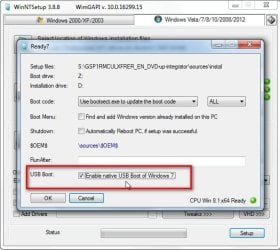
You could also get a copy of the installation media, and WinNtSetup will install that onto external usb disk, select like this:

usb-boot.jpg
 

My Computers My Computers

  • At a glance

    7 X64i5 84002x8gb 3200mhz
    Computer type
    PC/Desktop
    OS
    7 X64
    CPU
    i5 8400
    Motherboard
    gigabyte b365m ds3h
    Memory
    2x8gb 3200mhz
    Hard Drives
    various
    PSU
    pure power 11 400w cm
    Case
    Coolermaster
    Cooling
    cryorig m9i
  • At a glance

    7x64g54008gb ddr4 2400
    Computer type
    PC/Desktop
    OS
    7x64
    CPU
    g5400
    Motherboard
    ga b365m ds3h
    Memory
    8gb ddr4 2400
    PSU
    xfx pro 450w
Back
Top