how to troubleshoot 5 minute bootup (prev 10s) after win update reboot

kevincw01

New member
Local time
7:26 AM
Messages
6
came home to see windows telling me it needs to reboot due to a recent update. upon reboot I noticed it was sitting there at the animated windows logo prior to the logon screen. the numlock led on the keyboard was stuck so I reset the computer with no change. I then tried safe mode with also no luck. I reset once more and did some googling for quick solutions and about 5 minutes later the computer goes to the logon screen. this is repeatable. i ran a chkdsk /r /f with no change. im not quite sure what to check from here but something is definitely wrong when I go from a 10 second start time to 5 minutes. any ideas?
 

My Computer My Computer

At a glance

Microsoft Windows 7 Ultimate N 64-bit 7601 Mu...Intel(R) Core(TM) i5-3470 CPU @ 3.20GHz8.00 GBIntel(R) HD Graphics
Computer type
PC/Desktop
Computer Manufacturer/Model Number
custom build
OS
Microsoft Windows 7 Ultimate N 64-bit 7601 Multiprocessor Free Service Pack 1
CPU
Intel(R) Core(TM) i5-3470 CPU @ 3.20GHz
Motherboard
ASUSTeK COMPUTER INC. Z77-A
Memory
8.00 GB
Graphics Card(s)
Intel(R) HD Graphics
Sound Card
(1) Realtek High Definition Audio (2) Intel(R) Display Aud
Monitor(s) Displays
(2) Acer S231HL
Screen Resolution
1920 x 1080 x 32 bits (4294967296 colors) @ 59 Hz
Hard Drives
(1) Samsung SSD 840 PRO Seri (2) ST31000528AS
Antivirus
microsoft security essentials
Browser
chrome
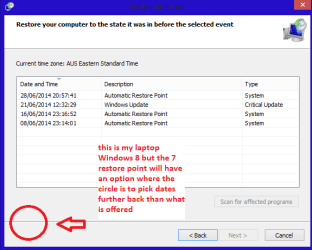
Hello and welcome Kevin mate if you can get safe mode which I am assuming of course do a system restore to as far back as you like and then it is just a matter of installing updates until one finds the offender and then you just hide it so it doesn't bother you again. (Right click on it and pick Hide)

If yo are not offered may restore points click on the box for further back ones see pic but I suspect you know about this option
 

Attachments

  • RESTORE POINT.PNG
    RESTORE POINT.PNG
    10.3 KB · Views: 5

My Computer My Computer

At a glance

Desk1 7 Home Prem / Desk2 10 Pro / Main lap A...Desk1 i5 3750K / Laptop i7 GTX 860M / Desk2 i...Desk1 8GB (1866) / Desk2 16GB (1333) / Laptop...Desk 1& 2NVidia GTX 650 & Laptops on board Intel
Computer type
PC/Desktop
Computer Manufacturer/Model Number
Own build (new) Desk1 / Asus ROG Win 7 / Desk2 1st build
OS
Desk1 7 Home Prem / Desk2 10 Pro / Main lap Asus ROG 10 Pro 2 laptop Toshiba 7 Pro Asus P2520 7 & 10
CPU
Desk1 i5 3750K / Laptop i7 GTX 860M / Desk2 i5 2500
Motherboard
Desk1 Asus P877-V / Desk2 Gigabyte H67 UD3H / Laptop ?
Memory
Desk1 8GB (1866) / Desk2 16GB (1333) / Laptop 8Gb DDR3
Graphics Card(s)
Desk 1& 2NVidia GTX 650 & Laptops on board Intel
Sound Card
Desk 1 & 2 -XONAR DG Realtek High Def audio Laptop
Monitor(s) Displays
Desk 1 Benq HD 2450 / Desk2 Philips 24" / Laptop 17.5"
Screen Resolution
1920x1080 D1 & D2 & Laptop 1
Hard Drives
Desk1 Samsung 120GB 830 SSD
Asus ROG 256GB 850 Pro SSD
Desk2 Samsung 840 256 SSD
Toshiba 120GB EVO
PSU
Desk 1 Corsair HX 1050/ Laptop ? / Desk 2 Corsair HX 650
Case
Desk 1 Cooler HAF XM ? Toshiba laptop / Desk2 Coolermaster
Cooling
Fans on all Desk1 -2 Desk2 - all Coolermasters 5 Laptop ?
Keyboard
Desk 1 MS Sidewinder X6 Desk 2 MS Sidewinder X 4
Mouse
Desk 1&2 - Gigabyte MS 900 gamer - laptop - Logitec wireless
Internet Speed
ADSL2+
Other Info
One other Desktop (tester) and spare Toshba laptop both with SSD's
Running Kaspersky 2016 ISS on all machines config'd identically
Logitec audio stereo systems on each machine (x3)
Canon MG5250MFC
Router/modem TP-Link running WPA2SK
Back
Top