Solved how to turn off the white blur behind window titles in Aero?

decibelle

New member
Local time
8:41 AM
Messages
72
It seems to assume that you are only going to use a dark font for your window title, but it looks terrible behind a light-colored font. Is there any way to get rid of this entirely?

Thanks,
Ellen
 

Attachments

  • 2014-02-08 12_43_27-Untitled - Notepad.png
    2014-02-08 12_43_27-Untitled - Notepad.png
    4.2 KB · Views: 20

My Computer My Computer

At a glance

XP Home, Windows 7 Professional 64-bit
Computer type
PC/Desktop
OS
XP Home, Windows 7 Professional 64-bit
The blur is the background showing through the Aero effect (Semi Transparent border).

You could turn off Aero.
 

My Computer My Computer

At a glance

Windows 10 Pro x64, Windows 8.1 Pro x64, Wind...INTEL i9-7920X LGA 206664 GB (4 X 16 GB) G-Skill V Series DDR4 3200 ...EVGA GTX 1060 SC 3 GB
Computer type
PC/Desktop
Computer Manufacturer/Model Number
Custom Built
OS
Windows 10 Pro x64, Windows 8.1 Pro x64, Windows 7 Ultimate x64 SP1,
CPU
INTEL i9-7920X LGA 2066
Motherboard
Gigabyte X299-WU8 F3
Memory
64 GB (4 X 16 GB) G-Skill V Series DDR4 3200 Quad Channel
Graphics Card(s)
EVGA GTX 1060 SC 3 GB
Sound Card
Realtek Onboard ALC1220
Monitor(s) Displays
2 x Samsung S27E310
Screen Resolution
1920x1080
Hard Drives
Samsung 2 x 970 EVO Plus 500 GB NVMe
1 x 6TB WD 6003FZBX SATA
1 x 6TB WD 60EFRX SATA
12 x 3TB WD 30EFRX SATA
PSU
Seasonic X-1050
Case
Thermaltake Armor+
Cooling
Corsair H80i V2 Liquid AOI Cooler
Keyboard
Logitech G510s
Mouse
Logitech MX Master 2S
Internet Speed
200 Mb/s
Antivirus
ESET NOD32 13.1
Browser
EDGE (Dev, Canary, Beta), Chrome
Other Info
ASUS RT-AC68U router
Malwarebytes 4.0.4
Well, the point is that I want to be able to use Aero, but without that shading. And as far as I can tell, the shading behind the lettering is not the same as the so-called Aero blur.

 

My Computer My Computer

At a glance

XP Home, Windows 7 Professional 64-bit
Computer type
PC/Desktop
OS
XP Home, Windows 7 Professional 64-bit
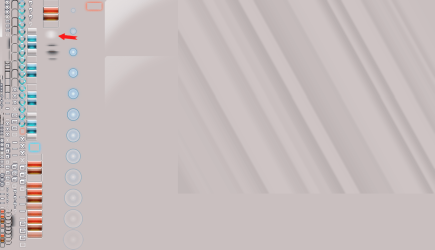
OK, I think I've figured it out. It's this little patch of white in Stream: 971 in aero.msstyles. I deleted it and no more blur.
 

Attachments

  • stream 971.png
    stream 971.png
    54.5 KB · Views: 4

My Computer My Computer

At a glance

XP Home, Windows 7 Professional 64-bit
Computer type
PC/Desktop
OS
XP Home, Windows 7 Professional 64-bit
Back
Top