P pstein New member Member VIP Local time 11:14 PM Messages 244 Apr 6, 2015 #1 Much to my surprise since a few days all folders are underlined in Windows Explorer on a certain computer. See attached snapshot Maybe I have accidentially switched an option somewhere. How can I disable underlining again? Peter Attachments underlined folders WinExplorer.png 43.8 KB · Views: 2 My Computer My Computer At a glance win7pro 64bitComputer typePC/DesktopOSwin7pro 64bit
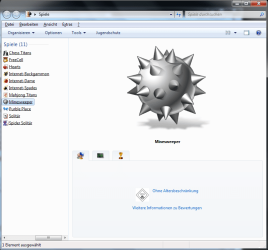
Much to my surprise since a few days all folders are underlined in Windows Explorer on a certain computer. See attached snapshot Maybe I have accidentially switched an option somewhere. How can I disable underlining again? Peter
Arc New member SF Team Local time 2:44 AM Messages 35,002 Apr 6, 2015 #2 Give it a try .... http://www.sevenforums.com/tutorials/295-folder-options-open.html See if you have checked the first option instead of the second one. Apply the "Double click to Open an item (Single Click to select) option. That is the default. My Computer My Computer At a glance Microsoft Windows 10 Pro Insider Preview 64-bitIntel(R) Core(TM) i3-4130 CPU @ 3.40GHzCorsair Vengence 4GB x2 (8.00GB Dual-Channel ...2047MB GeForce GTS 450 (ZOTAC International)Computer typePC/DesktopComputer Manufacturer/Model NumberSelf AssembledOSMicrosoft Windows 10 Pro Insider Preview 64-bitCPUIntel(R) Core(TM) i3-4130 CPU @ 3.40GHzMotherboardGigabyte Technology Co., Ltd. B85M-D3HMemoryCorsair Vengence 4GB x2 (8.00GB Dual-Channel DDR3 @ 798MHz)Graphics Card(s)2047MB GeForce GTS 450 (ZOTAC International)Sound CardOnboard (Realtek High Definition Audio)Monitor(s) DisplaysLG Flatron E2040TScreen Resolution1600x900Hard DrivesWestern Digital 1 TB Seagate 500 GBPSUCorsair VS550CaseCooler Master K380CoolingCooler Master Seidon 120V PlusKeyboardLogitech MK260rMouseLogitech MK260rInternet SpeedPMPL BroadbandAntivirusWindows Defender + MBAMBrowserFirefoxOther InfoDell Studio 15" Laptop
Give it a try .... http://www.sevenforums.com/tutorials/295-folder-options-open.html See if you have checked the first option instead of the second one. Apply the "Double click to Open an item (Single Click to select) option. That is the default.
C comptech Banned Local time 1:14 AM Messages 149 Location Mauritius Apr 6, 2015 #3 Hats off arc My Computer My Computer At a glance Windows 7 Ultimate 64 bitIntel pentium 32GB RAM DDR 3Intel HD GraphicsComputer typePC/DesktopOSWindows 7 Ultimate 64 bitCPUIntel pentium 3MotherboardMSIMemory2GB RAM DDR 3Graphics Card(s)Intel HD GraphicsSound CardRealtek AudioMonitor(s) DisplayszenwareScreen Resolution1680x1050Hard Drives80 GBCasei-MaxCoolingCooler MasterKeyboardA4TECHMouseedvanAntivirusAvast Anti virus 2015BrowserGoogle chrome
Arc New member SF Team Local time 2:44 AM Messages 35,002 Apr 6, 2015 #4 Haha ... first let us see if it helps him at all. My Computer My Computer At a glance Microsoft Windows 10 Pro Insider Preview 64-bitIntel(R) Core(TM) i3-4130 CPU @ 3.40GHzCorsair Vengence 4GB x2 (8.00GB Dual-Channel ...2047MB GeForce GTS 450 (ZOTAC International)Computer typePC/DesktopComputer Manufacturer/Model NumberSelf AssembledOSMicrosoft Windows 10 Pro Insider Preview 64-bitCPUIntel(R) Core(TM) i3-4130 CPU @ 3.40GHzMotherboardGigabyte Technology Co., Ltd. B85M-D3HMemoryCorsair Vengence 4GB x2 (8.00GB Dual-Channel DDR3 @ 798MHz)Graphics Card(s)2047MB GeForce GTS 450 (ZOTAC International)Sound CardOnboard (Realtek High Definition Audio)Monitor(s) DisplaysLG Flatron E2040TScreen Resolution1600x900Hard DrivesWestern Digital 1 TB Seagate 500 GBPSUCorsair VS550CaseCooler Master K380CoolingCooler Master Seidon 120V PlusKeyboardLogitech MK260rMouseLogitech MK260rInternet SpeedPMPL BroadbandAntivirusWindows Defender + MBAMBrowserFirefoxOther InfoDell Studio 15" Laptop
P pstein New member Member VIP Thread Starter Local time 11:14 PM Messages 244 Apr 6, 2015 #5 It works Thank you My Computer My Computer At a glance win7pro 64bitComputer typePC/DesktopOSwin7pro 64bit
Arc New member SF Team Local time 2:44 AM Messages 35,002 Apr 6, 2015 #6 Welcome. My Computer My Computer At a glance Microsoft Windows 10 Pro Insider Preview 64-bitIntel(R) Core(TM) i3-4130 CPU @ 3.40GHzCorsair Vengence 4GB x2 (8.00GB Dual-Channel ...2047MB GeForce GTS 450 (ZOTAC International)Computer typePC/DesktopComputer Manufacturer/Model NumberSelf AssembledOSMicrosoft Windows 10 Pro Insider Preview 64-bitCPUIntel(R) Core(TM) i3-4130 CPU @ 3.40GHzMotherboardGigabyte Technology Co., Ltd. B85M-D3HMemoryCorsair Vengence 4GB x2 (8.00GB Dual-Channel DDR3 @ 798MHz)Graphics Card(s)2047MB GeForce GTS 450 (ZOTAC International)Sound CardOnboard (Realtek High Definition Audio)Monitor(s) DisplaysLG Flatron E2040TScreen Resolution1600x900Hard DrivesWestern Digital 1 TB Seagate 500 GBPSUCorsair VS550CaseCooler Master K380CoolingCooler Master Seidon 120V PlusKeyboardLogitech MK260rMouseLogitech MK260rInternet SpeedPMPL BroadbandAntivirusWindows Defender + MBAMBrowserFirefoxOther InfoDell Studio 15" Laptop



 Hats off arc

