How to uninstall Nvidia Nforce Network Controller

Yihka

New member
Local time
12:20 AM
Messages
5
I know this has to do with network but this is a driver.

I wonder if someone can help me how to uninstall Nvidia Nforce Networking Controller. It is an network adapter driver. I wish to use the default microsoft one!

I have tried to uninstall it with the Device Manager but it reinstalls itself after a reboot. I have also tried to delete nvm62x64.sys and this did not work. it gets reput there after a reboot when it initialises the network adapter and installs it.

I have looked onto google and I couldnt find anything else. Please help!

The reason I want to delete this driver is because I think it has something to do with my Hard-Locks!
 

My Computer

OS
Windows 7
I know this has to do with network but this is a driver.

I wonder if someone can help me how to uninstall Nvidia Nforce Networking Controller. It is an network adapter driver. I wish to use the default microsoft one!

I have tried to uninstall it with the Device Manager but it reinstalls itself after a reboot. I have also tried to delete nvm62x64.sys and this did not work. it gets reput there after a reboot when it initialises the network adapter and installs it.

I have looked onto google and I couldnt find anything else. Please help!

The reason I want to delete this driver is because I think it has something to do with my Hard-Locks!


I would check your startup menu if it is reinstalling because the startup menu has it in it.
If nothing exists in your startup menu then I would look here.

I would suggest to look at your services menu and disable or stop it from loading on reboot.

Here's how you can do it.
1. Enter Contol Panel
2. Select Administrative Tools
3. Select Service in the large right window.
4. Look for the Nvidia Service that ppertains to you and select with mouse to open
5. Take a look if it the correct one then disable and hit apply
6. Get out and reboot then try to uninstall.
 

My Computer

Computer type
PC/Desktop
Computer Manufacturer/Model Number
Self Built
OS
Windows 10 Pro
CPU
Intel i5
Motherboard
I have a fatherboard
Memory
I'm old and lost a few chips
Graphics Card(s)
Yup
Sound Card
Yup
Monitor(s) Displays
Samsung 32" UHD
Screen Resolution
3840 x 2160
Hard Drives
Samsung 860 EVO drives
PSU
450 Watt and some fans that blow
Case
Small tower
Cooling
Yes I am cool. lol
Keyboard
Who needs a keyboard?
Mouse
Logitech Laser G7 wireless
Internet Speed
Zippy fast UP and DOWN
Antivirus
I got a shot
Browser
The new Improved EDGE 2020
The only service I can find that has to do with Nvidia itself:

Nvidia Display Driver Service

I would like to inform you that I think it gets seen by the Plug and Play Service (Or another service that finds hardware) where it automatically finds the correct driver to install for my onboard NIC.


What I want to happen is when my computer reboots and sees the onboard NIC, that it will not find the nvidia driver but the default microsoft driver.


I hope you can help me further!
 

My Computer

OS
Windows 7
Start NVIDIA driver uninstaller, select ONLY NIC driver, proceed, restart system...

zzz2496
 

My Computer

Computer Manufacturer/Model Number
Self Built
OS
Windows7 Ultimate 64bit
CPU
Intel Core 2 Quad Q6600
Motherboard
Abit IN9-32X-MMAX
Memory
DDR2 Adata 4GB
Graphics Card(s)
Nvidia GeForce GTX 285 1024 and Nvidia GeForce 8800GT 512
Sound Card
Asus Xonar HDAV 1.3
Monitor(s) Displays
Dell 2407WFP and BenQ 2400v and Philips 150v3
Screen Resolution
3840x1200 and 1024x768
Hard Drives
2 WDC 1TB
1 WDC 1.5TB
1 WDC 640GB
1 WDC 320GB
1 Seagate 200GB
PSU
Corsair TX 850W
Case
Cooler Master HAF932
Cooling
Arctic Cooling Freezer Extreme and plenty of fans...
Keyboard
MicrosoftNaturalKeyboard 4000/Apple Alu keyboard/Dinovo mini
Mouse
Logitech G5/MarbleMouseTrackball/PerformanceMX/SpacePilotPRO
Internet Speed
1.5Mbps down/384Kbps up
Other Info
APC SURT 1000XL
Logitech Z-560
Wiimote
Mikrotik Router
Linksys (now Cisco) SD2008 8 port Gigabit switch
Linksys WRT54G (acting as AP)
Apple wireless Aluminium keyboard
Apple Magic Mouse
Xbox360 wired controller
Have you tried the "Roll Back Driver" option under the driver tab?
 

My Computer

Computer type
PC/Desktop
Computer Manufacturer/Model Number
Home Built
OS
Windows 10 Education 64 bit
CPU
AMD Phenom II X4 980 Black Edition Deneb 3.7GHz
Motherboard
Asus M4N68T-M V2 µATX Motherboard
Memory
8GB 4GBx2 Kingston PC10600 DDR3 1333 Memory
Graphics Card(s)
Zotac NVIDIA Geforce GT640 2 Gig DDR3 PCIe
Sound Card
VIA VT1708s High Definition Audio 8-channel Onboard
Monitor(s) Displays
22" LG E2242 1080p and 2 19" I-INC AG191D
Screen Resolution
1280x1024 - 1920x1080 - 1280x1024
Hard Drives
Crucial M100 256 GB SSD and 500 GB WD Blue SATA
PSU
Thermaltake TR 620
Case
Power Up Black ATX Mid-Tower Case
Cooling
Stock heatsink and fan
Keyboard
Logitech Wireless K350 Wave
Mouse
Logitech Wireless M570 Trackman Wheel
Internet Speed
80 Mbps Down 30 Mbps Up
Antivirus
Windows Defender
Browser
Internet Explorer 11
Other Info
HP DVD1040e Lightscribe - External USB2
Start NVIDIA driver uninstaller, select ONLY NIC driver, proceed, restart system...

zzz2496
Under Control Panel -> Uninstall a program

I only find: Nvidia drivers

If I click this I get a pop-up saying this will uninstall my Nvidia Display Driver. No choice to uninstall the NIC driver.


Have you tried the "Roll Back Driver" option under the driver tab?
Cannot click the button.


The reason I am posting here since this is quite new since Vista & 7 that Windows automatically installs the right drivers. ( I do know it has been there before with Plug and Play ) This is very useful. What I want to accomplish that it will not install the right NIC driver ( Nvidia Nforce Networking Controller ) but the default one ( Microsoft )

I think this would happen in XP but I am not sure...


I do know it should be possible with the Device Manager

Please help!
 

My Computer

OS
Windows 7
If you go to "Advanced System Settings" under the Hardware tab you should see "Device Installation Settings". Click the button and you can select "Never install driver software from Windows update". It might be too late now but if you have to start over I would set this option right away. Then you will have control over what drivers get installed. Have you tried the driver supplied by your motherboard manufacturer? You might find a newer one on their web site, Microsoft's driver aren't always the latest and greatest.
 

My Computer

Computer type
PC/Desktop
Computer Manufacturer/Model Number
Home Built
OS
Windows 10 Education 64 bit
CPU
AMD Phenom II X4 980 Black Edition Deneb 3.7GHz
Motherboard
Asus M4N68T-M V2 µATX Motherboard
Memory
8GB 4GBx2 Kingston PC10600 DDR3 1333 Memory
Graphics Card(s)
Zotac NVIDIA Geforce GT640 2 Gig DDR3 PCIe
Sound Card
VIA VT1708s High Definition Audio 8-channel Onboard
Monitor(s) Displays
22" LG E2242 1080p and 2 19" I-INC AG191D
Screen Resolution
1280x1024 - 1920x1080 - 1280x1024
Hard Drives
Crucial M100 256 GB SSD and 500 GB WD Blue SATA
PSU
Thermaltake TR 620
Case
Power Up Black ATX Mid-Tower Case
Cooling
Stock heatsink and fan
Keyboard
Logitech Wireless K350 Wave
Mouse
Logitech Wireless M570 Trackman Wheel
Internet Speed
80 Mbps Down 30 Mbps Up
Antivirus
Windows Defender
Browser
Internet Explorer 11
Other Info
HP DVD1040e Lightscribe - External USB2
Yihka, in device manager, open the properties of that nforce network controller, go to driver tab, make a screenshot of that window, post here. Nvidia driver uninstaller will list your NIC if it installed the driver in the past.

zzz2496
 

My Computer

Computer Manufacturer/Model Number
Self Built
OS
Windows7 Ultimate 64bit
CPU
Intel Core 2 Quad Q6600
Motherboard
Abit IN9-32X-MMAX
Memory
DDR2 Adata 4GB
Graphics Card(s)
Nvidia GeForce GTX 285 1024 and Nvidia GeForce 8800GT 512
Sound Card
Asus Xonar HDAV 1.3
Monitor(s) Displays
Dell 2407WFP and BenQ 2400v and Philips 150v3
Screen Resolution
3840x1200 and 1024x768
Hard Drives
2 WDC 1TB
1 WDC 1.5TB
1 WDC 640GB
1 WDC 320GB
1 Seagate 200GB
PSU
Corsair TX 850W
Case
Cooler Master HAF932
Cooling
Arctic Cooling Freezer Extreme and plenty of fans...
Keyboard
MicrosoftNaturalKeyboard 4000/Apple Alu keyboard/Dinovo mini
Mouse
Logitech G5/MarbleMouseTrackball/PerformanceMX/SpacePilotPRO
Internet Speed
1.5Mbps down/384Kbps up
Other Info
APC SURT 1000XL
Logitech Z-560
Wiimote
Mikrotik Router
Linksys (now Cisco) SD2008 8 port Gigabit switch
Linksys WRT54G (acting as AP)
Apple wireless Aluminium keyboard
Apple Magic Mouse
Xbox360 wired controller
If you go to "Advanced System Settings" under the Hardware tab you should see "Device Installation Settings". Click the button and you can select "Never install driver software from Windows update". It might be too late now but if you have to start over I would set this option right away. Then you will have control over what drivers get installed. Have you tried the driver supplied by your motherboard manufacturer? You might find a newer one on their web site, Microsoft's driver aren't always the latest and greatest.

Unfortunately turning that off and copy and paste ( cut ) the driver away into a .rar file does not help, it keeps reinstalling the same driver, unless this is the Microsoft one.

I wish to use the microsoft one so I can test if it helps me not getting any hard-locks.

Yihka, in device manager, open the properties of that nforce network controller, go to driver tab, make a screenshot of that window, post here. Nvidia driver uninstaller will list your NIC if it installed the driver in the past.

zzz2496
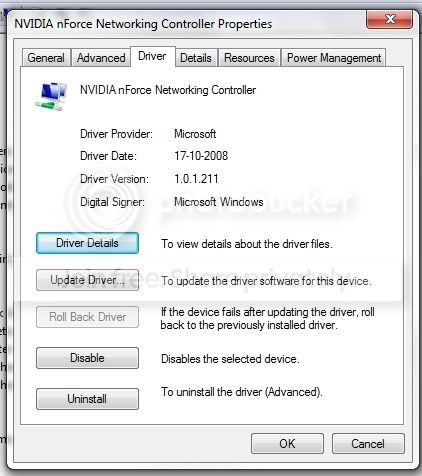
The network driver:

networkdriver.jpg


News about Hard-Locks:

I got one after restarting after uninstalling and taking away the .sys file. What I got is a Hard-Lock after it was done installing and I browsed the internet. After erstarting the driver malfunctioned and I had to reinstall it.
 

My Computer

OS
Windows 7
Yihka, it's already using Microsoft's driver... what else do you want to do? If you have NVIDIA's driver, it will say NVIDIA on the driver provider field...

zzz2496
 

My Computer

Computer Manufacturer/Model Number
Self Built
OS
Windows7 Ultimate 64bit
CPU
Intel Core 2 Quad Q6600
Motherboard
Abit IN9-32X-MMAX
Memory
DDR2 Adata 4GB
Graphics Card(s)
Nvidia GeForce GTX 285 1024 and Nvidia GeForce 8800GT 512
Sound Card
Asus Xonar HDAV 1.3
Monitor(s) Displays
Dell 2407WFP and BenQ 2400v and Philips 150v3
Screen Resolution
3840x1200 and 1024x768
Hard Drives
2 WDC 1TB
1 WDC 1.5TB
1 WDC 640GB
1 WDC 320GB
1 Seagate 200GB
PSU
Corsair TX 850W
Case
Cooler Master HAF932
Cooling
Arctic Cooling Freezer Extreme and plenty of fans...
Keyboard
MicrosoftNaturalKeyboard 4000/Apple Alu keyboard/Dinovo mini
Mouse
Logitech G5/MarbleMouseTrackball/PerformanceMX/SpacePilotPRO
Internet Speed
1.5Mbps down/384Kbps up
Other Info
APC SURT 1000XL
Logitech Z-560
Wiimote
Mikrotik Router
Linksys (now Cisco) SD2008 8 port Gigabit switch
Linksys WRT54G (acting as AP)
Apple wireless Aluminium keyboard
Apple Magic Mouse
Xbox360 wired controller
That appears to be an old driver.
Mine is listed as NVIDIA nForce 10/100 Mbps Ethernet
Driver Provider: NVIDIA
Driver Date: 4/30/2009
Driver Version: 73.0.6.0

I have an ASUS M2N68-AM SE2 motherboard and installed the latest ASUS provided driver from their support website. 7x64 Ultimate with no problems.
 

My Computer

Computer type
PC/Desktop
Computer Manufacturer/Model Number
Home Built
OS
Windows 10 Education 64 bit
CPU
AMD Phenom II X4 980 Black Edition Deneb 3.7GHz
Motherboard
Asus M4N68T-M V2 µATX Motherboard
Memory
8GB 4GBx2 Kingston PC10600 DDR3 1333 Memory
Graphics Card(s)
Zotac NVIDIA Geforce GT640 2 Gig DDR3 PCIe
Sound Card
VIA VT1708s High Definition Audio 8-channel Onboard
Monitor(s) Displays
22" LG E2242 1080p and 2 19" I-INC AG191D
Screen Resolution
1280x1024 - 1920x1080 - 1280x1024
Hard Drives
Crucial M100 256 GB SSD and 500 GB WD Blue SATA
PSU
Thermaltake TR 620
Case
Power Up Black ATX Mid-Tower Case
Cooling
Stock heatsink and fan
Keyboard
Logitech Wireless K350 Wave
Mouse
Logitech Wireless M570 Trackman Wheel
Internet Speed
80 Mbps Down 30 Mbps Up
Antivirus
Windows Defender
Browser
Internet Explorer 11
Other Info
HP DVD1040e Lightscribe - External USB2
Oh, I see...

Then, I have to install the Nvidia drivers instead since it has been using the Microsoft ones.

I do have another question though:

On the asus site, I cannot choose Windows 7 64bit ( Neither 32 bit ) only vista 64 bit. My question is: Will those drivers work optimal with Windows 7 64 bit too or should I go to the Nvidia website to download the drivers?

My motherboard is a: P5N-T Deluxe.

Instead I used the automatically find the correct drivers on the Nvidia Website.

Thank you for your help!
 

My Computer

OS
Windows 7
You're welcome... :)

zzz2496
 

My Computer

Computer Manufacturer/Model Number
Self Built
OS
Windows7 Ultimate 64bit
CPU
Intel Core 2 Quad Q6600
Motherboard
Abit IN9-32X-MMAX
Memory
DDR2 Adata 4GB
Graphics Card(s)
Nvidia GeForce GTX 285 1024 and Nvidia GeForce 8800GT 512
Sound Card
Asus Xonar HDAV 1.3
Monitor(s) Displays
Dell 2407WFP and BenQ 2400v and Philips 150v3
Screen Resolution
3840x1200 and 1024x768
Hard Drives
2 WDC 1TB
1 WDC 1.5TB
1 WDC 640GB
1 WDC 320GB
1 Seagate 200GB
PSU
Corsair TX 850W
Case
Cooler Master HAF932
Cooling
Arctic Cooling Freezer Extreme and plenty of fans...
Keyboard
MicrosoftNaturalKeyboard 4000/Apple Alu keyboard/Dinovo mini
Mouse
Logitech G5/MarbleMouseTrackball/PerformanceMX/SpacePilotPRO
Internet Speed
1.5Mbps down/384Kbps up
Other Info
APC SURT 1000XL
Logitech Z-560
Wiimote
Mikrotik Router
Linksys (now Cisco) SD2008 8 port Gigabit switch
Linksys WRT54G (acting as AP)
Apple wireless Aluminium keyboard
Apple Magic Mouse
Xbox360 wired controller
The only way to know if the Vista drivers will work is to try them. I used a VISTA driver for the NIC on my other PC and it worked OK, that was 7x86 though. I tried a Vista driver for my printer and that didn't work on ether windows 7 PC. 7x64 is listed for my motherboard so that is what I used, the NIC driver was in the Chip-set drivers package. You could try NVIDIA, if they have a 7x64 driver that you can find I'd use that over a Vista driver. The hard part might be identifying the exact model NVIDIA NIC you have, so you can get the right driver.
 

My Computer

Computer type
PC/Desktop
Computer Manufacturer/Model Number
Home Built
OS
Windows 10 Education 64 bit
CPU
AMD Phenom II X4 980 Black Edition Deneb 3.7GHz
Motherboard
Asus M4N68T-M V2 µATX Motherboard
Memory
8GB 4GBx2 Kingston PC10600 DDR3 1333 Memory
Graphics Card(s)
Zotac NVIDIA Geforce GT640 2 Gig DDR3 PCIe
Sound Card
VIA VT1708s High Definition Audio 8-channel Onboard
Monitor(s) Displays
22" LG E2242 1080p and 2 19" I-INC AG191D
Screen Resolution
1280x1024 - 1920x1080 - 1280x1024
Hard Drives
Crucial M100 256 GB SSD and 500 GB WD Blue SATA
PSU
Thermaltake TR 620
Case
Power Up Black ATX Mid-Tower Case
Cooling
Stock heatsink and fan
Keyboard
Logitech Wireless K350 Wave
Mouse
Logitech Wireless M570 Trackman Wheel
Internet Speed
80 Mbps Down 30 Mbps Up
Antivirus
Windows Defender
Browser
Internet Explorer 11
Other Info
HP DVD1040e Lightscribe - External USB2
Don't bother with Asus as they are one of the worst for keeping their download pages updated, or the Vista driver. Just get it directly from Nvidia,

NVIDIA DRIVERS 15.53 WHQL

If all you want is the ethernet driver make sure to select Custom install and only it.
 

My Computer

Computer type
PC/Desktop
Computer Manufacturer/Model Number
Me
OS
Win 7 Ultimate x64
CPU
FX-8350 @ 4.6 GHz so far
Motherboard
Asus M5A97 EVO
Memory
ADATA XPG V1 Series Black 8GB DDR3 1600
Graphics Card(s)
Sapphire R9 270x Dual-X
Sound Card
Xonar DGX w/ Corsair Vengence 1300
Monitor(s) Displays
Acer S232HL Abid
Screen Resolution
1920x1080
Hard Drives
120 GB OCZ Vertex 3
500 GB Seagate 7200.12
PSU
Antec Earthwatts 650W Green
Case
Antec Three Hundred
Cooling
Cooler Master 212 EVO
Keyboard
Logitech G510
Mouse
Logitech G500s
Internet Speed
35000/3000
Back
Top