Solved how to use see more results

dgudgel

New member
Member
Local time
8:33 PM
Messages
61
I've looked in tutorials but didn't find how to do this fundamental function of windows. I want to search some external hard drives for photos. What ever I am doing is wrong because windows is not finding the photos I put there previously. What are the exact steps to find photos in other locations after searching c drive. I click on "see other results" then what. I have a couple xt hard drives hooked up. It's nice to have a forum with enough people to get results right away.
 

My Computer My Computer

At a glance

windows home premium 32bit
OS
windows home premium 32bit
Hello Dgudgel,

If say you were looking for .jpg files, you could open the drive that you wanted to search for them in Windows Explorer, and type *.jpg in the search box and press Enter to do so. In addition, the tutorials below can help show you more details about searching that may be able to help more.

http://www.sevenforums.com/tutorials/117952-search-have-more-accurate-search-results.html

http://www.sevenforums.com/tutorials/36599-search-windows-7-a.html

http://www.sevenforums.com/tutorials/129437-windows-search-configure-use.html

Hope this helps,
Shawn
 

My Computer My Computer

At a glance

64-bit Windows 11 Pro for WorkstationsIntel i7-8700K OC'd to 5 GHz64 GB (4x16GB) G.SKILL TridentZ RGB DDR4 3600...ASUS ROG-STRIX-GTX1080TI-O11G-GAMING
Computer type
PC/Desktop
Computer Manufacturer/Model Number
Self built custom
OS
64-bit Windows 11 Pro for Workstations
CPU
Intel i7-8700K OC'd to 5 GHz
Motherboard
ASUS ROG Maximus XI Formula Z390
Memory
64 GB (4x16GB) G.SKILL TridentZ RGB DDR4 3600 MHz
Graphics Card(s)
ASUS ROG-STRIX-GTX1080TI-O11G-GAMING
Sound Card
Integrated
Monitor(s) Displays
2 x Samsung Odyssey G7 27"
Screen Resolution
2560x1440
Hard Drives
1TB Samsung 990 PRO M.2,
4TB Samsung 990 PRO PRO M.2,
TerraMaster F8 SSD Plus NAS
PSU
Seasonic Prime Titanium 850W
Case
Thermaltake Core P3
Cooling
Corsair Hydro H115i
Keyboard
Logitech wireless K800
Mouse
Logitech MX Master 4
Internet Speed
2 Gb/s Download and 100 Mb/s Upload
Antivirus
Malwarebyte Anti-Malware Premium
Browser
Google Chrome
Other Info
Logitech Z625 speaker system,
Logitech BRIO 4K Pro webcam,
HP Color LaserJet Pro MFP M477fdn,
APC SMART-UPS RT 1000 XL - SURT1000XLI,
Galaxy S23 Plus phone
When you click on "See more results", the screen that appears should have some options under "Search again in" such as "Libraries, Computer, Custom . . ." Click on Custom, then expand the Computer option. All your drives should be shown, and you can indicate the one(s) you want to search. (Hold down the Ctrl key to select more than one drive for the search.)
 

My Computer My Computer

At a glance

Windows 7 Home Premium SP1i36 GBATI Radeon
Computer Manufacturer/Model Number
Dell Inspiron 580s
OS
Windows 7 Home Premium SP1
CPU
i3
Memory
6 GB
Graphics Card(s)
ATI Radeon
What are the steps to search an external HD to find say JPG files. Opening windows explorer found none although I could not tell if it was still in windows explorer . My external HD is either F or H. There are thousands of JPG on these disks so obviously I am not doing it right. I have found them in the past. Thanks
 

My Computer My Computer

At a glance

windows home premium 32bit
OS
windows home premium 32bit
You could set your search settings like step 3 in the tutorial below to have more accurate searches.

http://www.sevenforums.com/tutorials/117952-search-have-more-accurate-search-results.html

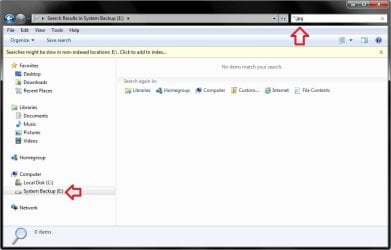
Next, select the HDD under computer in the navigation pane that you want to search, type *.jpg in the search box and press enter like below to hopefully find them. If they are different file extensions (ex: .jpeg), then type using that extension instead.

explorer.jpg
 

My Computer My Computer

At a glance

64-bit Windows 11 Pro for WorkstationsIntel i7-8700K OC'd to 5 GHz64 GB (4x16GB) G.SKILL TridentZ RGB DDR4 3600...ASUS ROG-STRIX-GTX1080TI-O11G-GAMING
Computer type
PC/Desktop
Computer Manufacturer/Model Number
Self built custom
OS
64-bit Windows 11 Pro for Workstations
CPU
Intel i7-8700K OC'd to 5 GHz
Motherboard
ASUS ROG Maximus XI Formula Z390
Memory
64 GB (4x16GB) G.SKILL TridentZ RGB DDR4 3600 MHz
Graphics Card(s)
ASUS ROG-STRIX-GTX1080TI-O11G-GAMING
Sound Card
Integrated
Monitor(s) Displays
2 x Samsung Odyssey G7 27"
Screen Resolution
2560x1440
Hard Drives
1TB Samsung 990 PRO M.2,
4TB Samsung 990 PRO PRO M.2,
TerraMaster F8 SSD Plus NAS
PSU
Seasonic Prime Titanium 850W
Case
Thermaltake Core P3
Cooling
Corsair Hydro H115i
Keyboard
Logitech wireless K800
Mouse
Logitech MX Master 4
Internet Speed
2 Gb/s Download and 100 Mb/s Upload
Antivirus
Malwarebyte Anti-Malware Premium
Browser
Google Chrome
Other Info
Logitech Z625 speaker system,
Logitech BRIO 4K Pro webcam,
HP Color LaserJet Pro MFP M477fdn,
APC SMART-UPS RT 1000 XL - SURT1000XLI,
Galaxy S23 Plus phone
OK now I know. Even a cave man can do it. Somehow the folder search options had been unchecked. You know windows. The longer you go. The more things and programs you hang on your computer the sooner you will develop a problem. I have a lot of stuff on this computer. So things can go wrong. But after correcting the folder search options I am back to normal. Thanks.
 

My Computer My Computer

At a glance

windows home premium 32bit
OS
windows home premium 32bit
You're most welcome. That's great news. :party:
 

My Computer My Computer

At a glance

64-bit Windows 11 Pro for WorkstationsIntel i7-8700K OC'd to 5 GHz64 GB (4x16GB) G.SKILL TridentZ RGB DDR4 3600...ASUS ROG-STRIX-GTX1080TI-O11G-GAMING
Computer type
PC/Desktop
Computer Manufacturer/Model Number
Self built custom
OS
64-bit Windows 11 Pro for Workstations
CPU
Intel i7-8700K OC'd to 5 GHz
Motherboard
ASUS ROG Maximus XI Formula Z390
Memory
64 GB (4x16GB) G.SKILL TridentZ RGB DDR4 3600 MHz
Graphics Card(s)
ASUS ROG-STRIX-GTX1080TI-O11G-GAMING
Sound Card
Integrated
Monitor(s) Displays
2 x Samsung Odyssey G7 27"
Screen Resolution
2560x1440
Hard Drives
1TB Samsung 990 PRO M.2,
4TB Samsung 990 PRO PRO M.2,
TerraMaster F8 SSD Plus NAS
PSU
Seasonic Prime Titanium 850W
Case
Thermaltake Core P3
Cooling
Corsair Hydro H115i
Keyboard
Logitech wireless K800
Mouse
Logitech MX Master 4
Internet Speed
2 Gb/s Download and 100 Mb/s Upload
Antivirus
Malwarebyte Anti-Malware Premium
Browser
Google Chrome
Other Info
Logitech Z625 speaker system,
Logitech BRIO 4K Pro webcam,
HP Color LaserJet Pro MFP M477fdn,
APC SMART-UPS RT 1000 XL - SURT1000XLI,
Galaxy S23 Plus phone
Back
Top