How to use SetupComplete.exe to modify a reg value? (Image)

NSXguy

New member
Local time
9:44 AM
Messages
4
Greetings all! I work in an enterprise environment & am trying to find the most efficient route to address a vulnerability in one of our images.

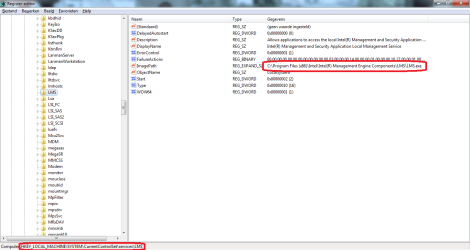
When Sysprep completes I need to put quotes around a reg entry in: HKLM\System\CurrentControlSet\services\LMS.

The entry is C:\Program Files (x86)\Intel\Intel(R) Management Engine Components\LMS\LMS.exe. I need to put quotes around it i.e. "C:\Program Files (x86)\Intel\Intel(R) Management Engine Components\LMS\LMS.exe"

I already have a command to change an account name using wmic in SetupComplete.exe i.e.: wmic useraccount where name= "User" call rename name= "NewUser"

Does anyone know a wmic command(s) that could be used for this, or an alternative scripting method for use in SetupComplete? Also, can anyone recommend a resource for wmic commands/syntax etc?

Thanks!
 

My Computer

Computer type
PC/Desktop
OS
Windows 7 Professional x64
nm...
 

My Computer

Computer type
PC/Desktop
OS
Windows 7 Professional x64
You did do sysprep/generlaize/oobe succesfully? Already created a wim file?
 

My Computer

Computer type
Laptop
Computer Manufacturer/Model Number
ACER ASPIRE 5742G
OS
Microsoft Windows 7 Home Premium 64-bits 7601 Multiprocessor Free Service Pack 1
CPU
Intel(R) Core(TM) i3 CPU M 370 @ 2.40GHz
Motherboard
Acer Aspire 5742G
Memory
4,00 GB
Graphics Card(s)
ATI Mobility Radeon HD 5400 Series
Sound Card
(1) AMD High Definition Audio Device (2) Realtek High Defi
Screen Resolution
1366 x 768 x 32 bits (4294967296 colors) @ 60 Hz
Hard Drives
WDC WD5000BEVT-22ZAT0
No qoutes needed. Why quotes?
 

Attachments

  • Naamloos.png
    Naamloos.png
    32.1 KB · Views: 3

My Computer

Computer type
Laptop
Computer Manufacturer/Model Number
ACER ASPIRE 5742G
OS
Microsoft Windows 7 Home Premium 64-bits 7601 Multiprocessor Free Service Pack 1
CPU
Intel(R) Core(TM) i3 CPU M 370 @ 2.40GHz
Motherboard
Acer Aspire 5742G
Memory
4,00 GB
Graphics Card(s)
ATI Mobility Radeon HD 5400 Series
Sound Card
(1) AMD High Definition Audio Device (2) Realtek High Defi
Screen Resolution
1366 x 768 x 32 bits (4294967296 colors) @ 60 Hz
Hard Drives
WDC WD5000BEVT-22ZAT0
Thanks for the reply, Kaktussoft. Yes on sysprep, and would be yes on wim but we use Norton Ghost. To clarify, this is on our production image, in use several years now. The registry entry in your screenshot is indeed the one I must modify (and one other, in the same way). I just need to put quotes around the statement to foil an expoit/vulnerability. This image is used in several govt. business areas which are subject to Nessus & Retina scans/audits to discover/address vulnerabilities.

The manual process we are currently using is for our deployment technicians to make this modification after imaging the box. I would like to use a script/entry in SetupComplete.exe to do the modification automatically.

Thanks again for any suggestions
 

My Computer

Computer type
PC/Desktop
OS
Windows 7 Professional x64
use setupcomplete.cmd for that

reg add ..... look syntax yourself please. You can try reg add command on a working machine to check for syntax errors. Be sure to add /f to the command

Reg add

Still don't understand why double quotes are needed!
 

My Computer

Computer type
Laptop
Computer Manufacturer/Model Number
ACER ASPIRE 5742G
OS
Microsoft Windows 7 Home Premium 64-bits 7601 Multiprocessor Free Service Pack 1
CPU
Intel(R) Core(TM) i3 CPU M 370 @ 2.40GHz
Motherboard
Acer Aspire 5742G
Memory
4,00 GB
Graphics Card(s)
ATI Mobility Radeon HD 5400 Series
Sound Card
(1) AMD High Definition Audio Device (2) Realtek High Defi
Screen Resolution
1366 x 768 x 32 bits (4294967296 colors) @ 60 Hz
Hard Drives
WDC WD5000BEVT-22ZAT0
Thanks, Kactussoft, I will use SetupComplete.cmd. I don't know why the double quotes are needed either; it is specified (I believe, our desktop security team requested the addition) in a STIG specifically to remedy a vulnerability. I'm guessing that it causes some escalation of privelege exploit (or similar) to be non-functional while not functionally interfering with the actual value in that key.

Again, thanks for your help/suggestion!
 

My Computer

Computer type
PC/Desktop
OS
Windows 7 Professional x64
Back
Top