How to use Unallocated files

Wingnut225

New member
Local time
8:32 AM
Messages
13
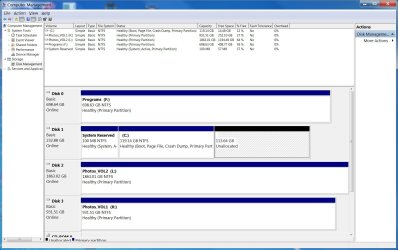
I recently upgraded from a 120gb SSD to a 250gb SSD as my primary system c: drive. I did this by using EaseUS Clone tool. It looks like it partitioned the 250gb as a 120gb and now I have 113gb left as unallocated. My goal here is to use the 250gb SSD as one partition as the primary system c: drive. How do I get rid of the unallocated files to have one partition at 250gb?

thank you for your time!
 

Attachments

  • Samsung 840.jpg
    Samsung 840.jpg
    181.3 KB · Views: 1

My Computer My Computer

Computer type
PC/Desktop
Computer Manufacturer/Model Number
Home built w/ Asus P8z68-v pro MB
OS
Windows 7 home premium 64bit
CPU
Intel i5-2500 3.3GHz
Motherboard
Asus P8z68-v pro
Memory
4-8GB corsair vengeance 1600mHz 9-9-9-24
Graphics Card(s)
Asus gtx650 ti
Hard Drives
Samsung SSD 840 EVO 250gb
Other storage drives
Antivirus
ESET smart security 6
Best and easiest-to-use partitioning software product: Partition Wizard. Installs and runs under Windows. If you want to do manipulations to the C-partition (i.e. operating Windows partition), you can't complete this while Windows is booted. So you specify the operations using the program, and then PW asks for a restart to complete the operations during boot process... before moving on to the Windows Welcome screen.

Alternatively, you can download/burn the standalone Partition Wizard bootable CD ISO. Now when you boot to this CD you are no longer operating under Windows on the C partition, and thus can perform and complete all operations right then and there. When finished, exit from the standalone environment and boot back to regular Windows.

Either method will accomplish what you want, which is to "extend" the C partition to the right so as to absorb the currently unallocated space on the drive into your C partition. Or, you can think of it as "resize C" picking up the unallocated space to its right. Same result.
 

My Computer My Computer

Computer type
PC/Desktop
Computer Manufacturer/Model Number
Home-built, two systems (1) and (2)
OS
Windows 7 Pro x64 (1), Win7 Pro X64 (2)
CPU
i5-3350p 3.1Ghz/6MB-cache (1); E8400 3.0Ghz/6MB-cache (2)
Motherboard
ASUS P8Z77-V Pro (1); ASUS P5Q3 (2)
Memory
8GB PC3-12800 DDR3 (1); 4GB PC3-10600 DDR3 (2)
Graphics Card(s)
ATI HD7750 (1), (see TV cards); ATI R7 250 (2)
Sound Card
Realtek ALC892 HD Audio (1); Realtek ALC1200 HD Audio (2)
Monitor(s) Displays
Eizo HD2441W LCD, Eizo S2433W (1); Eizo 24" S2433W (2)
Screen Resolution
1920x1200, 1920x1200 (1); 1920x1200 (2)
Hard Drives
(1) 1TB SATA-II (7200RPM), 2x2TB SATA-III (7200RPM), 250GB SATA-III (10000RPM) for OS; 2x2TB external USB 3.0

(2) 320GB SATA-II (7200RPM), 750GB SATA-II (7200RPM), 150GB SATA-II (10000RPM) for OS; 2TB external USB 3.0
PSU
Nesteq ECS-6001 600W (1); Nesteq ECS-5001 500W (2)
Case
Acousti-Case 360 (1) and (2)
Cooling
Noctua NH-U12P SE2 for CPU, 2x120mm case fans (1) and (2)
Keyboard
IBM PS/2 (1) and (2)
Mouse
Logitech MX Revolution wireless (1); Microsoft wired (2)
Internet Speed
100mbps down / 10mbps up
Antivirus
Microsoft Security Essentials; Malwarebyte Anti-Malware Pro
Browser
Firefox
Other Info
Ceton InfiniTV 4-tuner cablecard-enabled TV card as well as Hauppauge HVR-2250 OTA/ATSC 2-tuner TV card in (1), running under Win7 WMC
Thanks!! That was easy. After reading through the help menu, it seamed like it was best to use the "Move/Resize" option. No rebooting was necessary although I did anyway just to make sure all was fine.

Thanks very much for your help!!
 

My Computer My Computer

Computer type
PC/Desktop
Computer Manufacturer/Model Number
Home built w/ Asus P8z68-v pro MB
OS
Windows 7 home premium 64bit
CPU
Intel i5-2500 3.3GHz
Motherboard
Asus P8z68-v pro
Memory
4-8GB corsair vengeance 1600mHz 9-9-9-24
Graphics Card(s)
Asus gtx650 ti
Hard Drives
Samsung SSD 840 EVO 250gb
Other storage drives
Antivirus
ESET smart security 6
Back
Top