Solved How to use WDTLER and if I really have to?

Sorry I made a mistake in my last post that I have now corrected. I meant Intel rapid storage technology.
Reading the post; WD Black TLER confusion it would appear that this works no matter what tler is set to.
The more I research the more I find confusion about tler and if it can even be enabled on the newer drives so I think it is probably worth trying IRST to see what happens.
The only other alternatives it would seem, would be to download WDtler, attemt to burn it to a CD as an .iso boot your PC from the CD and check if you can change tler or not.
I believe the tler commands are "tlerscan" to tell you if you can tler your drives or not "tler-on" and "tler-off" to turn on and off
The only thing that is certain is that with tler switched off and no IRST the RAID is doomed to failure.
 

My Computer My Computer

At a glance

Windows 7 Ultimate x64Intel Core i7-2600K16 GB G Skill F3-10666 CL9D-4GBRLATI Radeon HD 6870
Computer Manufacturer/Model Number
Something I threw together
OS
Windows 7 Ultimate x64
CPU
Intel Core i7-2600K
Motherboard
Asus P8P67
Memory
16 GB G Skill F3-10666 CL9D-4GBRL
Graphics Card(s)
ATI Radeon HD 6870
Sound Card
ATI Radeon HDMI / Realtek ALC892
Monitor(s) Displays
2 x 22" standard monitors / LG32LC56v TV to watch films
Screen Resolution
1920 x1080
Hard Drives
2 x OCZ Vertex2 111.79GB
3 x Samsung103SJ
1 x Samsung103UJ
1 x WD3200BEVT
1 x Hitachi5K320-160
PSU
Thermaltake Toughpower Cable Management 750W
Case
Antec 300
Cooling
Noctua NH-U12P SE2 and 5 120mm Case fans
Keyboard
Microsoft Comfort Curve Keyboard 2000
Mouse
Hama M3110 / Logitech M305
Internet Speed
16000
Other Info
I have also used Fedora, Suse, Ubuntu Linux
And all other Windows from 95 to date except ME
So after trying and trying I just cannot get this going. I went to some sites on how to create a boot cd and then add the WDTLER files, but it is not working for me.

I did find this site

Create Ms-Dos BootCD - Hiren's Bootable CD - www.hiren.info

I got close, but I am still missing something. When I tried my option to run TLERscan, all I got was this cycle of DOS words just repeating itself as if it was looking for drives and then never finding them. It was so fast, I could not read the exact wording.

So if anyone can help out, I would really appreciate it and again, i am not DOS savvy so detail instructions will be a must.

Thanks to everyone so far.
 

My Computer My Computer

At a glance

Windows 10 Pro 64-bitCore I7-67008GB Corsair DominatorAsus STRIX GTX 980Ti
Computer type
PC/Desktop
Computer Manufacturer/Model Number
Home Built
OS
Windows 10 Pro 64-bit
CPU
Core I7-6700
Motherboard
Asus Maximus VIII Hero
Memory
8GB Corsair Dominator
Graphics Card(s)
Asus STRIX GTX 980Ti
Monitor(s) Displays
Asus PG278Q, Dell U2410
Screen Resolution
2560 x 1440, 1920 x 1200
Hard Drives
1 x Samsung 950 Pro 512GB
1 x 1TB HGST
PSU
750W Seasonic
Case
Antec 900 v3
Cooling
Stock
Internet Speed
Cable Internet
Are you by chance using a Raid card?
 

My Computer My Computer

At a glance

windows 10 pro 64 biti5 4690K@4500 COOLER MASTER Seidon 120M water...16gb Kingston HyperX DDR3 1600EVGA GTX 1070 sc
Computer type
PC/Desktop
Computer Manufacturer/Model Number
Custom
OS
windows 10 pro 64 bit
CPU
i5 4690K@4500 COOLER MASTER Seidon 120M water cooler
Motherboard
ASUS SABERTOOTH Z87 LGA 1150 Intel
Memory
16gb Kingston HyperX DDR3 1600
Graphics Card(s)
EVGA GTX 1070 sc
Monitor(s) Displays
BenQ GL2760H Black 27" 2ms HDMI Widescreen LED 1920X1080
Screen Resolution
DSR 2103X1183
Hard Drives
ADATA 256 gig SSD + 4 junk
PSU
EVGA supernova 750
Case
coolermaster
Cooling
many...
Keyboard
z merc
Mouse
Logitech wireless G602
Internet Speed
2.5mbs cable
No, I am using the onboard RAID.

Motherboard is an Asus P7P55D Deluxe (all the latest drivers)
ICH10R

I am using a Seagate hard drive for my O/S

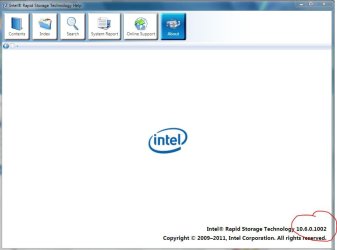
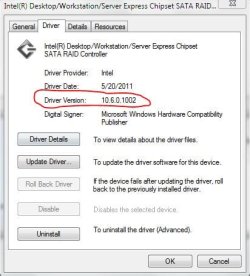
I created the RAID at boot up, the Ctrl+I got me to the screen. I created the RAID using the 4 WD drives I have and then booted to the O/S. Then at the desktop I downloaded the latest driver from Intel which is the 10.0.6.1002 which installed the program and now at boot up I have the Intel RST icon in the start tray and it shows the 4 drives in RAID and are working.

According to the fast screen at boot up, the Matrix Storage is version 8.9.0.1023.
 

My Computer My Computer

At a glance

Windows 10 Pro 64-bitCore I7-67008GB Corsair DominatorAsus STRIX GTX 980Ti
Computer type
PC/Desktop
Computer Manufacturer/Model Number
Home Built
OS
Windows 10 Pro 64-bit
CPU
Core I7-6700
Motherboard
Asus Maximus VIII Hero
Memory
8GB Corsair Dominator
Graphics Card(s)
Asus STRIX GTX 980Ti
Monitor(s) Displays
Asus PG278Q, Dell U2410
Screen Resolution
2560 x 1440, 1920 x 1200
Hard Drives
1 x Samsung 950 Pro 512GB
1 x 1TB HGST
PSU
750W Seasonic
Case
Antec 900 v3
Cooling
Stock
Internet Speed
Cable Internet
No, I am using the onboard RAID.

Motherboard is an Asus P7P55D Deluxe (all the latest drivers)
ICH10R

I am using a Seagate hard drive for my O/S

I created the RAID at boot up, the Ctrl+I got me to the screen. I created the RAID using the 4 WD drives I have and then booted to the O/S. Then at the desktop I downloaded the latest driver from Intel which is the 10.0.6.1002 which installed the program and now at boot up I have the Intel RST icon in the start tray and it shows the 4 drives in RAID and are working.

According to the fast screen at boot up, the Matrix Storage is version 8.9.0.1023.
Nit picking you mean 10.6.0.1022?

This is sounding good :D I have my fingers crossed that it stays stable for you.
 

My Computer My Computer

At a glance

Windows 7 Ultimate x64Intel Core i7-2600K16 GB G Skill F3-10666 CL9D-4GBRLATI Radeon HD 6870
Computer Manufacturer/Model Number
Something I threw together
OS
Windows 7 Ultimate x64
CPU
Intel Core i7-2600K
Motherboard
Asus P8P67
Memory
16 GB G Skill F3-10666 CL9D-4GBRL
Graphics Card(s)
ATI Radeon HD 6870
Sound Card
ATI Radeon HDMI / Realtek ALC892
Monitor(s) Displays
2 x 22" standard monitors / LG32LC56v TV to watch films
Screen Resolution
1920 x1080
Hard Drives
2 x OCZ Vertex2 111.79GB
3 x Samsung103SJ
1 x Samsung103UJ
1 x WD3200BEVT
1 x Hitachi5K320-160
PSU
Thermaltake Toughpower Cable Management 750W
Case
Antec 300
Cooling
Noctua NH-U12P SE2 and 5 120mm Case fans
Keyboard
Microsoft Comfort Curve Keyboard 2000
Mouse
Hama M3110 / Logitech M305
Internet Speed
16000
Other Info
I have also used Fedora, Suse, Ubuntu Linux
And all other Windows from 95 to date except ME
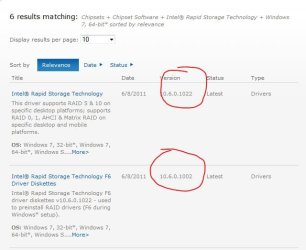
Well, nitpicking is good. It is 10.6.0.1002. I messed up the "6", but the last half is correct. 1002. I installed their driver update on another system a while back and it said 10.6.0.1022, but then this appeared. E-mailed Intel about it and they said they were going to fix it.
 

Attachments

  • Capture.JPG
    Capture.JPG
    42.5 KB · Views: 3
  • Capture1.JPG
    Capture1.JPG
    35.7 KB · Views: 4

My Computer My Computer

At a glance

Windows 10 Pro 64-bitCore I7-67008GB Corsair DominatorAsus STRIX GTX 980Ti
Computer type
PC/Desktop
Computer Manufacturer/Model Number
Home Built
OS
Windows 10 Pro 64-bit
CPU
Core I7-6700
Motherboard
Asus Maximus VIII Hero
Memory
8GB Corsair Dominator
Graphics Card(s)
Asus STRIX GTX 980Ti
Monitor(s) Displays
Asus PG278Q, Dell U2410
Screen Resolution
2560 x 1440, 1920 x 1200
Hard Drives
1 x Samsung 950 Pro 512GB
1 x 1TB HGST
PSU
750W Seasonic
Case
Antec 900 v3
Cooling
Stock
Internet Speed
Cable Internet
Yeah, it only looks like they fixed the F6 one to 1002. The installation software (first option) still says 1022 and it is not. It is 1002.

But anyways, back to the DOS boot cd and how to do it.
 

Attachments

  • Capture.JPG
    Capture.JPG
    37.1 KB · Views: 11

My Computer My Computer

At a glance

Windows 10 Pro 64-bitCore I7-67008GB Corsair DominatorAsus STRIX GTX 980Ti
Computer type
PC/Desktop
Computer Manufacturer/Model Number
Home Built
OS
Windows 10 Pro 64-bit
CPU
Core I7-6700
Motherboard
Asus Maximus VIII Hero
Memory
8GB Corsair Dominator
Graphics Card(s)
Asus STRIX GTX 980Ti
Monitor(s) Displays
Asus PG278Q, Dell U2410
Screen Resolution
2560 x 1440, 1920 x 1200
Hard Drives
1 x Samsung 950 Pro 512GB
1 x 1TB HGST
PSU
750W Seasonic
Case
Antec 900 v3
Cooling
Stock
Internet Speed
Cable Internet
Main point you have the right one installed :) and my fingers didn't ferk up ;)
I 'll not be much help with the boot CD as I have never tried doing it before. I think that most burning software ie. Nero have an option to make a bootable CD
 

My Computer My Computer

At a glance

Windows 7 Ultimate x64Intel Core i7-2600K16 GB G Skill F3-10666 CL9D-4GBRLATI Radeon HD 6870
Computer Manufacturer/Model Number
Something I threw together
OS
Windows 7 Ultimate x64
CPU
Intel Core i7-2600K
Motherboard
Asus P8P67
Memory
16 GB G Skill F3-10666 CL9D-4GBRL
Graphics Card(s)
ATI Radeon HD 6870
Sound Card
ATI Radeon HDMI / Realtek ALC892
Monitor(s) Displays
2 x 22" standard monitors / LG32LC56v TV to watch films
Screen Resolution
1920 x1080
Hard Drives
2 x OCZ Vertex2 111.79GB
3 x Samsung103SJ
1 x Samsung103UJ
1 x WD3200BEVT
1 x Hitachi5K320-160
PSU
Thermaltake Toughpower Cable Management 750W
Case
Antec 300
Cooling
Noctua NH-U12P SE2 and 5 120mm Case fans
Keyboard
Microsoft Comfort Curve Keyboard 2000
Mouse
Hama M3110 / Logitech M305
Internet Speed
16000
Other Info
I have also used Fedora, Suse, Ubuntu Linux
And all other Windows from 95 to date except ME
Back
Top